
1. Уводзіны
Thank you for choosing the Jesebang BD86 Bluetooth 5.4 Wireless Earbuds. This manual provides detailed instructions on how to set up, operate, and maintain your new earbuds. Please read this manual carefully before use to ensure optimal performance and longevity of your device.

Image 1.1: Jesebang BD86 Wireless Earbuds and Charging Case.
2. Змесціва ўпакоўкі
Калі ласка, праверце ўпакоўку на наяўнасць наступных прадметаў:
- Jesebang BD86 Wireless Earbuds (Left and Right)
- Чахол для бесправадной зарадкі
- Зарадны кабель USB-C
- Кіраўніцтва карыстальніка
3. Прадукт скончыўсяview
Familiarize yourself with the components of your Jesebang BD86 earbuds and charging case.
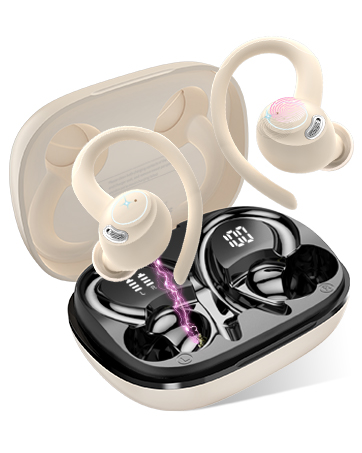
Image 3.1: Component Diagram. This image illustrates the key parts of the earbuds and charging case, including Mic 1, LED Indicator, Mic 2, Charging Pin on the earbuds, and the Dual LED Display and Type-C Input on the charging case.
- Навушнікі: Equipped with Mic 1, LED Indicator, Mic 2, and Charging Pins.
- Чахол для зарадкі: Features a Dual LED Display for battery status and a Type-C Input for charging.
4. Настройка
4.1. Зарадка навушнікаў і чахла
Перад першым выкарыстаннем цалкам зарадзіце навушнікі і зарадны футляр.
- Connect the USB-C charging cable to the Type-C input port on the charging case.
- Падключыце іншы канец кабеля да крыніцы сілкавання USB (напрыклад, камп'ютара, адаптара).
- Змесціце навушнікі ў зарадны футляр. Пераканайцеся, што яны правільна ўстаўлены, каб пачаць зарадку.
Святлодыёдны дысплей на зарадным чахле будзе паказваць працэнты зарада батарэіtage of the case and individual charge levels for each earbud. A full charge takes approximately 1.5 hours. The earbuds provide up to 6 hours of playback on a single charge, with the charging case extending total playback to 30 hours.

Image 4.1: Charging Case LED Display. This image shows the charging case with its LED display indicating the battery levels for both the case and the individual left and right earbuds.
4.2. Спалучэнне з вашай прыладай
The Jesebang BD86 earbuds feature one-touch automatic pairing.
- Пераканайцеся, што Bluetooth на вашай прыладзе ўключаны.
- Адкрыйце зарадны кейс і дастаньце абодва навушнікі. Яны аўтаматычна ўключацца і пяройдуць у рэжым спалучэння.
- On your device, search for Bluetooth devices and select "BD86" from the list.
- Once connected, you will hear a confirmation prompt, and the earbuds' LED indicators will stop flashing.
After the initial pairing, the earbuds will automatically connect to the last paired device when removed from the case.

Image 4.2: Bluetooth Pairing. This image displays a smartphone screen with the Bluetooth settings open, showing the "BD86" earbuds available for connection.
5. Інструкцыя па эксплуатацыі
5.1. Сэнсарныя элементы кіравання
The Jesebang BD86 earbuds feature intuitive touch controls for managing audio playback and calls.

Image 5.1: Smart Touch Controls. This diagram illustrates the various touch gestures and their corresponding functions on the earbuds, including changing tracks, play/pause, rejecting calls, activating voice assistants, power on/off, and answering calls.
| Жэст | Функцыя |
|---|---|
| Touch and hold (L/R) for 2 seconds | Змяніць трэк |
| Падвойнае націсканне (Л/П) | Play/Pause, Reject Call |
| Тройчы націск (Л/П) | Актываваць галасавы памочнік (Siri, Google Assistant) |
| Touch and hold (L/R) for 5 seconds | Уключэнне/выключэнне харчавання |
| Адзін націск (Л/П) | Адказаць на званок |
5.2. Аўдыёфункцыі
The BD86 earbuds are designed for an immersive audio experience:
- HiFi стэрэагук: Equipped with 14.2mm composite titanized diaphragm dynamic drivers, these earbuds restore high-frequency elements for rich, detailed audio.
- Ачысціць выклікі: Integrated with 4 HD microphones and ENC (Environmental Noise Cancellation) technology to ensure clear call quality by reducing background noise.
- Памяншэнне шуму ад ветру: Advanced wind flow technology minimizes wind noise, ensuring clear communication even in windy conditions.

Image 5.2: Acoustic Design. This image illustrates the internal acoustic components of the earbud, highlighting the 13mm drivers, ENC Noise Cancelling, and HD Call capabilities.
5.3. Воданепранікальнасць
The earbuds are rated IP7 waterproof, providing protection against sweat and rain. This allows for use during sports and in various weather conditions.

Image 5.3: IP7 Water Resistance. The image shows the earbuds with water droplets, symbolizing their IP7 dust and water resistance, suitable for daily use.
6. Тэхнічнае абслугоўванне
To ensure the longevity and optimal performance of your earbuds, follow these maintenance guidelines:
- Уборка: Рэгулярна працірайце навушнікі і зарадны футляр мяккай, сухой тканінай без ворса. Пазбягайце выкарыстання абразіўных матэрыялаў або агрэсіўных хімічных рэчываў.
- Кантакты для зарадкі: Periodically clean the charging contacts on both the earbuds and inside the case with a dry cotton swab to ensure a good connection.
- захоўванне: Калі навушнікі не выкарыстоўваюцца, захоўвайце іх у зарадным футляры, каб абараніць ад пылу і пашкоджанняў.
- Пазбягайце экстрэмальных умоў: Не падвяргайце навушнікі ўздзеянню экстрэмальных тэмператур, высокай вільготнасці або прамых сонечных прамянёў на працягу доўгага часу.
7. Выпраўленне непаладак
If you encounter any issues with your Jesebang BD86 earbuds, refer to the following common solutions:
| праблема | Магчымае рашэнне |
|---|---|
| Навушнікі не спалучаюцца | Ensure earbuds are charged. Turn off and on your device's Bluetooth. Place earbuds back in case, close, then reopen and try pairing again. |
| Ніякага гуку з аднаго навушніка | Check individual earbud charge. Try re-pairing both earbuds. Ensure both earbuds are removed from the case simultaneously. |
| Нізкая гучнасць або дрэнная якасць гуку | Adjust volume on both your device and the earbuds. Clean any debris from the earbud speakers. Ensure earbuds are properly seated in your ears. |
| Праблемы з зарадкай | Ensure the charging cable is securely connected. Clean the charging contacts on both earbuds and the case. Try a different USB power source or cable. |
| Навушнікі часта адключаюцца | Ensure you are within the Bluetooth range (up to 15 meters). Avoid obstacles between your device and the earbuds. Try re-pairing. |
8. Тэхнічныя характарыстыкі
| Асаблівасць | Дэталь |
|---|---|
| мадэль | BD86 |
| Марка | Джэсебанг |
| Версія Bluetooth | 5.4 |
| Далёкасць бесправадной сувязі | Да 15 метраў |
| Тэрмін службы батарэі навушнікаў | Да 6 гадзін (адной зарадкі) |
| Агульны час прайгравання (з кейсам) | Да 30 гадзін |
| Час зарадкі | Прыбл. 1.5 гадзіны |
| Воданепранікальнасць | IP7 (Impermeabile) |
| Мікрафон | 4 HD Mics with ENC Noise Cancellation |
| Памер драйвера | 14.2mm Composite Titanized Diaphragm Dynamic Driver |
| Метад кантролю | Сэнсарнае кіраванне |
| Падтрымка галасавога памочніка | Siri, памочнік Google |
| Порт для зарадкі | USB-C |
| Вага (на адзін навушнік) | 3.3 грамаў |
| Памеры (прадукт) | 5.5 х 4.5 х 1.8 см |
| Сумяшчальныя прылады | IOS, Android, PC, Tablets, Laptops, Car Audio Systems |
9. Гарантыя і падтрымка
9.1. Гарантыя на прадукт
Jesebang offers a Гарантыя 2 год for the BD86 Wireless Earbuds. This warranty covers manufacturing defects and ensures that any issues arising within this period will be addressed. Please retain your proof of purchase for warranty claims.

Image 9.1: 2 Years Warranty. This image displays a badge indicating a 2-year warranty, highlighting Jesebang's commitment to quality.
9.2. Падтрымка кліентаў
Our professional customer support team is available 24/7 to assist you with any questions or concerns you may have regarding your product. Our goal is to provide high-level customer support to ensure a satisfying purchase experience.
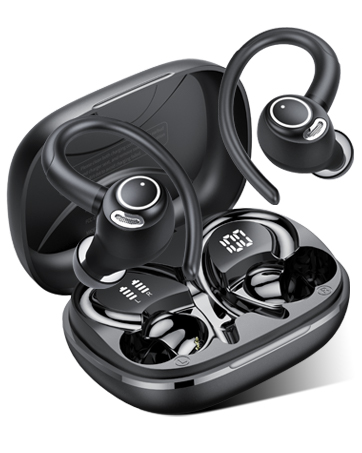
Image 9.2: 24/7 Customer Support. This image shows hands holding a glowing clock icon with '24/7', representing continuous customer support.
For support, please refer to the contact information provided with your product packaging or visit the official Jesebang webсайт.