
Уводзіны
This manual provides detailed instructions for the installation, operation, and maintenance of your Strong SRT 7040 Digital Satellite HD Receiver. Please read this manual carefully before using the device to ensure proper functionality and to prevent damage.

Image: The Strong SRT 7040 DTT Tuner and its retail packaging.
The Strong SRT 7040 is a Full HD digital satellite receiver designed for Free-To-Air (FTA) channels. It features a USB port for multimedia playback and software updates, and supports Dolby Audio for enhanced sound quality.
1. Настройка
1.1 Распакаванне
Асцярожна выміце ўсе кампаненты з упакоўкі. Пераканайцеся, што ў наяўнасці наступныя прадметы:
- Strong SRT 7040 DTT Tuner
- Пульт дыстанцыйнага кіравання (з 2 батарэйкамі тыпу ААА)
- Адаптар сілкавання
- Кіраўніцтва карыстальніка
1.2 Падключэнне прылады
Follow these steps to connect your SRT 7040 receiver:
- Спадарожнікавы ўваход: Connect your satellite dish cable to the САБ port on the back of the receiver.
- Video Output (HDMI): Падключыце кабель HDMI ад HDMI port on the receiver to an HDMI input on your television.
- Video Output (SCART): Alternatively, for older televisions, connect a SCART cable from the ТБ SCART port on the receiver to the SCART input on your television.
- Аўдыёвыхад (лічбавы): For digital audio, connect a coaxial cable from the COAXIAL S/PDIF port to your digital audio ampзадымнік.
- Аўдыёвыхад (аналагавы): For analog audio, connect RCA cables from the AUDIO R/L ports to your audio Hi-Fi ampзадымнік.
- USB-прылада: If desired, connect a USB storage device to the USB port for multimedia playback or software updates.
- Магутнасць: Падключыце адаптар сілкавання да 12 В === 1.5 А input on the receiver, then plug the adapter into a wall outlet.

Image: Rear panel connections of the Strong SRT 7040 DTT Tuner, showing SAT IN, HDMI, TV SCART, COAXIAL S/PDIF, AUDIO R/L, USB, and Power input.
1.3 Першая ўстаноўка і пошук каналаў
Upon first power-on, the receiver will guide you through an initial setup wizard. Follow the on-screen prompts to select your language, country, and perform an automatic channel scan. This process will detect and store all available satellite channels.
2. Інструкцыя па эксплуатацыі
2.1 Пульт дыстанцыйнага кіраванняview
The included remote control allows you to access all functions of the SRT 7040. Insert the two AAA batteries into the remote control, ensuring correct polarity.

Image: The remote control for the Strong SRT 7040 DTT Tuner, showing buttons for power, numbers, volume, channel, menu, and special functions.
2.2 Асноўныя функцыі
- Магутнасць: Націсніце УЛАДА button to turn the receiver on or off (standby mode).
- Выбар канала: Выкарыстоўвайце CH+ / CH- buttons to change channels sequentially, or use the numeric keypad to enter a channel number directly.
- Рэгулятар гучнасці: Выкарыстоўвайце ГУЧНАСЦЬ+ / ГУЧ- buttons to adjust the audio volume.
- Адключэнне гуку: Націсніце МУК кнопку, каб часова адключыць гук.
2.3 Навігацыя па меню
Націсніце МЕНЮ button to access the main menu. Use the arrow keys (UP, УНІЗ, НАЛЕВА, ПРАВІЛЬНА) для навігацыі па варыянтах і OK каб пацвердзіць выбар. Націсніце ВЫХАД to return to the previous screen or live TV.
2.4 Спецыяльныя магчымасці
- Таймеры: The receiver supports programming timers for recording or switching to specific channels at scheduled times. Access this feature via the menu.
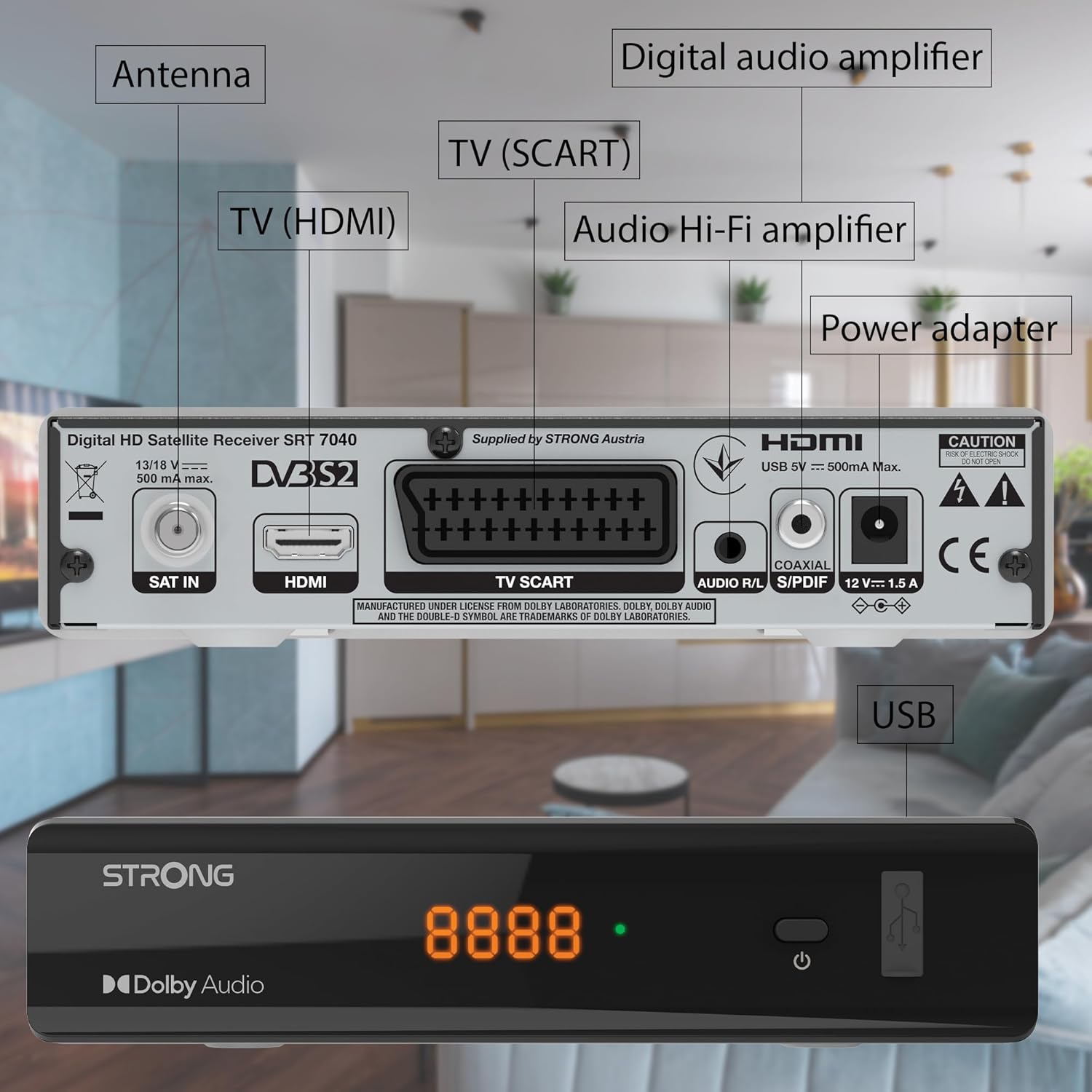
Image: The Strong SRT 7040 DTT Tuner displaying a timer icon, indicating its scheduling capabilities.
- Favorite Lists: Create customized lists of your preferred channels for quick access.
- субтытры: Enable or disable subtitles for compatible broadcasts using the SUB кнопку на пульце.
- Электронны тэлегід (EPG): Націсніце EPG кнопка для view program information for upcoming broadcasts.
- Dolby Audio: The receiver supports Dolby Audio for a high-quality sound experience.

Image: The Strong SRT 7040 DTT Tuner with the Dolby Audio logo, illustrating its sound processing capability.
3. Тэхнічнае абслугоўванне
3.1 Ачыстка
To clean the receiver, disconnect it from the power supply. Use a soft, dry cloth to wipe the exterior. Do not use liquid cleaners, aerosols, or abrasive materials, as these can damage the finish or internal components.
3.2 Абнаўленне праграмнага забеспячэння
Перыядычна правярайце інфармацыю вытворцы website for available software updates. Updates can improve performance, add new features, or resolve issues. Software updates are typically performed via the USB port following specific instructions provided with the update file.
3.3 Інфармацыя па бяспецы
- Do not open the receiver casing. Унутры няма дэталяў, якія можна абслугоўваць самастойна. Па ўсіх пытаннях абслугоўвання звяртайцеся да кваліфікаванага персаналу.
- Трымайце прыёмнік далей ад прамых сонечных прамянёў, крыніц цяпла і вільгаці.
- Забяспечце дастатковую вентыляцыю вакол прылады, каб прадухіліць перагрэў.
- Выкарыстоўвайце толькі адаптар сілкавання, які ўваходзіць у камплект.
4. Выпраўленне непаладак
If you encounter problems with your SRT 7040, consult the following table before contacting support.
| праблема | Магчымая прычына | Рашэнне |
|---|---|---|
| Няма ўлады | Адаптар сілкавання не падключаны; разетка няспраўная | Check power adapter connection; Try a different power outlet |
| Няма сігналу / Чорны экран | Satellite cable loose or disconnected; Incorrect input selected on TV; Satellite dish alignment issue | Check SAT IN cable connection; Ensure TV is on correct HDMI/SCART input; Perform a channel scan; Consult a professional for dish alignment if necessary |
| Пульт дыстанцыйнага кіравання не працуе | Batteries depleted or incorrectly inserted; Obstruction between remote and receiver | Replace batteries; Ensure correct polarity; Remove any obstructions; Point remote directly at receiver |
| Нізкая якасць выявы | Weak satellite signal; Incorrect display settings | Check satellite signal strength in menu; Adjust TV display settings; Ensure Full HD content is being broadcast |
5. Тэхнічныя характарыстыкі
The following are the technical specifications for the Strong SRT 7040 Digital Satellite HD Receiver:
- мадэль: SRT 7040 (SAT FTA Full HD)
- Марка: Моцны
- Памеры: 3.39 х 6.46 х 1.38 цалі (8.6 х 16.4 х 3.5 см)
- Вага прадмета: 9.2 унцыі (260 грама)
- колер: Чорны
- Тэхналогія падключэння: USB
- тtage: 100 - 240 В
- Частата: 50 - 60 Гц
- Спажываная магутнасць: 18 kWh (operational, typical)
- Дыяпазон працоўных тэмператур: Ад 0ºC да 40ºC
- Адносная вільготнасць: 10% - 95%
- батарэі: 2 батарэйкі тыпу ААА (у камплекце з пультам)
- Тэхнічныя характарыстыкі выкананы: DVB-S2
- У камплекце: Wally Receiver
6. Гарантыя і падтрымка
For warranty information and technical support, please refer to the warranty card included in your product packaging or visit the official Strong webсайт. Захоўвайце чэк аб куплі як пацвярджэнне пакупкі для гарантыйных прэтэнзій.
For further assistance, you may contact Strong customer service through the contact details provided on their official webсайт.