
Уводзіны
This manual provides comprehensive instructions for the Dpofirs 1080P 30FPS Vlogging Camera Recorder. Please read this manual carefully before using the device to ensure proper operation and to maximize its performance. Keep this manual for future reference.
Прадукт скончаныview
The Dpofirs Vlogging Camera Recorder is designed for capturing high-definition videos and photos. It features a 2.7-inch TFT rotatable screen, 16x digital zoom, and 16MP image resolution.
Асноўныя характарыстыкі:
- Камера HD: 2.7-inch TFT rotatable screen, 1080P video resolution, 16x digital zoom, 16MP pixels.
- Selfie Support: Front fill light for photos, 2 or 10-second self-timer.
- захоўванне: Supports up to 32GB memory card (not included). A Class10 U3 chip memory card is recommended for optimal performance.
- Падключэнне USB: Connects to a computer for file transfer and can function as a PC camera.
- Убудаваны дынамік: Убудаваны дынамік для прайгравання аўдыё.
- Запіс падчас зарадкі: Supports continuous recording while connected to a power source.
Кампаненты камеры:

Малюнак 1: Буйны план view of the camera's video lens, showing the focal length and aperture details.

Малюнак 2: Тыл view of the camcorder, highlighting the control buttons, menu button, mode button, and speaker grille.
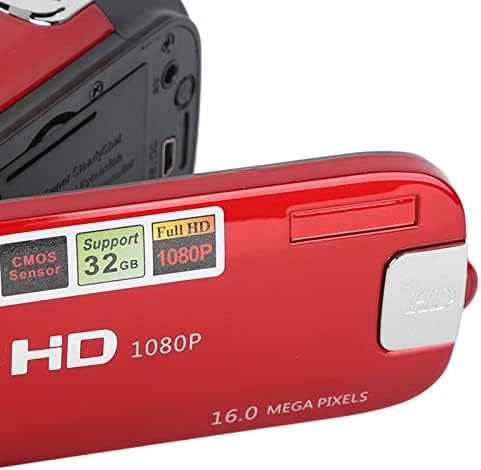
Малюнак 3: Падрабязны view of the camera's flip-out screen, showing resolution and megapixel information.

Малюнак 4: The Dpofirs camcorder displayed with its standard accessories, including the battery, USB cable, and wrist strap.
Настройка
- Зарадзіць акумулятар: Insert the included lithium battery into the camera. Connect the camera to a power source using the USB cable to fully charge the battery before first use.
- Устаўце карту памяці: Open the memory card slot cover. Insert a compatible SDHC memory card (up to 32GB, Class10 U3 recommended) into the slot until it clicks into place. Ensure the card is inserted in the correct orientation.
- Уключэнне: Націсніце і ўтрымлівайце кнопку харчавання, каб уключыць камеру.
Інструкцыя па эксплуатацыі
Асноўная аперацыя:
- Уключэнне/выключэнне харчавання: Націсніце і ўтрымлівайце кнопку харчавання, каб уключыць або выключыць камеру.
- Выбар рэжыму: Націсніце РЭЖЫМ button to switch between Photo mode and Video recording mode.
- Запіс відэа:
- У рэжыме відэа націсніце Запіс button (usually marked with a red dot or camera icon) to start recording.
- Націсніце Запіс кнопку яшчэ раз, каб спыніць запіс.
- Фотаздымкі:
- У фотарэжыме націсніце Аканіца button (usually a larger button on top) to capture a photo.
- Функцыя маштабавання: Use the zoom lever/buttons (often marked with 'W' for Wide and 'T' for Telephoto) to adjust the 16x digital zoom.
- Reviewing Content: Націсніце Прайграванне button (often marked with a play icon) to view recorded videos and photos. Use navigation buttons to browse.
Пашыраныя функцыі:
- Аўтаспуск: Access the menu settings to select a 2-second or 10-second self-timer for photos.
- Запаўняйце святло: The camera features a front fill light. Activate it through the menu settings for improved lighting in low-light conditions, especially for selfies.

Малюнак 5: The camcorder in use for a selfie, demonstrating the rotatable screen and front fill light feature.
- Падключэнне да ПК: Use the provided USB cable to connect the camera to a computer. The camera can be used to transfer files or as a PC camera.
- Выхад HD: The camera supports HD output for viewing content on compatible displays.
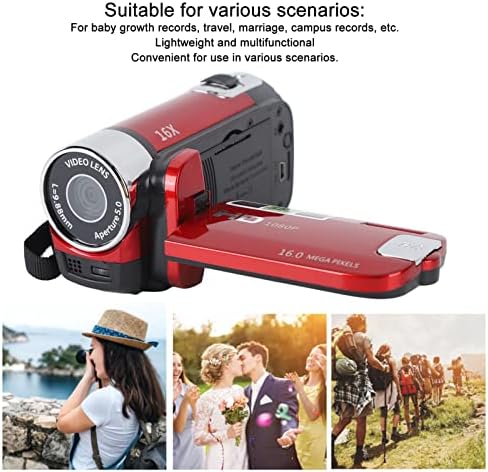
Малюнак 6: Illustrates various applicable scenarios for the camcorder, such as travel, weddings, and personal recordings.
Тэхнічнае абслугоўванне
- Уборка: Use a soft, dry cloth to clean the camera body. For the lens and screen, use a specialized lens cleaning cloth and solution. Avoid abrasive materials.
- захоўванне: Захоўвайце камеру ў прахалодным, сухім месцы, удалечыні ад прамых сонечных прамянёў і экстрэмальных тэмператур. Выміце акумулятар, калі камера не будзе выкарыстоўвацца працяглы час.
- Сыход за батарэяй: Fully charge the battery before storage and recharge it every few months to maintain its lifespan.
- Карта памяці: Regularly back up your data from the memory card to a computer or external storage device. Format the memory card periodically to maintain performance.
Ліквідацыю непаладак
| праблема | Магчымая прычына | Рашэнне |
|---|---|---|
| Камера не ўключаецца. | Батарэя разраджана або няправільна ўстаўлена. | Пераканайцеся, што акумулятар цалкам зараджаны і правільна ўстаўлены. |
| Нельга запісваць відэа ці рабіць фота. | Карта памяці запоўненая, не ўстаўлена або несумяшчальная. | Check memory card status. Ensure it is inserted, has free space, and is a Class10 U3 card. |
| Дрэнная якасць выявы/відэа. | Insufficient lighting, dirty lens, or incorrect settings. | Ensure adequate lighting. Clean the lens. Check resolution settings in the menu. |
| Кампутар не распазнае камеру. | Faulty USB cable or incorrect connection mode. | Try a different USB cable. Ensure the camera is in PC camera or mass storage mode if applicable. |
Тэхнічныя характарыстыкі
| Асаблівасць | Дэталь |
|---|---|
| Нумар мадэлі | Dpofirsgn9zt6aq2u-12 |
| Дазвол выявы | 16 Megapixels (effective), supports VGA, 1M, 5M, 12M, 16M |
| Фармат выявы | JPG |
| Дазвол відэа | 1080 Pixels (effective), supports FHD (1920x1080), HD (1280x720), 640x480 |
| Фармат відэа | AVI |
| Памер экрана | 2.7 цалі TFT |
| Лічбавы зум | 16x |
| Аптычны зум | 16x |
| Тып засаўкі | Электронныя |
| Аўтаспуск | 2 секунд, 10 секунд |
| ТБ выхад | NTSC 30fps, PAL 25fps |
| Носьбіты інфармацыі | SDHC memory card (up to 32GB, Class10 U3 recommended) |
| акумулятар | 1 x 10²⁰mAh Lithium Battery (built-in) |
| Сувязь | USB |
| Sensor Technology | CMOS |
| Вага | 216 грамаў |
| Памеры ўпакоўкі | 14 х 11 х 7 см |
| Суадносіны бакоў выявы | 16:9 |
| Налады балансу белага | Аўто |
| Тып кантролю экспазіцыі | Аўтаматычны |
| Колькасць выступоўцаў | 1 |
| Сумяшчальныя прылады | Персанальны кампутар |
| Тып відэакамеры | Відэакамера |
| Рэкамендуемае выкарыстанне | Personal recordings, baby growth records, travel, campus activities |
| Узровень воданепранікальнасці | Не воданепранікальны |
| Стабілізацыя выявы | Digital (Not Assured) |
| Формаў-фактар | Ручны |
| Тып аб'ектыва | маштабаванне |
| Тып фокусу | Аўтафокус |
| Рэжымы здымкі | Аўтаматычны |
Гарантыя і падтрымка
For warranty information and technical support, please refer to the documentation included with your purchase or contact Dpofirs customer service.
Палітыка вяртання: This product has a 30-day return policy for refund or replacement.