
1. Уводзіны
Thank you for choosing the GenMachine Mini PC. This compact yet powerful computer is designed to deliver exceptional performance for a variety of tasks, including gaming, office productivity, and creative design. Equipped with an AMD Ryzen 7 3750H processor, ample memory, and fast storage, it offers a seamless computing experience. This manual provides essential information for setting up, operating, maintaining, and troubleshooting your new Mini PC.
2. Што ў скрынцы
Please verify that all items are present and in good condition upon unboxing.
- 1 x GenMachine Mini PC
- 1 х кабель HDMI
- 1 х адаптар сілкавання
- 1 х Кіраўніцтва карыстальніка (гэты дакумент)
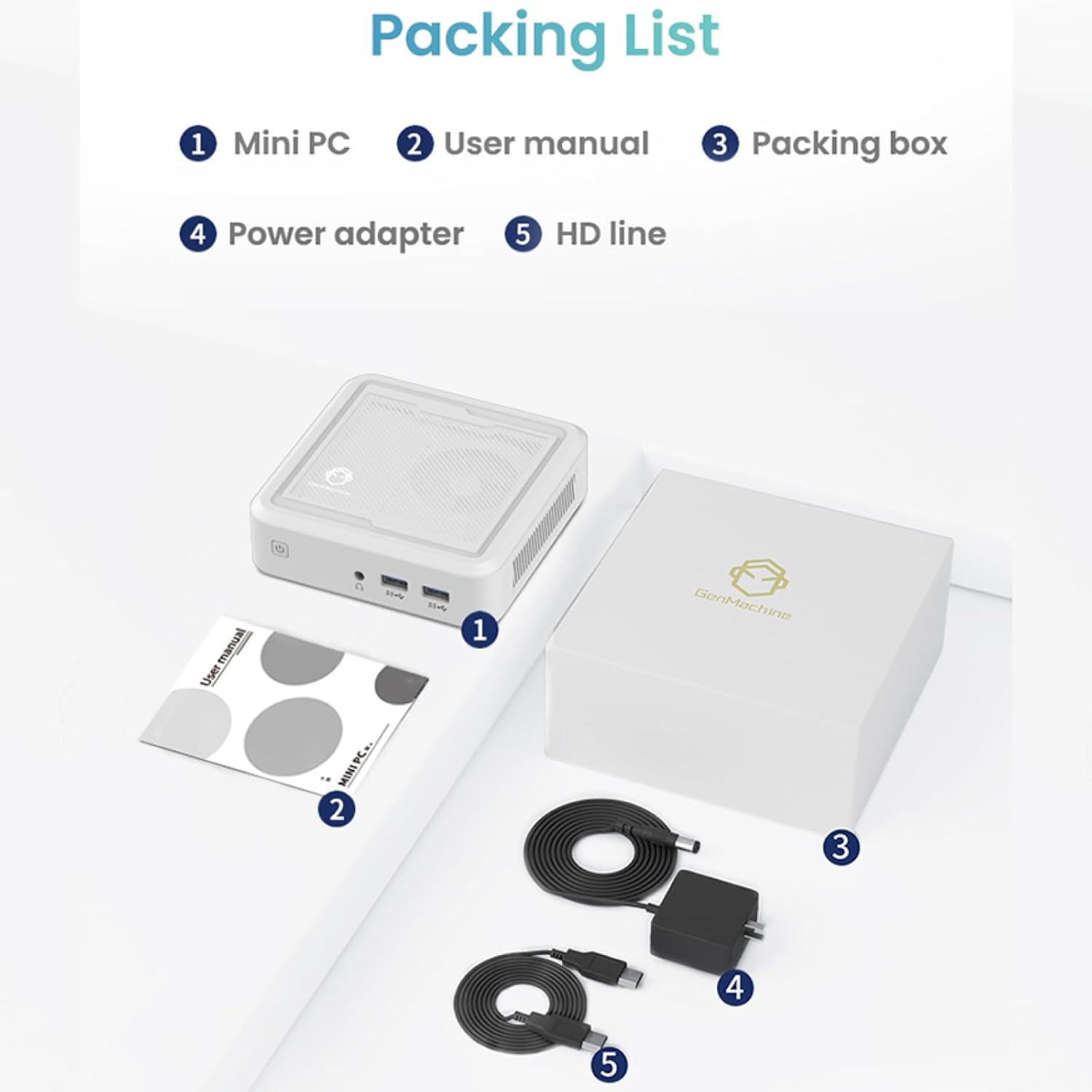
Figure 2.1: Packaging contents of the GenMachine Mini PC.
3. Асаблівасці прадукту
The GenMachine Mini PC is engineered with features to enhance your computing experience:
- Высокая прадукцыйнасць: Equipped with an AMD Ryzen 7 3750H processor, delivering speeds up to 4.0GHz with 4 cores and 8 threads for demanding tasks.
- AmpПамяць і захоўванне дадзеных: Features 8GB of DDR4 RAM and a 256GB SSD with M.2 NVMe support for seamless multitasking and quick file доступ.
- Універсальнае падключэнне: Advanced WiFi 6 and Bluetooth 5.2 capabilities ensure high-speed internet and smooth device pairing.
- Кампактны дызайн: A sleek, small form factor that fits easily into any workspace or gaming setup.
- Некалькі варыянтаў адлюстравання: HDMI and DisplayPort outputs support dual 4K displays for expanded productivity and immersive visuals.

Малюнак 3.1: Спераду view of the GenMachine Mini PC.
3.1 Rich Interface for Easy Connection
The Mini PC offers a comprehensive set of ports to meet various connectivity needs:
- USB 3.0 x 4
- HDMI х 1
- DisplayPort (DP) x 1
- LAN (Ethernet) x 1
- 3.5mm Audio Jack x 1
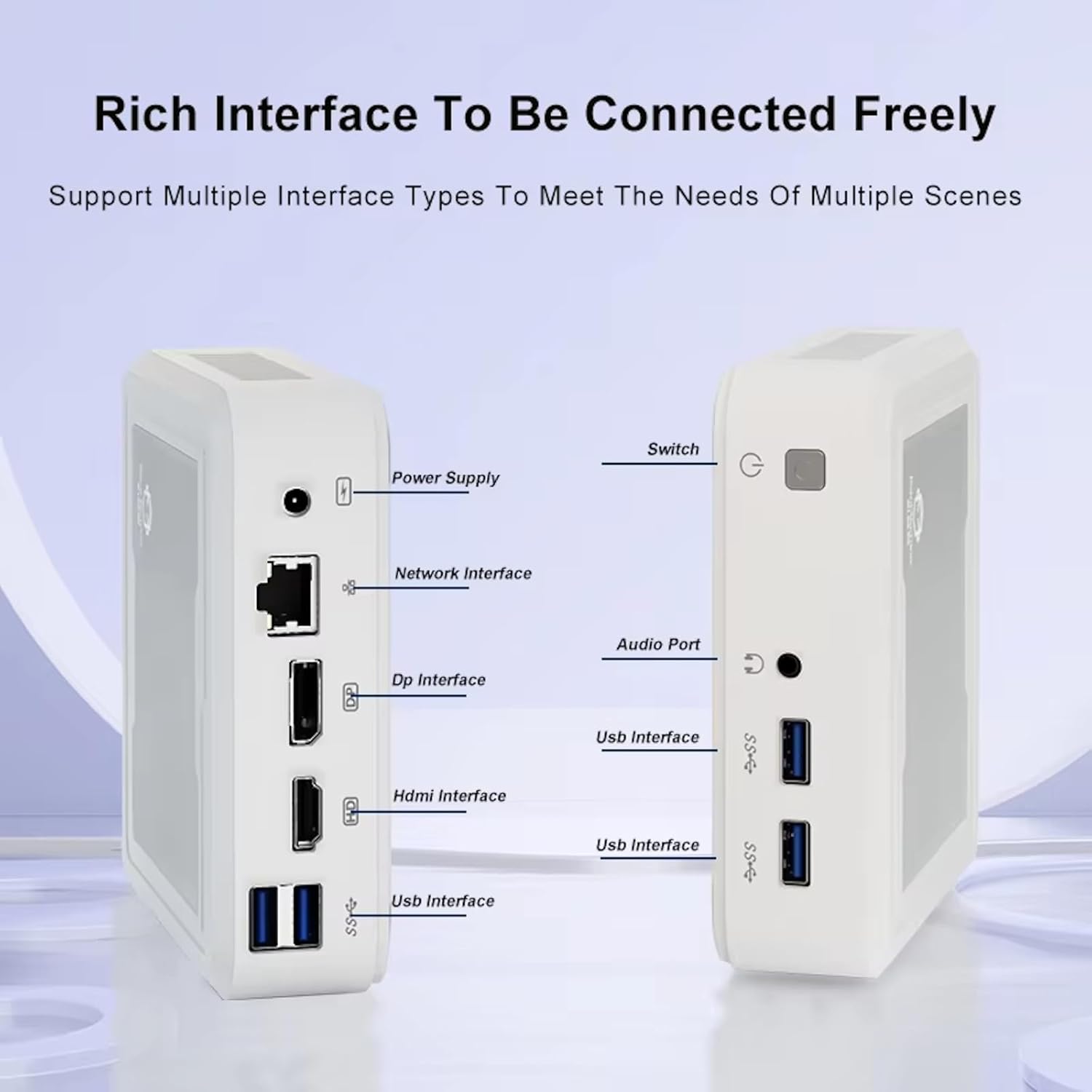
Figure 3.2: Available ports on the GenMachine Mini PC.
3.2 Падтрымка двух манітораў
Enhance your productivity or gaming experience by connecting up to two 4K displays simultaneously using the HDMI and DisplayPort outputs.

Figure 3.3: Dual 4K display setup with the GenMachine Mini PC.
Video 3.1: Demonstration of the GenMachine Mini PC supporting two monitors simultaneously.
3.3 Energy Efficiency and Quiet Operation
Designed for low noise operation, the Mini PC maintains a quiet environment, making it suitable for various settings.

Figure 3.4: Noise level comparison of the GenMachine Mini PC.
3.4 Compact and Durable Design
The Mini PC features an ultra-durable, lightweight metal casing, making it space-saving and robust for any work environment.
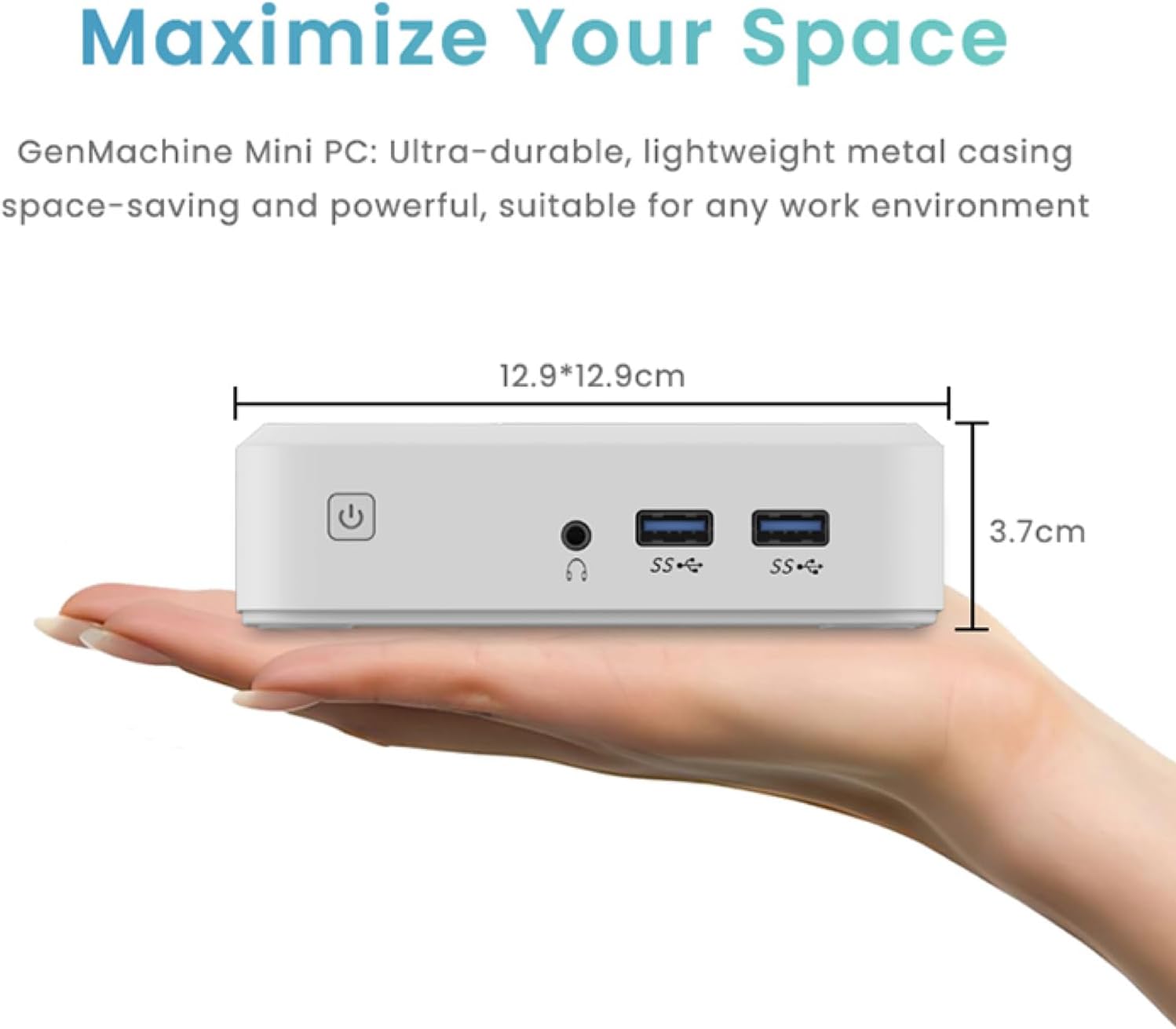
Figure 3.5: Compact size of the GenMachine Mini PC.
Відэа 3.2: Скончанаview of the GenMachine Mini PC's features and compact design.
4. Кіраўніцтва па наладцы
Follow these steps to set up your GenMachine Mini PC:
- Распакуйце міні-ПК: Акуратна дастаньце ўсе кампаненты з упакоўкі.
- Падключэнне да дысплея: Use the provided HDMI cable to connect the Mini PC to your monitor or TV. If using a DisplayPort monitor, use a compatible DP cable (not included).
- Падключэнне перыферыйных прылад: Падключыце клавіятуру, мыш і любыя іншыя прылады USB да даступных партоў USB 3.0.
- Падключэнне да сеткі (неабавязкова): For a wired internet connection, connect an Ethernet cable to the LAN port. For wireless, ensure your WiFi network is available during initial setup.
- Падключыце харчаванне: Plug the power adapter into the DC-in port on the Mini PC, then plug the adapter into a power outlet.
- Уключэнне: Press the power button on the front of the Mini PC. The system should boot up.
5. Інструкцыя па эксплуатацыі
5.1 Пачатковая загрузка і налада аперацыйнай сістэмы
Upon first power-on, the Mini PC will guide you through the operating system setup process. Follow the on-screen prompts to configure language, region, user accounts, and network settings.
5.2 Кіраванне харчаваннем
- Уключэнне: Націсніце кнопку харчавання адзін раз.
- Выключыць: Access the power options through the operating system's start menu and select 'Shut down'.
- Перазапуск: Access the power options through the operating system's start menu and select 'Restart'.
- Рэжым сну: Access the power options through the operating system's start menu and select 'Sleep'.
5.3 Падключэнне да Wi-Fi і Bluetooth
To connect to a wireless network or Bluetooth device, use the respective settings within your operating system. The Mini PC supports WiFi 6 and Bluetooth 5.2 for fast and reliable connections.
6. Тэхнічнае абслугоўванне
Рэгулярнае тэхнічнае абслугоўванне дапамагае забяспечыць даўгавечнасць і аптымальную прадукцыйнасць вашага міні-ПК:
- Уборка: Use a soft, dry cloth to clean the exterior. For dust in vents, use compressed air. Ensure the device is powered off and unplugged before cleaning.
- Вентыляцыя: Пераканайцеся, што міні-ПК знаходзіцца ў добра вентыляваным месцы. Не блакуйце вентыляцыйныя адтуліны.
- Абнаўленні праграмнага забеспячэння: Regularly update your operating system, drivers, and applications to ensure security and performance.
- Рэзервовае капіраванне даных: Перыядычна рабіце рэзервовыя копіі важных дадзеных на знешні дыск або ў воблачнае сховішча.
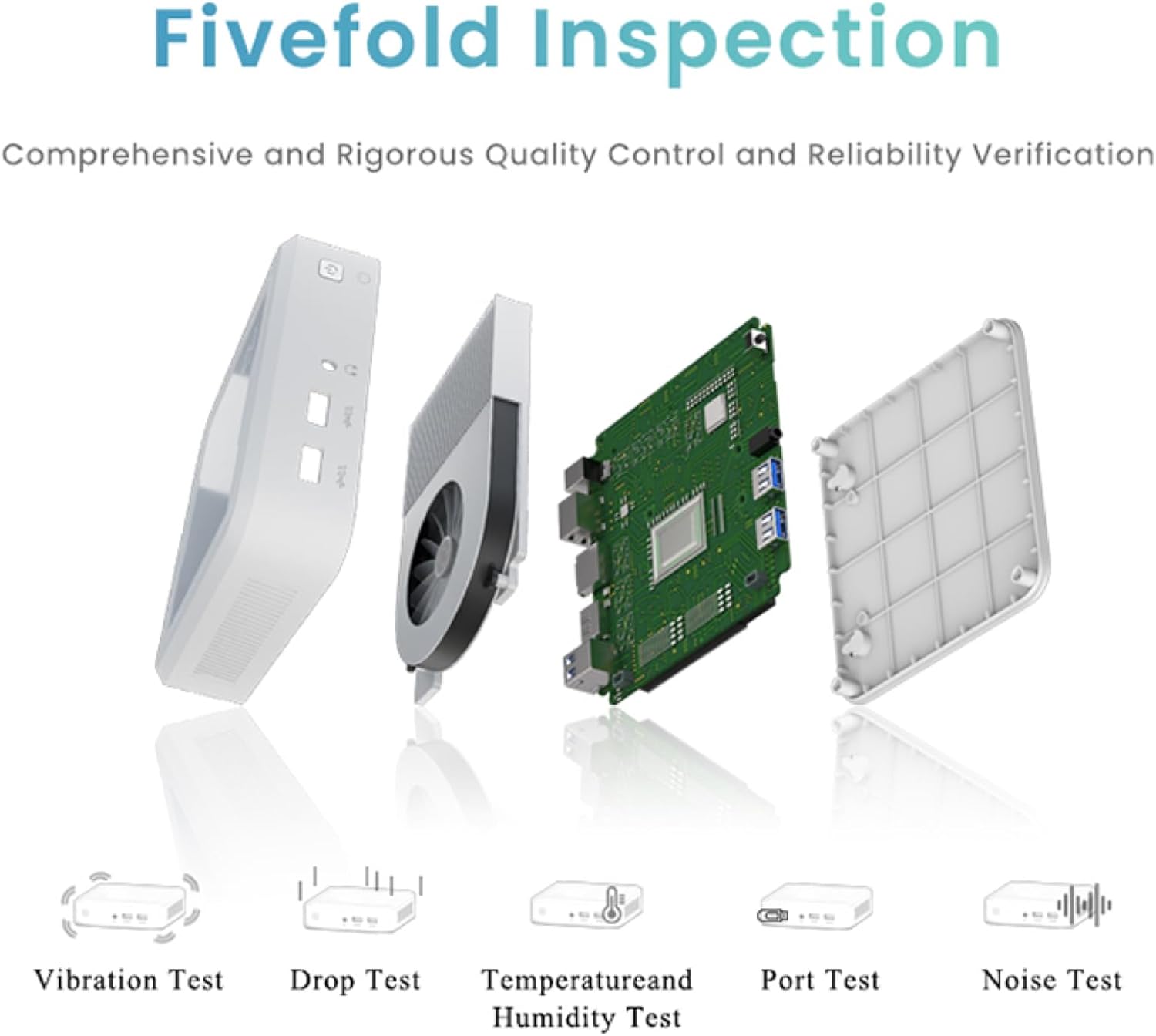
Figure 6.1: GenMachine's Fivefold Inspection process for quality control.
7. Выпраўленне непаладак
If you encounter issues with your Mini PC, refer to the following common problems and solutions:
- Няма харчавання:
- Пераканайцеся, што адаптар сілкавання надзейна падключаны як да міні-ПК, так і да спраўнай разеткі.
- Паспрабуйце іншую разетку.
- Няма дысплея:
- Verify that the HDMI or DisplayPort cable is securely connected to both the Mini PC and the monitor.
- Пераканайцеся, што манітор уключаны і настроены на правільную крыніцу ўваходнага сігналу.
- Калі магчыма, паспрабуйце іншы кабель дысплея або манітор.
- System Freezes or Unresponsive:
- Perform a hard reset by holding the power button for 5-10 seconds until the device powers off, then restart.
- Ensure the operating system and drivers are up to date.
- Check for overheating; ensure proper ventilation.
- Run a system diagnostic or memory test if the issue persists.
- Няма падключэння да Інтэрнэту:
- Для правадных падключэнняў праверце стан кабеля Ethernet і маршрутызатара.
- For Wi-Fi, ensure Wi-Fi is enabled in the operating system and you are connected to the correct network with the correct password.
- Перазагрузіце маршрутызатар/мадэм.
8. Тэхнічныя характарыстыкі
| Асаблівасць | Спецыфікацыя |
|---|---|
| Працэсар | AMD Ryzen 7 3750H (4 cores, 8 threads, up to 4.0GHz) |
| АЗП | 8 ГБ DDR4 |
| Захоўванне | 256GB SSD (with M.2 NVMe support) |
| Графічны супрацэсар | Графіка AMD Radeon Vega 10 |
| Максімальны дазвол экрана | 3840 x 2160 пікселяў (4K) |
| Бесправадны тып | 802.11ac (WiFi 6), Bluetooth 5.2 |
| Парты USB | 4 х USB 3.0 |
| Відэавыхады | HDMI, DisplayPort |
| Аперацыйная сістэма | OS (Pre-installed) |
| Вага прадмета | 2.1 фунта |
| Памеры прадукту | 4.9 х 4.9 х 1.4 цалі |
| Колер | Чорны |
9. Гарантыя і падтрымка
For warranty information and technical support, please refer to the warranty card included with your product or visit the official GenMachine webсайт. Захоўвайце чэк аб куплі як пацвярджэнне пакупкі для гарантыйных прэтэнзій.
If you require further assistance, please contact GenMachine customer support through the channels provided on their official webсайт.