
LeeKooLuu LeeKooLuu-A3221A4AM47EU
LeeKooLuu 1 Din Bluetooth Car Radio User Manual
Model: LeeKooLuu-A3221A4AM47EU
Уводзіны
This manual provides detailed instructions for the installation, operation, and maintenance of your LeeKooLuu 1 Din Bluetooth Car Radio. This device features a 7-inch manual flip-out screen, wireless Apple CarPlay, Android Auto, Bluetooth 5.1, FM radio, Mirror Link, SWC (Steering Wheel Control) support, AUX, TF card, and USB connectivity, along with a rear camera input. Please read this manual thoroughly before using the product to ensure proper functionality and safety.
Асаблівасці прадукту
- 7-inch HD digital LCD folding touch screen with manual flip-out mechanism.
- Wireless and wired Apple CarPlay compatibility for seamless iPhone integration.
- Wireless and wired Android Auto compatibility for Android smartphone integration.
- Mirror Link function to synchronize smartphone display to the car stereo screen (compatible with latest iPhones and most Android phones, excluding Samsung).
- Bluetooth 5.1 for stable wireless music streaming and hands-free calling.
- Integrated FM radio tuner (87.5-108.0MHZ) for live broadcasts.
- Multiple playback modes: Bluetooth, USB, AUX, TF card.
- High-speed USB 2.0 interface compatible with various U disks and removable hard drives.
- Support for Steering Wheel Control (SWC) for convenient operation while driving.
- Includes a waterproof night vision rear camera and a 6-meter video cable for reverse input.
- Built-in microphone and support for external microphone for clearer hands-free calls.
- Customizable colorful button lights (7 key light color changes).
- Аўдыё amplifier: 7388, Output power: 4*45W.
- Supported audio formats: MP3/WMA/WAV/APE/FLAC.
- Supported video formats: MKV/AVI/TS/TP/MP4/M4V (Max transmission speed 50Mbps-80Mbps).
Змест пакета
Пасля адкрыцця ўпакоўкі пераканайцеся, што ўсе кампаненты наяўныя і ў добрым стане:
- 1 x 1 Din Single Play Car Radio Unit
- 1 х камера рэзервовага капіявання
- 1 х кабель харчавання
- 1 х пульт дыстанцыйнага кіравання
- 2 ключы для разборкі
- 1 х Кіраўніцтва карыстальніка
Выява: Зверхуview of the package contents, showing the main head unit, AHD rear camera, power cable, speaker cable, remote control, and mounting brackets.
Ўстаноўка і налада
Памеры і пасадка
The car radio unit has an installation size of 188mm x 58mm (7.4 x 2.28 inches). The 7-inch screen measures 175mm in width and 113mm in height when extended. Please ensure your vehicle's dashboard opening is compatible with these dimensions before proceeding with installation.
Image: Detailed dimensions of the car radio unit, including the main body and the 7-inch flip-out screen.
Электраправодныя злучэнні
Refer to the included wiring diagram for proper connection of the power cable, speaker cable, and other accessories. Incorrect wiring can damage the unit or your vehicle's electrical system. It is recommended to have this unit installed by a professional.
- Сілавы кабель: Connect to the vehicle's power supply according to the diagram.
- Кабель дынаміка: Connect to your vehicle's speakers. Ensure correct polarity.
- Rear Camera Input (CVBS): Connect the provided backup camera to this input. The screen will automatically display the camera feed when the vehicle is in reverse gear.
- Знешні мікрафон: Connect the external microphone for improved call clarity.
- Інтэрфейс USB: Use for media playback or charging.
- Уваход AUX: Для падлучэння знешніх аўдыёпрылад.
- Слот TF карты: Insert a TF card for media playback.
Інструкцыя па эксплуатацыі
Агульная аперацыя
The unit operates via its 7-inch touch screen and physical buttons. The screen is manually flipped out for use. Navigate through menus by touching the icons on the screen. Adjust volume using the rotary knob or remote control.

Image: The main interface of the car radio, showing the 7-inch manual flip-out screen with various application icons, and the physical controls below.
Бесправадная сетка Apple CarPlay
To use Wireless Apple CarPlay, pair your iPhone with the car stereo via Bluetooth. Once connected, CarPlay will automatically launch, allowing you to access navigation, music, calls, and messages directly from the car stereo screen. Siri voice control is supported.

Image: Illustration of the car radio screen displaying the Apple CarPlay interface, with icons for various applications like iHeartRadio, Telegram, SiriusXM, NPR One, Waze, Spotify, MLB, and WhatsApp.
Бесправадная сетка Android Auto
For Wireless Android Auto, connect your Android smartphone to the car stereo via Bluetooth. This enables true wireless screen projection, providing access to music, GPS navigation, calls, and messages. Google Assistant voice control is supported.

Image: Illustration of the car radio screen displaying the Android Auto interface, with icons for applications such as Exit, Map, Phone, Messages, NetEase Music, Spotify, TikTok, and YouTube.
Функцыя люстранога злучэння
The Mirror Link function allows you to synchronize your smartphone's display with the 7-inch HD screen of the car stereo. This enables you to view and interact with your phone's content, such as maps, movies, and music. This feature is compatible with the latest iPhones (14 Pro or below) and most Android phones (Samsung not supported).
Bluetooth 5.1
The unit features Bluetooth 5.1 for stable and efficient wireless connectivity. Use Bluetooth for hands-free calling and audio streaming. The system supports auto-pairing and offers lower power consumption. An external microphone is included for clearer call quality.

Image: The car radio screen showing the Bluetooth interface, including options for music playback and hands-free calling, with a visual representation of stable signal and auto-pairing.
FM-радыё
Access the FM radio function to listen to your favorite stations. The radio frequency range is 87.5-108.0MHZ (Europe). Use the touch screen or physical buttons to tune to stations and save presets.
Прайграванне мультымедыя (USB/TF/AUX)
The car radio supports various multimedia playback options:
- USB: Insert a USB drive into the USB 2.0 port for audio and video playback.
- TF карта: Insert a TF (microSD) card into the designated slot for media playback.
- AUX: Connect external audio devices using the AUX input.

Image: The car radio screen displaying icons for different media sources such as Radio, PhoneLink, USB, USB2, AV IN, CCD, and Calculator, along with visual representations of Type-C, TF, AUX, and USB inputs.
Кіраванне на рулі (SWC)
If your vehicle supports Steering Wheel Control, you can connect the unit to your vehicle's SWC system. This allows you to control various functions of the radio, such as changing music tracks, adjusting volume, and switching modes, directly from your steering wheel for enhanced convenience and safety.

Image: The car radio screen showing the Steering Wheel Control setup interface, with options to map steering wheel buttons to various functions like volume, track skip, and mode selection.
Backup Camera Function
The included waterproof night vision rear camera connects to the unit's CVBS reverse input. When the vehicle is shifted into reverse gear, the car radio screen will automatically display the rear view, assisting with parking and maneuvering. The camera provides an HD image with a wide-angle view.
Image: The car radio screen showing a simulated backup camera view with parking guidelines, along with icons indicating night vision, waterproof, HD image, and wide angle features of the camera.
Colorful Button Lights
The unit features customizable button backlighting. You can select from 7 different key light colors to match your vehicle's interior or personal preference, enhancing the aesthetic appeal of the car radio.
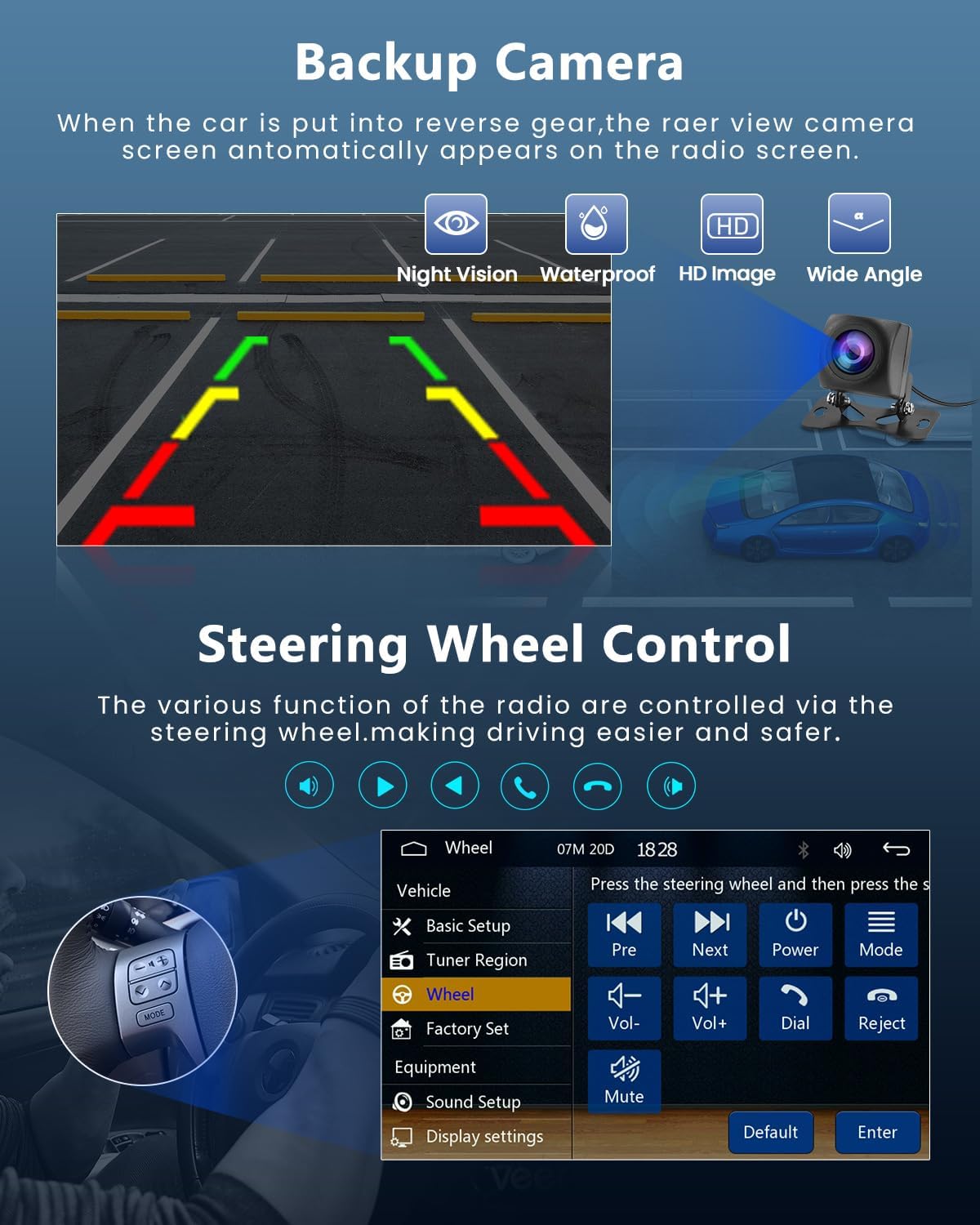
Image: The car radio's physical buttons illuminated in various colors, demonstrating the customizable colorful button lights feature.
Тэхнічнае абслугоўванне
- Уборка: Для чысткі экрана і прылады выкарыстоўвайце мяккую сухую тканіну. Не выкарыстоўвайце абразіўныя ачышчальнікі або растваральнікі.
- Сыход за экранам: Avoid pressing the screen with sharp objects. When flipping the screen out or in, do so gently.
- тэмпература: Operate the unit within the specified working temperature range of -20°C to 70°C.
- Абнаўленні прашыўкі: Праверце вытворцы webсайт для атрымання даступных абнаўленняў прашыўкі, каб забяспечыць аптымальную прадукцыйнасць і сумяшчальнасць.
Ліквідацыю непаладак
| праблема | Магчымая прычына | Рашэнне |
|---|---|---|
| Прылада не ўключаецца. | Incorrect power wiring; Blown fuse; Vehicle battery issue. | Check power cable connections. Verify vehicle's fuse box and battery. Consult a professional for wiring inspection. |
| Няма гуку з дынамікаў. | Няправільнае падключэнне дынамікаў; занадта нізкі ўзровень гучнасці; актыўная функцыя адключэння гуку. | Check speaker connections and polarity. Increase volume. Deactivate mute. |
| Праблемы з падключэннем Bluetooth. | Прылада не ў рэжыме спалучэння; Перашкоды; Па-за зонай дзеяння. | Пераканайцеся, што абедзве прылады знаходзяцца ў рэжыме спалучэння. Падыдзіце бліжэй да прылады. Перазапусціце Bluetooth на абедзвюх прыладах. |
| CarPlay/Android Auto не падключаецца. | Incorrect phone settings; Incompatible phone model; Bluetooth not connected. | Ensure Bluetooth is connected. Check phone settings for CarPlay/Android Auto permissions. Verify phone compatibility (Samsung not supported for Mirror Link). |
| Не адлюстроўваецца выява з задняй камеры. | Camera not connected; Incorrect wiring; Vehicle not in reverse. | Check camera cable connection to the CVBS input. Ensure reverse gear is engaged. Verify camera power supply. |
| Слабы прыём FM-радыё. | Антэна не падключана; Зона слабога сігналу; Перашкоды. | Ensure car antenna is properly connected. Try tuning to a stronger station. |
If the problem persists after attempting these solutions, please contact LeeKooLuu customer support or a qualified technician.
Тэхнічныя характарыстыкі
| Асаблівасць | Дэталь |
|---|---|
| сістэма | F133 |
| мадэль | 9601C |
| Памер экрана | 7.0 цаляў |
| Дазвол экрана | 1024*600 |
| тtage | 12В |
| Аўдыё Ampзадымнік | 7388 |
| Версія Bluetooth | 5.1 |
| Выходная магутнасць | 4*45 Вт |
| Інтэрфейс USB | USB2.0 |
| Зваротны ўвод | CVBS |
| Радыёдыяпазон | FM 87.5–108.0 МГц (Еўропа) |
| Знешні мікрафон | Падтрымліваецца |
| Рознакаляровыя агні | Падтрымліваецца |
| Працоўная тэмпература | -20°C ~ 70°C |
| Клавіша заводскіх налад | 113266 |
| Падтрымка аўдыёфарматаў | MP3 / WMA / WAV / APE / FLAC |
| Падтрымка фармату відэа | MKV/AVI/TS/TP/MP4/M4V (Max 50-80Mbps) |
| Памеры прадукту | 9.5 х 21.5 х 26 см; 1.58 кг |
| Нумар мадэлі тавару | LeeKooLuu-A3221A4AM47EU |
Гарантыя і падтрымка
For warranty information and technical support, please refer to the contact details provided with your purchase or visit the official LeeKooLuu webсайт. Захоўвайце пацвярджэнне пакупкі для прэтэнзій па гарантыі.
вытворца: ЛіКооЛу
ASIN: B0C3XMC45P
Звязаныя дакументы - LeeKooLuu-A3221A4AM47EU
 |
Аўтамагнітола Hieha Double Din: парады па ўсталёўцы і выкарыстанні Даведайцеся пра важныя парады па выкарыстанні двухдынавай аўтамабільнай стэрэасістэмы Hieha, а таксама пра ўстаноўку, сумяшчальнасць са смартфонамі (Android Auto, CarPlay, Mirror Link) і г.д.tagпатрабаванні і ліквідацыя непаладак. |
 |
Кіраўніцтва карыстальніка для MP5-плэера Oeretzrac T100C з тэлескапічным экранам і CarPlay Інструкцыя карыстальніка для аўтамабільнай стэрэасістэмы Oeretzrac T100C з тэлескапічным экранам, Apple CarPlay, Android Auto, Bluetooth і прайграваннем мультымедыя. Уключае інструкцыі па ўсталёўцы, эксплуатацыі і ліквідацыі непаладак. |
 |
CarPlay Screen Player User Manual for A301, A501, S170 This user manual provides comprehensive instructions for the JADO CarPlay Screen Player models A301, A501, and S170. It covers safety precautions, installation guides, wireless and wired connectivity options (CarPlay, Android Auto, AirPlay, Miracast, Bluetooth, AUX), audio output modes, optional features like playback and DVR, system settings, frequently asked questions, and detailed specifications. |
 |
User Manual: CooCom 9" Portable CarPlay Screen for Car User manual for the CooCom 9-inch portable CarPlay screen car stereo. This guide covers setup, features including Apple CarPlay, Android Auto, Airplay, Mirror Link, voice control, Bluetooth 5.3, GPS, FM, and details on the 4K dash cam and 1080P backup camera. Includes installation instructions and troubleshooting. |
 |
Кіраўніцтва карыстальніка і часта задаваныя пытанні па партатыўнай аўтамабільнай стэрэасістэме APOKAMORI 7" Падрабязнае кіраўніцтва па партатыўнай аўтамабільнай стэрэасістэме APOKAMORI 7 цаляў, якое ахоплівае правадныя падключэнні Android Auto і Apple CarPlay, наладу лагатыпа пры загрузцы і ліквідацыю распаўсюджаных праблем з падключэннем праграм. Уключае водгукі кліентаў і характарыстыкі прадукту. |
 |
Кіраўніцтва карыстальніка Carplay Screen Player — мадэлі S170, A301, A501 Comprehensive user manual for the Carplay Screen Player, detailing installation, features, wireless connectivity (Apple CarPlay, Android Auto, AirPlay), audio output modes, settings, and troubleshooting for models S170, A301, and A501. Includes specifications and safety guidelines. |
Ask a question about this manual
Ask about setup, troubleshooting, compatibility, parts, safety, or missing instructions. Manuals+ will review the question and use this page’s manual context to help answer it.