
1. Прадукт скончыўсяview
The Technoline WT8945 is a radio-controlled wall clock designed for indoor use, offering precise timekeeping along with integrated temperature and humidity displays. Its timeless design with a black frame and white dial ensures clear readability and aesthetic appeal in various indoor environments.
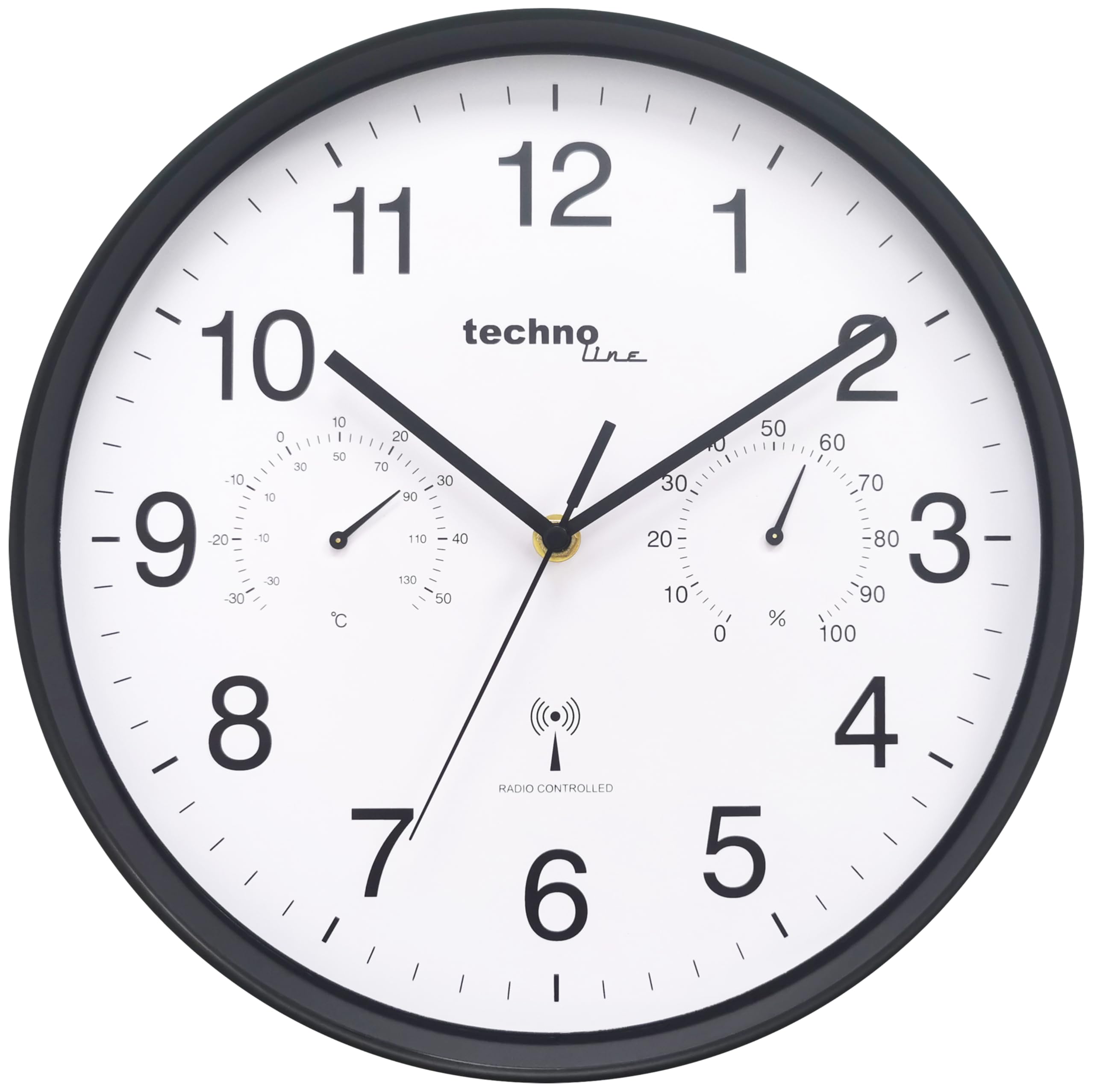
Малюнак 1.1: Фронт view of the Technoline WT8945 Radio-Controlled Wall Clock. The clock features a black frame, a white dial with large black numbers, and smaller analog displays for temperature and humidity.
Асноўныя функцыі ўключаюць у сябе:
- DCF-77 Radio Control: Ensures automatic and highly accurate time synchronization.
- Analog Temperature Display: Measures indoor temperature from -30 °C to +50 °C.
- Analog Humidity Display: Measures indoor humidity from 0% to 100%.
- Выразная чытальнасць: High-contrast white dial with black numbers, visible from a distance.
- Трывалая канструкцыя: Robust plastic frame.
- Крыніца харчавання: Operates on 1 x AA Mignon LR06 battery (not included).

Малюнак 1.2: Visual representation of the clock's main features: temperature display, humidity display, and DCF-77 radio control, shown in a living room setting.
2. Змесціва ўпакоўкі
Калі ласка, праверце змесціва пакета пасля распакавання, каб пераканацца ў наяўнасці ўсіх прадметаў і іх цэласнасці.
- 1 x Technoline WT8945 Radio-Controlled Wall Clock
- 1 х Інструкцыя па эксплуатацыі (гэты дакумент)
3. Настройка
3.1 Устаноўка батарэі
The clock requires one AA Mignon LR06 battery (not included) for operation.
- Знайдзіце батарэйны адсек на задняй частцы гадзінніка.
- Адкрыйце крышку батарэйнага адсека.
- Insert one AA Mignon LR06 battery, ensuring the correct polarity (+ and -) as indicated inside the compartment.
- Надзейна зачыніце крышку батарэйнага адсека.
Заўвага: Заўсёды выкарыстоўвайце новыя батарэйкі рэкамендаванага тыпу. Не змешвайце старыя і новыя батарэйкі або батарэйкі розных тыпаў.
3.2 Пачатковая сінхранізацыя часу
After battery installation, the clock will automatically attempt to synchronize with the DCF-77 radio signal. This process may take several minutes to a few hours, depending on your location and signal strength.
- The clock hands will typically move to the 12 o'clock position and then begin searching for the signal.
- Пасля атрымання сігналу гадзіннік аўтаматычна ўсталюе правільны час.
- Для найлепшага прыёму размясціце гадзіннік каля акна і далей ад электронных прылад, якія могуць выклікаць перашкоды.
3.3 Размяшчэнне
Choose a suitable indoor location for your wall clock. Consider the following:
- Бачнасць: Ensure the clock is easily visible from your desired viewінг вобласці.
- Прыём сігналу: For optimal radio signal reception, avoid placing the clock near large metal objects, concrete walls, or other electronic devices that might interfere with the signal.
- Умовы навакольнага асяроддзя: While the clock displays temperature and humidity, avoid placing it in direct sunlight, near heat sources, or in areas with extreme temperature fluctuations or high humidity, as this may affect the accuracy of the sensors.
4. Інструкцыя па эксплуатацыі
4.1 Вызначэнне часу
The Technoline WT8945 displays time using traditional analog clock hands (hour, minute, second). The radio-controlled mechanism ensures the time is always accurate to the DCF-77 signal.
4.2 Reading Temperature and Humidity
The clock features two smaller analog dials on its face:
- Дысплей тэмпературы: Located on the left side of the dial, it shows the indoor temperature in degrees Celsius (°C). The measurement range is from -30 °C to +50 °C.
- Дысплей вільготнасці: Located on the right side of the dial, it shows the indoor relative humidity as a percentage (%). The measurement range is from 0% to 100%.
These displays provide a quick overview of your indoor climate conditions.
4.3 Manual Time Adjustment (If Radio Signal is Unavailable)
In areas where the DCF-77 radio signal is weak or unavailable, the clock can be manually set. This feature is particularly useful if the clock fails to synchronize automatically.
- Remove the battery from the clock.
- Wait for approximately 1 minute.
- Reinsert the battery. The clock hands will move to the 12 o'clock position.
- Immediately after the hands reach 12, a small adjustment wheel or button should be accessible on the back of the clock (often near the battery compartment). Use this to manually set the time.
- Once the desired time is set, the clock will operate as a standard quartz clock until a DCF-77 signal is successfully received, at which point it will automatically re-synchronize.
Заўвага: The exact method for manual adjustment may vary slightly. Refer to any specific markings or controls on the back of your clock if the above steps do not immediately apply.
5. Тэхнічнае абслугоўванне
Proper maintenance ensures the longevity and accurate operation of your Technoline WT8945 wall clock.
- Уборка: Wipe the clock's surface with a soft, dry cloth. Do not use abrasive cleaners, solvents, or chemical agents, as these may damage the plastic frame or dial.
- Замена батарэі: Replace the AA battery annually, or when the clock hands stop moving or become erratic. Remove depleted batteries promptly to prevent leakage and damage to the clock mechanism.
- Ахова навакольнага асяроддзя: Protect the clock from extreme temperatures, direct sunlight, and high humidity.
6. Выпраўленне непаладак
If you encounter issues with your Technoline WT8945 clock, refer to the following troubleshooting guide:
| праблема | Магчымая прычына | Рашэнне |
|---|---|---|
| Стрэлкі гадзінніка не рухаюцца і не спыняюцца. | Разраджаная батарэя. | Заменіце батарэйку АА на новую. |
| Гадзіннік не сінхранізуецца або паказвае няправільны час. | Weak or no DCF-77 radio signal. Interference from other electronics. Incorrect initial setup. |
|
| Temperature or humidity display is inaccurate or stuck. | Sensor obstruction. Extreme environmental conditions. |
|
7. Тэхнічныя характарыстыкі

Малюнак 7.1: Dimensions of the Technoline WT8945 Wall Clock, showing a 30 cm diameter.
| Асаблівасць | Дэталь |
|---|---|
| Марка | Тэхналінія |
| Нумар мадэлі | WT8945 |
| Колер | Чорны |
| Памеры прадукту (Д х Ш х У) | 30 х 3.81 х 30 см |
| Вага прадмета | 730 грамаў |
| Матэрыял | Пластыкавыя |
| Тып дысплея | Аналаг |
| Асаблівасці | Humidity Display, Radio-Controlled Time (DCF-77) |
| Дыяпазон вымярэння тэмпературы | -30 °C да +50 °C |
| Дыяпазон вымярэння вільготнасці | ад 0% да 100% |
| Крыніца харчавання | 1 x AA Mignon LR06 Battery (not included) |
| Выкарыстанне ў памяшканні/на вуліцы | У памяшканні |
| Форма | Круглая |
8. Гарантыя і падтрымка
Technoline products are manufactured to high-quality standards. For information regarding warranty coverage, please refer to the warranty card included with your purchase or contact your retailer. For technical support or further assistance, please visit the official Technoline webсайт або звярніцеся ў іх аддзел абслугоўвання кліентаў.
Калі ласка, захавайце пацвярджэнне пакупкі для любых гарантыйных прэтэнзій.