
1. Уводзіны і большview
The Beelink SER3 3200U Mini PC is a compact and versatile computing device designed for a wide range of applications, from office productivity to 4K media playback. This manual provides essential information for the proper setup, operation, maintenance, and troubleshooting of your device. Please read this manual thoroughly before using your Mini PC.
2. Змесціва ўпакоўкі
Upon unboxing your Beelink SER3 3200U Mini PC, please verify that all the following items are included:
- Beelink SER3 3200U Mini PC
- Адаптар сілкавання (19В/3.42А)
- HDMI Cables (100cm)
- Wall-Mounted Bracket with screws
- Кіраўніцтва карыстальніка
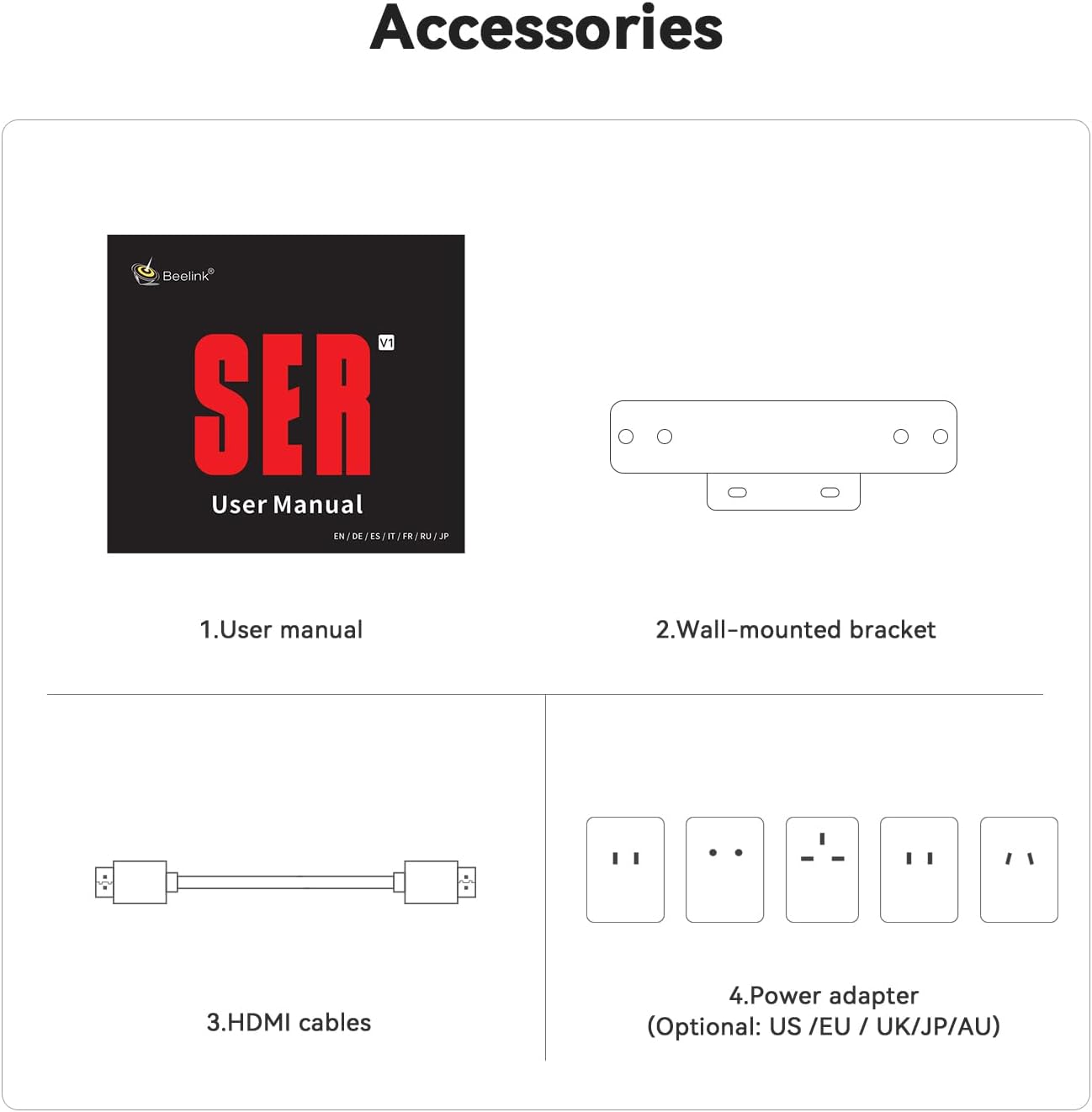
Апісанне: This image shows the standard accessories provided with the Beelink SER3 Mini PC, including the user manual, wall-mounted bracket, HDMI cables, and the power adapter.
3. Асаблівасці прадукту
The Beelink SER3 3200U Mini PC offers a robust set of features for efficient performance:
- Працэсар: AMD Ryzen 3 3200U (2C/4T, 2.6GHz up to 3.5GHz)
- Графіка: 3-core AMD Radeon Vega 3 Graphics (1200MHz)
- Памяць: Dual-channel DDR4 16GB RAM (expandable up to 32GB)
- захоўванне: 500GB M.2 PCIe 3.0 X4 SSD (supports up to 2TB M.2 NVMe SSD and 2.5-inch SATA HDD/SSD)
- Аперацыйная сістэма: Pre-installed Windows 11 Pro
- Вывад дысплея: Dual HDMI outputs supporting up to 4K 60Hz
- Падключэнне: WiFi 5 (2.4G+5GHz), Bluetooth 5.0, Gigabit Ethernet (1000M LAN)
- парты: 1x DC Jack, 2x HDMI, 4x USB 3.2 10Gbps, 1x RJ45 1000M LAN, 1x Audio Jack (HP&MIC)
- Астуджэнне: Efficient cooling system with a quiet large fan and dual heat pipes
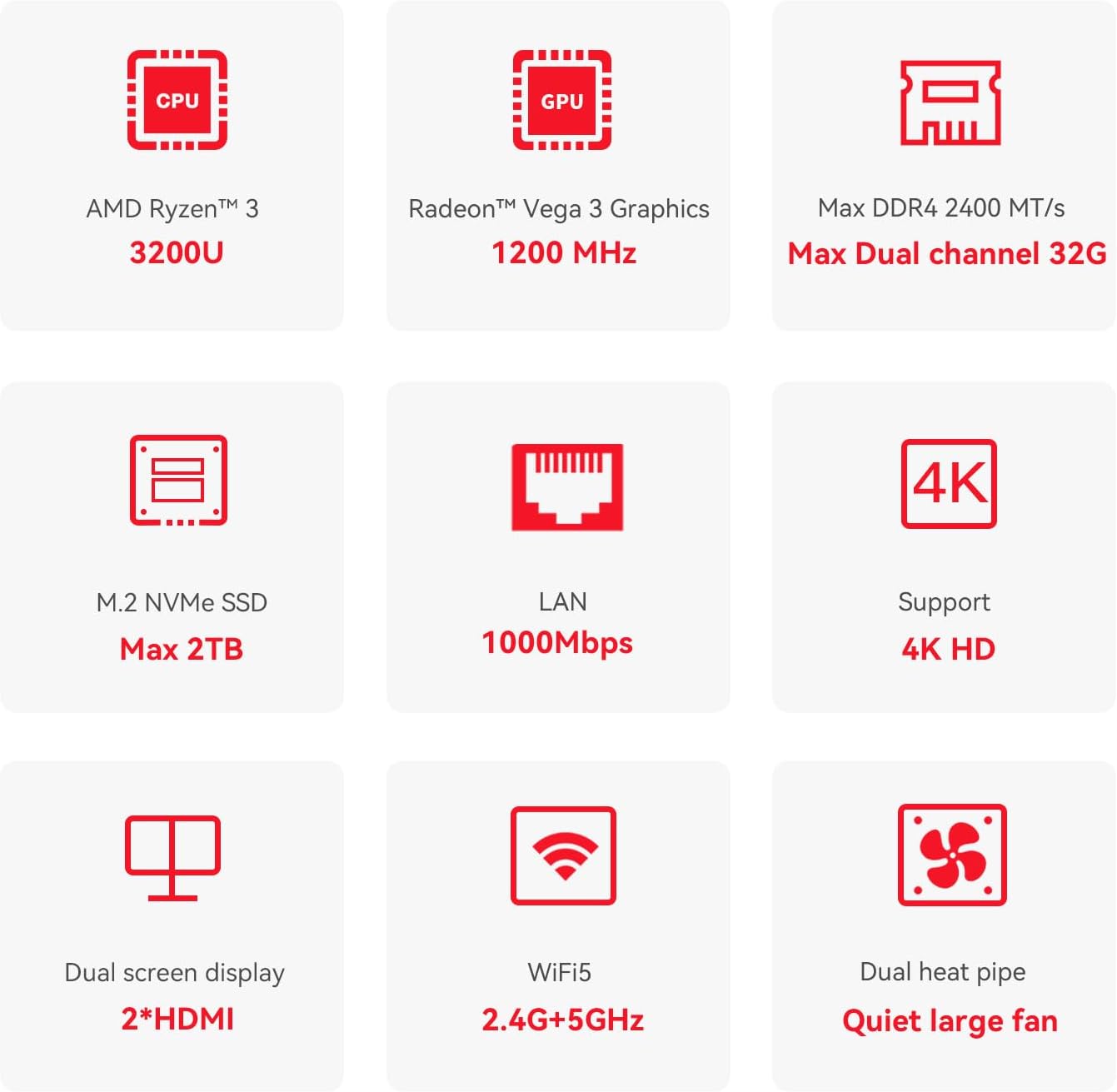
Апісанне: This diagram highlights the core specifications and features of the Beelink SER3 Mini PC, such as its AMD Ryzen 3 3200U CPU, Radeon Vega 3 Graphics, expandable DDR4 RAM, M.2 NVMe SSD support, 4K display capability, dual HDMI outputs, WiFi 5, 1000Mbps LAN, and efficient cooling system.
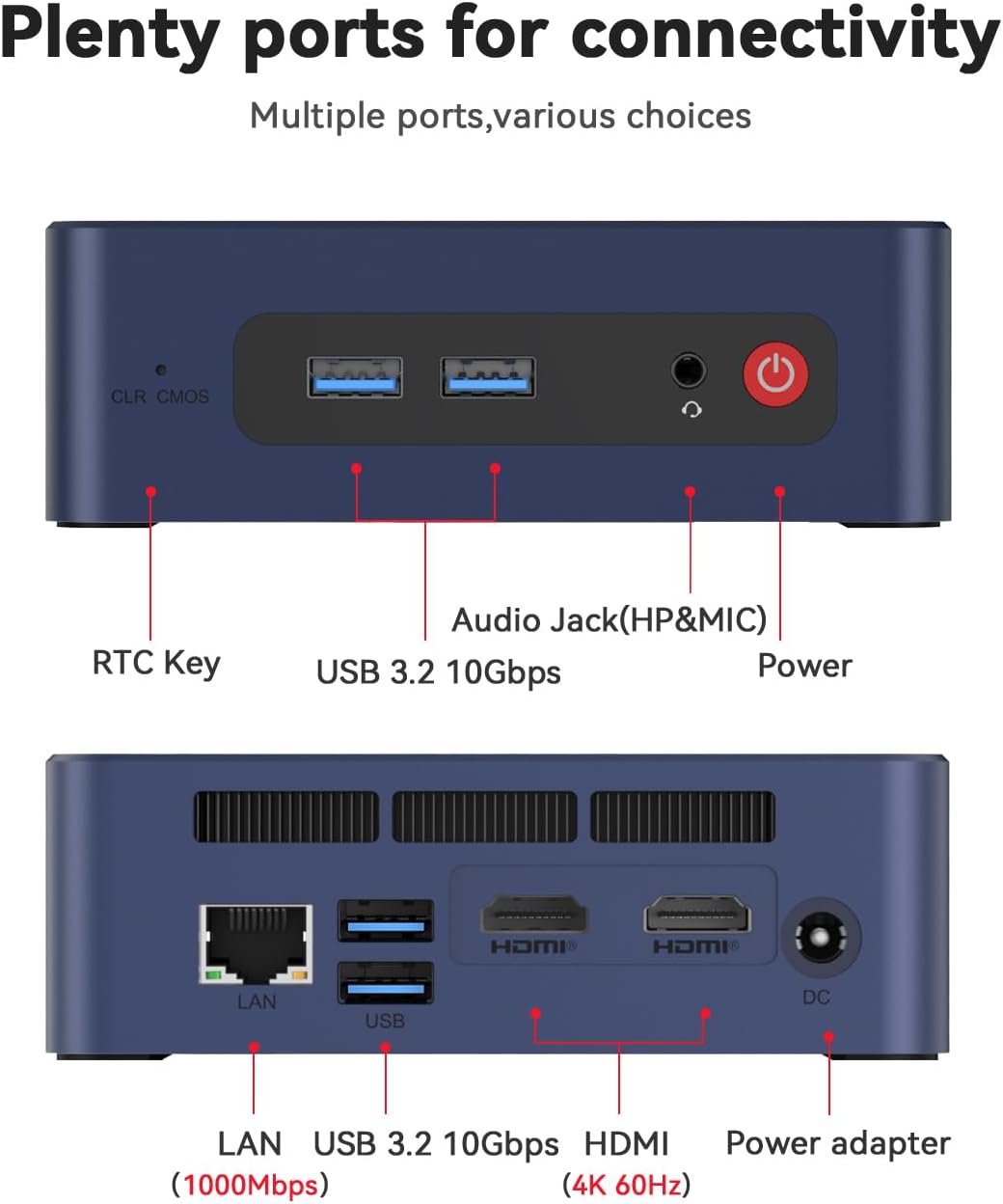
Апісанне: Гэта выява дае падрабязную інфармацыю view of the front and rear ports of the Beelink SER3 Mini PC, illustrating the location of the RTC Key, USB 3.2 ports, Audio Jack, Power button, LAN port, HDMI outputs, and DC power input.
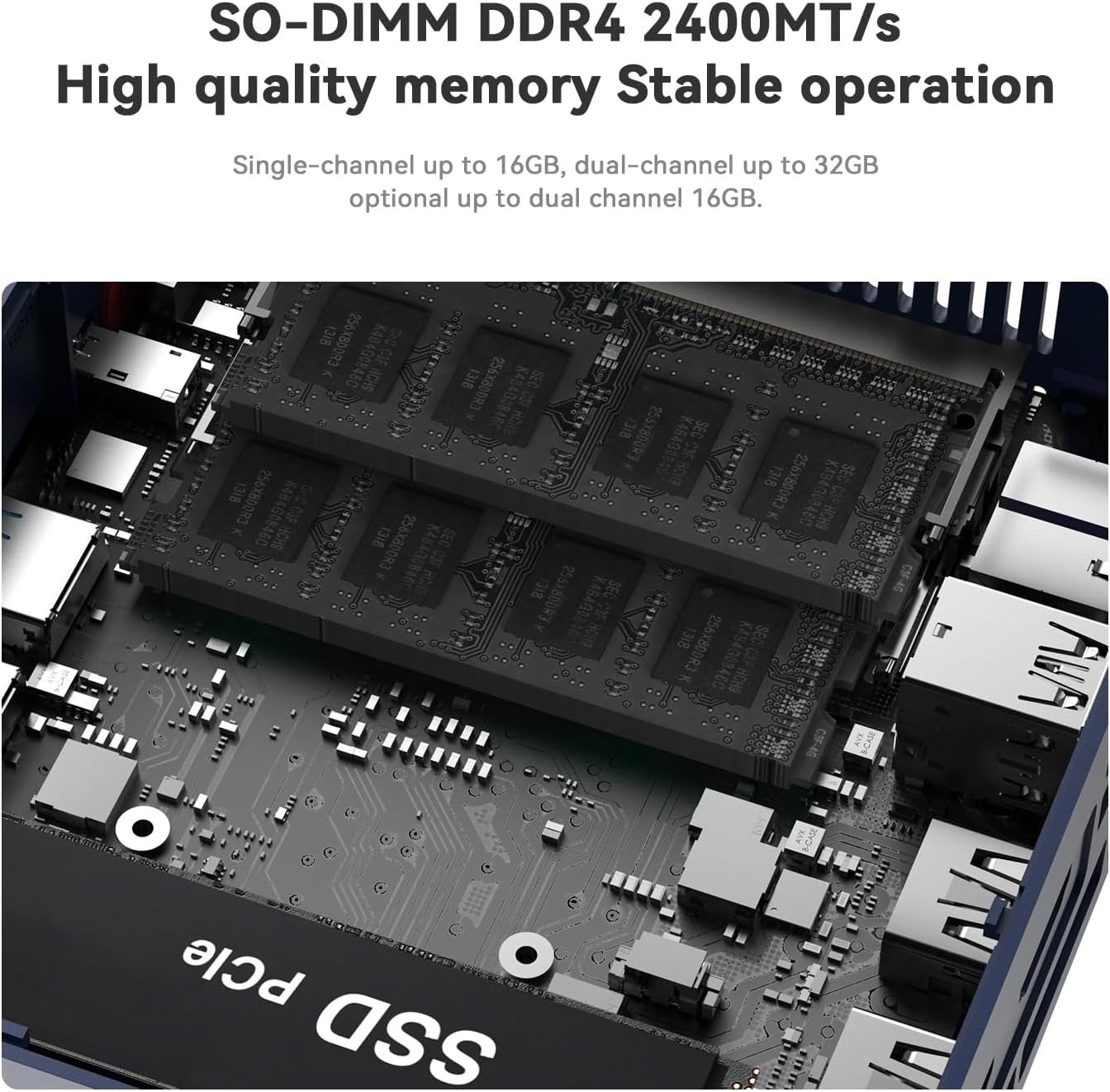
Апісанне: Унутраны view of the Beelink SER3 Mini PC, showcasing the SO-DIMM DDR4 memory slots and the M.2 NVMe SSD slot, indicating upgrade possibilities.
4. Кіраўніцтва па наладцы
4.1 Пачатковае падключэнне
- Падключэнне дысплея: Use an HDMI cable to connect your monitor(s) to the HDMI ports on the back of the Mini PC. The device supports dual 4K displays.
- Падключэнне перыферыйных прылад: Падключыце клавіятуру і мыш USB да даступных партоў USB 3.2.
- Падключыце харчаванне: Устаўце адаптар сілкавання ў раз'ём пастаяннага току на міні-ПК, а затым падключыце яго да разеткі.
- Уключэнне: Націсніце кнопку харчавання, размешчаную на пярэдняй панэлі міні-ПК.

Апісанне: This image demonstrates the Beelink SER3 Mini PC connected to two external monitors, highlighting its dual-screen display capability for enhanced productivity.
4.2 Сеткавае падключэнне
- Правадное злучэнне: Connect an Ethernet cable from your router or modem to the RJ45 LAN port on the Mini PC.
- Бесправоднае злучэнне: Once powered on, Windows 11 Pro will guide you through connecting to a Wi-Fi network. The device supports WiFi 5 (802.11ac).
4.3 Насценны мантаж (дадаткова)
The Beelink SER3 Mini PC can be mounted behind a monitor using the included wall-mounted bracket for a clutter-free setup.
- Attach the bracket to the Mini PC using the provided screws.
- Fix the bracket to the back of your display (if VESA compatible) or a wall using appropriate screws.

Апісанне: This diagram visually explains how to easily install the Beelink SER3 Mini PC using the provided wall-mounted bracket, showing it attached to the back of a monitor.
5. Інструкцыя па эксплуатацыі
5.1 Першая загрузка і ўстаноўка Windows
On the first boot, follow the on-screen instructions to complete the Windows 11 Pro setup, including language selection, network connection, and user account creation.
5.2 Штодзённая праца
- Уключэнне/выключэнне харчавання: Press the power button to turn the device on. To turn off, use the Windows Shut Down option or press and hold the power button for a few seconds.
- Перазапуск: Use the Windows Restart option for system reboots.
- Рэжым сну: The system will enter sleep mode after a period of inactivity, or you can manually select it from the Windows power options.
5.3 Dual Display Configuration
With two HDMI ports, you can extend your desktop across two screens or duplicate your display. Configure these settings through Windows Display Settings (Right-click on desktop > Display settings).
6. Тэхнічнае абслугоўванне
6.1 Ачыстка
- Рэгулярна працірайце знешнія паверхні міні-ПК мяккай сухой тканінай.
- Выкарыстоўвайце сціснутае паветра, каб акуратна выдаліць пыл з вентыляцыйных адтулін, каб забяспечыць належную цыркуляцыю паветра і астуджэнне.
6.2 Абнаўленне праграмнага забеспячэння
Keep your Windows operating system and drivers updated to ensure optimal performance and security. Windows Update will typically handle this automatically, but you can check manually via Settings > Windows Update.
6.3 Пашырэнне сховішча
Міні-ПК падтрымлівае пашырэнне памяці:
- An additional 2.5-inch SATA HDD or SSD (500GB~2TB) can be installed.
- The M.2 PCIe 3.0 X4 SSD can be upgraded to a larger capacity (up to 2TB).
6.4 Сістэма астуджэння
The Beelink SER3 Mini PC features a large fan and dual heat conduction tubes for efficient heat dissipation. Ensure the vents are not obstructed to maintain optimal operating temperatures.

Апісанне: Гэта выява забяспечвае ўнутранае view of the Beelink SER3 Mini PC's cooling solution, highlighting the large fan and dual heat pipes designed to efficiently dissipate heat and maintain system stability.
7. Выпраўленне непаладак
If you encounter issues with your Beelink SER3 Mini PC, refer to the following common solutions:
| праблема | Магчымая прычына | Рашэнне |
|---|---|---|
| Няма харчавання/Прылада не ўключаецца | Power adapter not connected or faulty; Power button issue | Ensure power adapter is securely connected to both the Mini PC and a working power outlet. Try a different outlet. |
| Няма адлюстравання на маніторы | HDMI cable loose or faulty; Incorrect input selected on monitor | Check HDMI cable connections. Ensure your monitor is set to the correct HDMI input source. Try a different HDMI cable or monitor. |
| Wi-Fi or Bluetooth not working | Drivers not installed; Wireless adapter disabled | Check Device Manager in Windows for wireless adapter status. Ensure Wi-Fi/Bluetooth is enabled in Windows settings. Update drivers if necessary. |
| Сістэма павольная або не рэагуе | Too many applications running; Insufficient RAM; Overheating | Close unnecessary applications. Check Task Manager for resource usage. Ensure proper ventilation and clean dust from vents. Consider upgrading RAM or SSD if frequently slow. |
| Cannot connect to LAN | Ethernet cable loose or faulty; Network driver issue | Check Ethernet cable connection. Verify network settings in Windows. Update LAN drivers. |
If the problem persists after attempting these solutions, please contact Beelink customer service for further assistance.
8. Тэхнічныя характарыстыкі
Detailed technical specifications for the Beelink SER3 3200U Mini PC:

Апісанне: This image presents a comprehensive table of the Beelink SER3 Mini PC's product specifications, detailing its dimensions, CPU, graphics, system disk, internal slots, interfaces, wireless LAN, power components, operating environment, storage environment, accessories, and additional functions.
| Асаблівасць | Дэталь |
|---|---|
| Марка | Білінк |
| Нумар мадэлі | SER |
| Аперацыйная сістэма | Windows 11 Pro |
| Мадэль працэсара | AMD Ryzen 3 3200U |
| Хуткасць працэсара | 2.6 GHz (up to 3.5 GHz boost) |
| Графічны супрацэсар | Графіка AMD Radeon Vega 3 (1200 МГц) |
| Ёмістасць памяці | 16 GB DDR4 (2400 MHz, expandable to 32 GB) |
| Апісанне жорсткага дыска | 500GB NVMe M.2 SSD (PCIe 3.0 X4) |
| Additional Storage Support | 1x 2.5-inch SATA HDD/SSD slot (500GB~2TB) |
| Бесправадныя тэхналогіі | Wi-Fi 5 (802.11ac), Bluetooth 5.0 |
| Ethernet | 1000M LAN (RJ45) |
| Відэавыхад | 2x HDMI (supports 4K@60Hz dual display) |
| Парты USB | 4x USB 3.2 10 Гбіт/с |
| Аўдыёраз'ём | 1x HP&MIC Audio Jack |
| Увод магутнасці | Раз'ём пастаяннага току (19 В / 3.42 А) |
| Памеры | 124 х 113 х 42 мм |
| Вага прадмета | 0.95 кілаграма |
| Спосаб астуджэння | Air (Quiet large fan, dual heat pipe) |
9. Гарантыя і падтрымка
Beelink is committed to providing excellent customer service and product reliability.
- Гарантыя: Your Beelink SER3 3200U Mini PC comes with a 3-year worry-free warranty.
- Тэхнічная падтрымка: Lifetime technical support is available for all Beelink products.
- Абслугоўванне кліентаў: 24-hour customer service is provided to assist with any inquiries or issues.
For support, please refer to the contact information provided in your product packaging or visit the official Beelink webсайт.