
Уводзіны
This manual provides detailed instructions for the setup, operation, and maintenance of your ATTACK SHARK Wireless Bluetooth/USB Wired Gaming Mechanical Keyboard. This compact 100-key keyboard features RGB backlighting, hot-swappable switches, and multiple connectivity options for versatile use across various devices.

Image: The ATTACK SHARK Wireless Mechanical Keyboard, showcasing its 100-key layout, RGB backlighting, orange coiled USB-C cable, and a cloud-shaped wrist rest.
Змест пакета
Праверце, ці ёсць усе прадметы ў вашай упакоўцы:
- ATTACK SHARK Wireless Mechanical Keyboard
- Cloud Keyboard Wrist Rest
- USB-C to USB-A Data Cable (Coiled)
- Каўпачок клавіш і здымнік выключальніка
- USB-прыёмнік 2.4 ГГц
- Additional Switches (Red Switch type)
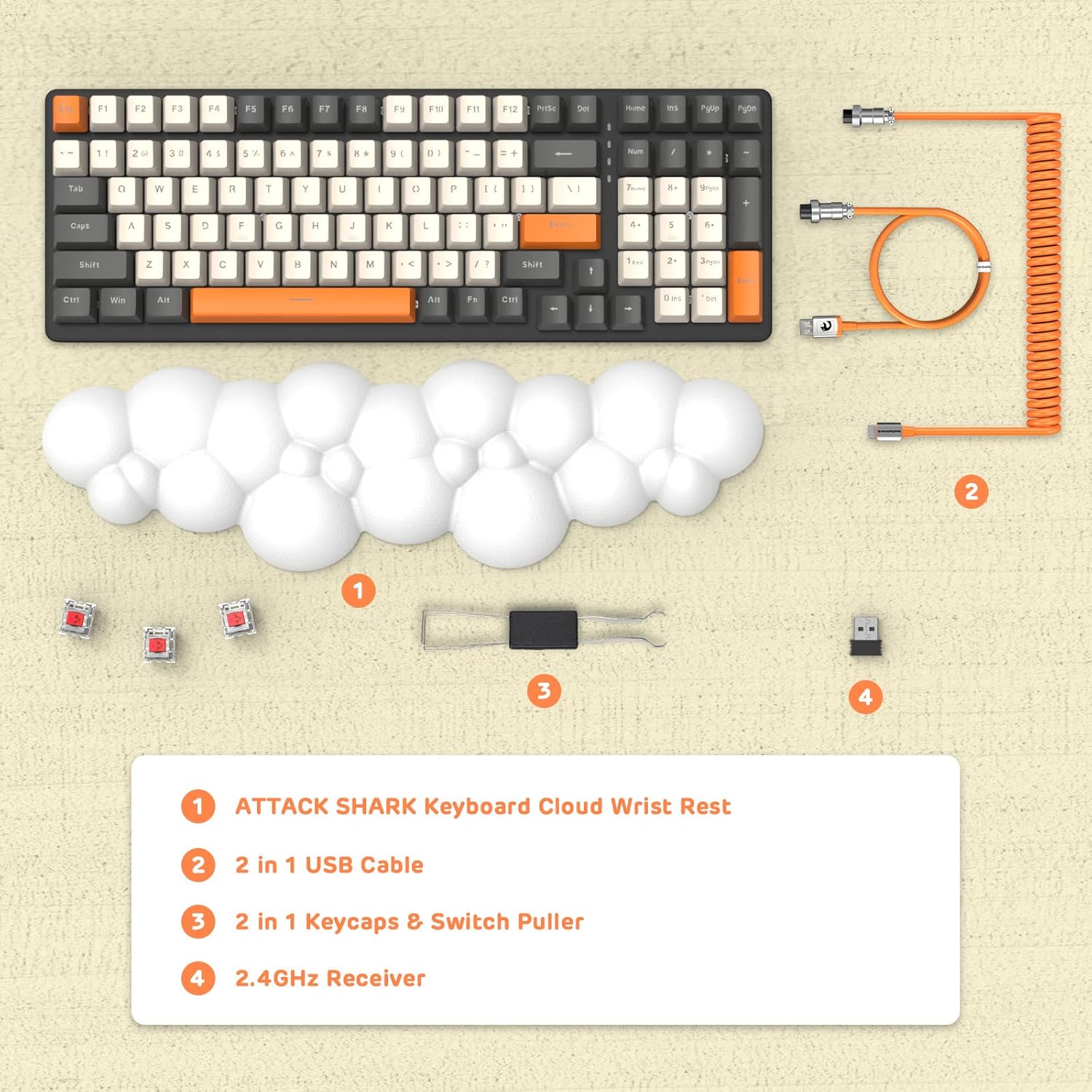
Выява: Над галавой view displaying the keyboard, cloud wrist rest, coiled USB cable, keycap and switch puller, and 2.4GHz USB receiver, along with spare switches.
Настройка
The keyboard supports three connection modes: Bluetooth 5.0, 2.4GHz Wireless, and USB-C Wired.
1. Правадное падключэнне (USB-C)
- Connect the USB-C end of the provided coiled cable to the keyboard's USB-C port.
- Падключыце канец кабеля USB-A да даступнага порта USB на вашым кампутары.
- The keyboard will automatically switch to wired mode (indicated by FN+5).

Image: A visual representation of the keyboard connecting to various devices (laptop, tablet, desktop, smartphone) via wired USB, 2.4GHz wireless, and Bluetooth.
2. Бесправадное злучэнне 2.4 ГГц
- Знайдзіце USB-прыёмнік 2.4 ГГц.
- Падключыце USB-прыёмнік да вольнага порта USB на вашым кампутары.
- Прэса FN + 4 on the keyboard to activate 2.4GHz wireless mode. The indicator light will show the connection status.
3. Злучэнне Bluetooth
The keyboard can store up to three Bluetooth devices.
- Націсніце і ўтрымлівайце FN + 1, FN + 2, або FN + 3 for 3-5 seconds to enter Bluetooth pairing mode for the desired channel. The indicator light will flash rapidly.
- On your device (e.g., laptop, tablet, smartphone), navigate to Bluetooth settings and search for available devices.
- Select "ATTACK SHARK Keyboard" (or similar name) from the list to pair.
- Пасля спалучэння індыкатар перастане міргаць і застанецца бесперапынным.
- Каб пераключыцца паміж падлучанымі прыладамі Bluetooth, проста націсніце FN + 1, FN + 2, або FN + 3.
Інструкцыя па эксплуатацыі
Кіраванне падсветкай RGB
The keyboard features customizable RGB backlighting with multiple modes.
- Пераключыць рэжым падсветкі: Прэса FN + INS to cycle through different RGB lighting effects.
- Наладзіць яркасць: Прэса FN + ↑ (Up Arrow) to increase brightness, FN + ↓ (Стрэлка ўніз), каб паменшыць яркасць.
- Адрэгуляваць хуткасць: Прэса FN + ← (Left Arrow) to decrease effect speed, FN + → (Right Arrow) to increase effect speed.

Image: The keyboard displaying various RGB lighting patterns, with key combinations for switching modes and adjusting brightness/speed.
Пераключальнікі з магчымасцю гарачай замены
The keyboard's PCB supports 3-pin mechanical switches, allowing for easy replacement without soldering. This feature enables customization of typing feel and extends the keyboard's lifespan.
- Выкарыстоўвайце прыкладзены здымнік для клавіш, каб акуратна зняць патрэбную клавішу.
- Use the switch puller to gently grasp and remove the switch from the PCB.
- Align the pins of the new 3-pin switch with the holes on the PCB and press firmly until it clicks into place.
- Заменіце каўпачок клавішы.

Выява: Падрабязны view of the keyboard's PCB with a switch removed, demonstrating the hot-swappable feature. Spare red switches are also shown.
Акумулятар і зарадка
The keyboard is equipped with a 4000mAh lithium battery.
- Тэрмін службы батарэі: Up to 200 hours of use with the backlight turned off.
- Зарадка: Connect the keyboard via the USB-C cable to a power source. The charging indicator light will show the charging status.
- Нізкі абtagІндыкатар e: The keyboard features a low voltage indicator to alert you when charging is required.

Image: The keyboard shown from the side, emphasizing its 4000mAh lithium battery capacity.
Тэхнічнае абслугоўванне
Каб забяспечыць даўгавечнасць і аптымальную прадукцыйнасць вашай клавіятуры:
- Уборка: Use a soft, dry cloth to wipe the keyboard surface. For deeper cleaning, remove keycaps using the provided puller and use compressed air to clear debris from between switches.
- Падстаўка для запясцяў: The PU material of the wrist rest is durable and washable. Clean with a damp тканіна і мяккае мыла, калі неабходна.
- захоўванне: Захоўвайце клавіятуру ў прахалодным, сухім месцы, удалечыні ад прамых сонечных прамянёў і экстрэмальных тэмператур.
- Пазбягайце вадкасці: Do not expose the keyboard to liquids. In case of spills, immediately disconnect power and allow it to dry completely before use.
Ліквідацыю непаладак
| выпуск | Магчымая прычына | Рашэнне |
|---|---|---|
| Клавіятура не рэагуе ў бесправадным рэжыме. | Low battery, incorrect mode selected, receiver not connected, or Bluetooth not paired. | Charge the keyboard. Ensure correct mode (FN+4 for 2.4G, FN+1/2/3 for Bluetooth) is selected. Verify 2.4G receiver is securely plugged in. Re-pair Bluetooth if necessary. |
| Keys are "sticking" or registering multiple inputs. | Debris under keycap/switch, faulty switch. | Remove keycap and switch, clean thoroughly with compressed air. If issue persists, replace the switch using the hot-swappable feature. |
| RGB backlight not working or dim. | Backlight turned off, brightness set too low, or low battery. | Press FN+INS to cycle modes. Adjust brightness with FN+↑ / FN+↓. Charge the keyboard. |
| Keyboard not recognized by device. | Driver issue, incorrect connection mode, or device compatibility. | Ensure correct connection mode is active. Try a different USB port or device. For wired mode, ensure the cable is fully inserted. Check device's operating system for necessary drivers (usually plug-and-play). |
Тэхнічныя характарыстыкі
- мадэль: 3b5c1fdb-29da-409c-b4b7-12e9e72fb741
- Падключэнне: Bluetooth 5.0, 2.4GHz Wireless (RF), USB-C Wired
- Макет: Compact 100 Keys (98% layout)
- Пераключальнікі: Hot-Swappable 3-pin Mechanical (Red Switch variant)
- Падсвятленне: RGB Backlit (9 modes)
- акумулятар: Літыевая батарэя 4000 мАг
- Сумяшчальныя прылады: Laptop, PC, Tablet (Mac/Win Supported)
- матэрыял: Polyurethane (PU) for wrist rest
- Памеры: 16.97 х 6.42 х 2.52 цалі (упакоўка)
- Вага прадмета: 2.94 фунта
- Асаблівасці: Ergonomic design, Custom Coiled Aviator Keyboard Cable, Keycap and Switch Puller included.
Гарантыя і падтрымка
For warranty information and technical support, please refer to the documentation provided with your purchase or visit the official ATTACK SHARK webсайт. Захоўвайце пацвярджэнне пакупкі для любых гарантыйных прэтэнзій.
вытворца: АТАКА АКУЛА
Дата першай даступнасці: 8 мая 2023 г