
THOMSON B206
THOMSON Sound Bar B206 User Manual
Мадэль: B206
Уводзіны
Дзякуй за пакупкуasing the THOMSON Sound Bar B206. This sound bar is designed to enhance your audio experience for television, music, and gaming, featuring multiple connectivity options and two wireless microphones for karaoke. This manual provides essential information for safe and efficient use of your device. Please read it thoroughly before operation and retain it for future reference.
Інфармацыя па бяспецы
- Не падвяргайце прыладу ўздзеянню дажджу, вільгаці або экстрэмальных тэмператур.
- Ensure proper ventilation around the sound bar to prevent overheating.
- Не адчыняйце casinг; звяртайцеся да кваліфікаванага персаналу па ўсё абслугоўванне.
- Выкарыстоўвайце толькі адаптар сілкавання, які ўваходзіць у камплект.
- Трымайце прыладу далей ад моцных магнітных палёў.
- Avoid placing heavy objects on the sound bar.
Змест пакета
Праверце, ці ўсе пералічаныя ніжэй прадметы ўваходзяць у вашу ўпакоўку:
- THOMSON Sound Bar (B206) x 1
- Пульт дыстанцыйнага кіравання x 1
- Бесправадны мікрафон x 2
- Адаптар сілкавання x 1
- Аўдыёкабель x 1
- Coaxial Cable x 1
- Optical Fiber Cable x 1
- Wall Mounting Kit x 1 (includes padlocks, gel column, screws)
- Кіраўніцтва карыстальніка x 1

Малюнак 1: Камплектуючыя прыналежнасці
This image displays the complete set of items provided with your THOMSON Sound Bar B206, including the sound bar unit, remote control, two wireless microphones, power adapter, user manual, audio cable, coaxial cable, optical fiber cable, and wall mounting kit components.
Прадукт скончаныview
Sound Bar Components
The THOMSON Sound Bar B206 features a sleek design with integrated controls and various input ports for versatile connectivity.

Figure 2: Sound Bar, Microphones, and Remote
This image shows the main sound bar unit, two wireless microphones, and the remote control, providing a complete view of the primary components.
Internal Speaker Design
The sound bar is equipped with four large dual drive units, delivering a maximum output power of 200 Watts for HiFi sound quality, including dual bass and clear mid-range frequencies for a 3D surround sound effect.

Figure 3: Internal Speaker Structure
This diagram illustrates the internal construction of the sound bar's speakers, emphasizing the dual drive units responsible for audio output, alongside the Bluetooth connectivity symbol.
Rear Panel Connections and Remote Control
The rear panel provides various input options, while the remote control offers full command over the sound bar's functions.

Figure 4: Rear Panel Ports and Remote Control
This image details the connectivity options on the sound bar's rear panel, including the power switch, HDMI ARC, power input, subwoofer output, coaxial, optical, and AUX inputs. The accompanying remote control is also shown, indicating various function buttons.
Настройка
1. Варыянты размяшчэння
The THOMSON Sound Bar B206 can be placed on a desktop or mounted on a wall. A wall mounting kit is included for convenient installation.
- Размяшчэнне на працоўным стале: Place the sound bar on a stable, flat surface in front of your TV.
- Насценны мантаж: Use the provided wall mounting kit (padlocks, gel column, screws) to securely attach the sound bar to a wall below your TV. Ensure the wall material can support the weight of the sound bar.
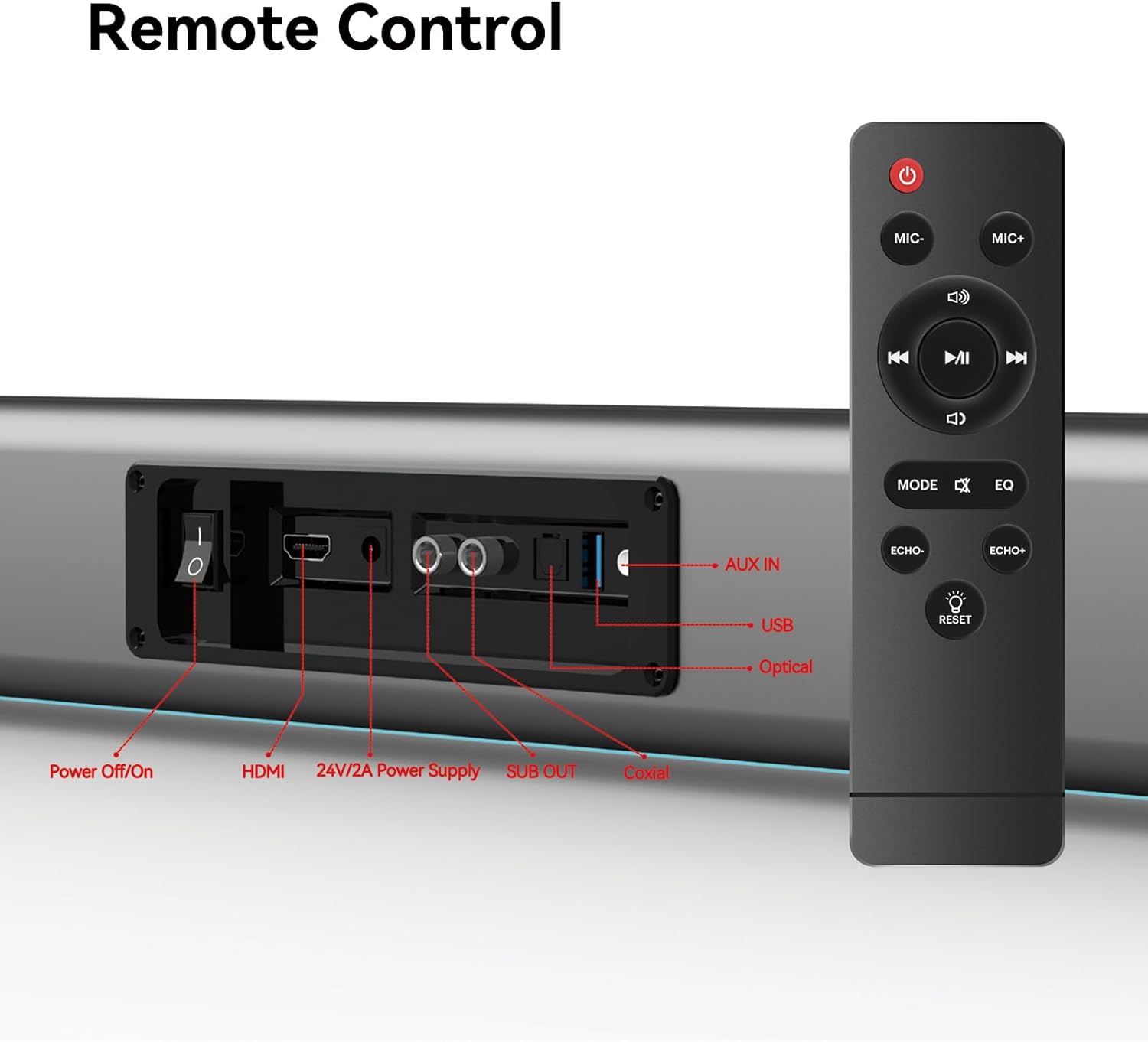
Figure 5: Placement Options (Wall Mount and Desktop)
This image illustrates the versatility of the sound bar's placement, showing it both mounted on a wall beneath a television and resting on a media console, highlighting the included wall mount kit for an elegant setup.
2. Падключэнне да сілкавання
- Connect the power adapter to the "24V/2A Power Supply" port on the sound bar's rear panel.
- Падключыце адаптар сілкавання да насценнай разеткі.
3. Аўдыёзлучэнні
Choose one of the following methods to connect the sound bar to your audio source (e.g., TV, smartphone, tablet, laptop):
- HDMI ARC:
Connect an HDMI cable (not included) from the HDMI ARC port on your TV to the HDMI port on the sound bar. Ensure your TV's HDMI ARC function is enabled in its settings.
- Аптычны:
Connect the provided optical fiber cable from your TV's optical output to the "Optical" port on the sound bar. Select "Optical" as the input source on the sound bar.
- AUX (3.5mm Audio Jack):
Connect the provided audio cable from your device's headphone jack or audio output to the "AUX IN" port on the sound bar. Select "AUX" as the input source.
- Кааксіяльны:
Connect the provided coaxial cable from your TV's coaxial output to the "Coaxial" port on the sound bar. Select "Coaxial" as the input source.
- USB:
Устаўце USB-назапашвальнік з аўдыё files into the "USB" port. The sound bar will automatically switch to USB mode and begin playback.
- Bluetooth:
Refer to the "Bluetooth Pairing" section under Operating Instructions for detailed steps.
Інструкцыя па эксплуатацыі
1. Уключэнне/выключэнне харчавання
Націсніце Выключэнне/уключэнне харчавання button on the sound bar's rear panel or the Магутнасць кнопку на пульце дыстанцыйнага кіравання, каб уключыць або выключыць прыладу.
2. Выбар крыніцы ўводу
Націсніце РЭЖЫМ button on the remote control to cycle through available input sources: HDMI ARC, Optical, AUX, Coaxial, USB, and Bluetooth. The LED display on the sound bar will indicate the currently selected mode.
3. Рэгулятар гучнасці
Выкарыстоўвайце Аб'ём + і гучнасць - buttons on the remote control or the physical controls on the right side of the sound bar to adjust the volume. The sound bar supports 8 levels of bass and treble adjustment.
4. Рэжымы эквалайзера
The sound bar offers 5 Equalizer (EQ) modes to optimize audio for different content types. Press the EQ button on the remote control to switch between modes:
- Рэжым фільма: Enhances cinematic sound effects and dialogue.
- Рэжым музыкі: Аптымізуе аўдыё для прайгравання музыкі.
- Рэжым навін: Clarifies spoken dialogue for news and talk shows.
- Additional modes may be available for specific audio profiles.
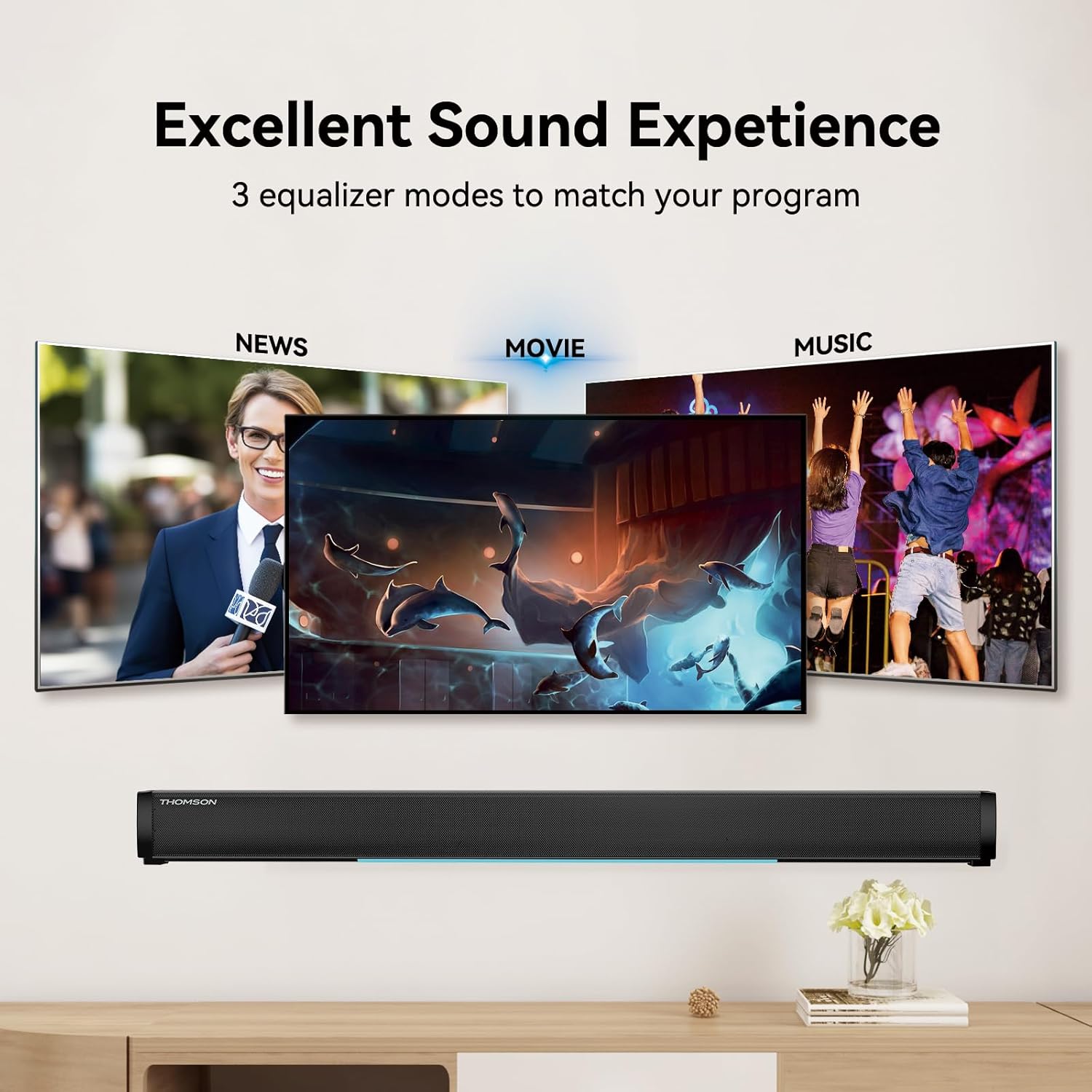
Figure 6: EQ Modes
This image illustrates the three primary equalizer modes (News, Movie, Music) available on the sound bar, demonstrating how each mode is tailored for different audio experiences.
5. Спарванне Bluetooth
- Уключыце саўндбар і абярыце рэжым Bluetooth з дапамогай РЭЖЫМ button on the remote. The LED display will show "BT" and flash, indicating pairing mode.
- На вашай прыладзе (смартфоне, планшэце і г.д.) уключыце Bluetooth і знайдзіце даступныя прылады.
- Select "THOMSON B206" from the list. Once connected, the sound bar's LED display will stop flashing.
6. Wireless Microphones
The sound bar comes with two wireless microphones for karaoke or vocal use.
- Ensure the microphones have fresh batteries (AAA, not included).
- Turn on the microphones. They should automatically pair with the sound bar.
- Выкарыстоўвайце МІКРАФОН+ і МІКРАФОН- buttons on the remote to adjust microphone volume.
- Выкарыстоўвайце РЭХА+ і РЭХА- buttons to adjust the echo effect.

Figure 7: Karaoke Functionality
This image depicts two individuals enjoying a karaoke session, utilizing the THOMSON sound bar and its wireless microphones connected to a large display, showcasing the product's entertainment capabilities.
Ліквідацыю непаладак
| праблема | Магчымая прычына | Рашэнне |
|---|---|---|
| Няма ўлады | Сеткавы кабель не падключаны; разетка неактыўная. | Пераканайцеся, што кабель харчавання надзейна падключаны. Праверце, ці працуе разетка. |
| Няма гуку | Няправільны выбар крыніцы ўваходнага сігналу; занадта нізкі ўзровень гучнасці; кабелі падключаны няправільна. | Select the correct input source (HDMI, Optical, AUX, etc.). Increase volume. Check all audio cable connections. |
| Спалучэнне Bluetooth не атрымалася | Sound bar not in pairing mode; Device too far; Bluetooth disabled on device. | Ensure sound bar is in Bluetooth mode and flashing. Move device closer. Enable Bluetooth on your device. |
| Мікрафоны не працуюць | Microphone batteries low/dead; Microphones not turned on. | Replace microphone batteries. Ensure microphones are switched on. |
| Volume jumps too much with one press | This can be a characteristic of the sound bar's volume control sensitivity. | Adjust volume carefully. Consider using the TV's volume control if connected via HDMI ARC, as it may offer finer adjustments. |
Тэхнічныя характарыстыкі
| Асаблівасць | Дэталь |
|---|---|
| Назва мадэлі | THOMSON Sound Bar B206 |
| Тып дынаміка | Саундбар |
| Максімальная выхадная магутнасць дынаміка | 200 ват |
| Канфігурацыя канала аб'ёмнага гуку | 2.0 |
| Тэхналогія падлучэння | Auxiliary, Bluetooth, Coaxial, HDMI ARC, Optical, USB |
| Тэхналогія бесправадной сувязі | Bluetooth |
| Метад кантролю | Дыстанцыйнае |
| Памеры прадукту | 37" Г x 3.35" Ш x 2.9" У |
| Вага прадмета | 8.63 фунта |
| Матэрыял | Пластыкавыя |
| Крыніца харчавання | Правадная электрычная |
| Асаблівасць | Бесправадныя мікрафоны |
Тэхнічнае абслугоўванне
- Уборка: Выкарыстоўвайце мяккую сухую тканіну для чысткі паверхні гукавой панэлі. Не выкарыстоўвайце вадкія ачышчальнікі або абразіўныя матэрыялы.
- захоўванне: Калі саўндбар не выкарыстоўваецца працяглы час, захоўвайце яго ў прахалодным, сухім месцы, удалечыні ад прамых сонечных прамянёў і экстрэмальных тэмператур.
- Сыход за мікрафонам: Remove batteries from the wireless microphones if they will not be used for a long time to prevent leakage.
Гарантыя і падтрымка
THOMSON products are designed and manufactured to the highest quality standards. For warranty information and customer support, please refer to the warranty card included in your package or visit the official THOMSON webсайт. Захоўвайце чэк аб куплі як пацверджанне пакупкі.
Інфармацыя аб адпаведнасці
This device complies with relevant regulations for electronic equipment. Any changes or modifications not expressly approved by the manufacturer could void the user's authority to operate the equipment.
Ask a question about this manual
Ask about setup, troubleshooting, compatibility, parts, safety, or missing instructions. Manuals+ will review the question and use this page’s manual context to help answer it.