
1. Уводзіны
This manual provides detailed instructions for the installation, operation, and maintenance of your VIMIN 6-Port 2.5G PoE Switch (Model VM-S250402P). This unmanaged switch is designed to enhance network performance with its high-speed ports and Power over Ethernet capabilities. Please read this manual thoroughly before using the device.

Figure 1: VIMIN 6-Port 2.5G PoE Switch (Model VM-S250402P)
2. Змесціва ўпакоўкі
Verify that all items are present and in good condition. If any item is missing or damaged, please contact your vendor.
- 1x VIMIN 6-Port 2.5G PoE Switch (Model VM-S250402P)
- 1x кабель харчавання
- 4x Ethernet Cables (Cat 6 or above, approximately 1 meter each)
- 1x Кіраўніцтва карыстальніка
3. Прадукт скончыўсяview
3.1 Пярэдняя панэль
The front panel features the RJ45 ports, SFP ports, LED indicators, and the VLAN switch.

Figure 2: Front Panel Layout and Typical Connection Scenario
3.2 Задняя панэль
The rear panel typically contains the power input and ventilation openings.

Figure 3: Rear Panel with Ventilation and Power Input
3.3 Святлодыёдныя індыкатары
The LED indicators provide real-time status of the switch's operation.
| Індыкатар | Статус | Апісанне |
|---|---|---|
| 4x 2.5Gbps Ports (Yellow) | On | 2.5G Link established |
| 4x 2.5Gbps Ports (Green) | On | Спасылка паспяховая |
| 2x 10G SFP (Yellow) | On | 10G Link established |
| 2x 10G SFP (Green) | On | Спасылка паспяховая |
| PoE Link (Red) | On | PoE харчаванне |
| PoE Link (Red) | Выкл | PoE выключана |
| PWR (магутнасць) | On | Device Powered On |
| PWR (магутнасць) | Выкл | Device Powered Off |

Figure 4: LED Indicator Guide
4. Настройка і ўстаноўка
The VIMIN 6-Port 2.5G PoE Switch is designed for plug-and-play operation, requiring no complex configuration.
4.1 Асноўныя этапы падключэння
- Падключыце харчаванне: Plug the power cable into the switch's power input and then into a power outlet.
- Падключыце прылады: Connect your network devices (e.g., NAS, APs, computers, routers) to the RJ45 ports using Ethernet cables. For 10Gbps connectivity, insert compatible SFP modules into the SFP ports and connect fiber optic cables.
- Праверце злучэнне: Check the LED indicators to ensure proper link and activity.

Figure 5: Plug and Play Setup Guide
4.2 SFP Module Installation
The switch supports adaptive 1G/2.5G/10G optical fiber modules (modules are NOT included and must be purchased separately).
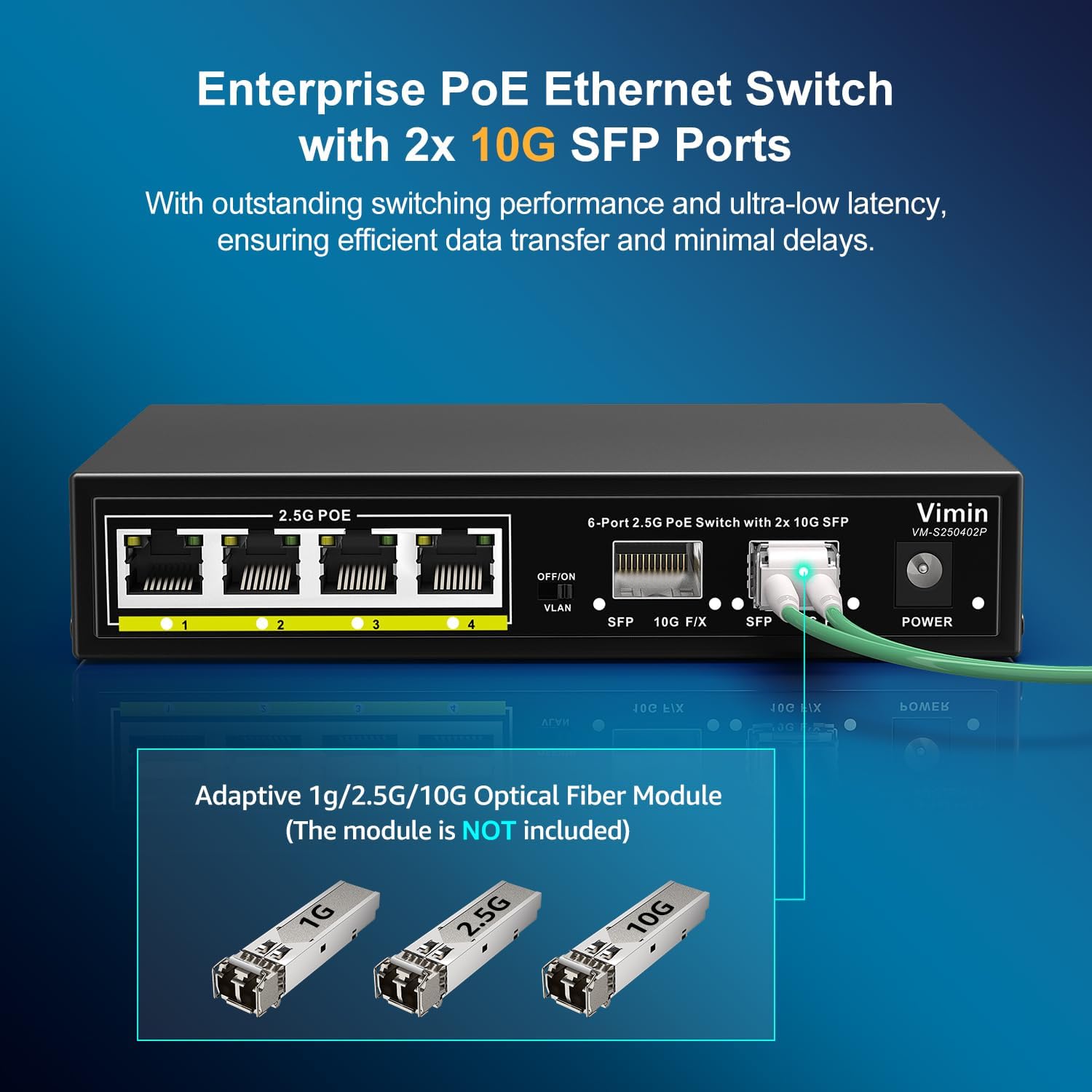
Figure 6: SFP Module Insertion
5. Аперацыя
This unmanaged switch operates automatically once connected. It supports IEEE 802.3af/at standards, providing up to 30W of power per port with a total PoE budget of 65W. It does not support passive PoE.
5.1 One-Key VLAN Function
The switch features a One-Key VLAN mode. When activated, ports 1-4 are isolated from each other but maintain communication with the SFP ports. This enhances network security and optimizes bandwidth utilization by preventing direct communication between connected devices on ports 1-4.

Figure 7: One-Key VLAN Operation
6. Тэхнічнае абслугоўванне
To ensure optimal performance and longevity of your VIMIN PoE switch, follow these maintenance guidelines:
- Асяроддзе: Operate the switch within the recommended temperature range of 14°F to 131°F (-10°C to 55°C).
- Уборка: Трымайце прыладу чыстай і без пылу. Выкарыстоўвайце для чысткі мяккую сухую тканіну.
- Вентыляцыя: Ensure proper airflow around the device. The fanless design relies on natural convection for heat dissipation.
- Магутнасць: Выкарыстоўвайце толькі адаптар сілкавання, які ўваходзіць у камплект.

Figure 8: Durable and Stable Design Features
7. Выпраўленне непаладак
If you encounter issues with your VIMIN PoE switch, refer to the following common problems and solutions:
- Няма харчавання: Ensure the power cable is securely connected to both the switch and the power outlet. Verify the power outlet is functional.
- Няма індыкатара сувязі: Check if the Ethernet cable is properly connected to both the switch port and the device. Ensure the connected device is powered on and functioning correctly. Try a different cable or port.
- Прылада PoE не ўключаецца: Confirm that the connected device is PoE compatible (IEEE 802.3af/at). Check the PoE power budget (65W total, 30W per port) to ensure it's not exceeded. Ensure the PoE Link LED is on.
- Павольная хуткасць сеткі: Verify that all connected devices and cables support 2.5G or 10G speeds. Ensure you are using Cat6 or higher Ethernet cables for optimal performance.
- VLAN Isolation Issue: If devices on ports 1-4 are communicating directly, ensure the One-Key VLAN switch is in the 'ON' position.
If the problem persists, please contact VIMIN technical support.
8. Тэхнічныя характарыстыкі
| Асаблівасць | Апісанне |
|---|---|
| Нумар мадэлі | VM-S250402P |
| Парты | 4x 2.5G PoE+ RJ45 Ports, 2x 10G SFP Ports |
| Камутацыйны патэнцыял | 60 Гбіт/с |
| Стандарт PoE | IEEE 802.3af/at (Does NOT support passive PoE) |
| Агульны бюджэт харчавання PoE | 65 Вт |
| Power per Port | Да 30 Вт |
| Функцыя VLAN | One-Key VLAN (Isolates ports 1-4, communicates with SFP ports) |
| Абарона ад маланак | 6KV |
| Астуджэнне | Безвентылятарны дызайн |
| Матэрыял корпуса | Металічны корпус |
| Працоўная тэмпература | Ад 14°F да 131°F (ад -10°C да 55°C) |
| Памеры прадукту | 6.3 х 4.33 х 1.3 цалі (16 х 11 х 3.3 см) |
| Вага прадмета | 1.89 фунта (0.86 кг) |
| UPC | 790885573682 |
9. Гарантыя і падтрымка
VIMIN provides a one-year warranty for this product, ensuring reliability, quality, and performance. We also offer lifetime technical support to assist you with any questions or issues.
For technical assistance or warranty claims, please contact VIMIN support:
- электронная пошта: support@vimintech.com
10. Відэа пра прадукт
Паглядзіце гэта відэа для візуальнага ўяўленняview of the VIMIN 6-Port 2.5G PoE Switch and its features.
Відэа: Скончанаview of the VIMIN 6-Port 2.5G PoE Switch, highlighting its 65W power budget and 60Gbps switching capacity.