
1. Уводзіны
This manual provides detailed instructions for the setup, operation, and maintenance of your Creative Sound Blaster Katana SE Multi-Channel Gaming Soundbar. Designed for an immersive audio experience, this soundbar features 180W peak power, a bi-amplified 4-driver design, Super X-Fi technology, and customizable RGB lighting. Please read this manual thoroughly before using your device to ensure optimal performance and safety.

Figure 1: Creative Sound Blaster Katana SE Gaming Soundbar
2. Важная інфармацыя па бяспецы
- Прачытайце гэтыя інструкцыі.
- Захоўвайце гэтыя інструкцыі.
- Звярніце ўвагу на ўсе папярэджанні.
- Выконвайце ўсе інструкцыі.
- Не выкарыстоўвайце гэты прыбор паблізу вады.
- Чысціце толькі сухой анучай.
- Не блакуйце вентыляцыйныя адтуліны. Усталюйце ў адпаведнасці з інструкцыямі вытворцы.
- Не ўстанаўлівайце побач з крыніцамі цяпла, такімі як радыятары, абагравальнікі, пліты або іншыя прылады (у тым ліку ampLifiers), якія вырабляюць цяпло.
- Абараняйце сеткавы шнур ад наступання або заціскання, асабліва ў месцах вілкі, разеткі і месца выхаду з прылады.
- Выкарыстоўвайце толькі насадкі/аксэсуары, указаныя вытворцам.
- Адключайце гэты прыбор ад сеткі падчас навальніцы або калі ён не выкарыстоўваецца на працягу доўгага часу.
3. Змесціва ўпакоўкі
Праверце, ці ёсць усе прадметы ў вашай упакоўцы:
- Creative Sound Blaster Katana SE Soundbar
- Subwoofer (wired)
- Пульт дыстанцыйнага кіравання
- Адаптар сілкавання
- USB-кабель C
- Аптычны кабель
4. Прадукт скончыўсяview
The Sound Blaster Katana SE is an all-in-one soundbar designed for powerful and immersive audio. It features a sleek design with integrated controls and a front-facing display.
4.1. Soundbar Components
- Элементы кіравання верхняй панэлі: Power, Volume Up/Down, Source, Mode, SXFI.
- Пярэдні дысплей: Shows current source (USB, AUX, OPTICAL, BT, TV), volume level, and selected sound mode.
- Front Headphone Jack: For connecting headphones directly.
- Убудаваны мікрафон: Для галасавой сувязі.
- RGB Lighting Strip: Customizable lighting effects located at the bottom of the soundbar.
- Драйверы: Бі-amplified 4-driver design for clear and precise audio.

Малюнак 2: Спераду view of the Sound Blaster Katana SE with RGB lighting
4.2. Злучэнне задняй панэлі
The rear panel provides various ports for connecting to your devices:
- HDMI Out (ARC): Для падлучэння да тэлевізара з падтрымкай Audio Return Channel.
- SXFI Out: Dedicated port for Super X-Fi enabled headphones.
- Аўдыёўваход USB: For digital audio connection to PC/Mac.
- Дапаможны ўваход: 3.5mm analog audio input.
- Аптычны ўваход: Лічбавы аптычны аўдыё ўваход.
- Сабвуфер: For connecting the wired subwoofer.
- Спажываная магутнасць: Для адаптара сілкавання.

Figure 3: Rear panel with HDMI ARC, SXFI Out, USB Audio In, Aux In, Optical In, Sub Out, and Power Input.
4.3. Сабвуфер
The included wired subwoofer enhances bass response for a more dynamic audio experience.

Малюнак 4: Унутраны view showing the soundbar's bi-amplified drivers and the subwoofer's design.
5. Настройка
Follow these steps to set up your Sound Blaster Katana SE:
- Размяшчэнне: Place the soundbar on a stable surface below your TV or monitor. Position the subwoofer on the floor near the soundbar for optimal bass.
- Падключыць сабвуфер: Connect the wired subwoofer cable to the 'Sub Out' port on the soundbar's rear panel.
- Падключыце харчаванне: Connect the power adapter to the soundbar's power input and then plug it into a wall outlet.
- Падключэнне крыніцы гуку: Choose your preferred audio connection method (HDMI ARC, Optical, USB, Aux, or Bluetooth) and connect the appropriate cable.
Video 1: Official product video demonstrating the Sound Blaster Katana SE's features and connectivity options.
6. Параметры падключэння
The Sound Blaster Katana SE offers a wide range of connectivity to suit various devices:
- HDMI Out (ARC): Connect to your TV's HDMI ARC port for high-quality audio and control.
- Аўдыёўваход USB: Ideal for connecting to PCs, Macs, or gaming consoles that support USB audio.
- Дапаможны ўваход: Use a 3.5mm audio cable to connect to devices with an analog audio output.
- Аптычны ўваход: For digital audio connection from TVs, game consoles, or other media players.
- Bluetooth 5.0: Pair wirelessly with your mobile devices, tablets, or computers for convenient audio streaming.
- SXFI Out: Connect Super X-Fi certified headphones for a personalized holographic audio experience.

Figure 5: Soundbar showcasing versatile connectivity with gaming consoles and mobile devices.
7. Інструкцыя па эксплуатацыі
7.1. Уключэнне/выключэнне харчавання
Press the Power button on the soundbar's top panel or the remote control to turn the device on or off.
7.2. Рэгулятар гучнасці
Use the Volume Up (+) and Volume Down (-) buttons on the soundbar or remote to adjust the audio level. The current volume will be displayed on the front panel.
7.3. Выбар крыніцы
Press the 'Source' button on the soundbar or remote to cycle through available input sources (HDMI ARC, USB, Aux, Optical, Bluetooth).
7.4. Гукавыя рэжымы
The soundbar features optimized sound modes for different content types. Press the 'Mode' button on the soundbar or remote to switch between:
- Музыка: Enhanced for musical playback.
- фільмы: Аптымізавана для кінематаграфічнага гуку.
- Гульні: Tailored for immersive gaming soundscapes.
- Effects Off: Neutral audio profile.
7.5. Выкарыстанне пульта дыстанцыйнага кіравання
The included remote control provides full functionality for the soundbar, including power, volume, source, mode, SXFI, RGB lighting, and custom buttons.
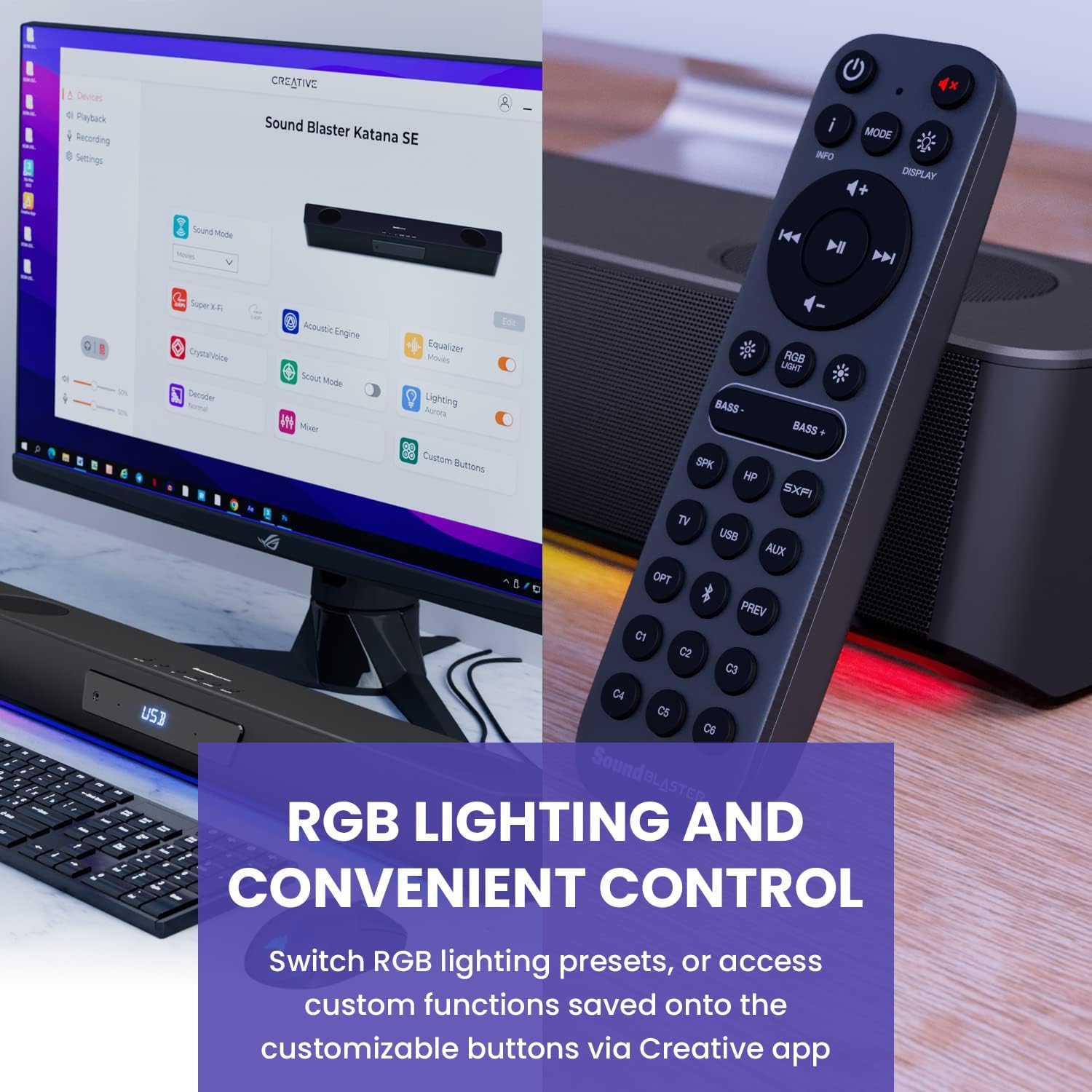
Figure 6: Remote control for the Sound Blaster Katana SE.
7.6. Creative App Customization
For advanced customization, download the Creative app on your PC or Mac. The app allows you to:
- Tune Audio Performance: Adjust EQ settings and activate Sound Blaster processing technologies.
- Настройка RGB-асвятлення: Select from various RGB presets or create your own custom lighting effects.
- Map Custom Functions: Assign specific commands to the six customizable buttons on the remote control.

Figure 7: Creative app interface showing sound mode, Super X-Fi, Acoustic Engine, Equalizer, CrystalVoice, Scout Mode, Lighting, Decoder, Mixer, and Custom Buttons.
8. Super X-Fi Technology
Super X-Fi technology personalizes your headphone audio experience for optimized and realistic listening. It recreates the soundstage of a multi-speaker system in your headphones.
- SXFI Battle Mode: Атрымайце канкурэнтныя перавагіtage in FPS games by accurately pinpointing enemy locations through enhanced audio cues.

Figure 8: Super X-Fi and SXFI Battle Mode for enhanced gaming audio.
9. Убудаваны мікрафон
The Sound Blaster Katana SE includes a built-in beamforming microphone, allowing you to participate in calls or in-game voice chat directly through the soundbar.
10. RGB-падсветка
The integrated RGB lighting strip can be customized to match your setup or mood. Use the remote control to cycle through presets or the Creative app for advanced color and effect adjustments.
11. Тэхнічнае абслугоўванне
To ensure the longevity and performance of your Sound Blaster Katana SE:
- Трымайце прыладу ў чысціні, праціраючы яе мяккай сухой тканінай.
- Avoid using liquid cleaners or aerosols.
- Пераканайцеся, што вентыляцыйныя адтуліны не закрыты.
- Не падвяргайце прыладу ўздзеянню экстрэмальных тэмператур або вільготнасці.
12. Выпраўленне непаладак
Калі ў вас узніклі праблемы з саўндбарам, звярніцеся да наступных распаўсюджаных рашэнняў:
- Няма гуку: Check all cable connections (power, audio source, subwoofer). Ensure the correct input source is selected on the soundbar. Verify the volume is not muted or too low.
- Скажоны гук: Try reducing the volume. Check audio cable integrity. Ensure the audio source is providing a clean signal.
- Праблемы з падключэннем Bluetooth: Ensure the soundbar is in Bluetooth pairing mode. Delete the soundbar from your device's Bluetooth list and re-pair. Move closer to the soundbar to reduce interference.
- Пульт дыстанцыйнага кіравання не працуе: Check battery levels and replace if necessary. Ensure there are no obstructions between the remote and the soundbar.
- RGB-ліхтары не працуюць: Check settings in the Creative app. Ensure RGB lighting is enabled via the remote or app.
13. Тэхнічныя характарыстыкі
| Асаблівасць | Спецыфікацыя |
|---|---|
| Назва мадэлі | 51MF8415AA000 27585486 |
| Тып дынаміка | Саундбар |
| Тып мацавання | Настольнае мацаванне |
| Асаблівасць | Bass Boost, Built In Microphone, Radio, Stereo Pairing, USB Port |
| Рэкамендуемае выкарыстанне для прадукту | For Gaming Consoles, For Computers |
| Сумяшчальныя прылады | Desktop, Laptop, MP3 Player, Projector, Smartphone, Tablet, Television |
| Колькасць адзінак | 1.0 Граф |
| Канфігурацыя канала аб'ёмнага гуку | 5.1 |
| Колер | 180W Peak Power with Bluetooth 5.0 |
| Уключаныя кампаненты | Дыстанцыйнае |
| Памеры прадукту | 25.6" Г x 4.3" Ш x 3.1" У |
| Вага прадмета | 5.9 фунта |
| Воданепранікальны | ХЛУСНЯ |
| Тып гарантыі | Абмежаваны |
| Колькасць элементаў | 1 |
| Метад кантролю | Дыстанцыйнае |
| Тэхналогія бесправадной сувязі | Bluetooth |
| Памер дынаміка | 1 цалі |
| Крыніца харчавання | Правадная электрычная |
| Дыяметр твітэра | 1 цалі |
| Узровень воданепранікальнасці | Не воданепранікальны |
| Тып пакета кліента | FFP |
| Тып аўдыё драйвера | Дынамічны драйвер |
| Тэхналогія падлучэння сабвуфера | Бесправадная сувязь |
| Колькасць узроўняў магутнасці | 1 |
| Канкрэтнае выкарыстанне прадукту | Gaming Consoles, Computers |
| UPC | 054651195639 |
| Вытворца | Творчыя лабараторыі |
| Форма | rectangular prism |
| Вага прадмета | 5.9 фунта |
| ASIN | B0C5DFMB93 |
| Нумар мадэлі тавару | MF8415 |
| Дата першай даступнасці | 16 мая 2023 г |
| Марка | Творчы |
| Максімальная выхадная магутнасць дынаміка | 100 ват |
| АЧХ | 20000 Гц |
| Тэхналогія падлучэння | Bluetooth |
| Рэжым выхаду гуку | Аб'ёмнае гучанне, стэрэа |
14. Гарантыя і падтрымка
Your Creative Sound Blaster Katana SE comes with a Limited Warranty. For detailed warranty information, product registration, technical support, and customer service, please visit the official Creative webсайт або звярніцеся да гарантыйнага талона, які ўваходзіць у камплект пастаўкі.