
Уводзіны
Welcome to the user manual for your Qubo NEO2NW mobile phone. This device is specifically designed for seniors, featuring large buttons, a clear display, and essential functions for easy communication. Please read this manual carefully to understand how to use your phone safely and effectively.
Прадукт скончаныview
The Qubo NEO2NW is a user-friendly flip phone equipped with features tailored for convenience and safety.

выява: The Qubo NEO2NW flip phone in its open position, displaying its large, easy-to-read keypad and clear screen. A charging dock is visible in the background, indicating its charging method.

выява: A black flip phone displaying the digital time '22:10' on its screen. This image provides multiple views of the phone, highlighting its large keypad and clear display.
Асноўныя характарыстыкі:
- Large buttons for easy dialing and navigation.
- Clear 2.4-inch display with adjustable font size.
- SOS emergency button for quick contact with pre-set numbers.
- Loud ringtone and speaker for improved audibility.
- Charging dock for convenient and stable charging.
- Basic functions: Call, SMS, Phonebook, Alarm Clock, Camera, FM Radio, Torch.
Настройка
1. Распакоўка і кампаненты
Carefully unpack your Qubo NEO2NW phone and ensure all components are present.

выява: Надview of the box contents, including the Qubo NEO2NW phone, its charging dock, a USB cable, a power adapter, the battery, and printed user manuals.
2. Усталёўка SIM-карты і акумулятара
- Зніміце заднюю крышку тэлефона.
- Insert your Micro SIM card(s) into the designated slot(s) (supports Dual SIM).
- If desired, insert a MicroSD memory card (up to 32GB) into the memory card slot.
- Insert the 800mAh Lithium-ion battery, ensuring the contacts align.
- Усталюйце заднюю крышку.
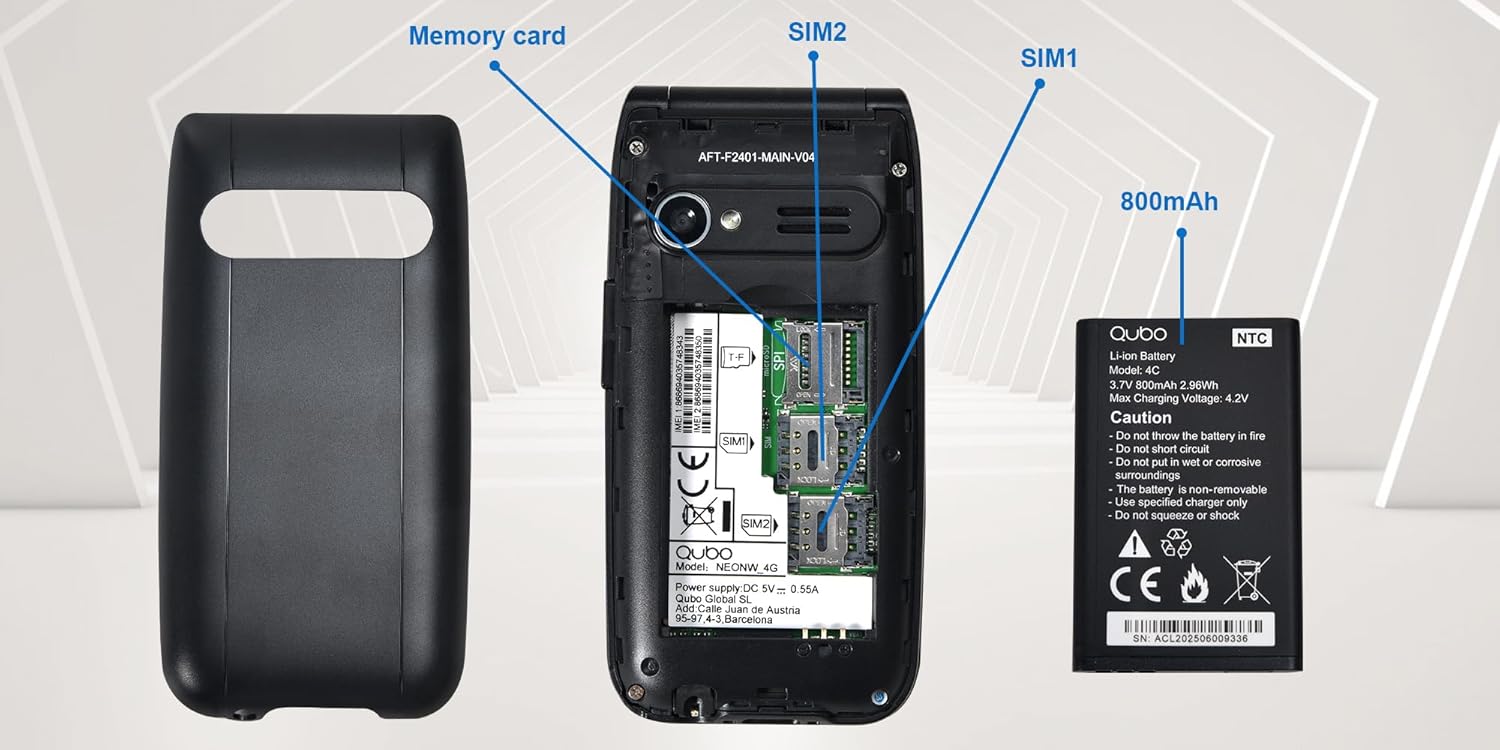
выява: Падрабязны view of the phone's interior, highlighting the slots for two Micro SIM cards (SIM1, SIM2) and a memory card. The 800mAh battery is shown separately.
3. Зарадка тэлефона
Before first use, fully charge the phone.
- Connect the USB Type-C cable to the phone and the power adapter. Plug the adapter into a wall outlet.
- Alternatively, place the phone in the charging dock. Ensure it is seated correctly and the charging indicator appears on the screen.
- Поўная зарадка займае прыкладна 2.3 гадзіны.

выява: This image shows the Type-C charging interface on the Qubo NEO2NW phone, along with an illustration of its battery compartment and icons indicating low power consumption and power-saving technology.
Інструкцыя па эксплуатацыі
1. Уключэнне/выключэнне харчавання
- Каб уключыць: націсніце і ўтрымлівайце Уключэнне/выключэнне выкліку кнопку (чырвоную кнопку), пакуль не загарыцца экран.
- Каб выключыць: націсніце і ўтрымлівайце Уключэнне/выключэнне выкліку button until the power off options appear, then select 'Power off'.
2. Здзяйсненне і прыём званкоў
- Каб набраць: Увядзіце нумар тэлефона з дапамогай клавіятуры і націсніце клавішу Тэлефануйце кнопка (зялёная кнопка).
- З тэлефоннай кнігі: Navigate to the Phonebook, select a contact, and press the Тэлефануйце кнопка.
- Каб адказаць: Калі тэлефон звоніць, націсніце кнопку Тэлефануйце кнопка.
- To end call: Націсніце Уключэнне/выключэнне выкліку кнопка.
3. Адпраўка і атрыманне SMS
- Перайдзіце да паведамленне меню.
- Select 'New Message' to compose.
- Увядзіце нумар атрымальніка або выберыце з кантактаў.
- Набярыце паведамленне з дапамогай клавіятуры.
- Націсніце «Адправіць».
4. SOS Emergency Function
The SOS button allows you to quickly contact pre-set emergency numbers.
- Setting SOS Numbers: Перайсці да Settings > SOS Settings to add up to 5 emergency contacts.
- Актывацыя SOS: У надзвычайнай сітуацыі націсніце і ўтрымлівайце SOS button on the back of the phone for a few seconds.
- The phone will automatically call the pre-set numbers in sequence until one answers. It will also send an emergency SMS to these contacts.

выява: This image demonstrates the SOS emergency call feature. It shows the Qubo NEO2NW phone with a highlighted SOS button and a visual representation of how it connects to up to 5 pre-programmed family numbers in an emergency.
5. Display and Font Settings
The phone features a 2.4-inch screen with options for large fonts for better readability.

выява: The Qubo NEO2NW phone's screen displaying large, clear fonts and the option to switch font sizes. The image also points out the loud ringtone capability and the large, tactile buttons on the keypad.
Тэхнічнае абслугоўванне
- Трымайце тэлефон сухім. Вільгаць можа пашкодзіць электронныя схемы.
- Пазбягайце экстрэмальных тэмператур. Высокія тэмпературы могуць скараціць тэрмін службы электронных прылад і пашкодзіць акумулятары.
- Не выкарыстоўвайце агрэсіўныя хімікаты, ачышчальныя растваральнікі або моцныя мыйныя сродкі для чысткі тэлефона. Працірайце яго мяккай,amp тканіна.
- Акуратна звяртайцеся з тэлефонам. Не кідайце, не стукайце і не трэсці яго.
- Use only Qubo-approved batteries, chargers, and accessories.
Ліквідацыю непаладак
| праблема | Магчымая прычына | Рашэнне |
|---|---|---|
| Тэлефон не ўключаецца | Батарэя разраджана або ўсталявана няправільна. | Зараджайце акумулятар не менш за 30 хвілін. Пераканайцеся, што акумулятар правільна ўстаўлены. |
| Немагчыма рабіць або прымаць званкі | No SIM card, SIM card not active, or out of network coverage. | Ensure SIM card is inserted and active. Check network signal. Contact your service provider. |
| SOS button not working | SOS numbers not set or incorrect. | Verify that emergency numbers are correctly configured in SOS settings. Ensure sufficient network signal. |
| Дрэнная якасць гуку | Low volume, poor network, or speaker/microphone obstruction. | Adjust call volume. Move to an area with better network coverage. Ensure speaker and microphone are clear. |
Тэхнічныя характарыстыкі
| Асаблівасць | Дэталь |
|---|---|
| Назва мадэлі | Qubo Flip Phone Charging Dock |
| Памер дысплея | 2.4 цалі |
| Дазвол дысплея | 240 х 320 пікселяў |
| Аперацыйная сістэма | KaiOS |
| АЗП | 64 Мб |
| Хуткасць працэсара | 260 МГц |
| Сотавая тэхналогія | 2G, 3G (GSM, UMTS) |
| Слоты для SIM-карт | Dual SIM (Micro SIM) |
| Max Flash Memory Support | 32 GB (MicroSD) |
| Задняя камера | 0.3 МП |
| Ёмістасць батарэі | 800 мАг (літый-іённы) |
| Час зарадкі | Прыбл. 2.3 гадзіны |
| Час размовы | Прыбл. 4 гадзіны |
| Час чакання | Прыбл. 8 дзён |
| Сувязь | USB тыпу C, раз'ём для навушнікаў 3.5 мм |
| Памеры | 10.5 х 5.3 х 1.7 см |
| Асаблівасці | SOS Button, FM Radio, Torch, GPS |
Гарантыя і падтрымка
For warranty information, please refer to the warranty card included in your product packaging. For technical support or further assistance, please contact Qubo customer service.
- вытворца: Qubo
- ASIN: B0C5GXR2VR
- Нумар мадэлі: 6e39af81-1411-4b00-b5ae-d8778c6ab86c
- Кантакты: Refer to the official Qubo website or documentation for up-to-date contact information.