
1. Уводзіны
This manual provides instructions for the proper use and care of your Docooler Portable USB Cassette Player. This device allows you to play audio cassettes and convert their content into digital MP3 files via a USB connection to a computer. Please read this manual thoroughly before operating the device to ensure optimal performance and longevity.
2. Прадукт скончыўсяview
The Docooler Portable USB Cassette Player is a compact, handheld device designed for playing and digitizing audio cassettes. It features a transparent casing, allowing visibility of the internal mechanism.
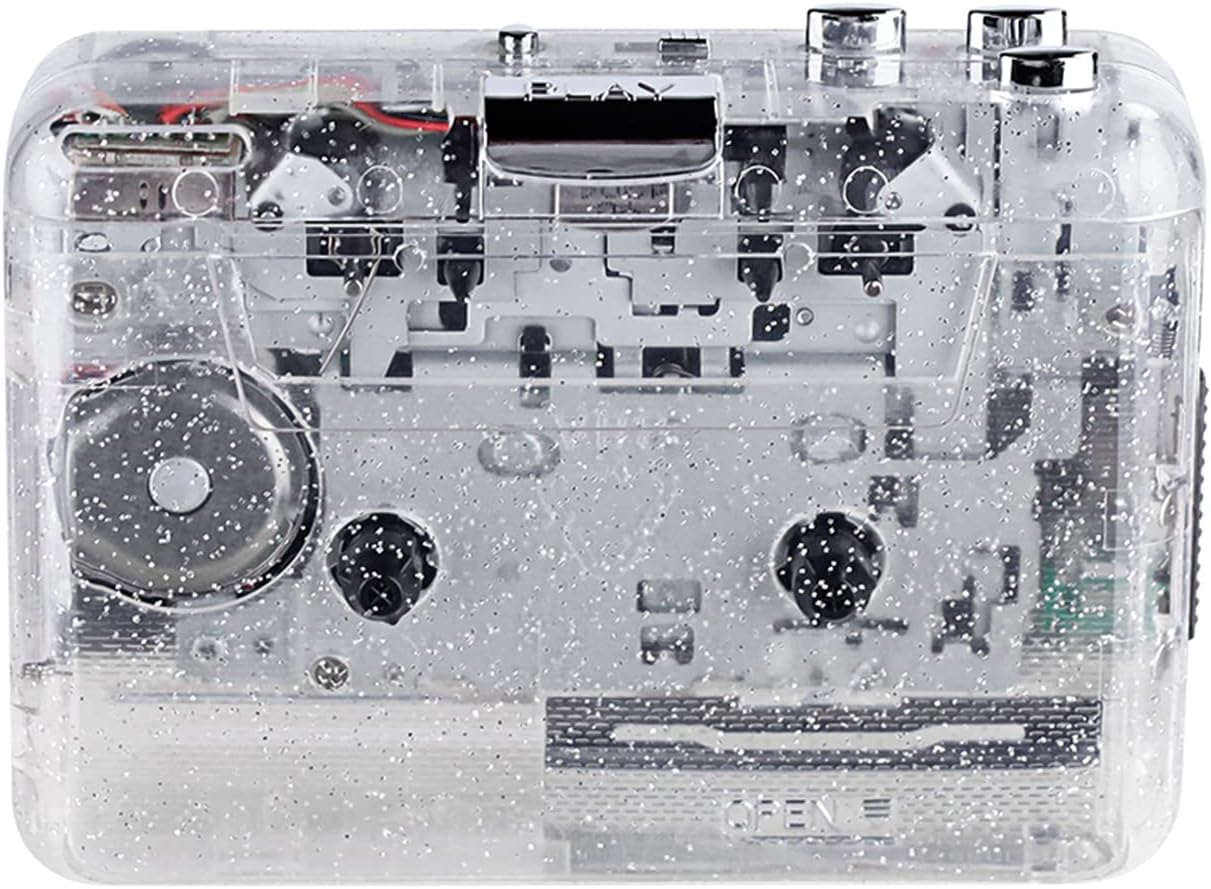
Малюнак 1: Спераду view of the Docooler Portable USB Cassette Player, showcasinг яго празрысты дызайн.

Figure 2: Various angles of the cassette player, including top, side, and open views.
Змест пакета:
- Docooler Portable USB Cassette Player
- Кабель USB
- Кіраўніцтва карыстальніка (гэты дакумент)
- Headphones (may vary by package)
3. Настройка
3.1 Крыніца харчавання
The cassette player can be powered by either batteries or a USB connection.
Ўстаноўка батарэі:
- Знайдзіце на прыладзе батарэйны адсек.
- Адкрыйце крышку батарэйнага адсека.
- Устаўце 2 батарэйкі тыпу АА (не ўключаны ў камплект), сачыце за правільнай палярнасцю (+/-).
- Надзейна зачыніце крышку батарэйнага адсека.
USB Харчаванне:
Connect the provided USB cable to the player's USB port and the other end to a powered USB port on your computer or a USB wall adapter. The device will draw power from the USB connection.
4. Інструкцыя па эксплуатацыі
4.1 Playing a Cassette Tape
- Open the cassette compartment cover.
- Insert an audio cassette tape with the open edge facing upwards.
- Close the cassette compartment cover firmly.
- Падключыце навушнікі або знешнія дынамікі да аўдыёвыхаду 3.5 мм.
- Націсніце ГУЛЬНЯ кнопку, каб пачаць прайграванне.
- Выкарыстоўвайце СТОП кнопку, каб спыніць прайграванне.
- Выкарыстоўвайце FF (хуткая перамотка наперад) і REW (перамотка назад) кнопкі для навігацыі па стужцы.
- Адрэгулюйце гучнасць з дапамогай рэгулятара гучнасці.
- The "DIR" button allows you to quickly flip the tape direction. The "play mode" button can be used to reverse playback once or an unlimited number of times.

Figure 3: The cassette player in use, demonstrating tape insertion and playback setup.

Figure 4: Users listening to audio through headphones connected to the cassette player.
4.2 Converting Tapes to MP3 Files
The Docooler Portable USB Cassette Player can convert your analog cassette audio into digital MP3 files. This process requires a computer and compatible audio recording software (not included).
- Ensure the cassette player is powered (via batteries or USB).
- Connect the cassette player to your computer using the provided USB cable.
- Install and open your preferred audio recording software on your computer. Software such as Audacity (free and open-source) is commonly used for this purpose.
- Configure your recording software to recognize the cassette player as an audio input device.
- Insert the cassette tape you wish to convert into the player.
- Start recording in your software, then press the ГУЛЬНЯ button on the cassette player.
- Monitor the recording process. Once the tape has finished playing, stop the recording in your software.
- Save the recorded audio as an MP3 file на вашым кампутары.

Figure 5: Illustration of the process to convert cassette audio to MP3 files using the player and a computer.
5. Тэхнічнае абслугоўванне
5.1 Ачыстка прылады
- Працярыце знешнія паверхні прайгравальніка мяккай сухой тканінай.
- Do not use liquid cleaners or abrasive materials, as they may damage the surface.
- Periodically clean the tape heads and pinch rollers using a cotton swab lightly dampпрацякаюць ізапрапілавым спіртам, каб забяспечыць аптымальную якасць гуку і прадухіліць пашкоджанне стужкі.
5.2 Захоўванне
- Калі прылада не выкарыстоўваецца працяглы час, выміце батарэйкі, каб прадухіліць уцечку.
- Захоўвайце прайгравальнік у прахалодным, сухім месцы, удалечыні ад прамых сонечных прамянёў і экстрэмальных тэмператур.
6. Выпраўленне непаладак
| праблема | Магчымая прычына | Рашэнне |
|---|---|---|
| Няма ўлады | Dead batteries; USB cable not connected properly. | Replace batteries; ensure USB cable is securely connected. |
| Няма гуку | Headphones/speakers not connected; volume too low; dirty tape heads. | Connect audio output device; increase volume; clean tape heads. |
| Poor sound quality (hissing, muffled) | Dirty tape heads; worn-out tape; low battery. | Clean tape heads; try a different tape; replace batteries. |
| Tape not playing or moving | Tape jammed; mechanism issue; low battery. | Check tape for damage; replace batteries. |
| Cannot convert to MP3 | USB connection issue; software not configured correctly; no recording software. | Ensure USB is connected; check software settings; install compatible recording software. |
7. Тэхнічныя характарыстыкі
- мадэль: B0C69FDZF6
- крыніца харчавання: 2 x AA Batteries or USB 5V DC
- інтэрфейс: USB 2.0
- Аўдыявыхад: 3.5 мм стэрэараз'ём
- Памеры: 7.2 х 5.91 х 1.54 цалі (прыблізна)
- Вага: 9.6 унцыі (прыблізна)
- вытворца: Docooler
8. Інфармацыя па бяспецы
- Не падвяргайце прыладу ўздзеянню вады або празмернай вільгаці.
- Не кідайце прыладу і не падвяргайце яе моцным ударам.
- Не спрабуйце разбіраць або рамантаваць прыладу самастойна. Звярніцеся да кваліфікаванага абслугоўваючага персаналу.
- Захоўваць у месцах, недаступных дзецям.
- Утылізуйце батарэі ў адпаведнасці з мясцовымі правіламі.
9. Гарантыя і падтрымка
For warranty information or technical support, please refer to the documentation included with your purchase or contact Docooler customer service through their official website or the retailer where the product was purchased. Please have your model number (B0C69FDZF6) and purchase date available when contacting support.