
1. Уводзіны
Thank you for choosing the ENERMAX PABYS PB30 ECB-PB30-BB-ARGB ATX PC Case. This manual provides essential information for the proper installation, operation, and maintenance of your new PC case. Please read this manual thoroughly before beginning the assembly process to ensure optimal performance and safety.

Малюнак 1: Спераду view of the ENERMAX PABYS PB30 PC case.
2. Асаблівасці прадукту
The ENERMAX PABYS PB30 PC case is designed to provide a robust and aesthetically pleasing enclosure for your PC components. Key features include:
- Edge-to-Edge Tempered Glass Side Panel: Прапануе выразнае view of your internal components and RGB lighting.
- Addressable RGB Lighting Synchronization Support: Compatible with major motherboard RGB software for unified lighting control.
- Pre-installed Square-shaped Lighting RGB Fan: Enhances cooling and visual appeal right out of the box.
- Removable HDD Cage: Facilitates easier cable management and provides flexibility for power supply installation.
3. Інструкцыі па ўсталёўцы
3.1. Распакаванне і падрыхтоўка
- Асцярожна дастаньце корпус ПК з упакоўкі.
- Пастаўце корпус на ўстойлівую, роўную паверхню.
- Remove the tempered glass side panel by unscrewing the thumb screws located at the rear of the case and gently pulling the panel away. Set it aside on a soft, non-abrasive surface to prevent scratches.
3.2. Устаноўка кампанента
Follow these steps to install your PC components:
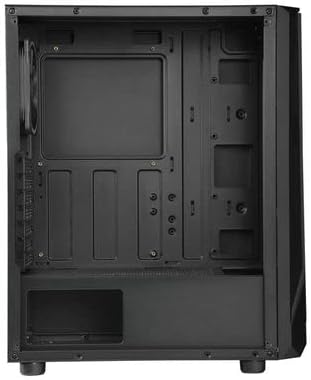
Figure 2: Interior layout of the ENERMAX PABYS PB30 PC case.
- Ўстаноўка мацярынскай платы: Align your ATX, MicroATX, or Mini-ITX motherboard with the standoffs inside the case. Secure it with the provided screws.
- Ўстаноўка блока сілкавання (БП): Усталюйце блок харчавання ў адведзены адсек у ніжняй задняй частцы корпуса. Замацуйце яго шрубамі ззаду.
- Усталяванне назапашвальніка: Utilize the removable HDD cage for 3.5-inch drives or dedicated mounts for 2.5-inch SSDs. Secure drives with appropriate screws.
- Усталёўка платы пашырэння: Remove the necessary expansion slot covers (7 available) at the rear of the case. Insert your graphics card or other expansion cards and secure them with screws.
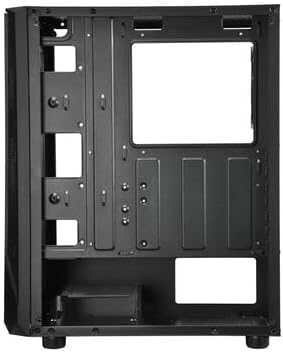
Малюнак 3: Зона для ўкладкі кабеляў за латкам матчынай платы.
3.3. Кіраванне кабелем
Route all power and data cables through the designated cutouts and tie-down points behind the motherboard tray. This improves airflow and maintains a clean interior aesthetic. The removable HDD cage can assist in managing PSU cables.
3.4. Падключэнні пярэдняй панэлі
Connect the front panel cables (USB 3.2 Gen1 x1, USB 2.0 x1, HD Audio, Power, Reset, LED) from the case to the corresponding headers on your motherboard. Refer to your motherboard manual for exact header locations.
4. Аперацыя
4.1. Уключэнне
Once all components are installed and cables are connected, replace the side panel. Connect your monitor, keyboard, mouse, and power cable to the PSU. Press the power button on the front panel to start your system.
4.2. Кіраванне RGB-падсветкай
The pre-installed RGB fan and any other addressable RGB components connected to the case can be controlled via your motherboard's RGB synchronization software (e.g., ASUS Aura Sync, MSI Mystic Light Sync, GIGABYTE RGB Fusion, ASRock Polychrome Sync). Ensure the RGB cables are correctly connected to the motherboard's 3-pin 5V ARGB header.
5. Тэхнічнае абслугоўванне
Рэгулярнае тэхнічнае абслугоўванне дапамагае забяспечыць аптымальную прадукцыйнасць і даўгавечнасць корпуса і кампанентаў вашага ПК.
- Ачыстка пылавога фільтра: Periodically remove and clean any dust filters (if present) to maintain good airflow and prevent dust buildup inside the case.
- Знешняя ачыстка: Працярыце вонкавыя паверхні мяккай, damp cloth. Avoid harsh chemicals that may damage the finish or tempered glass.
- Interior Dust Removal: Use compressed air to gently remove dust from internal components and fan blades. Ensure the system is powered off and unplugged before cleaning.
6. Выпраўленне непаладак
Калі ў вас узніклі праблемы са зборкай ПК, разгледзьце наступныя распаўсюджаныя дзеянні па ліквідацыі непаладак:
- Няма харчавання: Ensure the PSU is switched on, the power cable is securely connected, and all motherboard power connectors (24-pin ATX, 8-pin CPU) are properly seated. Check front panel power button connection to the motherboard.
- Вентылятары не круцяцца: Verify that all fan cables are correctly connected to the motherboard fan headers or any fan controller. Check BIOS settings for fan control.
- RGB-падсветка не працуе/сінхранізуецца: Confirm that the ARGB cable is connected to the correct 3-pin 5V ARGB header on the motherboard. Ensure your motherboard's RGB software is installed and configured correctly.
- Няма вываду на дысплей: Ensure your graphics card is properly seated in its PCIe slot and all necessary power cables are connected. Check that your monitor cable is connected to the graphics card, not the motherboard (if using a dedicated GPU).
7. Тэхнічныя характарыстыкі
| Асаблівасць | Апісанне |
|---|---|
| Назва мадэлі | ECB-PB30-BB-ARGB |
| Form Factor Support | ATX, MicroATX, Mini-ITX |
| Пярэднія парты I / O | 1x USB 3.2 Gen1, 1x USB 2.0, HD Audio |
| Слоты пашырэння | 7 |
| Памеры (Д х Ш х У) | 375 х 200 х 458 мм |
| Колер | Чорны |
| Матэрыялы | Загартаванае шкло, сталь |
| Спосаб астуджэння | Паветранае астуджэнне |
8. Гарантыя і падтрымка
ENERMAX products are manufactured to the highest quality standards. For warranty information, technical support, or service inquiries, please refer to the official ENERMAX webсайт або звярніцеся да мясцовага прадаўца. Захоўвайце пацвярджэнне пакупкі для прэтэнзій па гарантыі.