
1. Уводзіны
Thank you for choosing the Maxcom FW36 Aurum SE Smartwatch. This manual provides detailed instructions to help you set up, operate, and maintain your device, ensuring optimal performance and longevity. Please read this manual carefully before using your smartwatch.

Малюнак 1: Спераду view of the Maxcom FW36 Aurum SE Smartwatch, displaying time and health metrics.
2. Настройка
2.1 Распакоўка і першапачатковы агляд
Upon opening the package, verify that all components are present: Maxcom FW36 Aurum SE Smartwatch, charging cable, and this user manual. Inspect the device for any visible damage.
2.2 Зарадка разумнага гадзінніка
Before first use, fully charge your smartwatch. Connect the charging cable to the charging port on the back of the watch and to a standard USB power adapter (not included). The battery icon on the screen will indicate charging status. A full charge typically takes approximately 2 hours.
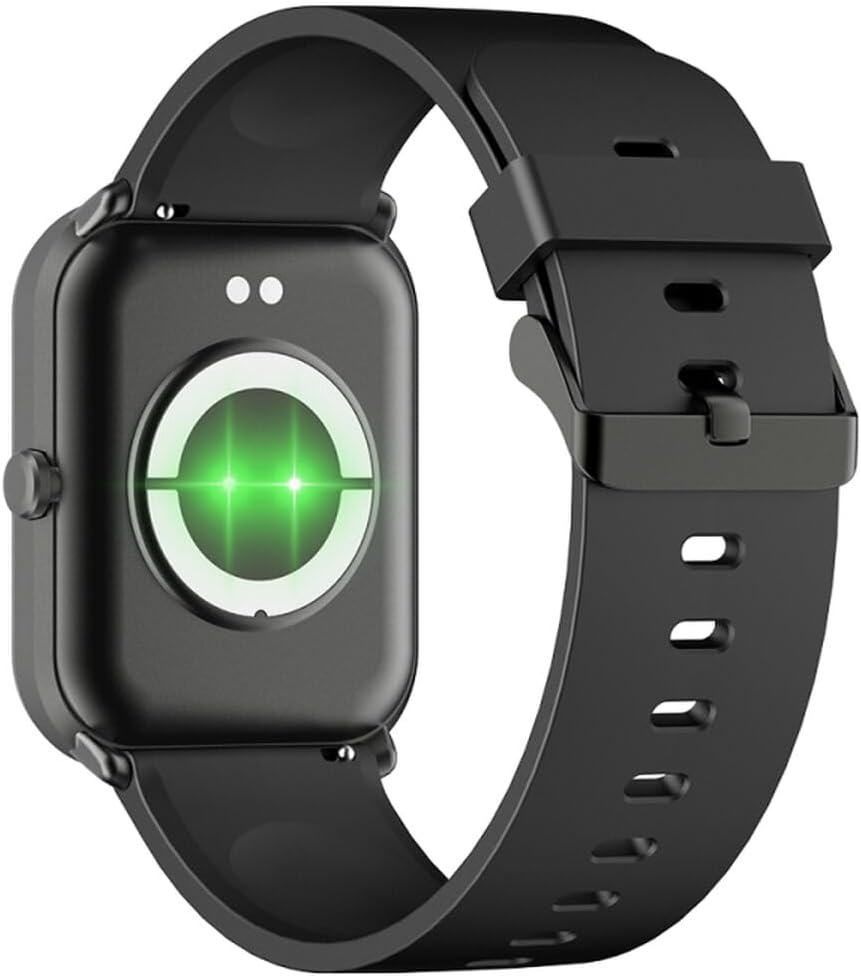
Малюнак 2: Задняя частка view of the smartwatch, highlighting the charging contacts and health sensors.
2.3 Уключэнне/выключэнне сілкавання
- Уключэнне: Націсніце і ўтрымлівайце бакавую кнопку некалькі секунд, пакуль экран не падсвяціцца.
- Выключэнне: From the watch face, swipe down to access quick settings, then tap the power icon, or navigate to "Settings" > "System" > "Power Off". Confirm your selection.
2.4 Усталёўка і спалучэнне праграм
- Спампаваць прыкладанне: Scan the QR code in the manual (if provided) or search for "GLORY FIT" in your smartphone's app store (Google Play Store for Android, Apple App Store for iOS).
- Рэгістрацыя/Уваход: Open the GLORY FIT app and follow the on-screen instructions to create an account or log in.
- Спалучэнне:
- Пераканайцеся, што Bluetooth уключаны на вашым смартфоне.
- Open the GLORY FIT app, go to "Device" or "My Device", and tap "Add Device".
- The app will search for nearby devices. Select "FW36 Aurum SE" from the list.
- Пацвердзіце запыт на спалучэнне як на смартфоне, так і на разумным гадзінніку.
Once paired, the smartwatch will synchronize data with your phone, including time and date settings.
3. Інструкцыя па эксплуатацыі
3.1 Асноўная навігацыя
- Сэнсарны экран: Swipe left/right to navigate between main functions (e.g., activity, heart rate). Swipe up to view апавяшчэнні. Правядзіце пальцам уніз, каб атрымаць доступ да хуткіх налад.
- Бакавая кнопка: Press once to return to the watch face or wake the screen. Press and hold for power options.

Малюнак 3: бок view of the smartwatch, illustrating the physical button and strap design.
3.2 Маніторынг здароўя
The Maxcom FW36 Aurum SE Smartwatch features several health monitoring functions:
- Манітор сардэчнага рытму: Swipe to the heart rate interface and wait for the measurement to complete. Ensure the watch is snug on your wrist.
- Датчык кіслароду ў крыві: Similar to heart rate, navigate to the SpO2 interface for measurement.
- Манітор артэрыяльнага ціску: Access this function from the main menu or by swiping to its dedicated screen.
- Маніторынг якасці сну: Гадзіннік аўтаматычна адсочвае вашы рэжымы сну, калі яго носяць падчас сну. View detailed reports in the GLORY FIT app.
- Шагомер: Tracks your daily steps, distance, and calories burned automatically.
Важна: Дадзеныя пра стан здароўя, якія прадстаўляюцца гэтай прыладай, прызначаны толькі для даведкі і не павінны выкарыстоўвацца для медыцынскай дыягностыкі або лячэння.
3.3 Мультыспартыўны рэжым
Access the multi-sport mode from the main menu to select various activities such as running, walking, cycling, etc. The watch will track specific metrics relevant to your chosen activity.
3.4 Апавяшчэнні
Once paired with your smartphone and notification permissions are granted in the GLORY FIT app, your smartwatch will display incoming calls, messages, and app notifications. Swipe up from the watch face to view гісторыя вашых апавяшчэнняў.
4. Тэхнічнае абслугоўванне
4.1 Ачыстка
Regularly clean your smartwatch and strap with a soft, dry cloth. For stubborn dirt, use a slightly damp тканінай і старанна высушыце. Пазбягайце выкарыстання агрэсіўных хімічных рэчываў або абразіўных матэрыялаў.
4.2 Воданепранікальнасць і пыланепранікальнасць
The Maxcom FW36 Aurum SE Smartwatch is designed to be dust resistant and water resistant. This means it can withstand splashes, rain, and brief immersion in shallow water. However, it is not suitable for hot showers, saunas, diving, or high-speed water sports. Avoid pressing buttons underwater.
4.3 Сыход за акумулятарам
To prolong battery life, avoid fully discharging the battery frequently. Charge the device regularly, even if not in use for extended periods. Store the device in a cool, dry place.
5. Выпраўленне непаладак
- Разумны гадзіннік не ўключаецца: Ensure the device is fully charged. Press and hold the side button for an extended period (10-15 seconds).
- Немагчыма спалучыць прыладу са смартфонам:
- Ensure Bluetooth is enabled on your phone and the smartwatch is within range.
- Перазагрузіце смартфон і разумны гадзіннік.
- Check if the GLORY FIT app has necessary permissions.
- Калі прылада была спалучана раней, паспрабуйце адключыць яе і зноў спалучыць.
- Няправільныя паказанні стану здароўя: Пераканайцеся, што гадзіннік шчыльна прылягае да запясця, не занадта туга і не занадта свабодна. Ачысціце датчыкі на задняй частцы гадзінніка. Пазбягайце празмерных рухаў падчас вымярэння.
- Апавяшчэнні не атрыманы: Verify that notification permissions are enabled for the GLORY FIT app in your phone's settings. Ensure the app is running in the background.
6. Тэхнічныя характарыстыкі
| мадэль | FW36 Aurum SE |
| Марка | Макскам |
| Аперацыйная сістэма | Android |
| Дысплей | 1.69" (4.29 cm) Color Touchscreen, 240 x 280 pixels, Digital, Rounded Corners |
| Ёмістасць батарэі | Літый-іённы 220 мАг |
| Сувязь | Bluetooth |
| Датчыкі | Heart Rate Monitor, Blood Oxygen Sensor, Blood Pressure Monitor, Pedometer |
| Ахова | Dust Resistant, Water Resistant |
| Сумяшчальнае прыкладанне | GLORY FIT |
| Dimensions (W x T x D) | 44.6 mm x 1.04 cm x 35 mm |
| Функцыянальнасць GPS | Няма ў наяўнасці |
7. Гарантыя і падтрымка
The Maxcom FW36 Aurum SE Smartwatch comes with a двухгадовая гарантыя against factory defects. Please retain your proof of purchase for warranty claims.
For technical support, troubleshooting assistance, or warranty inquiries, please contact Maxcom customer service through their official webсайт або кантактную інфармацыю, указаную ў дакументах па куплі.