
DOVIICO H13
DOVIICO H13 Smart Watch User Manual
Мадэль: H13
Уводзіны
This manual provides detailed instructions for the setup, operation, and maintenance of your DOVIICO H13 Smart Watch. Please read this manual thoroughly to ensure proper use and to maximize the benefits of your device. The DOVIICO H13 Smart Watch features a 1.69-inch full touch screen, comprehensive fitness tracking, and health monitoring capabilities, compatible with both iOS and Android smartphones.

Image: The DOVIICO H13 Smart Watch, showcasing its vibrant display and user interface with various application icons.
Што ўключана
The DOVIICO H13 Smart Watch package contains the following items:
- 1 x DOVIICO H13 Smart Watch
- 1 х Наручны бранзалет
- 1 х зарадны кабель
- 1 х Кіраўніцтва карыстальніка (гэты дакумент)
Кіраўніцтва па ўстаноўцы
1. Зарадка прылады
Before first use, fully charge your DOVIICO H13 Smart Watch. Connect the provided charging cable to the charging port on the back of the watch and to a standard USB power adapter (not included). A full charge typically takes approximately 2.5 hours.
2. Усталёўка прыкладання
To unlock the full functionality of your smart watch, download and install the companion mobile application on your smartphone. The app is compatible with iOS 9.0 and above, and Android 5.0 and above devices. Пошук the app name (usually mentioned in the quick start guide or on the watch screen during initial setup) in your phone's app store (Apple App Store for iOS, Google Play Store for Android).
3. Спалучэнне прылады
- Ensure your smart watch is charged and powered on.
- Уключыце Bluetooth на вашым смартфоне.
- Open the installed companion app on your smartphone.
- Follow the in-app instructions to search for and connect to your DOVIICO H13 Smart Watch. The watch will typically appear as "H13" or "DOVIICO H13" in the list of available devices.
- Пацвердзіце запыт на спалучэнне як на гадзінніку, так і на смартфоне, калі будзе патрэбен адпаведны запыт.
Пасля спалучэння гадзіннік сінхранізуе дадзеныя з вашым тэлефонам, і вы зможаце наладзіць параметры праз праграму.
Інструкцыя па эксплуатацыі
Базавая навігацыя
- Правядзіце пальцам уверх/уніз: Пракручвайце меню і апавяшчэнні.
- Правядзіце пальцам улева/управа: Доступ да хуткіх функцый або розных экранаў дадзеных.
- Націсніце: Выберыце элемент або пацвердзіце дзеянне.
- Бакавая кнопка: Typically used to return to the home screen or power on/off the device (long press).
Custom Watch Faces
The DOVIICO H13 Smart Watch allows for extensive customization of its watch face. Through the companion mobile application, you can browse and download a variety of pre-designed dials. Additionally, you can upload your own photos to personalize the watch background.

Малюнак: Examples of customizable watch faces available for the DOVIICO H13 Smart Watch, including digital and analog styles.
Маніторынг здароўя
The DOVIICO H13 Smart Watch provides comprehensive health data tracking to help you monitor your well-being.
Маніторынг сардэчнага рытму
Гадзіннік бесперапынна кантралюе ваш пульс на працягу дня. Вы можаце view real-time heart rate data directly on the watch or access historical data and trends in the companion app.
Blood Pressure and Blood Oxygen (SpO2) Tracking
The device is equipped to measure your blood pressure and blood oxygen saturation levels. For accurate readings, ensure the watch is worn snugly on your wrist. Consult the app for detailed insights and historical data.
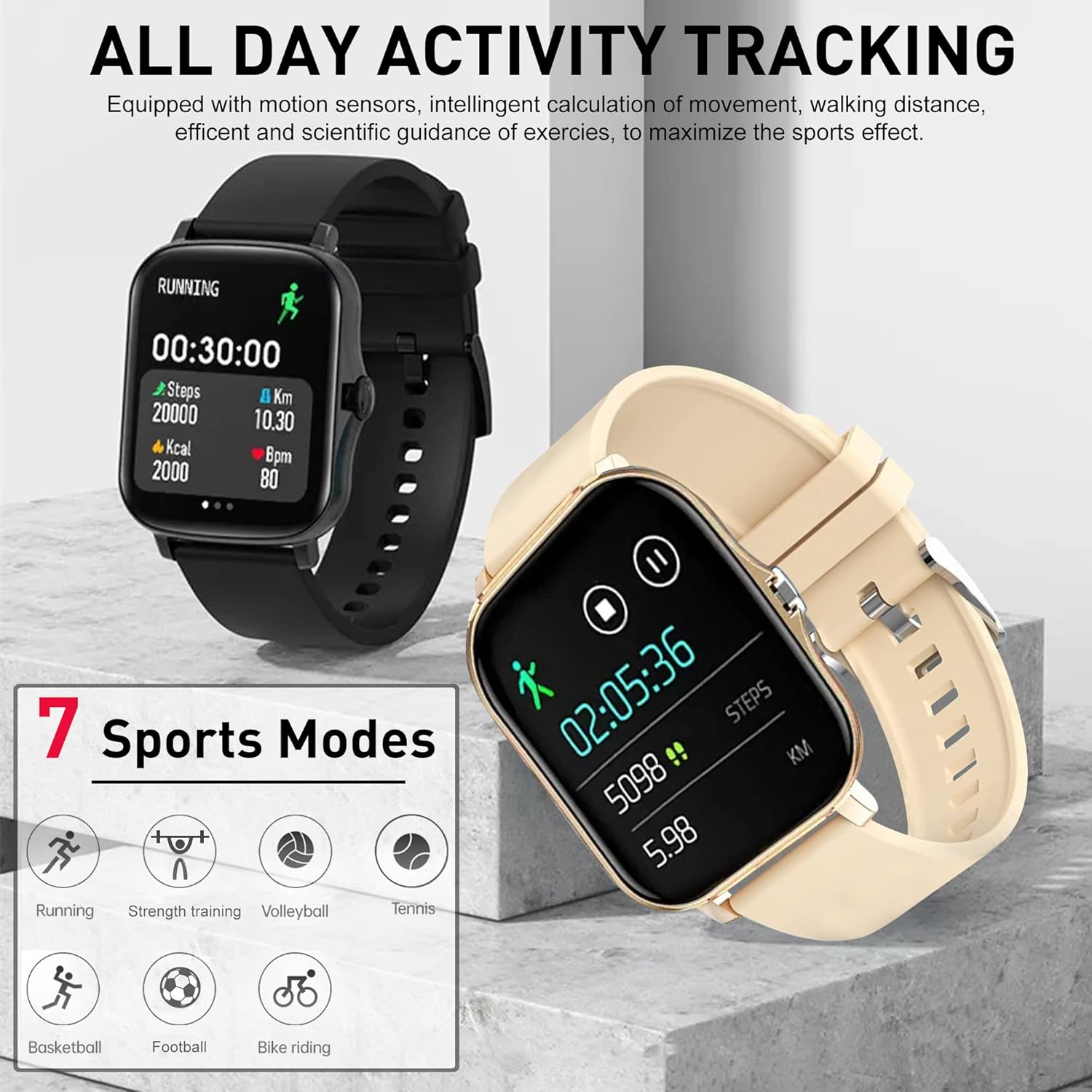
Image: The DOVIICO H13 Smart Watch showing real-time blood pressure (128/90 mmHg) and blood oxygen (98% SpO2) measurements.
Маніторынг сну
Wear your smart watch to bed to track your sleep patterns. It records deep sleep, light sleep, and awake times, providing a comprehensive analysis of your sleep quality in the mobile application.

Image: The DOVIICO H13 Smart Watch displaying sleep duration and a breakdown of sleep stages (глыбокі, лёгкі, прачнуты).
Адсочванне актыўнасці
The DOVIICO H13 Smart Watch is designed to track your daily activities and workouts, helping you stay motivated and achieve your fitness goals.
All-Day Activity Monitoring
The watch automatically tracks your steps, distance traveled, and calories burned throughout the day. This data is synchronized with the mobile app for detailed analysis and progress tracking.
Спартыўныя рэжымы
The DOVIICO H13 supports 7 different sports modes to provide more accurate tracking for specific activities. These include:
- Бег
- Язда на веласіпедзе
- Тэніс
- Сілавыя трэніроўкі
- Баскетбол
- Валейбол
- футбол
Select the appropriate mode before starting your workout for optimized data collection.

Image: The DOVIICO H13 Smart Watch showing a running activity screen with duration, steps, distance, calories, and heart rate, alongside icons representing the 7 supported sports modes.
Разумныя функцыі
Beyond health and fitness, the DOVIICO H13 Smart Watch offers a range of smart features to keep you connected and organized.
Разумныя апавяшчэнні
Receive alerts for incoming calls, SMS messages, and notifications from social media applications (e.g., WeChat, QQ, Facebook, Twitter, Line, WhatsApp, Instagram) directly on your wrist. The watch will vibrate to notify you, ensuring you don't miss important updates.

Image: Two DOVIICO H13 Smart Watches showing real-time message notifications from social media platforms.
Дадатковыя інструменты
The watch includes several convenient tools for daily use:
- Таймер і секундамер: Для заняткаў па часе.
- Будзільнік: Усталюйце бясшумныя вібрацыйныя сігналы трывогі.
- Музычны кантролер: Кіруйце прайграваннем музыкі на вашым смартфоне.
- Надвор'е: View бягучыя ўмовы надвор'я.
- Сядзячы напамін: Падштурхоўвае вас да руху пасля перыядаў бяздзейнасці.
- Знайдзіце свой тэлефон: Дапамагае знайсці спалучаны смартфон.
- Аддаленая фатаграфія: Кіруйце камерай тэлефона дыстанцыйна.
- Званкі па Bluetooth: Здзяйсняйце і прымайце званкі непасрэдна з гадзінніка.
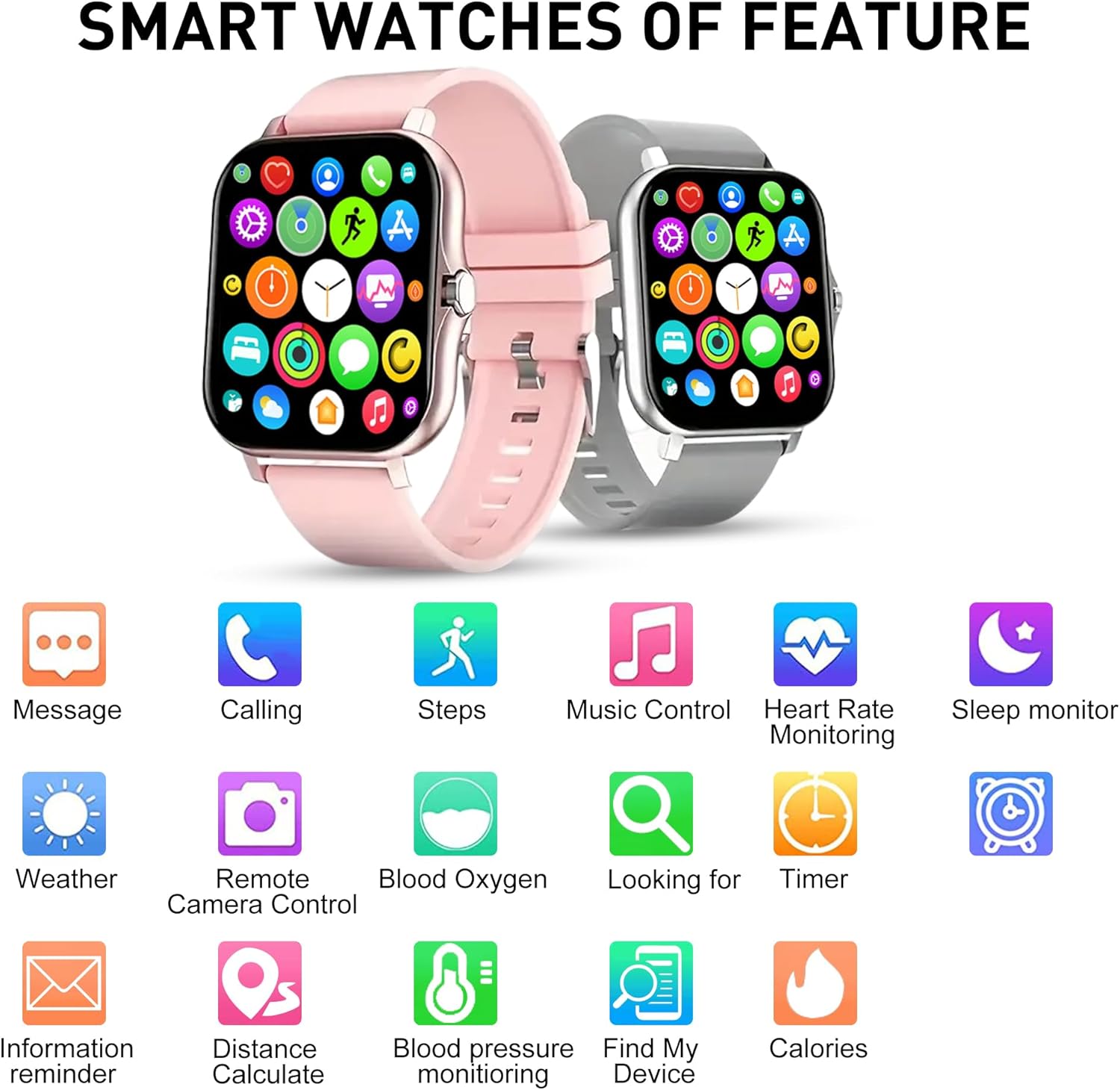
Выява: Оверview of the DOVIICO H13 Smart Watch's key features, represented by various icons for functions such as messaging, calling, step tracking, music control, and health monitoring.
Тэхнічнае абслугоўванне
Чыстка разумнага гадзінніка
- Рэгулярна працірайце экран гадзінніка і раменьчык мяккай тканінайamp, тканіна без ворса.
- Avoid using harsh chemicals, abrasive cleaners, or solvents, as these can damage the watch's finish and components.
- Перад зарадкай пераканайцеся, што кантакты зараднай прылады чыстыя і сухія, каб прадухіліць карозію.
Сыход за батарэяй
- Каб падоўжыць тэрмін службы батарэі, пазбягайце частай поўнай разрадкі гадзінніка.
- Захоўвайце гадзіннік у прахалодным, сухім месцы, калі ён не выкарыстоўваецца працяглы час.
- The watch has a battery capacity of 160 mAh and typically lasts for 7 days with normal use, with a standby time exceeding 30 days.
Агульны догляд
- Avoid exposing the watch to extreme temperatures, direct sunlight for prolonged periods, or high humidity.
- While the watch may have some water resistance, avoid submerging it in water or exposing it to high-pressure water jets unless explicitly stated in product specifications.
Ліквідацыю непаладак
Гадзіннік не ўключаецца
- Пераканайцеся, што гадзіннік цалкам зараджаны. Падключыце яго да зараднай прылады як мінімум на 30 хвілін.
- Press and hold the side button for several seconds to power it on.
Немагчыма спалучыць прыладу са смартфонам
- Пераканайцеся, што Bluetooth уключаны на вашым смартфоне.
- Ensure the watch is within Bluetooth range of your phone (typically 10 meters).
- Restart both your smartphone and the smart watch.
- Праверце, ці абноўлена суправаджальнае прыкладанне да апошняй версіі.
- Калі прылада была падключана раней, паспрабуйце адключыць яе ў наладах Bluetooth тэлефона, а затым зноў падключыць праз праграму.
Няправільныя паказанні стану здароўя
- Пераканайцеся, што гадзіннік шчыльна прылягае да запясця, але не занадта туга.
- Keep your wrist still during measurements.
- Рэгулярна чысціце датчык на задняй панэлі гадзінніка.
- Note that smart watch readings are for reference only and should not be used for medical diagnosis.
Апавяшчэнні не з'яўляюцца
- Пераканайцеся, што гадзіннік паспяхова спалучаны з вашым тэлефонам.
- Праверце дазволы на апавяшчэнні для суправаджальнага прыкладання ў наладах тэлефона.
- Ensure that notification alerts are enabled within the companion app settings for the specific applications you wish to receive alerts from.
- Disable "Do Not Disturb" mode on both your watch and phone.
Тэхнічныя характарыстыкі
| Асаблівасць | Дэталь |
|---|---|
| Марка | ДАВІЙКА |
| мадэль | H13 |
| Памер экрана | 1.69 цалі |
| Тып дысплея | ВК |
| дазвол | 240 х 240 |
| Сумяшчальнасць аперацыйнай сістэмы | Android 5.0+, iOS 9.0+ |
| Сувязь | Bluetooth |
| Ёмістасць батарэі | 160 Міліamp Гадзіны (мАг) |
| Час зарадкі | Прыкладна 2.5 гадзін |
| Тэрмін службы батарэі (звычайнае выкарыстанне) | Да 7 дзён |
| Час чакання | Over 30 Days |
| Памеры прадукту | 14.99 х 7.49 х 3 см |
| Вага прадмета | 80 г |
| Асаблівасці | Heart Rate, Blood Pressure, Blood Oxygen, Sleep Monitoring, Step/Distance/Calorie Tracking, 7 Sports Modes, Call/SMS/Social App Alerts, Alarm, Sedentary Reminder, Music Control, Weather, Remote Camera, Find Phone, Bluetooth Calling. |
Гарантыя і падтрымка
For information regarding warranty coverage and customer support for your DOVIICO H13 Smart Watch, please refer to the warranty card included in your product packaging or visit the official DOVIICO website. If you encounter any issues not covered in this manual, please contact DOVIICO customer service for assistance.
Звязаныя дакументы - H13
 |
Oregon Scientific SE336/SE336M Touch Heart Rate Monitor User Manual User manual for the Oregon Scientific SE336/SE336M Touch Heart Rate Monitor. Learn how to set up, use, and maintain your device for accurate heart rate tracking and exercise data. |
 |
MorePro H56 Smart Watch: Operation Guide and Specifications Comprehensive user manual and operation guide for the MorePro H56 Smart Watch. Learn about its features, setup, specifications, health monitoring, and maintenance. Download the FitCloudPro app for full functionality. |
 |
Кіраўніцтва карыстальніка разумнага гадзінніка MAXTOP T5 - функцыі, налада і выкарыстанне Падрабязнае кіраўніцтва карыстальніка для разумнага гадзінніка MAXTOP T5, якое ахоплівае функцыі бегу з GPS, маніторынг пульса, адсочванне артэрыяльнага ціску, крокомер, манітор сну, воданепранікальнасць і інтэграцыю з дадаткам MAXTOP. Даведайцеся, як наладзіць і эфектыўна выкарыстоўваць свой разумны гадзіннік. |
 |
Oregon Scientific SE338 / SE338M Touch ECG Strapless Heart Rate Monitor User Manual This comprehensive user manual guides you through the setup, operation, and features of the Oregon Scientific SE338 / SE338M Touch ECG Strapless Heart Rate Monitor. Discover how to accurately track your heart rate, set up your personal profile, and utilize the device for effective fitness monitoring and workout analysis. |
 |
Кіраўніцтва карыстальніка пульсометра без раменьчыка Oregon Scientific SE138 Азнаёмцеся з пульсометрам Oregon Scientific SE138 без раменьчыкаў з дапамогай гэтага падрабязнага кіраўніцтва карыстальніка. Адкрыйце для сябе такія функцыі, як адсочванне пульса, падлік калорый, секундамер і аналіз зон трэніровак, каб палепшыць ваш фітнес-падарожнічанне. |
 |
LIGE Smart Watch User Manual: Features, Setup, and Troubleshooting Comprehensive user manual for the LIGE Smart Watch, covering component introduction, charging, app installation, feature usage (heart rate, blood pressure, sleep tracking), precautions, FAQs, and warranty information. |
Ask a question about this manual
Ask about setup, troubleshooting, compatibility, parts, safety, or missing instructions. Manuals+ will review the question and use this page’s manual context to help answer it.