
The Voice VHOL-6/2069
The Voice Hollywood Wireless Headphones User Manual
Model: VHOL-6/2069 | Brand: The Voice
Уводзіны
Thank you for choosing The Voice Hollywood Wireless Headphones. These headphones are designed to provide a superior audio experience with the convenience of wireless connectivity. Featuring HD Ultra Max Sound, a comfortable adjustable headband, and a tri-fold design for portability, they are optimized for seamless integration with Siri and Google Assistant. This manual provides detailed instructions for setup, operation, maintenance, and troubleshooting to ensure optimal performance and longevity of your device.
Інфармацыя па бяспецы
- Не падвяргайце навушнікі ўздзеянню экстрэмальных тэмператур, вільготнасці або агрэсіўных рэчываў.
- Пазбягайце праслухоўвання на высокім узроўні гучнасці на працягу доўгага часу, каб прадухіліць пашкоджанне слыху.
- Do not use the headphones while driving, cycling, or in situations where inability to hear ambient sounds could be dangerous.
- Трымайце навушнікі далей ад дзяцей і хатніх жывёл.
- Only use the provided charging cable and accessories.
- Не спрабуйце разбіраць або мадыфікаваць навушнікі. Гэта прывядзе да анулявання гарантыі.
Змест пакета
Калі ласка, пераканайцеся, што ўсе прадметы прысутнічаюць у вашай упакоўцы:
- The Voice Hollywood Wireless Headphones
- Зарадны кабель USB Type-C
- Аўдыёкабель 3.5 мм (AUX)

Figure 1: Included components and key features of the headphones.
Прадукт скончаныview
The Hollywood Wireless Headphones feature an ergonomic design for extended comfort and intuitive controls for ease of use. The over-ear cups provide a comfortable fit, and the adjustable headband ensures a secure fit for various head sizes. The tri-fold design allows for compact storage and portability.

Малюнак 2: Спераду view навушнікаў.

Figure 3: Headphones in folded position for portability.
Элементы кіравання і парты
Refer to Figure 1 for a visual guide to the controls and ports. The main controls are located on the ear cups and include:
- Кнопка харчавання: Выкарыстоўваецца для ўключэння/выключэння і пачатку спалучэння праз Bluetooth.
- Кнопка павелічэння гучнасці/наступнага трэка: Кароткае націсканне для павелічэння гучнасці, доўгае націсканне для наступнага трэка.
- Кнопка памяншэння гучнасці/пераключэння на папярэдні трэк: Кароткае націсканне для памяншэння гучнасці, доўгае націсканне для папярэдняга трэка.
- Шматфункцыянальная кнопка (МФК): Прайграванне/паўза, адказ/завяршэнне выклікаў, актывацыя галасавога памочніка.
- Порт USB Type-C: Для зарадкі навушнікаў.
- 3.5 мм аўдыяраз'ём: Для праваднога падлучэння выкарыстоўвайце кабель AUX.
- Убудаваны мікрафон: For hands-free calling and voice assistant commands.
Настройка
Зарадка навушнікаў
Before first use, fully charge your headphones. A full charge typically takes approximately 2-3 hours.
- Connect the small end of the USB Type-C charging cable to the charging port on the headphone ear cup.
- Падключыце большы канец USB-кабеля да адаптара харчавання USB (не ўваходзіць у камплект) або да USB-порта кампутара.
- The LED indicator light will illuminate during charging and turn off or change color once fully charged.
Спалучэнне Bluetooth
Pair your headphones with your Bluetooth-enabled device (e.g., smartphone, tablet, computer).
- Пераканайцеся, што навушнікі выключаны.
- Press and hold the Power button for approximately 5-7 seconds until the LED indicator light flashes blue and red alternately, indicating pairing mode.
- На прыладзе ўключыце Bluetooth і пачніце пошук новых прылад.
- Select "Hollywood" from the list of available devices.
- Once successfully paired, the LED indicator will flash blue slowly or turn solid blue.
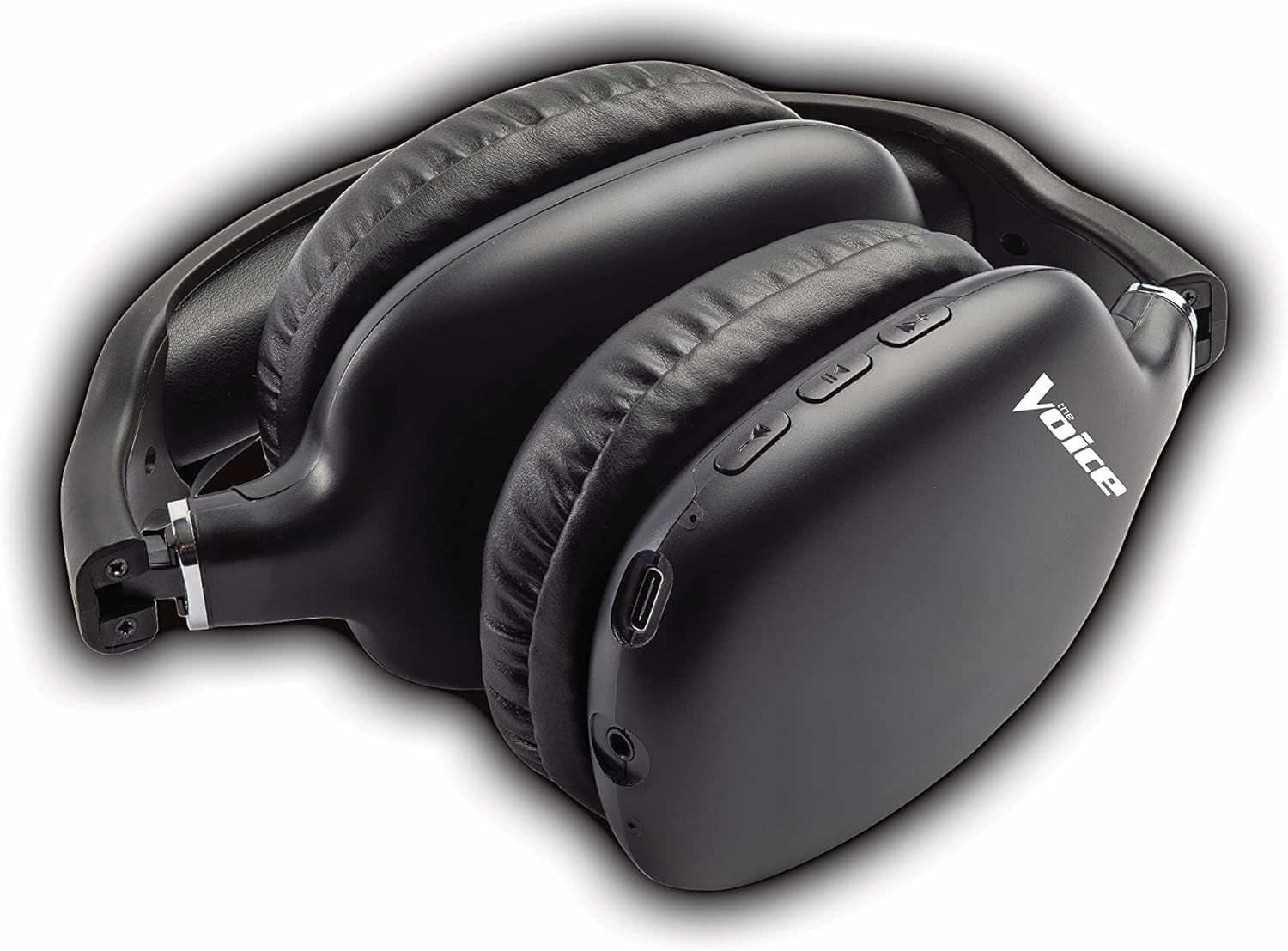
Figure 4: Headphones paired with a smartphone.
Правадное падключэнне (рэжым AUX)
You can use the headphones with non-Bluetooth devices or when the battery is depleted using the included 3.5mm audio cable.
- Plug one end of the 3.5mm audio cable into the audio jack on the headphone ear cup.
- Plug the other end into the 3.5mm audio output jack of your device.
- Навушнікі аўтаматычна пераключацца ў правадны рэжым.
Інструкцыя па эксплуатацыі
Уключэнне/выключэнне харчавання
- Уключэнне: Націсніце і ўтрымлівайце кнопку харчавання прыблізна 3 секунды, пакуль святлодыёдны індыкатар не пачне міргаць сінім колерам.
- Выключэнне: Націсніце і ўтрымлівайце кнопку харчавання прыблізна 3 секунды, пакуль не пагасне святлодыёдны індыкатар.
Прайграванне музыкі
- Прайграванне/Паўза: Short press the Multi-function Button (MFB).
- Наступны трэк: Доўга націсніце кнопку павелічэння гучнасці.
- Папярэдні трэк: Доўга націсніце кнопку памяншэння гучнасці.
- Павялічыць гучнасць: Кароткачасова націсніце кнопку павелічэння гучнасці.
- Паменшыць гучнасць: Кароткачасова націсніце кнопку памяншэння гучнасці.
Кіраванне званкамі
- Адказ/завяршэнне выкліку: Short press the Multi-function Button (MFB).
- Адхіліць выклік: Long press the Multi-function Button (MFB).
- Паўторны набор апошняга нумара: Двойчы націсніце шматфункцыянальную кнопку (MFB).
Актывацыя галасавога памочніка
- Актываваць Siri/Google Assistant: Triple-press the Multi-function Button (MFB).
Video 1: Demonstrates the adjustable and padded comfort, built-in mic, and connectivity to Google or Siri for The Voice Hollywood Wireless Headphones.

Figure 5: User enjoying audio with the headphones, highlighting comfort and usability.
Тэхнічнае абслугоўванне
Уборка
Regular cleaning helps maintain the headphones' appearance and functionality.
- Працярыце амбушуры і агалоўе мяккай, сухой тканінай без ворса.
- Для ўстойлівага бруду злёгку ачысціцеampen the cloth with water and mild soap, then wipe dry immediately.
- Не выкарыстоўвайце абразіўныя ачышчальнікі, спірт або хімічныя растваральнікі.
Захоўванне
When not in use, store your headphones in a cool, dry place, away from direct sunlight and extreme temperatures. Utilize the tri-fold feature for compact storage.
Ліквідацыю непаладак
If you encounter issues with your headphones, refer to the table below for common problems and solutions.
| праблема | Магчымая прычына | Рашэнне |
|---|---|---|
| Навушнікі не ўключаюцься | Нізкі акумулятар | Поўнасцю зарадзіце навушнікі. |
| Немагчыма спалучыць прыладу | Навушнікі не ў рэжыме спалучэння; Bluetooth прылады выключаны; Занадта далёка ад прылады | Ensure headphones are in pairing mode (flashing red/blue). Turn device Bluetooth on/off. Move headphones closer to device (within 10 meters). |
| Няма гуку | Занадта нізкі гук; Няма падключэння; Няправільная крыніца гуку | Павялічце гучнасць навушнікаў і прылады. Пераканайцеся, што навушнікі правільна спалучаныя/падлучаныя. Праверце налады аўдыёвыхаду на прыладзе. |
| Скажэнне гуку | Перашкоды; гучнасць прылады занадта высокая | Адыдзіце далей ад іншых бесправадных прылад. Зменшце гучнасць на прыладзе. |
| Не працуе мікрафон | Not connected; Device settings | Ensure headphones are properly paired. Check microphone input settings on your device. |
Тэхнічныя характарыстыкі
| Асаблівасць | Дэталь |
|---|---|
| Назва мадэлі | Галівуд |
| Тэхналогія падлучэння | Wireless, Wired (Bluetooth) |
| Размяшчэнне вушэй | Над вухам |
| Формаў-фактар | Над вухам |
| Тып кіравання | Voice Control, Built-in buttons and microphone |
| Дыяпазон частот | 20 Гц - 20 кГц |
| Вага прадмета | 13.4 унцыі |
| Памеры (пакет) | 9.65 х 8.35 х 3.58 цалі |
| Нумар мадэлі | VHOL-6/2069 |
| UPC | 841133120698 |
Гарантыя і падтрымка
The Voice Hollywood Wireless Headphones come with a standard manufacturer's warranty. For detailed warranty information, technical support, or service inquiries, please refer to the warranty card included in your product packaging or visit the official The Voice Electronics website. Do not attempt to repair the product yourself.