
1. Уводзіны
This manual provides essential information for the safe and effective operation of your VOLTCRAFT DSO-2202H + AFG Handheld Oscilloscope. This versatile device combines the functions of an oscilloscope, a multimeter, and an arbitrary function generator (AFG) into a single portable unit. Please read this manual thoroughly before using the device to ensure proper handling and to prevent damage or injury.
2. Інфармацыя па бяспецы
Always observe the following safety precautions to avoid personal injury and prevent damage to the instrument or other equipment.
- Прачытайце ўсе інструкцыі: Before operating the device, read and understand all safety and operating instructions.
- Use proper probes: Use only probes and accessories rated for the voltage and current of the measurement.
- Пазбягайце вільготных умоў: Не выкарыстоўвайце прыладу ў вільготных або damp асяроддзях.
- Зазямленне: Ensure proper grounding when connecting to mains power or high-voltagэлектронныя ланцугі.
- Не адчыняйце casing: Refer all servicing to qualified service personnel. Opening the casinможа падвергнуць вас небяспечнаму ўздзеянню вільгаціtagэс.
- Observe all ratings: Не перавышайце максімальныя ўваходныя намінальныя значэнні прылады.
3. Прадукт скончыўсяview
The VOLTCRAFT DSO-2202H + AFG is a compact, multi-functional test instrument designed for various electrical measurement tasks. It features a clear color LCD display and intuitive controls.
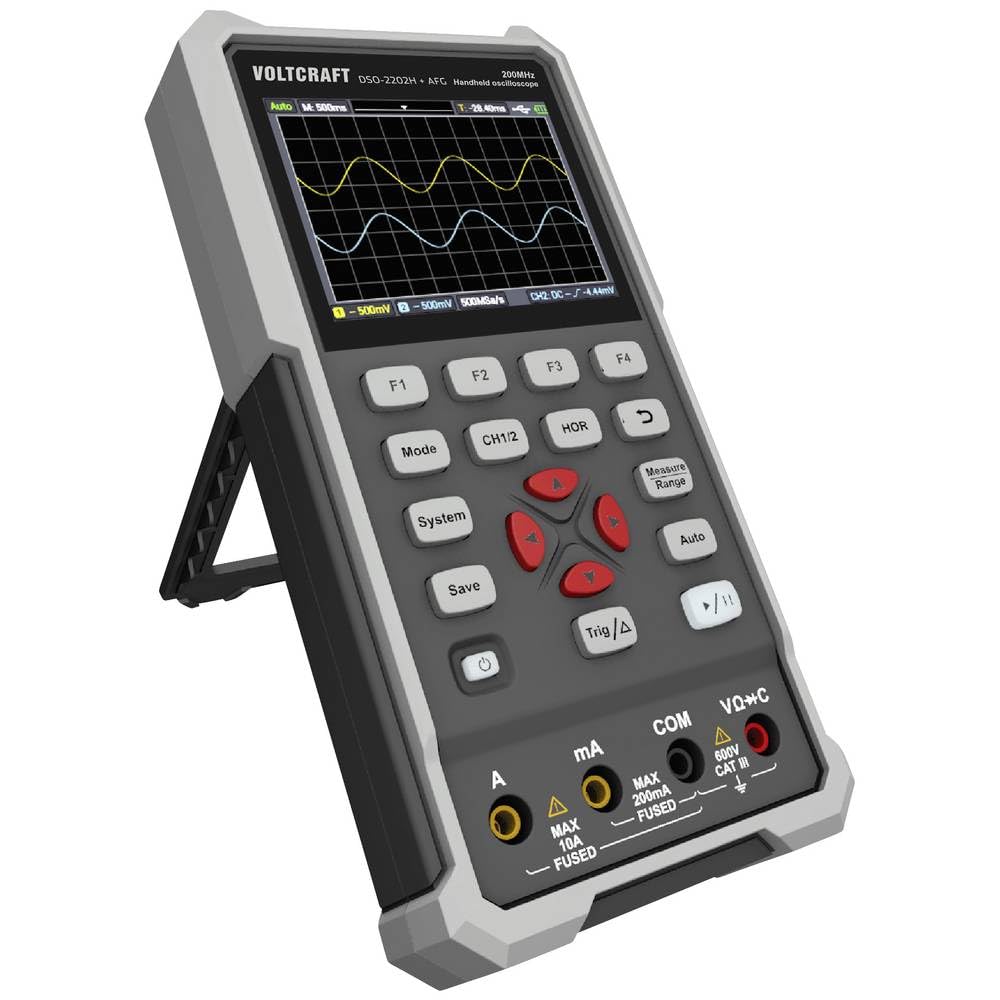
Малюнак 1: Спераду view of the VOLTCRAFT DSO-2202H + AFG Handheld Oscilloscope with connected test probes. The display shows a voltage reading, and the control panel with function buttons and navigation keys is visible below.
Асноўныя характарыстыкі:
- 3-in-1 Oscilloscope, Multimeter, and Waveform Generator
- 3.5-inch (8.89 cm) Color LCD Screen (320 x 240 pixels)
- USB Type-C Interface for connectivity and data storage
- Durable and robust design
4. Настройка
Follow these steps for initial setup of your device.
4.1 Уключэнне/выключэнне
- Каб уключыць прыладу, націсніце і ўтрымлівайце Магутнасць button located on the side/top panel.
- The color LCD screen will illuminate, displaying the startup sequence.
- Каб выключыць харчаванне, націсніце і ўтрымлівайце Магутнасць кнопку яшчэ раз, пакуль прылада не выключыцца.
4.2 Падключэнне зондаў
For oscilloscope functions, connect the oscilloscope probes to the BNC connectors. For multimeter functions, connect the test leads to the appropriate input jacks (VΩ+C, mA, A, COM) at the bottom of the device.
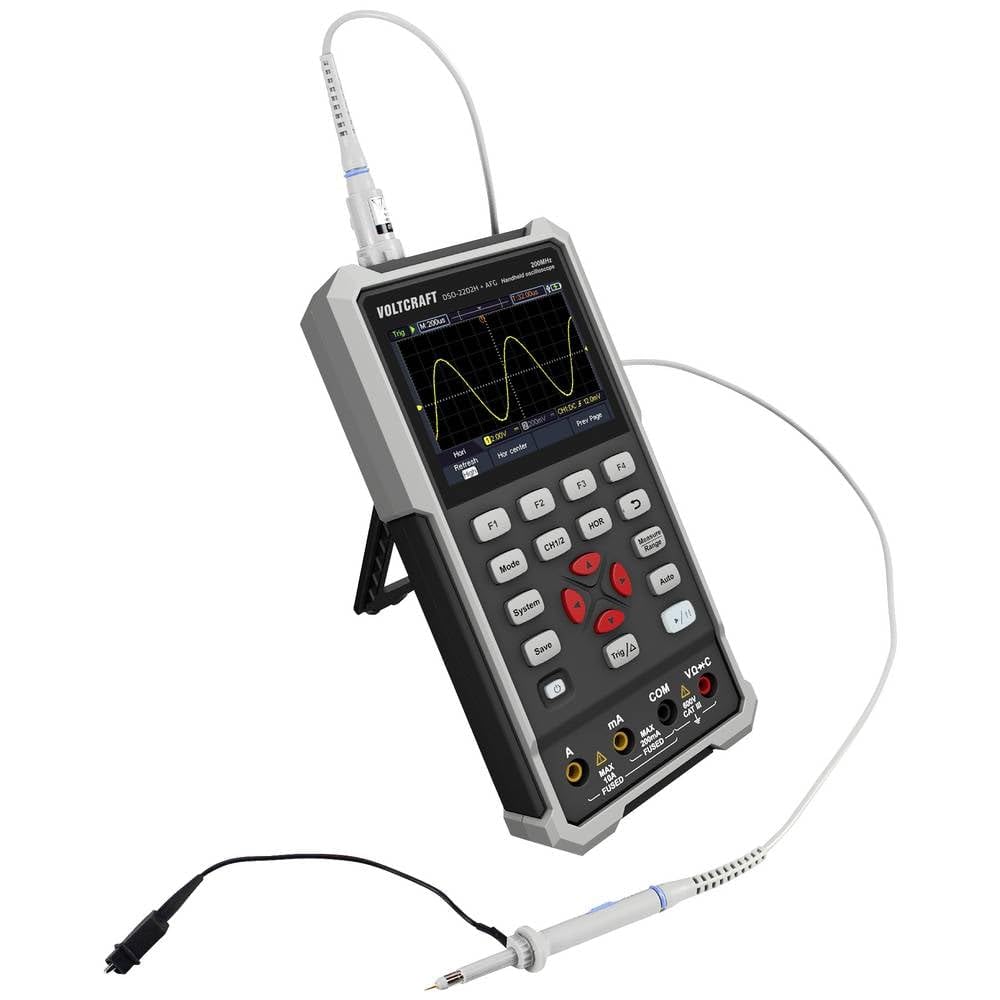
Малюнак 2: бок view of the device showing the kickstand extended for desktop use and an oscilloscope probe connected to the BNC input. The multimeter input jacks are visible at the bottom.
5. Інструкцыя па эксплуатацыі
The DSO-2202H + AFG offers three primary modes of operation: Oscilloscope, Multimeter, and Arbitrary Function Generator.
5.1 Рэжым асцылографа
This mode allows you to visualize and analyze electrical signals. The device features 2 channels and a 200MHz bandwidth.
- Націсніце Рэжым кнопку, каб выбраць рэжым асцылографа.
- Connect the oscilloscope probe(s) to the circuit under test.
- Выкарыстоўвайце CH1/2 button to switch between channels or view абодва.
- Adjust the vertical sensitivity (V/div) and horizontal time base (s/div) using the navigation buttons.
- Выкарыстоўвайце Трыганаметрычны/Δ button to set trigger conditions for stable waveform display.
- The Аўто button can automatically adjust settings for a stable waveform.

Figure 3: The device displaying a waveform in oscilloscope mode. The screen shows voltage and time divisions, indicating a signal measurement.
5.2 Рэжым мультыметра
The multimeter function allows for precise measurements of voltage, current, resistance, capacitance, and continuity.
- Націсніце Рэжым кнопку, каб выбраць рэжым мультыметра.
- Connect the test leads to the appropriate input jacks (e.g., VΩ+C for voltage/resistance/capacitance, A or mA for current, COM for common).
- Select the desired measurement function (e.g., DC Voltagе, AC Voltage, Resistance) using the function buttons (F1-F4) or navigation keys.
- Прачытайце значэнне вымярэння на дысплеі.
5.3 Arbitrary Function Generator (AFG) Mode
The AFG allows you to generate various waveforms for testing circuits.
- Націсніце Рэжым button to select AFG mode.
- Connect the output of the AFG to the circuit requiring a signal input.
- Use the function buttons (F1-F4) and navigation keys to select waveform type (sine, square, triangle, etc.), frequency, ampлітуда і зрушэнне.
- Adjust parameters as needed for your application.
5.4 Захоўванне дадзеных
The USB Type-C port can be used for data storage. Connect the device to a computer using a USB Type-C cable to transfer saved waveforms or measurement data.
6. Тэхнічнае абслугоўванне
Proper maintenance ensures the longevity and accuracy of your device.
- Уборка: Рэгулярна працірайце прыладу мяккай сухой тканінай. Не выкарыстоўвайце абразіўныя ачышчальнікі або растваральнікі.
- захоўванне: Захоўвайце прыладу ў прахалодным, сухім месцы, удалечыні ад прамых сонечных прамянёў і экстрэмальных тэмператур.
- Сыход за батарэяй: If the device has an internal rechargeable battery, ensure it is charged periodically if stored for long periods to maintain battery health.
- Сыход за зондам: Inspect probes and test leads for damage before each use. Replace any damaged accessories immediately.
7. Выпраўленне непаладак
Калі ў вас узніклі праблемы з прыладай, звярніцеся да наступных распаўсюджаных крокаў па ліквідацыі непаладак.
- Прылада не ўключаецца: Ensure the device is charged or connected to a power source. Check the power button for proper engagement.
- Няма адлюстравання: If the device powers on but the screen is blank, try adjusting the display brightness (if available) or restarting the device.
- Няправільныя паказанні: Verify that probes and test leads are correctly connected and not damaged. Ensure the correct measurement mode and range are selected. Calibrate the device if necessary (refer to advanced settings or contact support).
- Нестабільная форма хвалі: In oscilloscope mode, adjust the trigger level, trigger source, and time base settings. Use the Auto button for initial setup.
For persistent issues, contact VOLTCRAFT customer support or your retailer.
8. Тэхнічныя характарыстыкі
| Спецыфікацыя | Каштоўнасць |
|---|---|
| Вытворца | ВАЛТКРАФТ |
| Нумар мадэлі | VC-13438620 (DSO-2202H + AFG) |
| Памеры прадукту (Д х Ш х У) | 17 х 12 х 40 см |
| Вага | 600 грамаў |
| Матэрыял | Пластыкавыя |
| Прапускная здольнасць асцылографа | 200 МГц |
| Каналы | 2-канальны |
| Sample Ацэнка | 1 Гвыб./с |
| Глыбіня памяці | 8 kpts |
| дазвол | 8 біт |
| Дысплей | 3.5-inch (8.89 cm) Color LCD (320 x 240 pixels) |
| Інтэрфейс | USB Type-C |
| Сістэма вымярэнняў | Метрыка |
| Батарэі ўваходзяць у камплект | няма |
| Патрабуюцца батарэі | няма |
9. Гарантыя і падтрымка
For warranty information, please refer to the documentation provided with your purchase or contact your retailer. For technical support, visit the official VOLTCRAFT webсайт або звярніцеся ў іх аддзел абслугоўвання кліентаў.