
1. Уводзіны
The NOYAFA NF-8108-M is a versatile cable and network tester designed for professionals to efficiently measure network cable length, identify open and short circuits, and detect wiring errors in various cable types. This device is suitable for RJ45, Cat5, Cat6, 5E, and 6E cables, providing accurate and reliable results for network installation and maintenance.
2. Асаблівасці прадукту
- Вымярэнне даўжыні кабеля: Accurately measures network cable length and determines the distance to open or short circuits.
- Wiring Error Detection: Checks for wiring errors in 5E, 6E, and coaxial cables, including open circuit, short circuit, jumper wire, and reverse connection.
- Multi-Remote Testing: Capable of testing up to 8 groups of cables sequentially using remote units.
- Партатыўны дызайн: Compact unit with an extended battery life of approximately 50 hours in standby mode.
- Аўтаматычнае адключэнне: Features an automatic time-delay shut-off function to conserve battery power.
- Самакаліброўка: Includes self-checking and automatic compensation for changes in battery capacity or ambient temperature.
- ВК-дысплей: Clear LCD for displaying test results and operational status.
3. Кампаненты прадукту
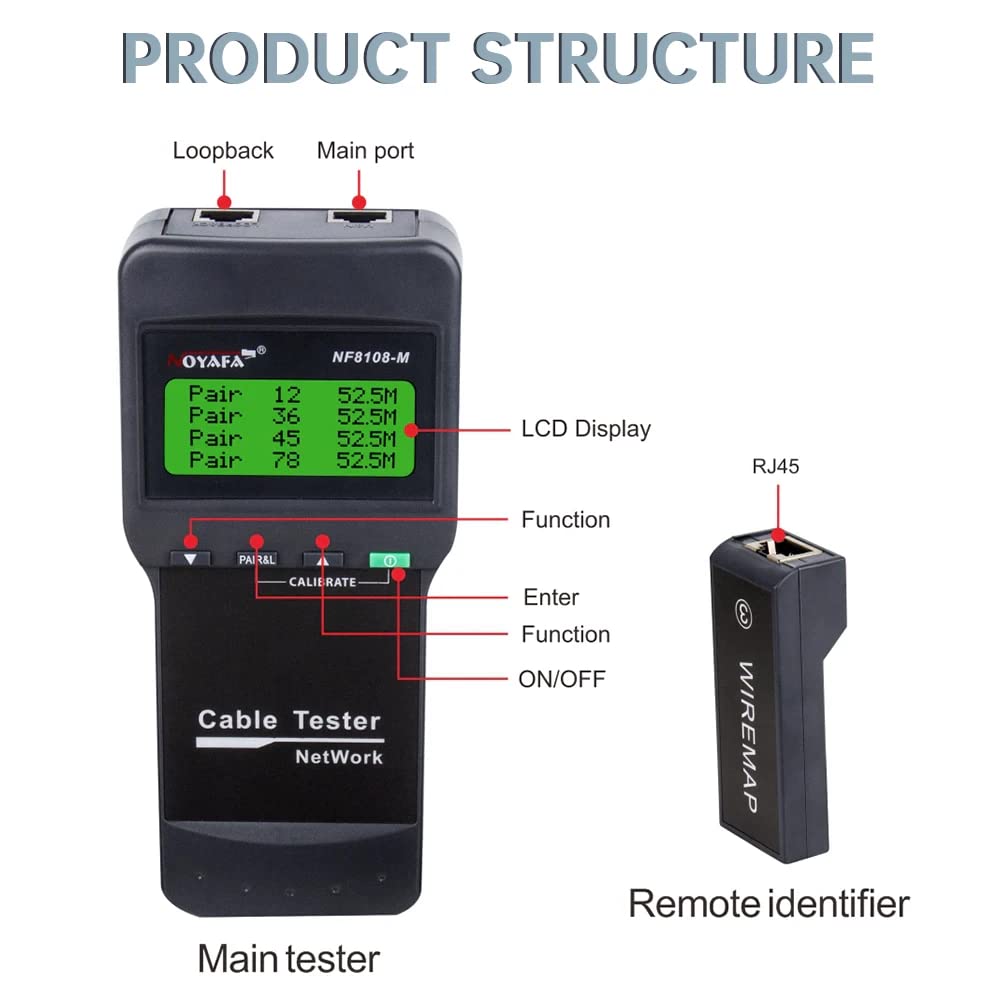
Figure 3.1: Product Structure Overview
This image illustrates the main components of the NF-8108-M tester, including the main unit with its LCD display, function buttons, and ports, alongside a remote identifier. Key labels point to the Loopback port, Main port, LCD Display, Function button, Enter button, and ON/OFF switch on the main tester, and the RJ45 port on the remote identifier.
Асноўны тэстар
- ВК-дысплей: Shows test results, settings, and status.
- Функцыянальныя кнопкі: For navigating menus and selecting test modes.
- Парты RJ45: For connecting network cables.
- Кнопка харчавання: Каб уключыць і выключыць прыладу.
Remote Identifier Units
- Порт RJ45: For connecting the far end of the network cable during testing.
- The NF-8108-M model includes 8 remote units for sequential testing of multiple cables.
4. Настройка
4.1 Устаноўка батарэі
- Locate the battery compartment on the back of the main tester unit.
- Адкрыйце крышку батарэйнага адсека.
- Insert 4 x 1.5V DC batteries (or the included Lithium Ion battery) according to the polarity markings.
- Надзейна зачыніце крышку батарэйнага адсека.
4.2 Першапачатковае ўключэнне
- Каб уключыць прыладу, націсніце кнопку ON/OFF.
- The LCD display will illuminate, indicating the device is ready for use.
- The device performs a self-check upon startup.
5. Інструкцыя па эксплуатацыі

Figure 5.1: Measuring Cable Length
The main tester unit is shown connected to a LAN cable, displaying the length measurement for each wire pair on its LCD screen. This function helps identify the exact length of the cable and the distance to any faults.

Figure 5.2: Cable Continuity Testing
This image depicts the main tester unit connected to a cable, with several remote identifier units laid out. The LCD shows 'WIRE MAP: PASS' and the pinout sequence, indicating successful continuity testing across multiple cable segments or connections.
5.1 Measuring Cable Length
- Connect one end of the network cable to the 'Main port' on the tester.
- If measuring an installed cable, connect the other end to a remote identifier unit. For uninstalled cables, the remote unit may not be necessary for basic length measurement.
- Select the 'Measure Length' function from the menu using the function buttons.
- The LCD will display the length of each wire pair and the total cable length. It will also indicate the distance to any open or short circuits.
5.2 Cable Continuity and Wiring Error Testing
- Connect one end of the network cable to the 'Main port' on the tester.
- Connect the other end of the cable to one of the remote identifier units (e.g., Remote 1).
- Select the 'Wire Map' or 'Continuity Test' function from the menu.
- The LCD will display the wiring sequence (e.g., 1-1, 2-2, etc.).
- 'PASS' indicates correct wiring.
- 'OPEN' indicates a broken wire.
- 'SHORT' indicates two or more wires are touching.
- 'CROSS' or 'REVERSE' indicates incorrect pin assignments.
- To test multiple cables, connect each cable to a different remote identifier (up to 8) and cycle through the remote units using the tester's functions.
6. Тэхніка бяспекі
- Высокі кнtage Папярэджанне: Do not connect the tester to high voltage lines (AC 60V/DC 42V or higher) to prevent damage to the device and potential injury.
- Правільнае абыходжанне: Handle the device with care. Some parts may be sharp; store it in a safe place to avoid injury.
- Correct Port Usage: Always connect cables to the correct ports (RJ45) as indicated on the device.
- Прачытайце кіраўніцтва: Always read and understand the user manual completely before operating the device.
7. Тэхнічныя характарыстыкі
Transmitter (Main Unit)
- LCD Indicator: 53 х 25 мм
- Частата тонаў: 225 Гц
- Max. Distance of Cable Map: 300м
- Макс. Працоўны ток: Менш за 70 мА
- Сумяшчальныя раздымы: RJ45
- Faults Display: ВК-дысплей
- Індыкатар нізкага ўзроўню батарэі: LCD (below 6.5V)
- тtagе абарона: 60 В пераменнага току / 42 В пастаяннага току
- Тып батарэі: 4 x 1.5V DC (or 1 Lithium Ion battery, included)
- Памеры (ДхШхГ): 184 х 84 х 46 мм
Аддалены блок
- Сумяшчальныя раздымы: RJ45
- Number of Remote Units: 8
- Памеры (ДхШхГ): 78 х 33 х 22 мм
Генерал
- Вага прадмета: 500 г
- Памеры прадукту: 15 х 10 х 6 см
- матэрыял: Акрыланітрылбутадыенстырол (АБС)
- Крыніца харчавання: Харчаванне ад батарэі
- Ватtage: 1 ват
- Сістэма вымярэнняў: Метрыка
- Дакладнасць вымярэння: ±1%
- Сертыфікаты: CE, ISO 9001, RoHS
- Тэрмін службы батарэі: Approximately 4 weeks (standby)
- Аперацыйная Voltage (мінімум): 1.5 вольт
- Верхні рэйтынг тэмпературы: 60 градусы па Цэльсіі
8. Тэхнічнае абслугоўванне
- Уборка: Працірайце прыладу мяккай сухой тканінай. Не выкарыстоўвайце абразіўныя ачышчальнікі або растваральнікі.
- захоўванне: Захоўвайце тэстар у прахалодным, сухім месцы, удалечыні ад прамых сонечных прамянёў і экстрэмальных тэмператур.
- Сыход за батарэяй: Калі прылада не будзе выкарыстоўвацца працяглы час, выміце батарэйкі, каб прадухіліць іх уцечку.
- Абарона порта: Keep the RJ45 ports free from dust and debris. Use protective caps if provided.
9. Выпраўленне непаладак
- Прылада не ўключаецца: Праверце ўстаноўку акумулятараў і пераканайцеся, што яны дастаткова зараджаныя. Пры неабходнасці замяніце.
- Inaccurate Length Measurement: Ensure proper connection of the cable to both the main unit and the remote identifier. Verify cable type settings if applicable.
- No Continuity Reading: Check for secure connections at both ends of the cable. Ensure the remote unit is functioning correctly.
- Праблемы з ВК-дысплеем: Калі дысплей цьмяны або мігціць, заменіце батарэйкі.
- Паведамленні пра памылкі: Refer to the specific error code or message displayed on the LCD for guidance. If issues persist, contact customer support.
10. Гарантыя і падтрымка
The NOYAFA NF-8108-M Cable and Network Tester comes with a Гарантыя 1 год з даты пакупкі. Гэтая гарантыя распаўсюджваецца на вытворчыя дэфекты і няспраўнасці пры нармальным выкарыстанні. Калі ласка, захавайце пацвярджэнне пакупкі для прэтэнзій па гарантыі.
For technical support, service, or warranty inquiries, please contact NOYAFA customer service through their official channels or the retailer where the product was purchased.