
Уводзіны
Thank you for choosing the A4 TECH 2DRUMTEK B25 True Wireless Earbuds. These earbuds feature advanced Bluetooth 5.2 technology for stable connectivity, Hybrid Active Noise Cancelling for an immersive audio experience, and an IPX4 rating for water and dust resistance, making them suitable for active lifestyles. The M.O.C.I (Mycelium of Carbon IT) hybrid diaphragm ensures clear highs, balanced mids, and deep bass. This manual provides detailed instructions for setup, operation, maintenance, and troubleshooting to help you get the most out of your device.
Змест пакета
- 2DRUMTEK B25 True Wireless Earbuds (Left and Right)
- Чахол для зарадкі
- Зарадны кабель
- Кіраўніцтва карыстальніка
Прадукт скончаныview
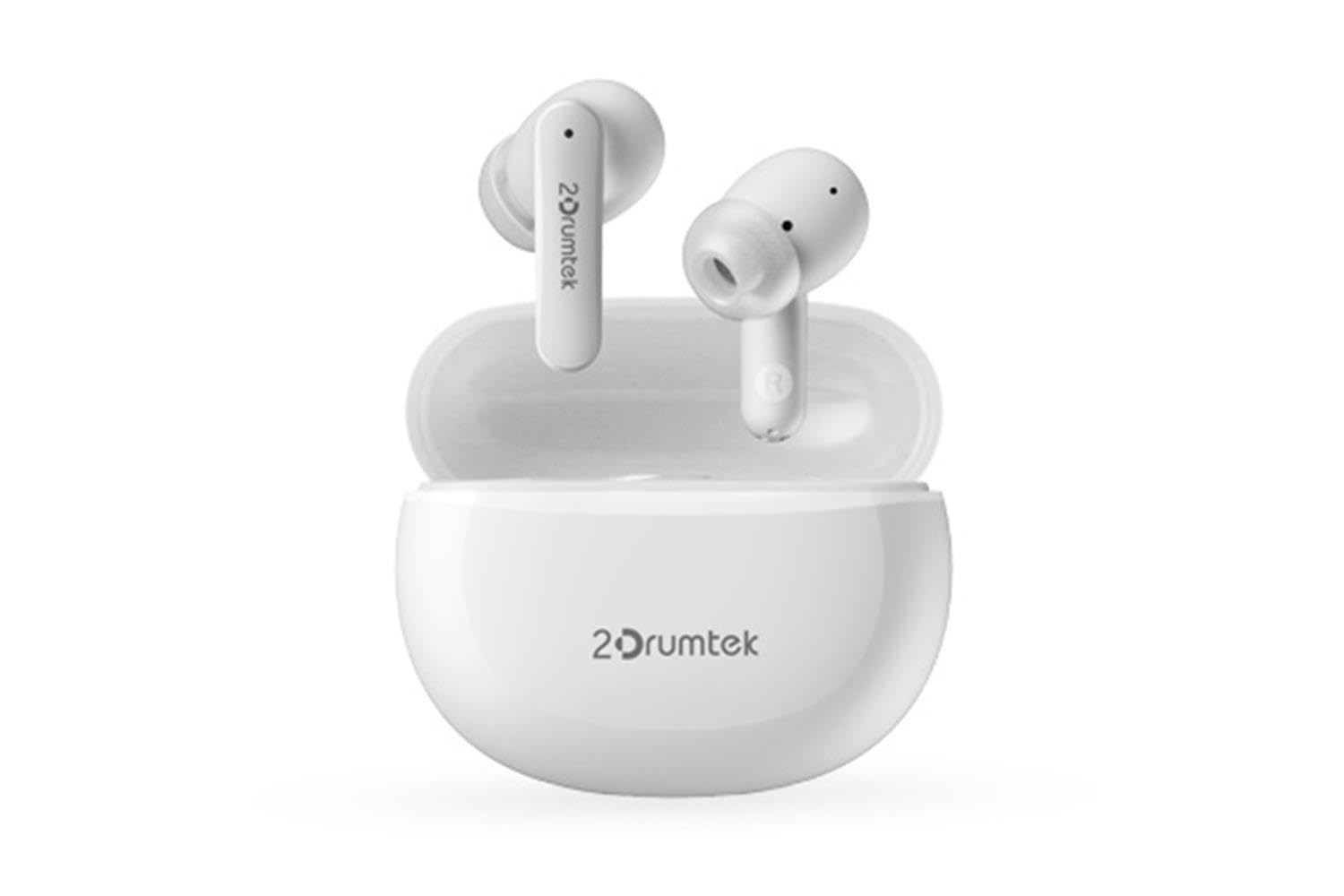
Image: A pair of white A4 TECH 2DRUMTEK B25 True Wireless Earbuds, showing their in-ear design and the '2Drumtek' branding on the stems.
The 2DRUMTEK B25 earbuds feature an ergonomic in-ear design. Each earbud includes a touch control area for various functions, a microphone for calls and voice assistant, and charging contacts at the bottom of the stem. An LED indicator provides status updates for pairing and battery life.
Настройка
1. Зарадка навушнікаў і зараднага футляра
Before first use, fully charge the earbuds and the charging case. Place the earbuds into the charging case. Connect the charging cable to the case and a USB power source. The LED indicators on the case and earbuds will show charging status. A full charge provides up to 5 hours of playback for the earbuds, with an additional 15 hours from the charging case.
2. Першапачатковае спалучэнне
- Адкрыйце зарадны кейс. Навушнікі аўтаматычна пяройдуць у рэжым спалучэння.
- На вашай прыладзе (смартфоне, планшэце, ПК) уключыце Bluetooth.
- Пошук available Bluetooth devices and select "2DRUMTEK B25".
- Once connected, you will hear a confirmation tone, and the LED indicator on the earbuds will change.
3. Automatic Reconnection
After the initial pairing, the earbuds will automatically connect to your previously paired device when you open the charging case and take them out, provided Bluetooth is enabled on your device.
Інструкцыя па эксплуатацыі
1. Уключэнне/выключэнне харчавання
- Уключэнне: Адкрыйце зарадны футляр, і навушнікі-ўкладышы ўключацца аўтаматычна.
- Выключэнне: Змясціце навушнікі назад у зарадны футляр і зачыніце вечка. Яны аўтаматычна выключацца.
2. Music Playback (Touch Control)
- Прайграванне/Паўза: Адзін націск на любы навушнік.
- Наступная песня: Двойчы націсніце на правы навушнік.
- Папярэдняя песня: Двойчы націсніце левы навушнік.
3. Call Management (Touch Control)
- Адказ/завяршэнне выкліку: Адзін націск на любы навушнік.
- Адхіліць выклік: Націсніце і ўтрымлівайце любы навушнік на працягу 2 секунд.
4. Voice Assistant (Touch Control)
Triple tap on either earbud to activate your device's voice assistant (e.g., Siri, Google Assistant, Amazon Alexa).
5. Актыўнае шумапрыглушэнне (ANC)
The earbuds feature Hybrid Active Noise Cancelling. Refer to the specific touch control gestures in the quick start guide for activating and deactivating ANC mode, as these can vary.
Тэхнічнае абслугоўванне
- Уборка: Regularly clean the earbuds, especially the ear tips and charging contacts, with a soft, dry cloth. Avoid using harsh chemicals or abrasive materials.
- захоўванне: Калі навушнікі не выкарыстоўваюцца, захоўвайце іх у зарадным футляры, каб абараніць ад пылу і пашкоджанняў.
- Water and Dust Resistance (IPX4): The earbuds are rated IPX4, meaning they are resistant to splashing water and sweat from any direction. They are suitable for workouts and outdoor activities but should not be submerged in water. Ensure the earbuds are dry before placing them back in the charging case to prevent damage.
- Сыход за батарэяй: Каб падоўжыць тэрмін службы батарэі, не разраджайце навушнікі цалкам часта. Рэгулярна зараджайце іх, нават калі яны не выкарыстоўваюцца пастаянна.
Ліквідацыю непаладак
- Навушнікі не спалучаюцца: Ensure both earbuds are charged. Place them back in the case, close the lid, then open it again to re-enter pairing mode. Check your device's Bluetooth settings and try reconnecting.
- Працуе толькі адзін навушнік: Ensure both earbuds are charged. Try resetting the earbuds by placing them in the case and then taking them out. Re-pair with your device if necessary.
- Няма гуку: Check the volume level on your connected device. Ensure the earbuds are properly paired and connected.
- Праблемы з зарадкай: Пераканайцеся, што зарадны кабель надзейна падключаны як да чахла, так і да крыніцы харчавання. Ачысціце зарадныя кантакты на навушніках і ўнутры чахла.
- Дрэнная якасць гуку: Ensure the earbuds are properly seated in your ears. Try different ear tip sizes for a better seal.
Тэхнічныя характарыстыкі
| Асаблівасць | Апісанне |
|---|---|
| Назва мадэлі | 2DRUMTEK B25 |
| Тэхналогія падлучэння | Бесправадная сувязь (Bluetooth 5.2) |
| Шумапрыглушэнне | Гібрыднае актыўнае падаўленне шуму |
| Узровень воданепранікальнасці | IPX4 (воданепранікальнасць) |
| Размяшчэнне вушэй | Укладышы |
| Тып кіравання | Сэнсарнае кіраванне |
| Сумяшчальныя прылады | PCs, Laptops, Mobile Phones, Tablets, Other Bluetooth Devices |
| Матэрыял | Plastic, Metal, Carbon Fiber |
| Тэрмін службы батарэі (навушнікі) | Да 5 гадзін зарадкі |
| Агульны час прайгравання (з кейсам) | Да 20 гадзін |
Інфармацыя па бяспецы
- Не разбірайце і не мадыфікуйце прадукт.
- Берагчы ад экстрэмальных тэмператур і прамых сонечных прамянёў.
- Avoid exposing the product to fire or high heat.
- Не выкарыстоўвайце навушнікі-ўкладышы на празмерна высокай гучнасці працяглы час, каб пазбегнуць пашкоджання слыху.
- Захоўваць у месцах, недаступных дзецям і хатнім жывёлам.
Гарантыя і падтрымка
This product comes with a standard manufacturer's warranty. For detailed warranty information, please refer to the warranty card included in your package or visit the official A4 TECH website. If you encounter any issues or require technical assistance, please contact A4 TECH customer support through their official channels. Please have your model number (B25) and proof of purchase ready when contacting support.