
ACEZONE H-03-B
ACEZONE A-Spire ANC Gaming Headset User Manual
Model: H-03-B
1. Уводзіны
Thank you for choosing the ACEZONE A-Spire ANC Gaming Headset. This headset is engineered for competitive gaming, offering superior audio clarity and precise in-game sound cue detection. It features advanced hybrid active noise cancellation (ANC) and a noise-cancelling microphone, designed to enhance your gaming and audio experience across multiple platforms.

Figure 1: ACEZONE A-Spire ANC Gaming Headset
2. Асноўныя магчымасці
- Advanced Hybrid ANC: Specifically designed for gaming to effectively cancel out external noise, providing an immersive audio experience.
- Ultra Noise-Cancelling Microphone: Features flip-to-mute functionality and filters out up to 98% of unwanted background noise for crystal-clear communication.
- Лёгкі і зручны дызайн: Weighing only 270 grams with leatherette ear cups, ideal for extended gaming sessions without discomfort.
- Fastest In-Game Response Time: Engineered to deliver crucial in-game audio cues faster than competitor headsets, potentially up to 4 seconds faster.
- Мультыплатформенная сувязь: Supports USB-C and analog (minijack) connections for compatibility with Windows PC, PS4, PS5, Xbox, Switch, Android, iOS, and Mac devices.
- Злучэнне Bluetooth: Allows for wireless connection to mobile devices, iPads, or tablets for music listening and other audio.
- Падтрымка мабільных праграм: Provides sound profiles optimized for competitive esports titles and music listening, allowing for personalized EQ settings.
- Доўгі тэрмін службы батарэі: Прапануе да 35 гадзін бесперапыннага выкарыстання ад адной зарадкі.
- Replaceable Cables: Ensures longevity and adaptability, allowing for easy replacement of damaged or outdated cables.
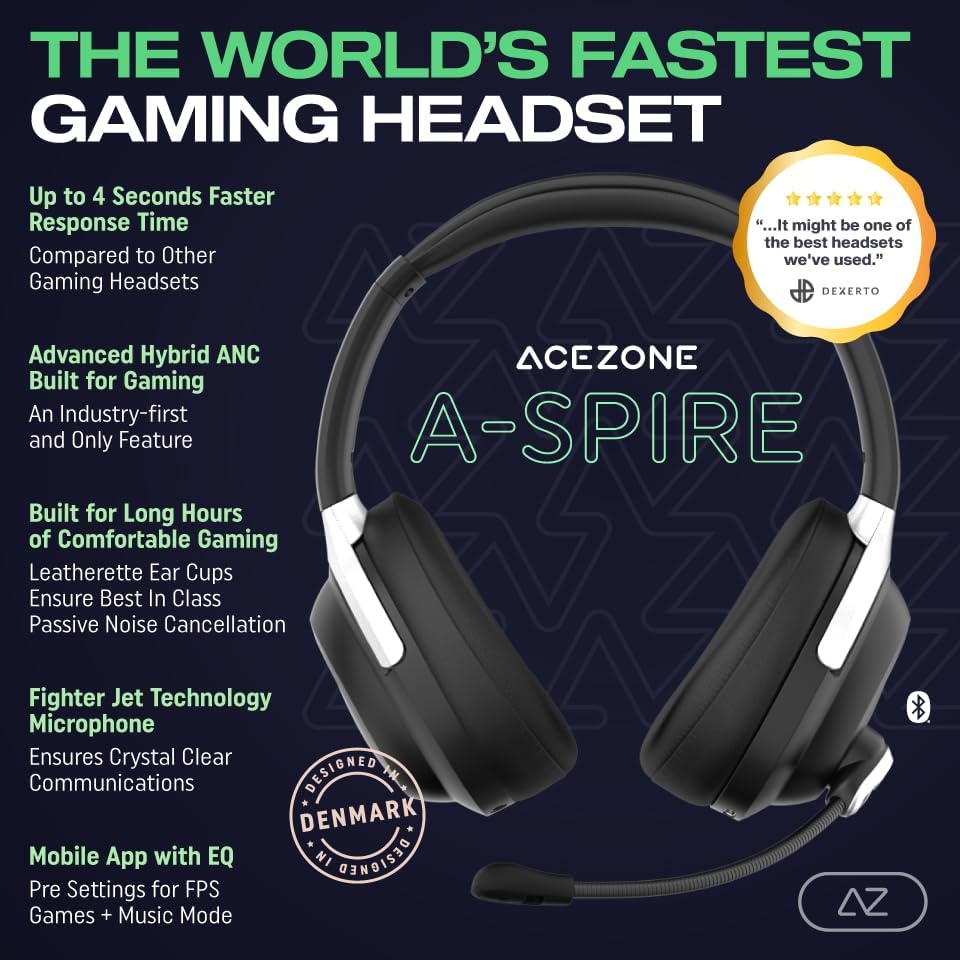
Малюнак 2: Закончанаview of ACEZONE A-Spire key features.
3. Змесціва ўпакоўкі
Калі ласка, пераканайцеся, што ўсе прадметы прысутнічаюць у вашай упакоўцы:
- ACEZONE A-Spire ANC Gaming Headset
- Здымны мікрафон
- Кабель USB-C да USB-A
- 3.5mm Audio Cable (Minijack)
- Кіраўніцтва карыстальніка (гэты дакумент)
- Футляр для пераноскі (калі ўваходзіць у камплект вашай канкрэтнай мадэлі)
4. Настройка
4.1 Першапачатковая плата
Before first use, fully charge your A-Spire headset. Connect the provided USB-C cable to the headset's USB-C port and the other end to a powered USB port (e.g., computer, wall adapter). The LED indicator on the headset will show charging status and turn off when fully charged.
4.2 Падключэнне мікрафона
Insert the detachable microphone into the designated port on the left earcup until it clicks securely into place. Ensure it is fully inserted for optimal performance.
4.3 Wired Connection (USB-C / 3.5mm Analog)
For gaming on PC, PS4, PS5, Xbox, or Switch, use either the USB-C cable or the 3.5mm analog cable. The USB-C connection is recommended for optimal audio performance and microphone functionality on compatible devices.
- USB-C: Connect the USB-C cable from the headset to an available USB-C port on your gaming device or PC.
- 3.5-мм аналагавы: Connect the 3.5mm audio cable from the headset to the 3.5mm audio jack on your controller or device.
4.4 Bluetooth Connection (Mobile/Tablet)
For connecting to mobile devices or tablets for music and calls:
- Пераканайцеся, што гарнітура ўключана.
- Activate Bluetooth pairing mode on the headset (refer to the headset's controls for specific button press).
- On your mobile device, go to Bluetooth settings and select "ACEZONE A-Spire" from the list of available devices.
- Пасля спалучэння гарнітура пакажа паспяховае падключэнне.

Figure 3: The ACEZONE mobile application for headset control.
5. Інструкцыя па эксплуатацыі
5.1 Уключэнне/выключэнне сілкавання
Press and hold the Power button (location specified in quick start guide) for approximately 3 seconds to turn the headset on or off. An audible prompt or LED indicator will confirm the status.
5.2 Актыўнае падаўленне шуму (ANC)
The A-Spire features advanced hybrid ANC. To activate or deactivate ANC, press the dedicated ANC button (location specified in quick start guide). ANC helps to reduce ambient noise, allowing for greater focus during gaming or clearer audio for music.

Figure 4: Internal components related to the Advanced Hybrid ANC system.
5.3 Выкарыстанне мікрафона
The microphone is designed with ultra noise-cancelling technology. To mute the microphone, simply flip it upwards. To unmute, flip it back down. Ensure the microphone is positioned correctly near your mouth for optimal voice pickup and noise reduction.

Figure 5: Illustration of the microphone's noise-cancelling technology.
5.4 Рэгулятар гучнасці
Adjust the volume using the volume wheel or buttons located on the headset (refer to the quick start guide for exact location). Rotate or press to increase or decrease audio output.
5.5 Мабільнае прыкладанне
Download the ACEZONE mobile application from your device's app store. The app allows you to customize sound profiles, adjust equalizer (EQ) settings for gaming or music, and manage other headset features. This provides a personalized audio experience.
Спампаваць у App Store | Атрымаць яго на Google Play
(Note: Replace XXXXXXXXX with actual app ID if available)
5.6 Відэадэманстрацыя
Video 1: Official ACEZONE video demonstrating the ANC gaming headsets in use by professional players. This video highlights the headset's performance in competitive gaming environments.
6. Тэхнічнае абслугоўванне
- Уборка: Для чысткі гарнітуры выкарыстоўвайце мяккую сухую тканіну. Для амбушураў злёгкуamp cloth can be used, but ensure no moisture enters the speaker grilles. Avoid harsh chemicals or abrasive materials.
- захоўванне: Store the headset in its provided carrying case when not in use to protect it from dust and physical damage. Keep it in a cool, dry place away from direct sunlight and extreme temperatures.
- Сыход за кабелем: Handle cables gently. Avoid sharp bends or excessive pulling. The replaceable cables allow for easy replacement if they become damaged.
- Сыход за батарэяй: Каб падоўжыць тэрмін службы батарэі, не разраджайце гарнітуру цалкам часта. Рэгулярна зараджайце яе, нават калі яна не выкарыстоўваецца пастаянна.
7. Выпраўленне непаладак
| праблема | Магчымая прычына | Рашэнне |
|---|---|---|
| Няма гуку з гарнітуры. | Headset not powered on; incorrect connection; low battery; device volume too low. | Ensure headset is powered on and charged. Check cable connections (USB-C/3.5mm) or Bluetooth pairing. Increase volume on headset and connected device. |
| Не працуе мікрафон. | Microphone muted; not properly inserted; incorrect input device selected on PC/console. | Flip microphone down to unmute. Ensure it's fully inserted. Check audio settings on your device to confirm the A-Spire microphone is selected as the input. |
| АНК неэфектыўны. | ANC not activated; improper fit of earcups. | Press the ANC button to activate. Adjust headset fit to ensure earcups create a good seal around your ears. |
| Праблемы са спалучэннем Bluetooth. | Гарнітура не ў рэжыме спалучэння; прылада занадта далёка; перашкоды. | Ensure headset is in Bluetooth pairing mode. Move closer to the device. Turn off other Bluetooth devices to reduce interference. Try unpairing and re-pairing. |
| Кароткі тэрмін службы батарэі. | Frequent ANC use; aging battery. | ANC consumes more power; consider turning it off when not needed. Ensure full charge cycles. If battery life significantly degrades, contact support. |
8. Тэхнічныя характарыстыкі
| Асаблівасць | Дэталь |
|---|---|
| Назва мадэлі | PY-ZZYY-2QDY |
| Нумар мадэлі | H-03-B |
| Марка | АЦЭЗОН |
| Тэхналогія падлучэння | Wired (USB-C, 3.5mm Analog), Bluetooth |
| Тэхналогія бесправадной сувязі | Bluetooth 5.0 |
| Дыяпазон Bluetooth | 10 метраў |
| Кантроль шуму | Гібрыднае шумапрыглушэнне |
| Формаў-фактар | Над вухам |
| Вага прадмета | 0.86 кілаграма (1.9 фунта) |
| Дыяпазон частот | Ад 20 Гц да 20 кГц |
| Тэрмін службы батарэі | 35 гадзін |
| Тып аўдыё драйвера | Дынамічны драйвер |
| Функцыя кабеля | Раздымныя |
| Матэрыял | Plastic (Carrying Case) |
| Колер | Чорны |
9. Гарантыя і падтрымка
ACEZONE products are manufactured to the highest quality standards. For warranty information, technical support, or service inquiries, please refer to the warranty card included with your product or visit the official ACEZONE webсайт. Захоўвайце пацвярджэнне пакупкі для прэтэнзій па гарантыі.
Official ACEZONE Store: https://www.amazon.com/stores/AceZone/page/AF0AB4FD-B5D8-4F19-B629-A24E5251D01E
Ask a question about this manual
Ask about setup, troubleshooting, compatibility, parts, safety, or missing instructions. Manuals+ will review the question and use this page’s manual context to help answer it.