
1. Уводзіны
This manual provides detailed instructions for the installation, operation, and maintenance of your Turing TP-MMD4MV2 Smart Series TwilightVision 4MP IR Zoom Dome IP Camera. This advanced surveillance camera features a 2.7-13.5mm motorized varifocal lens, Smart IR illumination up to 40m (131ft), and TwilightVision technology for optimal image clarity in low-light conditions. It supports up to a 256GB MicroSD card for edge storage and is designed for outdoor use with IP67 weather resistance and IK10 vandal resistance. Please read this manual thoroughly before using the product to ensure proper setup and functionality.
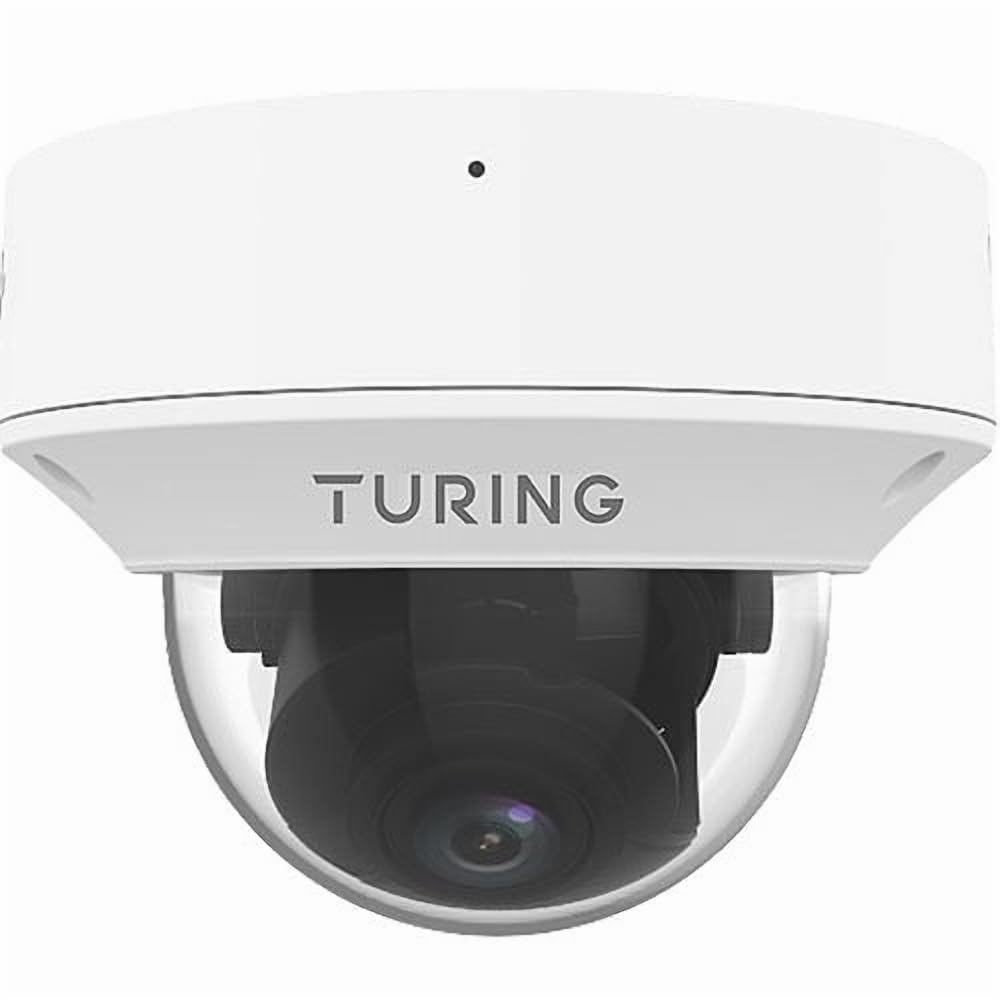
Figure 1: Turing TP-MMD4MV2 Smart Series TwilightVision 4MP IR Zoom Dome IP Camera. This image shows the white dome camera with its protective casing.
2. Інфармацыя па бяспецы
Калі ласка, выконвайце наступныя меры бяспекі, каб пазбегнуць траўмаў або пашкоджання прадукту:
- Электрабяспека: Ensure power supply meets the camera's requirements (DC 12V+/-25% or PoE IEEE 802.3af). Do not overload power outlets.
- Ўстаноўка: Installation should be performed by qualified personnel. Mount the camera securely to prevent it from falling.
- Асяроддзе: Do not expose the camera to extreme temperatures, humidity, or corrosive environments beyond its specified operating conditions.
- Уборка: Use a soft, dry cloth for cleaning. Do not use strong detergents or abrasive materials.
- Разборка: Не спрабуйце разбіраць або мадыфікаваць камеру. Гэта прывядзе да анулявання гарантыі і можа прывесці да пашкоджанняў.
3. Змесціва ўпакоўкі
Праверце, ці ёсць усе прадметы ў вашай упакоўцы:
- Turing TP-MMD4MV2 IP Dome Camera
- Mounting Screw Kit (screws, wall anchors)
- Воданепранікальны раз'ём для кабеля Ethernet
- Свердзел Шаблон
- Кароткае кіраўніцтва карыстальніка / Кіраўніцтва карыстальніка (гэты дакумент)
Note: A MicroSD card and DC 12V power adapter are not included and must be purchased separately if not using Power over Ethernet (PoE).
4. Прадукт скончыўсяview
The TP-MMD4MV2 camera is designed for robust outdoor surveillance, offering high-resolution imaging and intelligent features.
4.1 Асноўныя магчымасці
- Разрозненне 4 мегапікселяў: Captures video at 2688x1520 pixels at 30/25fps.
- Motorized Varifocal Lens: 2.7-13.5mm lens with auto-focus for flexible viewныя вуглы.
- TwilightVision Technology: Enhances image clarity in extremely low-light conditions (down to 0.002 Lux).
- Разумны ВК: Infrared illumination up to 40 meters (131 feet) for clear night vision.
- People and Vehicle Search: Advanced analytics when used with Turing SMART series NVRs and Turing Vision Cloud.
- Убудаваны мікрафон: Для маніторынгу гуку.
- Edge Storage: Supports up to 256GB MicroSD card (not included).
- Трывалы дызайн: IP67 weather-rated and IK10 vandal-resistant.
- Параметры харчавання: Supports Power over Ethernet (PoE) and DC 12V.
4.2 Кампаненты камеры
The camera consists of the main dome unit, a mounting base, and various ports. While a specific diagram is not provided, typical components include:
- Dome Cover: Protective, vandal-resistant casing.
- Модуль камеры: Contains the lens, image sensor, and IR LEDs.
- Порт Ethernet (RJ45): Для падлучэння да сеткі і PoE.
- Уваход пастаяннага току: For optional 12V DC power supply.
- Кнопка скіду: To restore factory default settings.
- Слот для карты MicroSD: Located internally, accessible by removing the dome cover.
Figure 2: Illustrative diagram of camera components (image not available). This diagram would typically show the external parts of the dome camera, including the lens, IR LEDs, and the location of the cable connections and reset button.
5. Настройка і ўстаноўка
Follow these steps for proper installation of your camera.
5.1 Мантаж камеры
- Выберыце месца: Select a suitable outdoor location for wall mounting, ensuring a clear field of view and within range of your network cable. The camera is IP67 and IK10 rated for outdoor use.
- Падрыхтуйце паверхню: Use the provided drill template to mark the screw holes on the mounting surface. Drill pilot holes as indicated.
- Абараніце базу: Attach the camera's mounting base to the surface using the supplied screws and wall anchors.
- Кабельнае кіраванне: Route the Ethernet cable through the mounting base or side cable entry point. Use the waterproof connector for outdoor installations to protect the RJ45 connection.
Figure 3: Illustrative diagram of camera mounting (image not available). This diagram would show the steps for securing the camera base to a wall or ceiling, including drilling and cable routing.
5.2 Уключэнне камеры
Камера можа харчавацца двума спосабамі:
- Харчаванне праз Ethernet (PoE): Connect an Ethernet cable from a PoE-enabled switch or NVR to the camera's RJ45 port. This provides both power and data.
- Адаптар харчавання пастаяннага току 12 В: If PoE is not available, connect a 12V DC power adapter (not included) to the camera's DC power input. Then, connect an Ethernet cable for data transmission.
5.3 Сеткавае падключэнне
Connect the camera to your network via an Ethernet cable. The camera supports Ethernet connectivity. While 'Wireless Communication Technology: Wi-Fi' is listed in some specifications, the primary and most robust connection method for this model is wired Ethernet, especially for PoE. For initial setup, a wired connection is recommended.
5.4 Усталёўка карты MicroSD
To install a MicroSD card for local storage (up to 256GB):
- Выключэнне: Disconnect power from the camera before proceeding.
- Remove Dome Cover: Carefully twist and remove the outer dome cover to access the internal components.
- Устаўце карту MicroSD: Locate the MicroSD card slot and gently insert the card until it clicks into place.
- Replace Dome Cover: Reattach the dome cover, ensuring it is securely sealed to maintain weather resistance.
Figure 4: Illustrative diagram of MicroSD card slot location (image not available). This diagram would show the internal view of the camera with the dome cover removed, highlighting the MicroSD card slot.
6. Кіраванне камерай
Once installed and powered, the camera can be accessed and configured.
6.1 Пачатковы доступ і канфігурацыя
The camera is designed to integrate with Turing SMART NVRs (TR-MR(P) models) and the Turing Vision Cloud for full functionality, including People and Vehicle Search. Refer to your NVR's manual or Turing Vision Cloud documentation for specific integration steps.
- Выяўленне ў сетцы: Use Turing's network discovery tool to find the camera's IP address on your network.
- Web інтэрфейс: Доступ да камеры web інтэрфейс праз a web browser using its IP address. Log in with default credentials (refer to the Quick Start Guide for defaults).
- Змяніць пароль: У мэтах бяспекі адразу ж зменіце пароль па змаўчанні пры першым уваходзе ў сістэму.
- Налады сеткі: Configure IP address, subnet mask, and gateway if necessary.
6.2 Adjusting the Motorized Lens
The 2.7-13.5mm motorized varifocal lens allows you to remotely adjust the zoom and focus:
- Access the camera's live view through the NVR interface or web браўзер.
- Locate the zoom and focus controls.
- Adjust the zoom to achieve the desired field of view. The camera will automatically adjust focus (AF).
6.3 Smart IR and TwilightVision
The camera automatically switches between day and night modes. Smart IR adjusts the intensity of the infrared LEDs to prevent overexposure of close-up objects, ensuring balanced illumination up to 40m (131ft). TwilightVision technology provides enhanced color images in extremely low-light conditions before switching to IR mode.
6.4 Запіс і захоўванне
- Запіс на відэарэгістратар: Configure recording schedules and motion detection settings on your Turing SMART NVR.
- Запіс на карту MicroSD: If a MicroSD card is installed, configure event-triggered or continuous recording via the camera's web інтэрфейс.
- Кадаванне відэа: The camera supports Ultra 265, H.265, H.264, and MJPEG video encoding formats.
6.5 Аўдыяманіторынг
The built-in microphone captures audio. Ensure audio recording is enabled in the camera's settings if desired. Audio compression uses G.711.
7. Тэхнічнае абслугоўванне
Рэгулярнае тэхнічнае абслугоўванне забяспечвае аптымальную прадукцыйнасць і даўгавечнасць вашай камеры.
- Уборка: Periodically clean the dome cover with a soft, damp cloth to remove dust, dirt, or water spots that may affect image quality. Do not use harsh chemicals.
- Абнаўленні прашыўкі: Check the Turing website for the latest firmware updates. Regularly updating firmware can improve performance, add features, and enhance security. Follow the provided instructions carefully during updates.
- Праверка кабеля: Periodically inspect all cables and connections for wear, damage, or corrosion, especially for outdoor installations.
- Праверкі навакольнага асяроддзя: Ensure the camera's environment remains within its operating temperature and humidity ranges.
8. Выпраўленне непаладак
Звярніцеся да наступнай табліцы, каб азнаёміцца з распаўсюджанымі праблемамі і іх рашэннямі.
| праблема | Магчымая прычына | Рашэнне |
|---|---|---|
| Няма харчавання на камеру | Incorrect power supply; PoE not active; loose connection | Verify 12V DC power or PoE source. Check all cable connections. |
| Няма відэаканала | Network issue; incorrect IP address; camera not configured | Check network cable. Ensure camera is powered. Verify IP address and network settings. Restart camera. |
| Дрэнная якасць выявы | Dirty lens/dome; improper focus; low light conditions | Clean the dome cover. Adjust focus via the motorized lens controls. Ensure sufficient lighting or proper IR operation. |
| Немагчыма атрымаць доступ да камеры праз сетку | IP address conflict; firewall blocking; incorrect network settings | Use network discovery tool. Check network configuration. Temporarily disable firewall for testing. Reset camera to factory defaults if necessary. |
| Карта MicroSD не запісвае | Card full; card not formatted; recording schedule not set | Check card status in settings. Format card if needed. Configure recording schedule. Ensure card is properly inserted. |
9. Тэхнічныя характарыстыкі
Detailed technical specifications for the Turing TP-MMD4MV2 camera:
| Асаблівасць | Спецыфікацыя |
|---|---|
| Нумар мадэлі | TP-MMD4MV2 |
| Датчык выявы | 1/3-inch, 4.0 megapixel, progressive scan, CMOS |
| Макс. дазвол | 4MP (2688x1520) at 30/25fps |
| Аб'ектыў | 2.7-13.5mm motorized varifocal, AF automatic focusing |
| Кут View | H: 98.26 - 31.35 degrees; V: 54.76 - 18.55 degrees; D: 127.74 - 36.99 degrees |
| Мінімальная асветленасць | Color: 0.002 Lux (F1.2, AGC on); 0 Lux with IR on |
| Далёкасць ВК | Smart IR up to 40m (131ft) |
| Кампрэсія відэа | Ultra 265, H.265, H.264, MJPEG |
| Сціск аўдыё | G.711 |
| Лічбавае шумапрыглушэнне | 2D and 3D DNR |
| Захоўванне краёў | Карта MicroSD, да 256 ГБ (не ўваходзіць у камплект) |
| Электразабеспячэнне | DC 12V+/-25%, PoE (IEEE 802.3af) |
| Энергаспажыванне | Макс. 7.0 Вт |
| Абарона ад пранікнення | IP67 |
| Супраціў вандалам | ІК10 |
| Памеры (Д х У) | 5.88 х 4.4 цалі (149.35 х 111.76 мм) |
| Вага | 2.03 фунтаў (0.92 кг) |
| Працоўная тэмпература | Refer to manufacturer's official specifications for exact range |
| Пратакол злучэння | Ethernet |
| Supported NVR | Turing SMART NVR: мадэлі TR-MR(P). |
10. Інфармацыя аб гарантыі
Turing products are covered by a limited warranty. For specific warranty terms, conditions, and duration, please refer to the official Turing webсайт або гарантыйны талон, які ўваходзіць у камплект пастаўкі прадукту. Захоўвайце пацвярджэнне пакупкі для прэтэнзій па гарантыі.
11. Падтрымка кліентаў
If you encounter any issues or have questions not covered in this manual, please contact Turing customer support:
- Webсайт: Visit the official Turing webсайт з часта задаванымі пытаннямі, рэсурсамі падтрымкі і кантактнай інфармацыяй.
- Тэхнічная падтрымка: Contact details for technical assistance can typically be found on the manufacturer's webна сайце або ва ўпакоўцы вашага прадукту.
12. Відэа пра прадукты
У дадзеных аб прадукце для ўбудавання ў гэта кіраўніцтва не было прадстаўлена афіцыйных відэа аб прадукце ад прадаўца.