
Supermicro MBD-X10DRG-O+-CPU
Supermicro X10DRG-O+-CPU Motherboard User Manual
Model: MBD-X10DRG-O+-CPU
1. Уводзіны
This user manual provides comprehensive instructions for the installation, configuration, and maintenance of the Supermicro X10DRG-O+-CPU Motherboard. This motherboard is designed for high-performance computing environments, supporting dual Intel Xeon E5-2600 v3/v4 processors and extensive memory configurations.
Please read this manual thoroughly before beginning the installation process to ensure proper setup and operation.
2. Інфармацыя па бяспецы
Always observe the following safety precautions when handling the motherboard and other computer components:
- Перад усталёўкай або зняццем якіх-небудзь кампанентаў пераканайцеся, што блок харчавання адключаны ад разеткі.
- Насіце антыстатычны бранзалет або часцей дакранайцеся да заземленага металічнага прадмета, каб зняць статычную электрычнасць.
- Трымайце матчыну плату за краю, каб не дакранацца да адчувальных кампанентаў.
- Трымайце матчыну плату далей ад вадкасцей і экстрэмальных тэмператур.
- Refer to the safety guidelines provided with other components (CPU, RAM, etc.) for additional precautions.
3. Змесціва ўпакоўкі
Verify that all items are present in the package. If any item is missing or damaged, contact your vendor immediately.
- Supermicro X10DRG-O+-CPU Motherboard
- I / O Shield
- Кабелі SATA (колькасць можа адрознівацца)
- Кароткі даведнік
- CD/DVD з драйверамі (ці спасылка для запампоўкі драйвераў)
4. Кампаноўка мацярынскай платы
Ніжэй надview of the Supermicro X10DRG-O+-CPU Motherboard, highlighting key components and connectors.
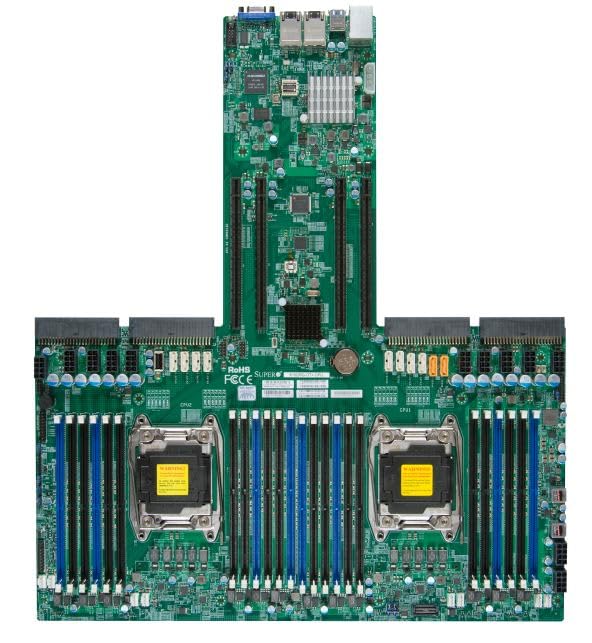
Figure 4.1: Supermicro X10DRG-O+-CPU Motherboard. This image displays the full motherboard, showing the dual CPU sockets, numerous DDR4 DIMM slots, PCIe expansion slots, and various I/O ports and connectors.
Ключавыя кампаненты:
- CPU Sockets (LGA 2011-3): Two sockets for Intel Xeon E5-2600 v3/v4 processors.
- DDR4 DIMM Slots: Multiple slots supporting up to 3072 GB of ECC DDR4 memory.
- Слоты пашырэння PCIe: Various PCIe 3.0 slots for graphics cards, network cards, and other expansion devices.
- Парты SATA: Connectors for SATA 3.0 storage devices.
- Парты USB: USB 2.0 and USB 3.0 headers and rear panel ports.
- Парты LAN: Ethernet ports for network connectivity.
- Раздымы харчавання: ATX 24-pin, 8-pin EPS, and 4-pin power connectors.
5. Настройка
Выканайце наступныя дзеянні для правільнай усталёўкі матчынай платы і яе кампанентаў.
5.1 Усталёўка працэсара
- Open the CPU socket retention levers.
- Акуратна выраўнуйце працэсар з сокетам, пераканаўшыся, што трохкутная адзнака на працэсары супадае з адзнакай на сокеце.
- Акуратна ўстаўце працэсар у раз'ём, не прыціскаючы яго да сілы.
- Close the retention levers to secure the CPU.
- Apply thermal paste and install the CPU cooler according to the cooler manufacturer's instructions.
5.2 Усталёўка памяці (RAM)
- Адкрыйце зашчапкі з абодвух канцоў слота DIMM.
- Сумясціце выемку на модулі памяці DDR4 з ключом у слоце DIMM.
- Шчыльна ўстаўце модуль у слот, пакуль зашчапкі не зафіксуюцца.
- Repeat for all desired memory modules, following the motherboard's memory population guidelines for optimal performance.
5.3 Устаноўка запамінальнай прылады
- Падключыце адзін канец кабеля перадачы дадзеных SATA да порта SATA на матчынай плаце.
- Падключыце другі канец кабеля перадачы дадзеных SATA да жорсткага дыска SATA або SSD-назапашвальніка.
- Падключыце кабель харчавання SATA ад блока харчавання да прылады захоўвання дадзеных.
5.4 Усталёўка платы пашырэння
- Select an appropriate PCIe slot for your expansion card (e.g., GPU, network card).
- Remove the corresponding slot cover from your PC case.
- Сумясціце плату пашырэння са слотам і моцна націсніце, пакуль яна цалкам не ўстане на месца.
- Secure the card with a screw or retention clip to the PC case.
5.5 Падключэнне сілкавання
- Connect the 24-pin ATX power connector from your power supply to the main power header on the motherboard.
- Connect the 8-pin EPS (CPU) power connector(s) to the corresponding headers near the CPU sockets.
- Пераканайцеся, што ўсе кабелі харчавання надзейна падключаны.
5.6 Падключэнне пярэдняй панэлі
Connect the front panel cables (Power LED, HDD LED, Power Switch, Reset Switch, USB, Audio) from your PC case to the corresponding headers on the motherboard. Refer to the motherboard's silkscreen labels for correct pin assignments.
6. Аперацыйная
6.1 Налада BIOS/UEFI
Upon first boot, you may need to enter the BIOS/UEFI setup utility to configure system settings. Typically, you can access this by pressing DEL or F2 during the POST (Power-On Self-Test) sequence. Common settings to configure include boot order, date/time, and enabling/disabling specific features.
6.2 Ўстаноўка драйвера
After installing your operating system, install the necessary drivers for the motherboard's chipsets, LAN, audio, and other integrated components. Drivers can be found on the included driver CD/DVD or downloaded from the Supermicro official webсайт.
6.3 Устаноўка аперацыйнай сістэмы
Insert your operating system installation media (USB drive or DVD) and follow the on-screen prompts to install the OS. Ensure the boot order in BIOS/UEFI is set to prioritize your installation media.
7. Тэхнічнае абслугоўванне
7.1 Ачыстка
Рэгулярна чысціце матчыну плату і кампаненты ад пылу сціснутым паветрам. Перад чысткай пераканайцеся, што сістэма выключана і адключана ад сеткі. Пазбягайце выкарыстання вадкасцей або абразіўных матэрыялаў.
7.2 Абнаўленне прашыўкі
Перыядычна правярайце Supermicro website for updated BIOS/UEFI firmware. Firmware updates can improve stability, performance, and add support for new hardware. Follow the provided instructions carefully when performing a firmware update to avoid system damage.
8. Выпраўленне непаладак
У гэтым раздзеле прадстаўлены рашэнні распаўсюджаных праблем, з якімі вы можаце сутыкнуцца.
| праблема | Магчымая прычына | Рашэнне |
|---|---|---|
| Сістэма не ўключаецца. | Няспраўныя кабелі харчавання, няспраўны блок харчавання, няправільныя падключэнні пярэдняй панэлі. | Check all power connections (24-pin, 8-pin EPS). Verify front panel power switch connection. Test power supply. |
| Няма вываду дысплея. | Incorrectly seated GPU, faulty monitor cable, no integrated graphics. | Reseat the graphics card. Check monitor cable connections. Ensure monitor is on correct input. |
| System beeps repeatedly. | Memory (RAM) issue. | Reseat RAM modules. Try one module at a time. Refer to BIOS beep codes for specific diagnosis. |
| Аперацыйная сістэма не знойдзена. | Incorrect boot order, loose SATA cable, unformatted drive. | Check BIOS/UEFI boot order. Reseat SATA cables. Ensure drive is properly formatted and OS installed. |
9. Тэхнічныя характарыстыкі
Detailed technical specifications for the Supermicro X10DRG-O+-CPU Motherboard.
- Нумар мадэлі: MBD-X10DRG-O+-CPU
- Марка: Supermicro
- Падтрымка працэсара: Dual Intel Xeon E5-2600 v3/v4 Processors (LGA 2011-3)
- Максімальны памер аператыўнай памяці: 3072 GB DDR4 ECC
- Падтрымліваецца стандарт сістэмнай шыны: SATA 3
- Тып раздыма S/PDIF: Аптычны
- Памеры ўпакоўкі: 25 х 25 х 4 цалі
- UPC: 672042176427
- Дата першай даступнасці: 21 чэрвеня 2023 г
10. Гарантыя і падтрымка
Каб атрымаць інфармацыю аб гарантыі і тэхнічнай падтрымцы, звярніцеся да афіцыйнага пастаўшчыка Supermicro. webна сайце або звярніцеся ў месца пакупкі. Захоўвайце пацвярджэнне пакупкі для прэтэнзій па гарантыі.
Афіцыйны прадстаўнік Supermicro Webсайт: www.supermicro.com