
Haltech HT-150900
Кіраўніцтва карыстальніка блока кіравання Haltech Elite 1500
Мадэль: HT-150900
1. Уводзіны
The Haltech Elite 1500 Engine Control Unit (ECU) is an advanced, fully programmable engine management system designed to provide precise control over various engine functions. This manual offers essential information for the proper installation, configuration, and operation of your Elite 1500 ECU, ensuring optimal performance and reliability. Please read this manual thoroughly before attempting any installation or configuration.
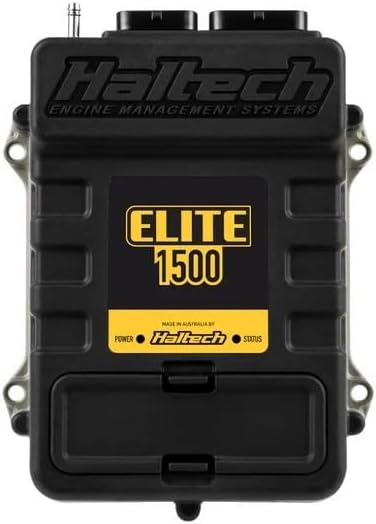
Image 1.1: Haltech Elite 1500 Engine Control Unit. The unit is black with the Haltech logo and 'Elite 1500' prominently displayed in yellow. It features connection ports at the top and mounting points on the sides.
2. Змесціва ўпакоўкі
Праверце, ці ёсць у вашай упакоўцы ўсе пералічаныя ніжэй прадметы:
- Haltech Elite 1500 ECU (HT-150900)
- Кароткае кіраўніцтва
- Associated wiring harness (if included in kit)
- Кабель сувязі USB
- Software CD or download instructions
3. Настройка і ўстаноўка
The Haltech Elite 1500 ECU is designed for a Plug'n'Play installation in many applications, allowing for a relatively quick setup. Refer to the included Quick Start Guide for detailed, step-by-step instructions specific to your vehicle or application.
3.1. Праверкі перад устаноўкай
- Перад пачаткам усталёўкі пераканайцеся, што акумулятар аўтамабіля адключаны.
- Confirm compatibility of the Elite 1500 ECU with your engine and vehicle system.
- Gather all necessary tools and additional components (e.g., sensors, relays) as required by your specific setup.
3.2. Mounting the ECU
Mount the ECU in a secure location away from excessive heat, moisture, and vibration. Ensure adequate airflow around the unit if possible. Use the provided mounting points on the ECU casing.
3.3. Падключэнне правадоў
Connect the wiring harness to the ECU and to the vehicle's engine and electrical system according to the wiring diagrams provided in the comprehensive installation guide. Pay close attention to power, ground, sensor, and injector connections. Incorrect wiring can cause damage to the ECU or vehicle components.
3.4. Ўстаноўка праграмнага забеспячэння
Install the Haltech ESP (Elite Software Programmer) software on your computer. This software is essential for configuring and tuning your Elite 1500 ECU. Follow the on-screen instructions during installation.
4. Інструкцыя па эксплуатацыі
Once the Elite 1500 ECU is physically installed and the software is ready, you can proceed with initial configuration and operation.
4.1. Connecting to the ECU
Connect the ECU to your computer using the supplied USB cable. Ensure the vehicle's ignition is on (but the engine is not necessarily running) to power the ECU. Launch the Haltech ESP software.
4.2. Initial Configuration and Base Map Loading
Within the ESP software, establish communication with the ECU. Load an appropriate base map for your engine configuration. This base map provides a starting point for engine operation. Carefully review and adjust basic settings such as engine type, sensor calibrations, and injector data before attempting to start the engine.
4.3. Engine Start-up and Tuning
After initial configuration, attempt to start the engine. Monitor all engine parameters within the ESP software. Professional tuning is highly recommended to optimize engine performance, fuel efficiency, and reliability. The Elite 1500 offers extensive tuning capabilities for fuel, ignition, boost, and auxiliary functions.
4.4. Data Logging and Monitoring
Utilize the data logging features of the ESP software to record engine parameters during operation. This data is crucial for diagnostics, tuning, and identifying potential issues. Real-time monitoring allows for immediate feedback on engine behavior.
5. Тэхнічнае абслугоўванне
The Haltech Elite 1500 ECU is designed for durability and requires minimal maintenance. However, adhering to the following guidelines can prolong its lifespan and ensure consistent performance:
- Рэгулярны агляд: Periodically check all wiring connections to the ECU for tightness and corrosion.
- Чысціня: Keep the ECU and its connectors free from dirt, dust, and moisture. Use a soft, dry cloth for cleaning. Avoid using harsh chemicals.
- Абнаўленні праграмнага забеспячэння: Regularly check the Haltech website for firmware and software updates for your Elite 1500 ECU. Keeping the software up-to-date ensures access to the latest features and bug fixes.
- Ахова навакольнага асяроддзя: Ensure the ECU remains protected from extreme temperatures, direct water exposure, and excessive vibrations.
6. Выпраўленне непаладак
If you encounter issues with your Elite 1500 ECU, consider the following troubleshooting steps:
- No Communication with ECU:
- Праверце падключэнне USB-кабеля.
- Ensure ECU is powered (ignition on).
- Check device drivers on your computer.
- Паспрабуйце іншы USB-порт або кабель.
- Engine Not Starting/Running Poorly:
- Confirm all wiring connections are correct and secure.
- Check for proper sensor readings in the ESP software.
- Verify that the correct base map is loaded and basic settings are configured.
- Inspect fuel pressure and ignition system components.
- Consult the comprehensive Haltech documentation or a qualified tuner.
- Коды памылак:
Refer to the Haltech ESP software for specific error code definitions and recommended actions. Diagnostic Trouble Codes (DTCs) can provide valuable clues to the source of a problem.
For persistent issues, it is recommended to contact Haltech technical support or a certified Haltech dealer.
7. Тэхнічныя характарыстыкі
| Вытворца | Халтэх |
| Марка | Халтэх |
| мадэль | HT-150900 |
| Вага прадмета | 2.36 фунта |
| Памеры ўпакоўкі | 9.25 х 8.74 х 2.28 цалі |
| Нумар мадэлі тавару | HT-150900 |
| Экстэр'ер | Апрацаваны |
| Нумар дэталі вытворцы | HT-150900 |
| ASIN | B0C95L7RNN |
| Дата першай даступнасці | 23 чэрвеня 2023 г |
| Аўтамабільны тып | Універсальная пасадка |
8. Гарантыя і падтрымка
For detailed warranty information, please refer to the warranty card included with your product or visit the official Haltech website. Haltech provides technical support and resources to assist with installation, configuration, and troubleshooting.
Official Haltech Webсайт: www.haltech.com
It is recommended to register your product on the Haltech website to receive updates and access support resources.
Ask a question about this manual
Ask about setup, troubleshooting, compatibility, parts, safety, or missing instructions. Manuals+ will review the question and use this page’s manual context to help answer it.