Уводзіны
Welcome to the user manual for your new FERMAX Duox Plus Veo 4.3" Monitor. This manual provides essential information for the proper installation, operation, and maintenance of your device. Please read this manual thoroughly before using the product to ensure safe and efficient operation.
Важная інфармацыя па бяспецы
- Электрабяспека: Ensure all electrical connections are made by a qualified professional and comply with local electrical codes. Disconnect power before installation or maintenance.
- Умовы навакольнага асяроддзя: Do not expose the monitor to extreme temperatures, humidity, or direct sunlight. Install in a dry, well-ventilated area.
- Апрацоўка: Handle the monitor with care to avoid damage to the screen or internal components.
- Уборка: Для чысткі выкарыстоўвайце мяккую сухую тканіну. Не выкарыстоўвайце абразіўныя ачышчальнікі або растваральнікі.
- Утылізацыя: Dispose of the product and its components according to local electronic waste regulations.
Змест пакета
Калі ласка, пераканайцеся, што ўсе пералічаныя ніжэй прадметы ўваходзяць у ваш пакет:
- FERMAX Duox Plus Veo 4.3" Monitor Unit
- Мантажны кранштэйн
- Connection Cables (if applicable)
- Шрубы і дзюбелі
- Кіраўніцтва карыстальніка (гэты дакумент)
Асаблівасці прадукту
The FERMAX Duox Plus Veo 4.3" Monitor offers advanced features for your intercom system:
- 4.3-inch color display for clear video communication.
- Аўдыясувязь без рук.
- Intuitive button interface for call answer, door release, and additional functions.
- Sleek, compact design suitable for modern interiors.
- Compatible with Duox Plus digital systems.
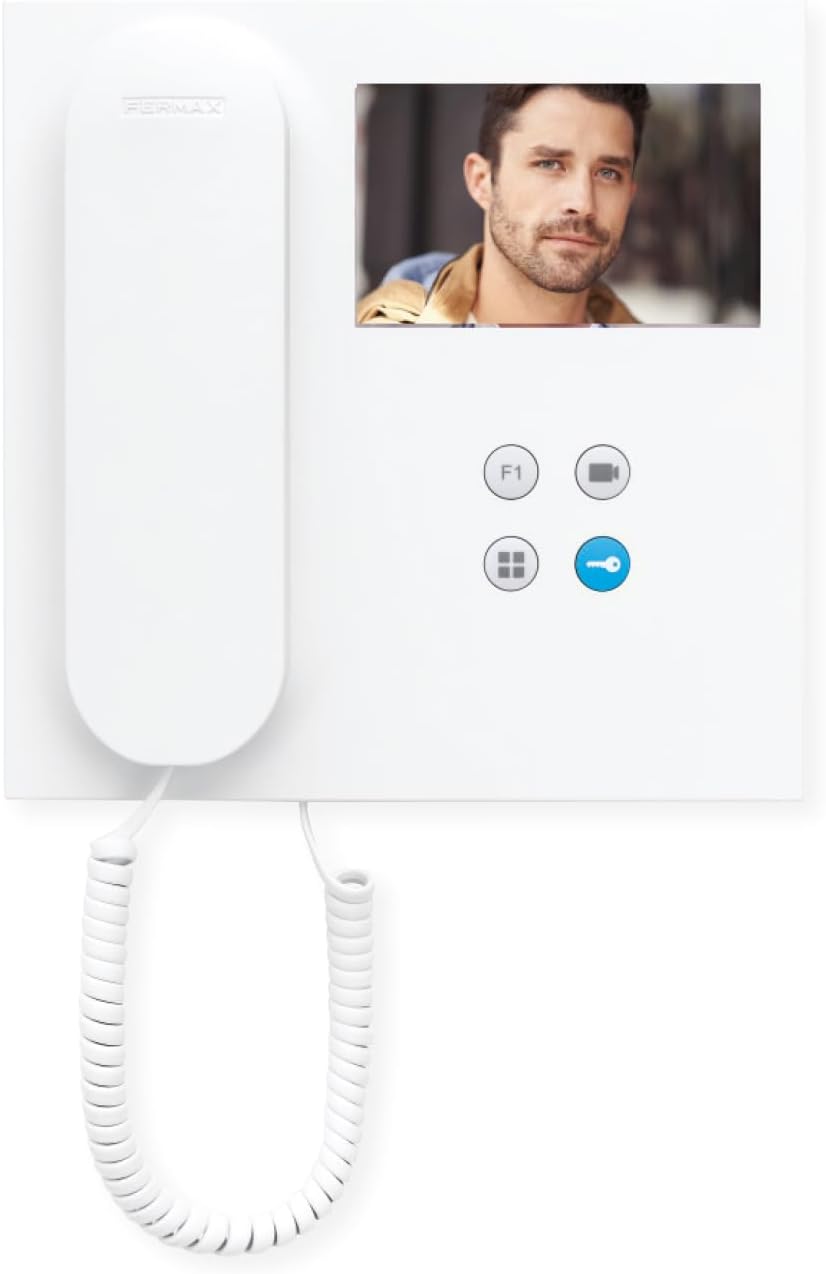
Выява: спераду view of the FERMAX Duox Plus Veo 4.3" Monitor, showing the display, handset, and control buttons.
Настройка і ўстаноўка
1. Мантаж манітора
- Выберыце месцазнаходжанне: Select a suitable indoor location, away from direct heat sources or moisture.
- Адзначыць кропкі свідравання: Выкарыстоўвайце мантажны кранштэйн у якасці шаблону, каб адзначыць кропкі свідравання на сцяне.
- Свідраваць адтуліны: Drill holes at the marked points and insert wall plugs.
- Бяспечны кранштэйн: Прымацуйце мантажны кранштэйн да сцяны з дапамогай прадугледжаных шруб.
2. Падключэнне правадоў
Папярэджанне: Ensure power is disconnected before making any electrical connections. Refer to your system's wiring diagram for specific connections.
- Connect the Duox Plus bus wires (data and power) to the designated terminals on the monitor.
- Connect any additional wires for auxiliary functions (e.g., second door release, panic button) as per your system's requirements.
- Пераканайцеся, што ўсе злучэнні надзейныя і належным чынам ізаляваны.
3. Падключэнне манітора
- Carefully align the monitor with the mounting bracket.
- Slide the monitor onto the bracket until it clicks securely into place.
- Аднавіць сілкаванне сістэмы.
Інструкцыя па эксплуатацыі
Прыём званка
- When a visitor calls from the outdoor panel, the monitor will ring and display the visitor's image.
- Каб адказаць на выклік, націсніце Кнопка адказу (typically indicated by a phone icon).
- Каб завяршыць выклік, націсніце Кнопка завяршэння выкліку (often the same button or a distinct hang-up icon).
Адкрыццё дзвярэй
- During a call, or when monitoring the outdoor panel, press the Кнопка адкрыцця дзвярэй (typically indicated by a key icon) to open the main entrance door.
Monitoring the Outdoor Panel
- каб view the outdoor panel camera without an incoming call, press the Кнопка манітора (often indicated by a camera icon). The display will show the live feed.
Рэгуляванне налад
- Аб'ём: Use the volume controls (if present, or via menu) to adjust the ringtone and conversation volume.
- Яркасць/кантраст: Access the monitor's menu (refer to specific button layout) to adjust display settings.
Тэхнічнае абслугоўванне
- Уборка: Выкарыстоўвайце мяккую тканіну без ворса, каб акуратна працерці экран іasing. Do not use liquid cleaners, aerosols, or abrasive materials.
- агляд: Перыядычна правярайце ўсе кабелі і злучэнні на наяўнасць прыкмет зносу або пашкоджанняў.
- Абнаўленні праграмнага забеспячэння: Калі магчыма, праверце інфармацыю вытворцы website for any firmware updates for your Duox Plus system.
Ліквідацыю непаладак
| праблема | Магчымая прычына | Рашэнне |
|---|---|---|
| Няма выявы на экране. | No power; loose connection; camera issue. | Check power supply. Ensure all cables are securely connected. Verify outdoor panel camera is functioning. |
| No audio during call. | Volume too low; faulty connection; microphone/speaker issue. | Increase volume. Check audio cable connections. Contact support if issue persists. |
| Door release not working. | Incorrect wiring; faulty lock mechanism; system error. | Verify wiring to the door strike. Test the lock mechanism independently. Consult system installer. |
| Monitor not ringing. | Ringtone volume off; system not registered; faulty outdoor panel button. | Check ringtone volume. Ensure monitor is properly registered to the system. Test outdoor panel button. |
If the problem persists after attempting these solutions, please contact FERMAX technical support or your installer.
Тэхнічныя характарыстыкі
| Асаблівасць | Дэталь |
|---|---|
| мадэль | 90b61eff-c290-484c-aba5-73e26c52e3da |
| Памер экрана | 4.3 цалі |
| дазвол | 800 х 600 |
| Суадносіны бакоў | 4:3 |
| Каэфіцыент кантраснасці выявы | 2000:1 |
| Паверхня экрана | Глянцавы |
| Вытворца | ФЕРМАКС |
| Памеры ўпакоўкі | 8.74 х 8.15 х 2.01 цалі |
Гарантыя і падтрымка
FERMAX products are designed for durability and reliability. For information regarding warranty terms and conditions, please refer to the warranty card included with your product or visit the official FERMAX webсайт.
For technical support, installation assistance, or service inquiries, please contact your local FERMAX distributor or visit the support section of the FERMAX webсайт:

Image: FERMAX brand logo with the slogan "Connectivity for All".