Прадукт скончаныview
The Lytmi Fantasy 3 TV Backlight Kit with HDMI 2.1 Sync Box is designed to enhance your viewing experience by synchronizing ambient lighting with your screen content. It supports high resolutions up to 8K 60Hz and 4K 120Hz, making it ideal for gaming and high-definition media. The kit features a high-density LED strip and multiple HDMI 2.1 inputs for versatile connectivity.

Figure 1: Lytmi Fantasy 3 TV Backlight Kit enhancing a gaming experience.
Змест пакета
Праверце наяўнасць усіх кампанентаў у камплекце:
- Lytmi Fantasy 3 Sync Box
- LED Light Strip (for 65-70 inch TVs)
- Кабелі HDMI
- Адаптар сілкавання
- Mounting Clips/Adhesives
- Кіраўніцтва карыстальніка (гэты дакумент)

Figure 2: Included components: Sync Box, LED strip, HDMI cables, power adapter, and mounting accessories.
Інструкцыя па наладзе
- Prepare Your TV: Ensure your TV is clean and dry on the back surface where the LED strip will be applied.
- Attach LED Strip: Carefully peel the adhesive backing from the LED strip and attach it to the back of your TV, following the perimeter. Ensure the strip is positioned correctly for full corner mapping.

Figure 3: Proper placement of the LED strip for full corner mapping.
- Падключыце святлодыёдную стужку да сінхранізацыйнай скрынкі: Plug the LED strip's connector into the designated port on the Lytmi Sync Box.
- Connect HDMI Devices: Connect your HDMI source devices (e.g., gaming console, TV box, PC) to the HDMI IN ports (HDMI 1-4) on the Sync Box.

Figure 4: Connecting various HDMI devices to the Sync Box.
- Connect Sync Box to TV: Connect an HDMI cable from the Sync Box's HDMI OUT (TV) port to an HDMI IN port on your television.
- Уключэнне: Connect the power adapter to the Sync Box and plug it into a power outlet. The Sync Box will power on.
- Download Lytmi App: Download the Lytmi Home App from your smartphone's app store. Follow the in-app instructions to pair your Sync Box via Wi-Fi.
Інструкцыя па эксплуатацыі
Screen Synchronization
The Lytmi Fantasy 3 uses an advanced algorithm to accurately synchronize the backlight colors with the content displayed on your TV screen. This provides an immersive viewing experience, especially for high-performance gaming and fast-paced movies.

Figure 5: The system provides smart and accurate real-time color synchronization.
Кантроль прыкладанняў
Use the Lytmi Home App to control various aspects of your backlight kit, including:
- Уключэнне/выключэнне святла
- Рэгуляванне яркасці
- Changing colors and light effects
- Switching between screen sync mode, music mode, and ambient lighting scenes.
Галасавое кіраванне
The Lytmi Fantasy 3 is compatible with popular voice assistants such as Alexa and Google Assistant. Once integrated, you can use voice commands for basic functions like turning the lights on/off or changing colors.
Тэхнічнае абслугоўванне
To ensure optimal performance and longevity of your Lytmi Fantasy 3 TV Backlight Kit, follow these simple maintenance guidelines:
- Уборка: Gently wipe the Sync Box and LED strip with a soft, dry cloth. Do not use liquid cleaners or abrasive materials.
- Кабельнае кіраванне: Пераканайцеся, што ўсе кабелі акуратна размешчаны і не нацягнуты, каб пазбегнуць пашкоджанняў.
- Вентыляцыя: Ensure the Sync Box has adequate ventilation and is not covered, to prevent overheating.
Ліквідацыю непаладак
If you encounter issues with your Lytmi Fantasy 3 TV Backlight Kit, refer to the following common problems and solutions:
| праблема | Магчымая прычына | Рашэнне |
|---|---|---|
| Lights not turning on or syncing. | Loose connections, power issue, app not connected. | Check all cable connections (HDMI, power, LED strip). Ensure the Sync Box is powered. Verify app connection and settings. |
| Inaccurate color synchronization. | Incorrect LED strip placement, calibration needed. | Ensure the LED strip is correctly installed for full corner mapping. Use the Lytmi app to recalibrate the color detection if available. |
| Lights dim drastically in certain modes. | Software setting, potential hardware issue. | Check brightness settings in the Lytmi app. If the issue persists, contact customer support. |
| HDMI input switching issues. | HDMI cable quality, device compatibility. | Ensure you are using high-quality HDMI 2.1 cables. Try manually switching inputs via the Sync Box button or app. Some TV models may have compatibility nuances (e.g., Dolby Vision with LG TVs). |
Тэхнічныя характарыстыкі
| Асаблівасць | Дэталь |
|---|---|
| мадэль | LDD21 |
| Колер | RGB (чырвоны, зялёны, сіні) |
| Выкарыстанне ў памяшканні/на вуліцы | У памяшканні |
| Асаблівасць | Sync Screen/Music |
| Тып крыніцы святла | святлодыёд |
| Крыніца харчавання | DC |
| Светлы колер | Шматколернасць |
| Тэма | Tv |
| Нагода | indoor ambiance |
| стыль | Сучасны |
| Матэрыял | Полівінілхларыду |
| Тып кантролера | Кіраванне праграмамі, галасавое кіраванне |
| Пратакол злучэння | Bluetooth, WiFi |
| Тэхналогія падлучэння | Wi-Fi |
| Колькасць крыніц святла | 72 |
| тtage | 12 В (пастаянны ток) |
| Ватtage | 36 ват |
| Уключаныя кампаненты | Хаб |
| Вага прадмета | 2.1 фунта |
| Колькасць элементаў | 1 |
| Метад кантролю | дадатак |
| Узровень воданепранікальнасці | Не воданепранікальны |
| Тэхналогія бесправадной сувязі | Wi-Fi |
| Памер | For 65-70 Inch TV(Uncroppable) |
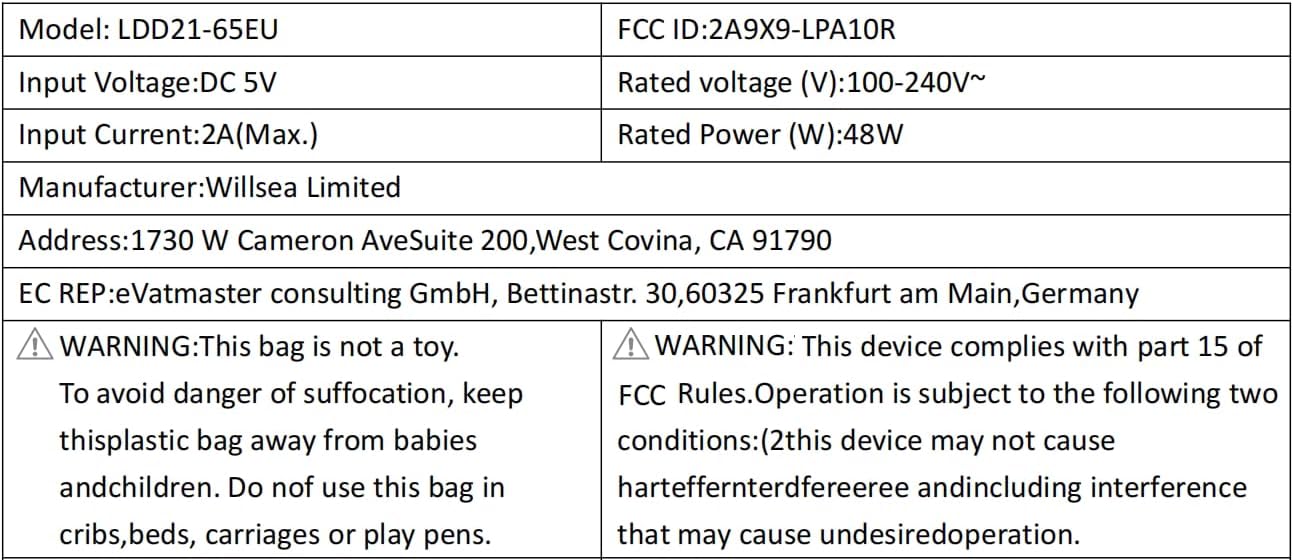
Figure 6: Electrical specifications and compliance details for the LDD21-65EU model.
Гарантыя і падтрымка
Інфармацыя аб гарантыі
The product's warranty description states: няма Please refer to your purchase documentation or retailer for any specific return or exchange policies.
Падтрымка кліентаў
For any questions or assistance regarding your Lytmi product, please contact customer support:
электронная пошта: support@lytmi.co
Lytmi provides 24/7 customer service to assist you.