
1. Уводзіны
This user manual provides essential information for the installation, operation, and maintenance of your Palit GeForce RTX 4060 StormX 8GB graphics card. Please read this manual thoroughly before installing and using the product to ensure proper functionality and to prevent damage.
2. Змесціва ўпакоўкі
Праверце, ці ёсць усе прадметы ў камплекце з вашым прадуктам:
- Palit GeForce RTX 4060 8GB Storm X Graphics Card
- Кіраўніцтва па хуткай усталёўцы (калі ў камплекце)
- Driver CD/DVD (if included, otherwise download latest drivers online)
3. Настройка і ўстаноўка
3.1 Кантрольны спіс перад устаноўкай
- Пераканайцеся, што ваш блок харчавання (БП) адпавядае мінімальным патрабаванням да магутнасціtage requirement (typically 550W or higher for an RTX 4060, check specific PSU recommendations).
- Confirm your motherboard has an available PCI Express x16 slot.
- Turn off your computer and disconnect the power cable before proceeding.
- Зазямліцеся, каб зняць статычную электрычнасць.
3.2 Устаноўка абсталявання
- Адкрыйце корпус кампутара.
- Знайдзіце свабодны слот PCI Express x16 на матчынай плаце.
- Remove any expansion slot covers that obstruct the installation.
- Carefully align the graphics card with the PCIe slot and press it firmly until it is securely seated. Ensure the retention clip locks into place.
- Замацуеце відэакарту да корпуса шрубамі.
- Connect the required 8-pin PCIe power connector from your power supply to the graphics card.
- Зачыніце корпус кампутара.

Малюнак 1: Спераду view of the Palit GeForce RTX 4060 StormX 8GB graphics card, showing the single fan cooling solution.
3.3 Ўстаноўка драйвера
- Падключыце кабель дысплея (HDMI або DisplayPort) ад відэакарты да манітора.
- Уключыце кампутар.
- Once the operating system loads, download the latest NVIDIA drivers for the GeForce RTX 4060 from the official NVIDIA webсайт (www.nvidia.com/drivers).
- Выконвайце інструкцыі на экране, каб завяршыць усталёўку драйвера. Можа спатрэбіцца перазагрузка сістэмы.
4. Кіраванне відэакартай
4.1 Падключэнні дысплея
The Palit GeForce RTX 4060 StormX 8GB supports multiple display outputs. Connect your monitor(s) using the available ports:
- HDMI: For high-definition audio and video output.
- DisplayPort: For high-resolution and high-refresh-rate displays.
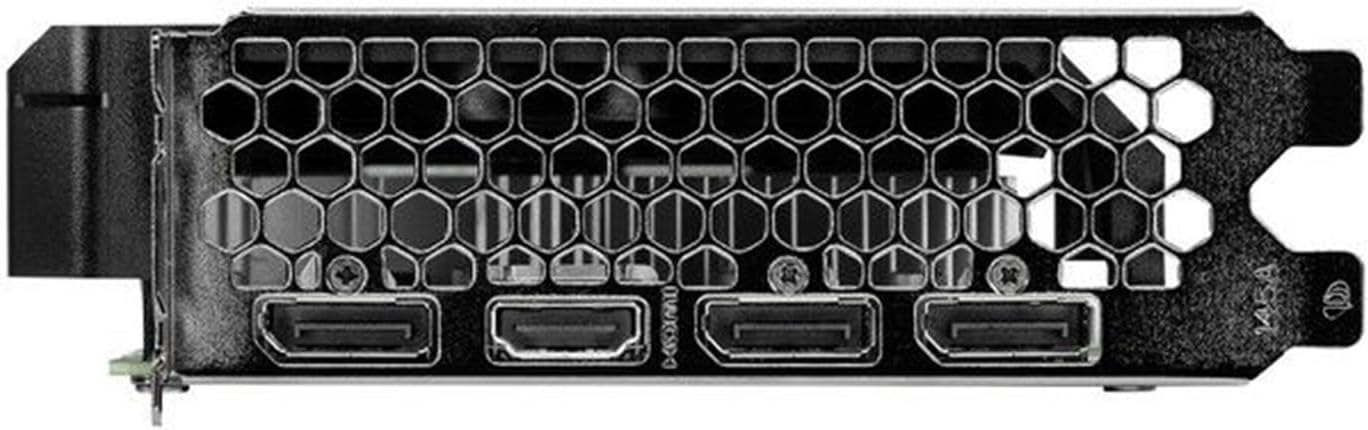
Figure 2: Rear I/O panel showing the HDMI and DisplayPort outputs.
4.2 Асноўныя магчымасці
- NVIDIA G-SYNC: Enjoy smooth, tear-free gameplay at high refresh rates when paired with a compatible G-SYNC monitor.
- DLSS 3 & Ray Tracing: Experience enhanced visual fidelity and performance in supported games with NVIDIA's Deep Learning Super Sampling and real-time ray tracing technologies.
- Тэхналогія 0 дБ: The fan remains off during light workloads, ensuring silent operation. Fan activation occurs only under heavier loads to maintain optimal temperatures.
- ThunderMaster Utility: Palit's proprietary software allows you to monitor GPU status, adjust fan speeds, and manage overclocking settings for personalized performance. Download from the official Palit webсайт.
- Mini-ITX Form Factor Support: With a compact length of 17cm, this card is suitable for small form factor PC builds, offering powerful performance in a space-saving design.
5. Тэхнічнае абслугоўванне
Рэгулярнае тэхнічнае абслугоўванне дапамагае забяспечыць даўгавечнасць і аптымальную прадукцыйнасць вашай відэакарты.
- Выдаленне пылу: Periodically clean dust from the graphics card heatsink and fan using compressed air. Ensure the computer is powered off and unplugged before cleaning. Hold the fan blades gently to prevent over-spinning during cleaning.
- Абнаўленні драйвераў: Keep your graphics drivers updated by regularly checking the official NVIDIA website for the latest versions. Driver updates often include performance improvements, bug fixes, and support for new games.
- Маніторынг тэмпературы: Use monitoring software (like Palit ThunderMaster or other third-party tools) to keep an eye on GPU temperatures, especially during heavy loads, to ensure it operates within safe limits.
6. Выпраўленне непаладак
Калі ў вас узніклі праблемы з відэакартай, звярніцеся да наступных распаўсюджаных крокаў па ліквідацыі непаладак:
- Няма вываду на дысплей:
- Пераканайцеся, што кабель дысплея надзейна падключаны як да відэакарты, так і да манітора.
- Пераканайцеся, што манітор уключаны і настроены на правільную крыніцу ўваходнага сігналу.
- Check if the graphics card is properly seated in the PCIe slot and the 8-pin power connector is firmly attached.
- Паспрабуйце падключыцца да іншага порта вываду дысплея на відэакарце або да іншага манітора, калі такі маецца.
- Праблемы з драйверамі:
- Perform a clean installation of the latest drivers from the NVIDIA website. Use the 'Custom' installation option and select 'Perform a clean installation'.
- If issues persist, try rolling back to a previous stable driver version.
- Poor Performance/Crashes:
- Ensure your system meets the minimum requirements for the applications or games you are running.
- Monitor GPU temperatures to rule out overheating.
- Праверце наяўнасць фонавых праграм, якія спажываюць сістэмныя рэсурсы.
- Verify your power supply unit is sufficient and providing stable power.
- Шум вентылятара:
- Ensure no cables or obstructions are interfering with the fan blades.
- Clean any dust buildup on the fan and heatsink.
- Use the ThunderMaster utility to adjust fan curves if desired, but avoid setting fan speeds too low under load.
If these steps do not resolve your issue, please contact Palit customer support or your retailer for further assistance.
7. Тэхнічныя характарыстыкі
| Асаблівасць | Спецыфікацыя |
|---|---|
| Графічны працэсар | NVIDIA GeForce RTX 4060 |
| Ядра CUDA | 3072 |
| Павялічыць гадзіннік | 2460 МГц |
| Памер памяці | 8 ГБ GDDR6 |
| Інтэрфейс памяці | 128-бітны |
| Хуткасць памяці | 17 Гбіт/с |
| Тып аўтобуса | PCI Express 4.0 x16 |
| Выхады дысплея | 1x HDMI, 3x DisplayPort |
| Максімальнае лічбавае разрозненне | 8K Ultra HD |
| Раз'ём харчавання | 1x 8-кантактны |
| TDP | 115 Вт |
| Астуджэнне | Active (Single Fan) |
| Памеры (ДхШхВ) | 12.6 x 7.09 x 2.36 цалі (прыблізна 320 x 180 x 60 мм) |
| Нумар мадэлі тавару | NE64060019P1-1070F |
8. Гарантыя і падтрымка
Palit products are manufactured to the highest quality standards. This product is covered by a limited warranty provided by Palit or your retailer. Please refer to the warranty information provided with your purchase or visit the official Palit webсайт для падрабязных умоў.
For technical support, driver downloads, or further assistance, please visit the official Palit webсайт на www.palit.com or contact your local retailer.