
Alienware AW520H
Кіраўніцтва карыстальніка правадной гульнявой гарнітуры Alienware AW520H
Мадэль: AW520H
Уводзіны
This manual provides instructions for the Alienware AW520H Wired Gaming Headset. It covers setup, operation, maintenance, and troubleshooting to ensure optimal performance and longevity of your device.
The Alienware AW520H headset is designed to deliver precision audio with Hi-Res certified drivers and Dolby Atmos spatial audio support, integrated into a comfortable and adjustable design.
Што ў скрынцы
Праверце наяўнасць усіх кампанентаў у камплекце:
- Alienware AW520H Wired Gaming Headset
- Дакументацыя (кіраўніцтва карыстальніка, гарантыйная інфармацыя)
Прадукт скончаныview
Familiarize yourself with the key components and features of your Alienware AW520H headset.
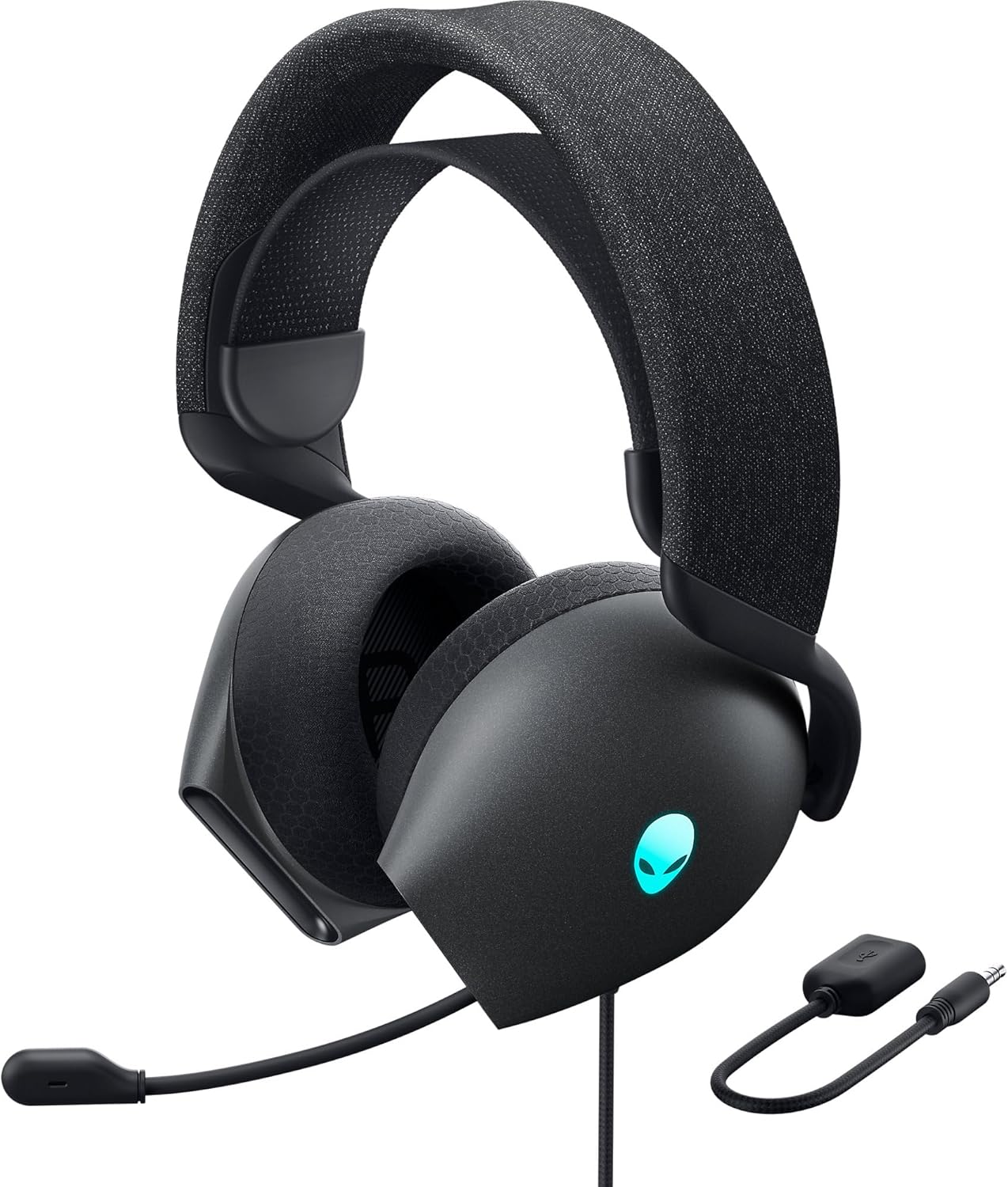

Асноўныя характарыстыкі:
- Hi-Res Certified Drivers: Delivers clear and rich sound across a wide frequency range.
- Dolby Atmos Spatial Audio: Provides precise positional audio for an immersive experience.
- AI-Driven Noise Cancellation Microphone: Retractable boom mic focuses on your voice, reducing ambient noise.
- Зручны дызайн: Features soft memory foam ear pads with breathable fabric and an adjustable suspension headband for extended wear.
- RGB-падсветка AlienFX: Customizable RGB lighting on the earcups, controllable via Alienware Command Center.
- Універсальнае падключэнне: Supports both USB and 3.5mm connections for broad compatibility.
Настройка
Follow these steps to set up your Alienware AW520H headset.
1. Падключэнне гарнітуры
The AW520H offers flexible connectivity options:
- 3.5 мм аўдыяраз'ём: Connect the 3.5mm cable directly to your PC, gaming console controller, or any other compatible device with a 3.5mm audio port. This provides basic audio and microphone functionality.
- USB-злучэнне: For full functionality, including Dolby Atmos spatial audio and AlienFX RGB lighting customization, connect the headset via USB to your PC. This typically involves using a 3.5mm to USB adapter if your PC does not have a combined audio jack.


2. Software Installation (Optional, for full features)
To unlock the full potential of your headset, including Dolby Atmos and AlienFX RGB lighting customization, install the Alienware Command Center software on your PC. This software allows for personalized audio profileі светлавыя эфекты.
- Download the latest version of Alienware Command Center from the official Alienware support webсайт.
- Выконвайце інструкцыі на экране, каб завяршыць усталёўку.
- Connect your headset via USB to ensure it is recognized by the software.
Інструкцыя па эксплуатацыі
аўдыё Controls
The headset features integrated controls for convenient audio management:
- Кола гучнасці: Located on the earcup, rotate the wheel to increase or decrease the audio volume.
- Кнопка адключэння мікрафона: Press the button on the earcup to mute or unmute the microphone.

Выкарыстанне мікрафона
The AW520H features an AI-driven noise-canceling retractable boom microphone:
- Падоўжыць/Уцягнуць: Gently pull the microphone boom out from the earcup to extend it for use. Push it back into the earcup to retract it when not needed.
- пазіцыянаванне: For optimal voice clarity, position the microphone approximately 1-2 inches from your mouth.
- Падаўленне шуму: The AI-driven noise cancellation automatically works to filter out ambient sounds, focusing on your voice.

Рэгуляванне для камфорту
The headset is designed for comfort during long gaming sessions:
- Suspension Headband: Slide the suspension headband up or down to find the ideal fit for your head size.
- Earcup Rotation: The earcups can slightly pivot to conform to the shape of your ears.
- Memory Foam Ear Pads: The soft memory foam ear pads with breathable fabric provide cushioning and ventilation.

RGB-падсветка AlienFX
Customize the RGB lighting on your headset using the Alienware Command Center software:
- Адкрыйце камандны цэнтр Alienware.
- Navigate to the lighting settings for your AW520H headset.
- Select desired colors, effects, and brightness levels.
- Ensure the headset is connected via USB for lighting customization.
Тэхнічнае абслугоўванне
Правільнае абслугоўванне гарантуе даўгавечнасць і прадукцыйнасць вашай гарнітуры.
- Уборка: Выкарыстоўвайце мяккую сухую тканіну, каб выцерці амбушуры і агалоўе. Для ўстойлівага бруду злёгкуamp можна выкарыстоўваць тканіну, але пазбягайце празмернай вільгаці. Не выкарыстоўвайце агрэсіўныя хімікаты або абразіўныя ачышчальнікі.
- захоўванне: Store the headset in a clean, dry place away from extreme temperatures and direct sunlight. Retract the microphone when not in use to protect it.
- Сыход за кабелем: Avoid sharp bends or kinks in the audio cable. Do not pull on the cable to disconnect the headset.
- Амбушюры: The ear pads are made of breathable fabric and memory foam. While durable, they are not designed for frequent removal. If replacement is needed, consult Alienware support.
Ліквідацыю непаладак
If you encounter issues with your Alienware AW520H headset, refer to the following common solutions:
Няма гуку або нізкі гук
- Праверце злучэнні: Ensure the 3.5mm cable or USB connection is securely plugged into both the headset and your device.
- Узроўні гучнасці: Verify that the volume wheel on the headset is turned up. Check the audio output settings on your PC or console to ensure the headset is selected as the default output device and volume is not muted.
- Праграмнае забеспячэнне/драйверы: If connected via USB, ensure Alienware Command Center is installed and updated. Check your operating system's sound settings for driver issues.
- Тэст на іншай прыладзе: Connect the headset to a different device (e.g., smartphone, another PC) to determine if the issue is with the headset or the original device.
Мікрафон не працуе
- Праверце кнопку адключэння гуку: Пераканайцеся, што кнопка адключэння мікрафона на гарнітуры не актываваная.
- Размяшчэнне мікрафона: Verify the microphone boom is fully extended and positioned correctly.
- Налады ўводу: Check your PC or console's sound input settings to ensure the headset microphone is selected as the default input device. Adjust microphone volume levels.
- Налады прыкладання: Some applications (e.g., Discord, Zoom) have their own microphone settings. Verify the correct microphone is selected within these applications.
- Праграмнае забеспячэнне/драйверы: If connected via USB, ensure Alienware Command Center is installed and updated.
AlienFX RGB Lighting Not Working
- USB-злучэнне: Ensure the headset is connected via USB to your PC. RGB lighting functionality requires a USB connection.
- Камандны цэнтр Alienware: Verify that Alienware Command Center is installed and running. Check the lighting settings within the software for the headset.
- Абнаўленне праграмнага забеспячэння: Ensure Alienware Command Center and headset firmware are up to date.
Тэхнічныя характарыстыкі
| Асаблівасць | Дэталь |
|---|---|
| Назва мадэлі | AW520H |
| Тэхналогія падлучэння | Wired (USB, 3.5 mm Jack) |
| Тып аўдыё драйвера | Дынамічны драйвер |
| АЧХ | 40 KHz (40,000 Hz) |
| Імпеданс | 32 Ом |
| Кантроль шуму | Active Noise Cancellation (AI-driven for mic) |
| Мікрафон | Retractable, Unidirectional |
| Элементы кіравання | Volume Control, Microphone Mute (On-headset) |
| Размяшчэнне вушэй | Над вухам |
| Формаў-фактар | На вуха |
| Матэрыял | Memory foam, breathable fabric |
| Колер | Цёмны бок Месяца |
| Памеры прадукту | 7.28 х 4.35 х 8.46 цалі |
| Вага прадмета | 11.8 унцыі |
| Вытворца | Dell |
| Сумяшчальныя прылады | Windows, wired devices |
Гарантыя і падтрымка
For warranty information and technical support, please refer to the documentation included with your product or visit the official Alienware support webсайт.
вытворца: Dell
Нумар мадэлі: AW520H
Дата першай даступнасці: 30 чэрвеня 2023 г
For further assistance, please contact Alienware customer support through their official channels.