
THOMSON 50UA5S13
Кіраўніцтва карыстальніка для 50-цалевага 4K UHD Smart Android TV THOMSON 50UA5S13
1. Уводзіны
Welcome to the user manual for your new THOMSON 50UA5S13 50-inch 4K UHD Smart Android TV. This manual provides essential information for setting up, operating, and maintaining your television. Please read it thoroughly to ensure optimal performance and safe use of your device.
Your THOMSON TV offers a stunning 4K UHD display, providing four times the detail of Full HD. It features the Android TV operating system, granting access to a vast array of applications, intelligent voice control via Google Assistant, and seamless content streaming with Chromecast built-in. Enjoy immersive audio with Dolby Audio technology and versatile content reception through its integrated triple tuner (DTT, cable, or satellite).

Малюнак 1: Спераду view of the THOMSON 50UA5S13 4K UHD Smart Android TV displaying various streaming app icons.
2. Інфармацыя па бяспецы
Before operating your television, please read all safety instructions carefully. Keep this manual for future reference.
- крыніца харчавання: Пераканайцеся, што тэлевізар падключаны да разеткі з патрэбнай гучнасцюtage, як паказана на этыкетцы прадукту.
- Вентыляцыя: Не блакуйце вентыляцыйныя адтуліны. Пакіньце дастатковую прастору вакол тэлевізара для належнай цыркуляцыі паветра і прадухілення перагрэву.
- Размяшчэнне: Размясціце тэлевізар на ўстойлівай, роўнай паверхні. Пазбягайце размяшчэння яго пад прамымі сонечнымі прамянямі, побач з крыніцамі цяпла або ў месцах з высокай вільготнасцю або пылам.
- Вада і вільгаць: Не падвяргайце тэлевізар уздзеянню дажджу або вільгаці. Не стаўце на тэлевізар прадметы, напоўненыя вадкасцямі, напрыклад, вазы.
- Уборка: Адключыце тэлевізар ад сеткі перад чысткай. Выкарыстоўвайце мяккую сухую тканіну. Не выкарыстоўвайце вадкія або аэразольныя ачышчальнікі.
- Абслугоўванне: Не спрабуйце абслугоўваць тэлевізар самастойна. Звяртайцеся па любыя тэхнічныя работы да кваліфікаванага персаналу.
3. Змесціва ўпакоўкі
Праверце наяўнасць усіх прадметаў у камплекце:
- THOMSON 50UA5S13 50-inch 4K UHD Smart Android TV
- Remote Control (Premium backlit)
- Сілавы кабель
- Падстаўка для тэлевізара (2 штукі) і шрубы
- Гарантыйны талон
- Кароткае кіраўніцтва карыстальніка (можа быць уключана асобна)
4. Фізічная ўстаноўка
4.1 Мацаванне падстаўкі для тэлевізара
- Асцярожна пакладзеце тэлевізар экранам уніз на мяккую чыстую паверхню, каб пазбегнуць пашкоджання экрана.
- Сумясціце дэталі падстаўкі з адпаведнымі пазы ў ніжняй частцы тэлевізара.
- Замацуйце падстаўкі з дапамогай прадугледжаных шруб. Пераканайцеся, што яны надзейна зацягнуты.
4.2 Насценны мантаж (дадаткова)
This TV supports VESA wall mounts with a 200x200 pattern. A wall mount bracket is not included and must be purchased separately. Follow the instructions provided with your wall mount bracket for proper installation. Ensure the wall can support the weight of the TV and the mount.
4.3 Памеры і размяшчэнне
Consider the TV's dimensions for optimal placement in your viewінг вобласці.

Figure 2: Diagram showing the dimensions of the THOMSON 50UA5S13 TV: 112 cm width, 69 cm height (with stand), 26 cm depth (with stand).
5. Сувязі
Connect your TV to various external devices using the ports located on the back and side panels.

Figure 3: Illustration of the back panel ports including HDMI, LAN, USB, Audio Out, Satellite, Antenna, AV In, and Common Interface.
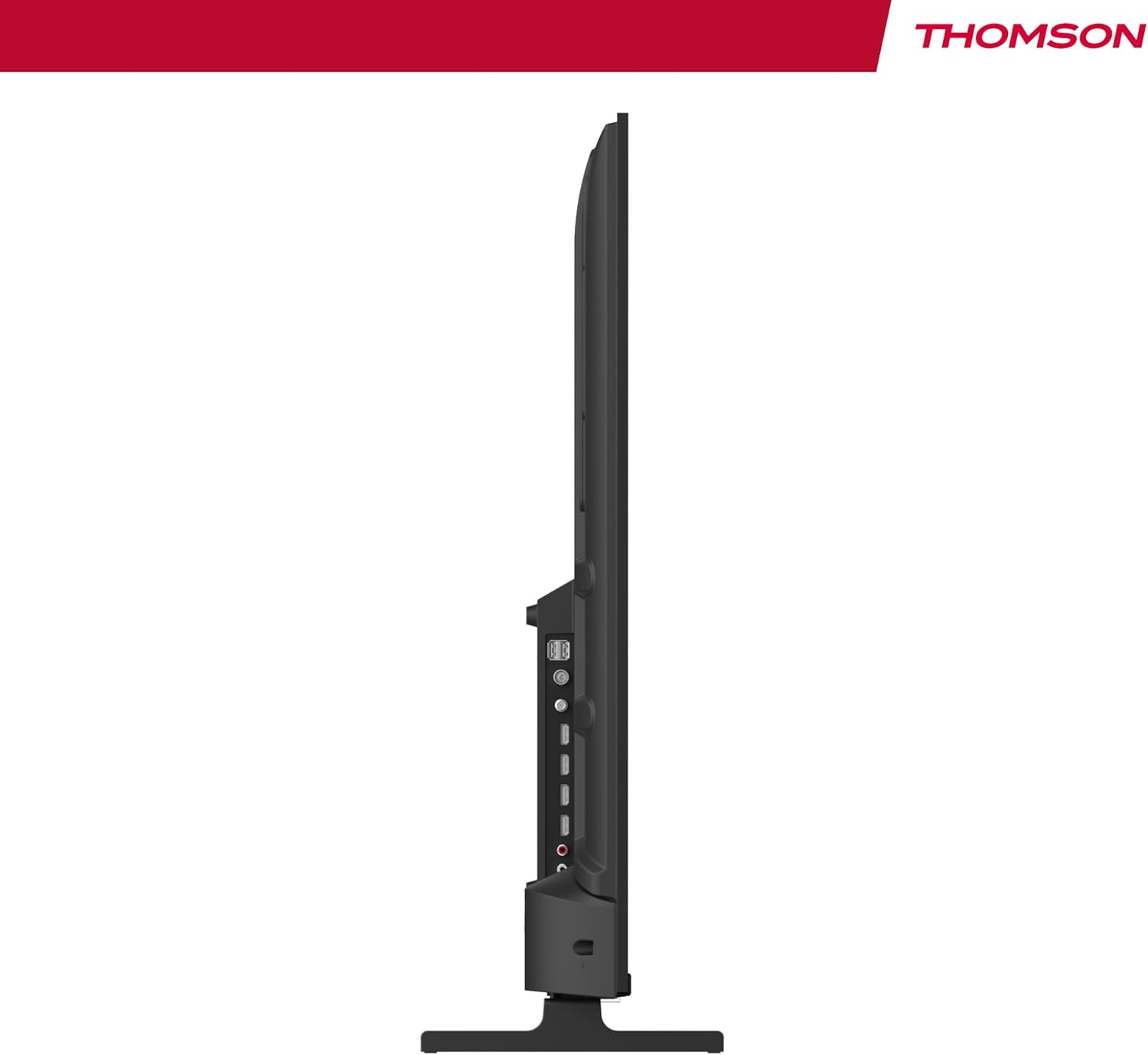
Малюнак 4: Бакавы прафесіяналfile view of the TV, showing accessible ports on the side.
- Магутнасць: Падключыце кабель сілкавання да тэлевізара і разеткі.
- Антэна/Кабель/Спадарожнік: Use the appropriate input for your broadcast signal (DTT, cable, or satellite).
- HDMI (x4): Падключыце знешнія прылады, такія як Blu-ray-плэеры, гульнявыя прыстаўкі або тэлевізійныя прыстаўкі.
- USB (x2): Падключыце USB-назапашвальнікі для прайгравання медыяфайлаў.
- LAN: Падключыце кабель Ethernet для праваднога падключэння да Інтэрнэту.
- Audio Out (Digital Optical): Connect to an external sound system for enhanced audio.
- AV-уваход: Падключыце старыя прылады з дапамогай кампазітных відэа- і стэрэаўдыёкабеляў.
- Агульны інтэрфейс (CI+): Insert a CI+ module and smart card for encrypted digital services.
- Bluetooth: Pair wireless headphones, speakers, or other compatible Bluetooth devices.
6. Initial Setup and Android TV
6.1 Першае ўключэнне
- After connecting all necessary cables, plug the TV into a power outlet.
- Націсніце кнопку харчавання на пульце дыстанцыйнага кіравання або на тэлевізары.
- Выконвайце падказкі на экране, каб выбраць патрэбную мову.
6.2 Налада сеткі
Connect your TV to the internet for access to Android TV features and apps.
- Wi-Fi: Выберыце сваю сетку Wi-Fi са спісу і ўвядзіце пароль.
- Правадная (LAN): If you connected an Ethernet cable, the TV should automatically detect the wired connection.
6.3 Google Account Sign-in
Sign in with your Google Account to access the Google Play Store, Google Assistant, and personalized recommendations.
6.4-каналнае сканаванне
After network setup, the TV will guide you through scanning for available channels based on your antenna, cable, or satellite connection.
7. Кіраванне тэлевізарам
7.1 Пульт дыстанцыйнага кіравання
The premium backlit remote control allows easy navigation, even in low light. Key features include:
- Кнопка харчавання: Уключае або выключае тэлевізар.
- Кнопкі навігацыі: Для навігацыі па меню.
- Кнопкі гучнасці/каналаў: Рэгуляванне гучнасці і пераключэнне каналаў.
- Кнопка Памочніка Google: Актывуе галасавое кіраванне.
- Favorites Button: Quickly launch your designated favorite application.
- Кнопкі хуткага доступу да праграм: Прамы доступ да папулярных струменевых сэрвісаў.
7.2 Функцыі Android TV
Your THOMSON TV runs on Android TV, providing a smart and intuitive user experience.

Figure 5: The Android TV home screen displaying various applications and content recommendations.
- прыкладанні: Access over 400,000 movies and TV shows from apps like Netflix, Prime Video, Disney+, YouTube, Spotify, and Apple TV.
- Памочнік Google: Use your voice to control the TV, search for content, get answers, and manage smart home devices. Simply press the Google Assistant button on your remote and speak your command.

Figure 6: A user interacting with the Google Assistant via the TV remote control.
- Убудаваны Chromecast: Wirelessly stream movies, music, and videos from compatible smartphones, tablets, or computers directly to your TV.
7.3 Налады выявы
Аптымізуйце свой viewвопыт працы з перадавымі тэхналогіямі выявы:
- 4K UHD: Enjoy ultra-high definition resolution with 8 million pixels for incredibly detailed and precise images.
- HDR (шырокі дынамічны дыяпазон) і Dolby Vision: These technologies enhance contrast, brightness, and color accuracy, providing a more realistic and vibrant picture.

Figure 7: Visual comparison illustrating the enhanced detail of 4K UHD (3840x2160) over Full HD (1920x1080).

Figure 8: Comparison showing the improved contrast and color depth with Dolby Vision compared to Standard Dynamic Range (SDR).
7.4 Налады гуку
Experience dynamic and immersive audio:
- Dolby Audio / Dolby Atmos: Creates a rich, room-filling sound experience. (Note: Dolby Atmos requires compatible sound equipment).

Figure 9: Visual representation of Dolby Atmos sound creating an immersive audio experience around viewERS.
8. Тэхнічнае абслугоўванне
8.1 Чыстка тэлевізара
- Заўсёды адключайце тэлевізар ад сеткі перад чысткай.
- Use a soft, lint-free cloth to gently wipe the screen and TV body.
- Для ўстойлівых плям злёгку пачысціцеampen the cloth with water or a specialized screen cleaner (ensure it's safe for TV screens) and wipe gently. Never spray liquid directly onto the screen.
8.2 Абнаўленне праграмнага забеспячэння
Your Android TV may receive periodic software updates to improve performance and add new features. Ensure your TV is connected to the internet to receive these updates. You can usually check for updates in the TV's settings menu.
9. Выпраўленне непаладак
Калі ў вас узніклі праблемы з тэлевізарам, звярніцеся да наступных распаўсюджаных рашэнняў:
| праблема | Магчымае рашэнне |
|---|---|
| Няма ўлады | Праверце, ці надзейна падключаны кабель сілкавання да тэлевізара і разеткі. Паспрабуйце іншую разетку. |
| Няма малюнка/гуку | Ensure the correct input source is selected. Check cable connections to external devices. For sound, check volume levels and external audio system connections. |
| Пульт дыстанцыйнага кіравання не працуе | Праверце або заменіце батарэйкі. Пераканайцеся, што паміж пультам дыстанцыйнага кіравання і ІЧ-датчыкам тэлевізара няма перашкод. |
| Немагчыма падключыцца да Wi-Fi | Пераканайцеся, што ваш маршрутызатар Wi-Fi уключаны і працуе. Паўторна ўвядзіце пароль Wi-Fi. Паспрабуйце перазагрузіць тэлевізар і маршрутызатар. |
| Slow performance or apps | Close unused applications. Clear cache for problematic apps in settings. Restart the TV. Ensure a stable internet connection. |
10. Тэхнічныя характарыстыкі
Detailed technical specifications for the THOMSON 50UA5S13 TV:
| Асаблівасць | Спецыфікацыя |
|---|---|
| Марка | Томсан |
| Нумар мадэлі | 50UA5S13 |
| Памер экрана | 50 цалі (126 см) |
| Тэхналогія адлюстравання | UHD (LED LCD) |
| дазвол | 3840 x 2160 (4K UHD) |
| Частата абнаўлення | 60 Гц |
| Асаблівасці | Flat Screen, Android TV, Google Assistant, Chromecast built-in, HDR, Dolby Vision, Dolby Audio |
| Сувязь | Bluetooth, Wi-Fi, 4x HDMI, 2x USB, LAN, Digital Optical Audio Out, AV In, CI+ |
| Цюнэр | Triple Tuner (ATSC for Antenna, Cable, Satellite) |
| Канфігурацыя гуку | 2.0 |
| Памеры (Д х Ш х У) | 111.1 х 26 х 69.2 см (з падстаўкай) |
| Вага | 8.5 кілаграмаў |
| Насценнае мацаванне VESA | 200x200 mm (mount not included) |
| Клас энергаэфектыўнасці | E |
Падрабязную інфармацыю аб энергетыцы можна знайсці ў базе дадзеных ЕС EPREL:
Інфармацыйны ліст прадукту EPREL

Figure 10: The EU Energy Label for the THOMSON 50UA5S13 TV, indicating its energy efficiency class and consumption.
11. Гарантыя і падтрымка
Your THOMSON 50UA5S13 TV comes with a full 3-year manufacturer's warranty, demonstrating its reliability and quality. For warranty claims or technical support, please refer to the warranty card included in your package or visit the official THOMSON support webсайт для вашага рэгіёна. Захоўвайце пацвярджэнне пакупкі для пацверджання гарантыі.
Ask a question about this manual
Ask about setup, troubleshooting, compatibility, parts, safety, or missing instructions. Manuals+ will review the question and use this page’s manual context to help answer it.