
ION Audio Highlander
Кіраўніцтва карыстальніка партатыўнай калонкі ION Audio Highlander
Model: Highlander
Брэнд: ION Audio
1. Прадукт скончыўсяview
The ION Audio Highlander is a high-powered, all-weather portable Bluetooth speaker designed to deliver rich sound and deep bass even at high volumes. Its durable construction makes it suitable for various environments, ensuring your music can accompany you wherever you go.
Асноўныя характарыстыкі:
- Магутны гук: Delivers 120 Watts of speaker maximum output power for impactful sound.
- Павышаны бас: Enhances low frequencies for maximum impact.
- Bluetooth 5.0 Enabled: Allows wireless streaming and control of your music from compatible devices.
- Воданепранікальнасць IPX5: Designed to withstand splashes and rain, making it safe for outdoor use.
- Rechargeable 50-Hour Battery: Provides extended playtime on a single charge.
- Built-in Handles and Wheels: Facilitates easy transportation.
2. Змесціва ўпакоўкі
Пераканайцеся, што ўсе пералічаныя ніжэй прадметы прысутнічаюць у вашай упакоўцы:
- ION Audio Highlander Portable Speaker
- Сілавы кабель
3. Кіраўніцтва па наладцы
3.1 Зарадка акумулятара
Before first use, fully charge the Highlander speaker. The battery life is approximately 50 hours, but initial charging may take several hours.
- Connect the included power cable to the power input on the back of the Highlander speaker.
- Падключыце другі канец кабеля харчавання да звычайнай разеткі.
- The charging indicator light will illuminate. The light will change or turn off once charging is complete.
3.2 Уключэнне/выключэнне
To power the speaker on or off, locate the power button on the control panel.
- Каб уключыць: Press and hold the Power button for a few seconds until the display illuminates.
- Каб выключыць: Press and hold the Power button again for a few seconds until the display turns off.
3.3 Спалучэнне па Bluetooth
Follow these steps to connect your Bluetooth device to the Highlander speaker:
- Ensure the Highlander speaker is powered on and in Bluetooth mode. The Bluetooth indicator on the display will flash, indicating it's ready to pair.
- On your Bluetooth device (smartphone, tablet, laptop), go to its Bluetooth settings.
- Пошук available devices. Select "ION Highlander" from the list.
- Once paired, the Bluetooth indicator on the speaker will stop flashing and remain solid. You can now play audio through the speaker.
- To disconnect, turn off Bluetooth on your device or select "Forget This Device" in your device's Bluetooth settings.
4. Інструкцыя па эксплуатацыі
4.1 Панэль кіравання скончанаview
The top panel of the Highlander speaker features various controls for managing audio playback and settings.

- Кнопка харчавання: Уключае або выключае дынамік.
- Рэгулятар гучнасці: Рэгулюе агульны ўзровень гучнасці.
- Кнопка Bluetooth: Запускае рэжым спалучэння Bluetooth.
- Кнопка ўзмацнення басоў: Activates or deactivates the bass boost feature.
- Экран дысплея: Shows current mode, battery status, and other information.
4.2 Adjusting Volume and Bass Boost
- Аб'ём: Rotate the main volume knob clockwise to increase volume and counter-clockwise to decrease it.
- Павышаны бас: Press the "Bass Boost" button to enhance the bass output. Press it again to return to normal audio.
4.3 Асаблівасці партатыўнасці
The Highlander is designed for easy transport:
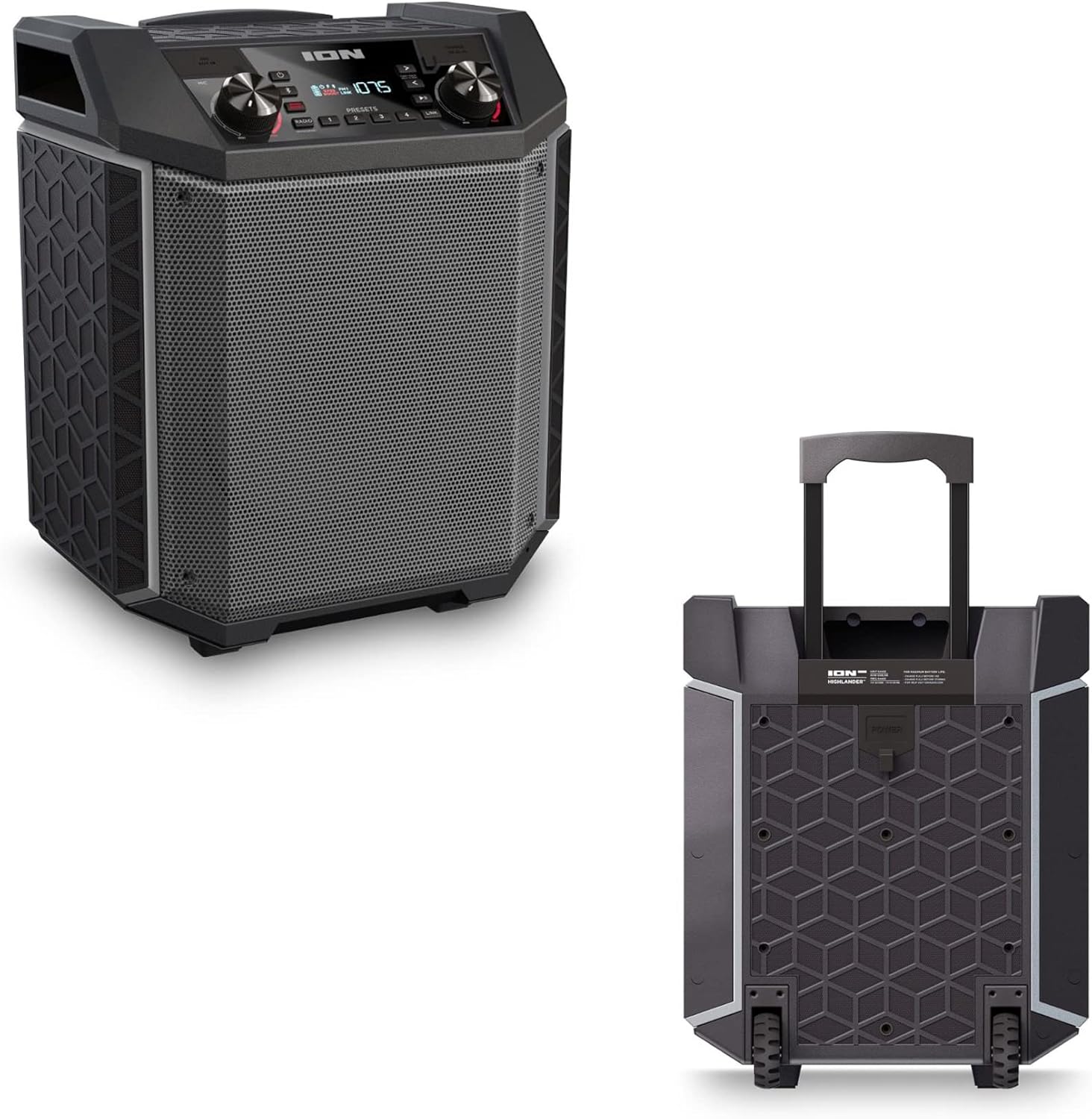

- Высоўная ручка: Pull up the integrated handle to roll the speaker like luggage.
- Колы: Use the built-in wheels for smooth movement across various surfaces.
4.4 Воданепранікальнасць (IPX5)
The Highlander speaker is IPX5 water-resistant, meaning it can withstand splashes of water from any direction. It is suitable for use by the pool or in light rain.

Важна: Do not submerge the speaker in water. Ensure all port covers are securely closed when exposed to water.
5. Тэхнічнае абслугоўванне
5.1 Ачыстка
- Заўсёды выключайце дынамік і адключайце яго ад крыніцы сілкавання перад чысткай.
- Выкарыстоўвайце мяккую, сухую тканіну для працірання вонкавых паверхняў.
- Для ўстойлівых забруджванняў злёгку dampпрамыйце тканіну вадой. Пазбягайце выкарыстання агрэсіўных хімікатаў, растваральнікаў або абразіўных ачышчальнікаў.
- Не распыляйце ачышчальныя вадкасці непасрэдна на дынамік.
5.2 Захоўванне
- Захоўвайце дынамік у прахалодным, сухім месцы, удалечыні ад прамых сонечных прамянёў і экстрэмальных тэмператур.
- If storing for an extended period, ensure the battery is partially charged (around 50%) to maintain battery health. Recharge every few months if not in use.
5.3 Сыход за акумулятарам
- Пазбягайце частай поўнай разрадкі акумулятара.
- Не падвяргайце батарэю ўздзеянню празмернага цяпла або холаду.
- If the battery performance significantly degrades, contact customer support for assistance.
6. Выпраўленне непаладак
If you encounter issues with your Highlander speaker, refer to the table below for common problems and solutions.
| праблема | Магчымае рашэнне |
|---|---|
| Дынамік не ўключаецца. |
|
| Немагчыма спалучыцца з прыладай Bluetooth. |
|
| Няма гуку або нізкі ўзровень гучнасці. |
|
| Скажэнне гуку. |
|
7. Тэхнічныя характарыстыкі
| Асаблівасць | Дэталь |
|---|---|
| Назва мадэлі | Горац |
| Марка | ІОН |
| Тып дынаміка | На адкрытым паветры |
| Тэхналогія падлучэння | Bluetooth 5.0 |
| Крыніца харчавання | Харчаванне ад батарэі |
| Тэрмін службы батарэі | 50 гадзін |
| Узровень воданепранікальнасці | IPX5 (воданепранікальнасць) |
| Максімальная выхадная магутнасць дынаміка | 120 ват |
| Памеры прадукту | 19.5" Г x 19.5" Ш x 14" У |
| Вага прадмета | 23.2 фунта |
| Матэрыял | Water-resistant plastic or rubber, with a black coating |
| Уключаныя кампаненты | Сілавы кабель |
| UPC | 657768542732 |
8. Гарантыя і падтрымка
The ION Audio Highlander speaker comes with a Limited Warranty. For specific details regarding warranty coverage, duration, and terms, please refer to the warranty information provided with your purchase or visit the official ION Audio webсайт.
For technical support, troubleshooting assistance beyond this manual, or warranty claims, please contact ION Audio customer support through their official channels. Keep your proof of purchase handy when contacting support.