
1. Уводзіны
This manual provides essential information for the installation, operation, and maintenance of your Phillips MX7053 Digital Deadbolt PCD-360. Please read these instructions carefully before installation and use to ensure proper function and longevity of the product.
The Phillips MX7053 Digital Deadbolt is designed for interior wood or metal doors, offering secure keyless entry via a numeric keypad or traditional key access. It features a light indicator for status updates and supports up to 50 unique user codes.
2. Асаблівасці прадукту
- Лёгкая ўстаноўка: Designed for straightforward installation using basic tools.
- Універсальны мантаж: Features an interior mounting plate that can be screwed or welded.
- Лічбавая клавіятура: Exterior keypad supports 4 to 10-digit codes for up to 50 users.
- Індыкатар стану: Integrated light indicator shows lock/unlock status and alerts for incorrect code entries.
- Dual Access: Keyless entry via keypad or traditional high-security key access.
- Працуе ад батарэі: Requires 4 AA batteries (not included), eliminating the need for electrical wiring.
3. Змесціва ўпакоўкі
Перад пачаткам усталёўкі пераканайцеся, што ўсе кампаненты наяўныя:
- Phillips MX7053 Digital Deadbolt (Exterior Keypad Unit)
- Interior Thumb Turn Unit
- Мантажная пласціна
- High-Security Keys (Quantity may vary)
- Installation Screws and Hardware
- Кіраўніцтва па эксплуатацыі (гэты дакумент)

Малюнак 3.1: Packaging of the Phillips MX7053 Digital Deadbolt, illustrating the included components and highlighting the 1-year warranty.
4. Тэхнічныя характарыстыкі
| Вытворца | Філіпс |
| Нумар мадэлі | MX7053 |
| Колер | Чорны |
| Скончыць | Пэндзаль |
| Матэрыял | Метал, пластык |
| Тып замка | Тупік |
| Асаблівасці | Touch keypad, Keyless entry |
| Крыніца харчавання | 4 батарэйкі АА (не ўключаны) |
| Вага | 1.12 кілаграма |
| Памеры (Д х Ш х У) | 21.01 х 11 х 23.01 см |
5. Інфармацыя па бяспецы
- Do not expose the lock to extreme temperatures or direct moisture.
- Use only specified AA alkaline batteries. Do not mix old and new batteries or different types of batteries.
- Keep keys in a secure location away from the lock.
- Regularly check battery levels and replace batteries when indicated to prevent lock-out.
- Пазбягайце выкарыстання абразіўных ачышчальнікаў або растваральнікаў на паверхні замка.
6. Ўстаноўка
The Phillips MX7053 Digital Deadbolt is designed for surface-mount installation on interior wood or metal doors. It is compatible with both left and right-opening doors.
6.1 Неабходныя інструменты
- Адвёртка (рэкамендуецца крыжовая)
- Дрыль (калі патрэбныя новыя адтуліны)
- Вымяральная стужка або лінейка
- Аловак
6.2 Этапы ўстаноўкі
- Падрыхтуйце дзверы: Ensure the door is clean and free of obstructions. If replacing an existing lock, remove it.
- Усталюйце зашчапку засаўкі: Insert the deadbolt latch into the door edge. Ensure the latch is oriented correctly for your door's handing (left or right).
- Mount the Exterior Keypad: Position the exterior keypad unit on the outside of the door, aligning it with the deadbolt latch.
- Усталюйце ўнутраную мантажную пласціну: On the inside of the door, attach the interior mounting plate. Secure it with the provided screws. This plate can be screwed directly or welded for added security.
- Connect the Interior Unit: Connect the cable from the exterior keypad to the interior thumb turn unit. Carefully tuck any excess cable into the door cavity.
- Secure the Interior Unit: Attach the interior thumb turn unit to the mounting plate using the remaining screws. Ensure it is flush against the door.
- Тэставая аперацыя: Before closing the door, test the deadbolt's operation using both the thumb turn and the key. Ensure the deadbolt extends and retracts smoothly.
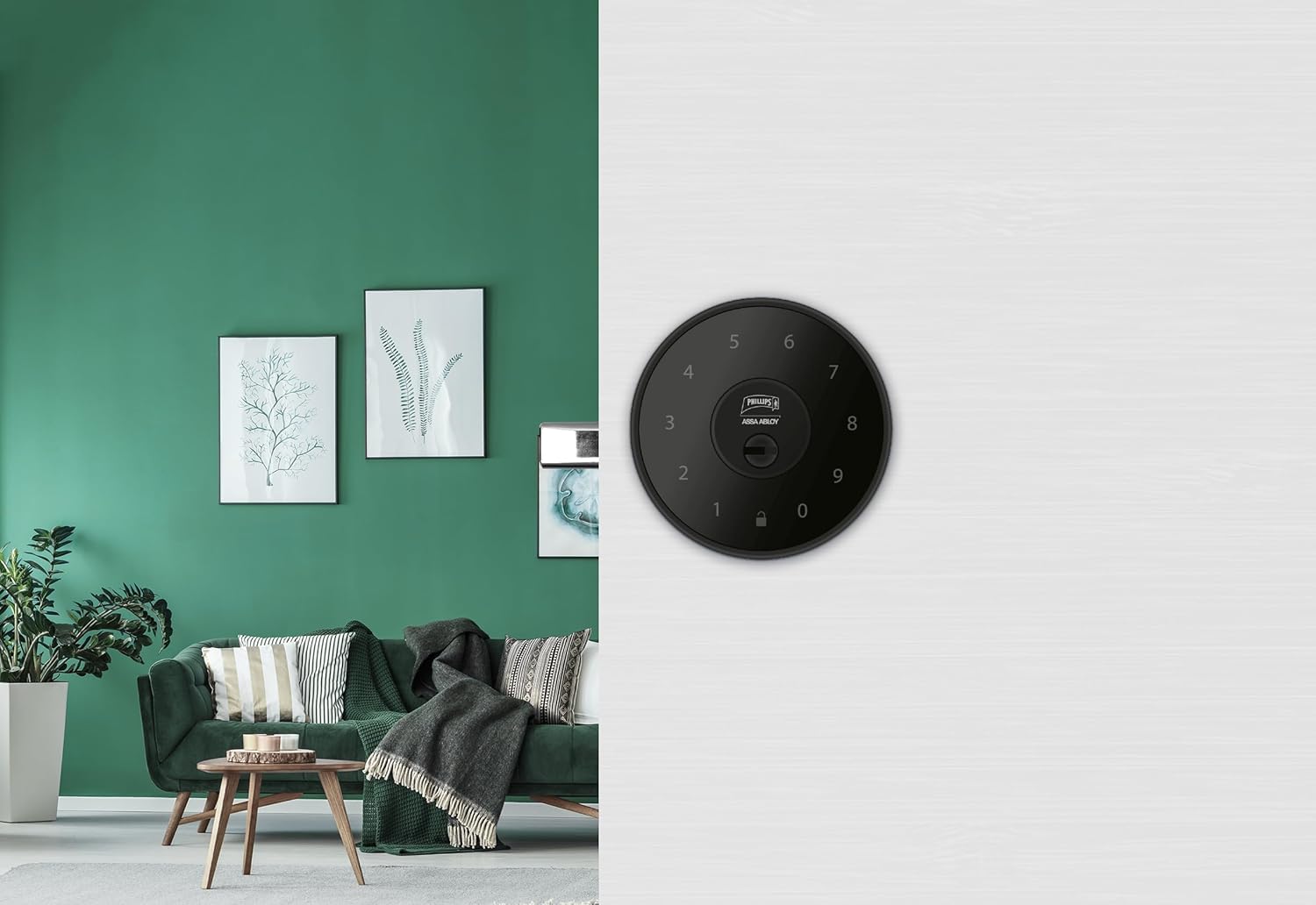
Малюнак 6.1: An installed Phillips MX7053 Digital Deadbolt, showcasing its exterior keypad on a door.

Малюнак 6.2: Крупны план спераду view of the exterior keypad, highlighting the numeric interface and keyhole.
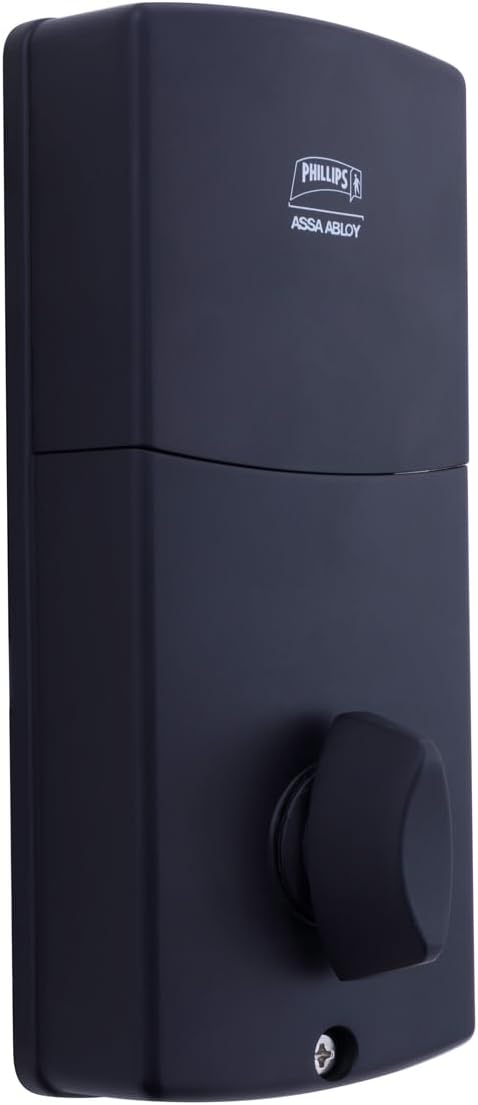
Малюнак 6.3: Тыл view of the interior unit, which houses the battery compartment and the thumb turn for manual locking/unlocking.
7. Устаноўка і замена батарэі
The Phillips MX7053 Digital Deadbolt requires 4 AA alkaline batteries for operation. Batteries are not included.
- Доступ да батарэйнага адсека: Locate the battery cover on the interior thumb turn unit. Slide or unclip the cover to open the compartment.
- Устаўце батарэі: Insert 4 new AA alkaline batteries, ensuring correct polarity (+/-) as indicated inside the compartment.
- Зачыніць адсек: Replace the battery cover, ensuring it is securely closed.
- тэст: After installing batteries, the lock should emit a beep and the keypad lights may illuminate briefly, indicating power.
Заўвага: Replace all four batteries simultaneously. Do not mix old and new batteries or different battery types. Low battery indication will typically be a series of beeps or a specific light pattern when operating the lock.
8. Аперацыя
8.1 Адмыканне дзвярэй
- Выкарыстанне кода: Enter your 4 to 10-digit user code on the exterior keypad. The light indicator will confirm successful entry, and the deadbolt will retract.
- Выкарыстанне ключа: Insert the high-security key into the keyhole on the exterior keypad and turn it to unlock the deadbolt.
- Знутры: Turn the thumb turn on the interior unit to retract the deadbolt.
8.2 Блакаванне дзвярэй
- Звонку: Press any key on the keypad or simply wait for the auto-lock feature (if enabled) to engage the deadbolt.
- Выкарыстанне ключа: Insert the high-security key into the keyhole on the exterior keypad and turn it to extend the deadbolt.
- Знутры: Turn the thumb turn on the interior unit to extend the deadbolt.
9. Праграмаванне кодаў карыстальнікаў
The lock supports up to 50 unique user codes, each 4 to 10 digits long. Refer to the specific programming instructions included with your lock for detailed steps on adding, deleting, or modifying user codes. Generally, this involves entering a master code followed by a sequence of commands and the desired user code.
Важна: Keep your master code confidential and do not share it. It is essential for managing all other user codes.
10. Тэхнічнае абслугоўванне
- Уборка: Працярыце паверхню замка мяккай губкайamp тканіна. Не выкарыстоўвайце агрэсіўныя хімікаты або абразіўныя ачышчальнікі.
- Праверка батарэі: Неадкладна замяняйце батарэйкі, калі з'яўляецца індыкатар нізкага зараду батарэй.
- Механічная праверка: Periodically check that all screws are tight and the lock operates smoothly. Lubricate the deadbolt mechanism with a silicone-based lubricant if necessary.
11. Выпраўленне непаладак
- Замак не адказвае: Праверце ўстаноўку батарэек і пры неабходнасці замяніце іх. Пераканайцеся, што клавіятура чыстая і без смецця.
- Deadbolt Not Extending/Retracting: Verify that the door frame strike plate is properly aligned with the deadbolt. Check for any obstructions in the door jamb.
- Няправільны ўвод кода: If the light indicator flashes or beeps after entering a code, re-enter the code carefully. Ensure you are using a valid, programmed user code.
- Клавіятура не падсвятляецца: This may indicate very low batteries or a power issue. Replace batteries.
12. Гарантыя і падтрымка
The Phillips MX7053 Digital Deadbolt PCD-360 comes with a Гарантыя 1 год з даты пакупкі, якая пакрывае вытворчыя дэфекты. Калі ласка, захавайце пацвярджэнне пакупкі для прэтэнзій па гарантыі.
For technical assistance, troubleshooting beyond this manual, or warranty inquiries, please contact Phillips customer support. Refer to the contact information provided on the product packaging or Phillips' official webсайт.
Additional protection plans may be available from third-party providers for extended coverage.