
1. Уводзіны
This manual provides essential information for the safe and efficient use of your CUBOT P80 smartphone. Please read it carefully before using the device and keep it for future reference.
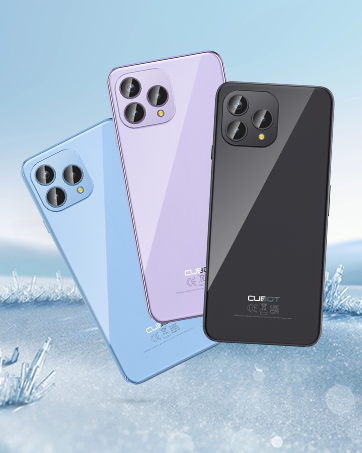
The CUBOT P80 is available in multiple color options.
2. Што ў скрынцы
Праверце, ці ёсць усе прадметы ў камплекце з вашым прадуктам:
- Смартфон CUBOT P80
- Phone protective case
- Phone protection film (pre-applied or separate)
- Charger (9V2A)
- Кабель USB (тып C)
- Type-C headphone
- SIM pin ejector tool
- Кароткае кіраўніцтва
- Compliance regulation document

Included accessories with the CUBOT P80 smartphone.
3. Device Layout and Physical Features
The CUBOT P80 features a sleek design with a 6.58-inch FHD+ display and a triple camera system on the rear.
Памеры і вага
- Таўшчыня: 9.75 мм
- Вага: 217 г

The CUBOT P80's slim profile і лёгкі дызайн.
Сканер адбіткаў пальцаў
The device includes a side-mounted fingerprint scanner for secure and quick unlocking.

Fingerprint sensor location for convenient unlocking.
4. Настройка
Устаўка SIM-карт і TF-карт
The CUBOT P80 supports dual SIM functionality or one SIM card with a TF (microSD) card for expanded storage.
- Знайдзіце латок для SIM-карты на бакавой панэлі тэлефона.
- Устаўце інструмент для выцягвання SIM-карты ў невялікую адтуліну побач з латком і моцна націсніце, пакуль латок не выскочыць.
- Place your Nano SIM card(s) and/or TF card into the designated slots on the tray. Ensure the gold contacts are facing down.
- Асцярожна ўстаўце латок назад у тэлефон, пакуль ён не будзе ўпоравень з корпусам прылады.

SIM and TF card installation options.
Першапачатковае ўключэнне
Press and hold the power button located on the side of the device until the CUBOT logo appears. Follow the on-screen instructions to complete the initial setup, including language selection, Wi-Fi connection, and Google account login.
5. Інструкцыя па эксплуатацыі
Аперацыйная сістэма Android 13
The CUBOT P80 runs on Android 13, offering a user-friendly interface, enhanced privacy controls, and access to the Google Play Store for applications.

Скончанаview of the Android 13 operating system.
Асаблівасці дысплея
The device features a 6.58-inch FHD+ Capacitive Touch Screen with a resolution of 2408x1080 pixels, 400 nits peak brightness, and a 20:9 aspect ratio.

Key features of the CUBOT P80 display.
6. Асаблівасці камеры
The CUBOT P80 is equipped with an AI Quad Camera System on the rear and a high-resolution front camera.
Тэхнічныя характарыстыкі камеры
- Асноўная камера: 48 МП
- Пярэдняя камера: 24 МП
- Макракамера: 2 МП

The CUBOT P80's AI Quad Camera System.
Асноўная камера
The 48MP main camera captures images with high detail and clarity.

High-resolution capture with the 48MP main camera.
Пярэдняя камера
The 24MP front camera is designed for clear selfies and video calls, featuring beauty modes.

Selfie capabilities of the 24MP front camera.
Макракамера
The 2MP macro lens allows for detailed close-up photography of small objects.

Detailed close-up shots with the 2MP macro camera.
Multiple Camera Modes
The camera application includes various modes such as Night View, Portrait, and Panorama to enhance your photography experience.

Explore various photography modes.
7. Сувязь
Сетка і Wi-Fi
The CUBOT P80 supports Dual 4G Dual VoLTE for cellular connectivity and 2.4/5GHz Dual Wi-Fi for stable and faster internet access.
- GSM: 850/900/1800/1900 МГц
- WCDMA: B1/2/4/5/6/8/19
- FDD: B1/2/3/4/5/7/8/12/13/17/18/19/20/26/28A/28B/66
- TDD: 38/39/40/41
Cellular and Wi-Fi network support.
NFC and GPS
The device includes Multifunctional NFC for cash-free mobile payments and supports GPS, GLONASS, and Galileo for accurate global satellite positioning.
NFC for payments and advanced GPS for navigation.
8. Акумулятар і зарадка
The CUBOT P80 is equipped with a 5200mAh battery, providing extended usage times. It supports 18W fast charging and OTG (On-The-Go) functionality.
- Рэжым чакання: Да 26 дзён
- Званкі: Да 29 гадзін
- Прайграванне музыкі: Да 26 гадзін
- Прайграванне відэа: Да 7 гадзін

Battery life and charging features.
9. Захоўванне і прадукцыйнасць
The CUBOT P80 is powered by an MT8788 Octa-core processor and features ample memory and storage.
- Працэсар: MediaTek MT8788 Octa-core (12nm process, 2.0 GHz clock speed)
- Аператыўная памяць: 8GB + 8GB Expansion RAM (total 16GB)
- Унутраная памяць (ПЗУ): 256 ГБ
- Пашыраная памяць: Да 1 ТБ праз TF-карту

Processor and memory details.

RAM expansion technology for enhanced performance.

Internal and expandable storage options.
10. Важныя заўвагі
Сумяшчальнасць з аператарам
The CUBOT P80 smartphone does not support AT&T, Cricket, or Verizon networks in the United States. Please confirm your carrier's compatibility before purchasing or using this device.

Important information regarding network compatibility.
11. Тэхнічныя характарыстыкі
| Асаблівасць | Спецыфікацыя |
|---|---|
| Нумар мадэлі | P80-schwarz-US |
| Аперацыйная сістэма | Android 13.0 |
| Працэсар | MediaTek MT8788 Octa-core |
| АЗП | 16 GB (8GB + 8GB Expansion) |
| Унутраная памяць | 256 ГБ |
| Сховішча з магчымасцю пашырэння | Да 1 ТБ (карта TF) |
| Памер экрана | 6.58 цалі |
| дазвол | 1920 x 1080 (FHD+) |
| Асноўная камера | 48 МП |
| Пярэдняя камера | 24 МП |
| Макракамера | 2 МП |
| Ёмістасць батарэі | 5200 мАг |
| Зарадка | Хуткая зарадка 18 Вт |
| Сувязь | 4G LTE, Dual SIM, Wi-Fi (2.4/5GHz), NFC, Bluetooth |
| Навігацыя | GPS, ГЛОНАСС, Галілей |
| Аўдыёраз'ём | 3.5 мм |
| Памеры | 9.29 х 7.17 х 1.81 цалі (упакоўка) |
| Вага прадмета | 7.7 унцыі |
12. Выпраўленне непаладак
Агульныя праблемы і рашэнні
- Прылада не ўключаецца: Пераканайцеся, што акумулятар зараджаны. Падключыце тэлефон да зараднай прылады і пачакайце некалькі хвілін, перш чым зноў спрабаваць уключыць яго.
- Слабы сігнал сеткі: Check SIM card insertion. Ensure you are within your carrier's coverage area. Note that the CUBOT P80 is not compatible with AT&T, Cricket, or Verizon.
- Збоі праграм: Clear the cache of the problematic app (Settings > Apps > [App Name] > Storage > Clear Cache). If the issue persists, try reinstalling the app or performing a factory reset (backup data first).
- Акумулятар хутка разраджаецца: Reduce screen brightness, close unused apps running in the background, disable unnecessary notifications, and limit location services.
- Fingerprint scanner not working: Ensure your finger is clean and dry. Re-register your fingerprints in the security settings.
13. Гарантыя і падтрымка
For warranty information and technical support, please refer to the official CUBOT webсайт або звярніцеся да прадаўца. Захоўвайце пацвярджэнне пакупкі для прэтэнзій па гарантыі.
Інтэрнэт-рэсурсы:
- Наведайце ст CUBOT Store on Amazon для атрымання інфармацыі аб прадуктах і абнаўленняў.
14. Відэа прадуктуview
Афіцыйнае відэа пра прадуктasing the CUBOT P80's features and design.