
1. Уводзіны
Thank you for choosing the STRICH SEP-80 88-Key Digital Piano. This portable digital piano is designed for beginners and experienced musicians alike, offering a full-size, touch-sensitive keyboard with a wide range of features. Please read this manual carefully to ensure proper setup, operation, and maintenance of your instrument.

Figure 1: STRICH SEP-80 88-Key Digital Piano with included accessories.
2. Што ў скрынцы
Your STRICH SEP-80 package includes the following items:
- STRICH SEP-80 88-Key Digital Piano
- X-shaped Keyboard Stand
- Педаль сустейн
- Падстаўка для нот
- USB адаптар харчавання
- Кіраўніцтва па эксплуатацыі

Figure 2: All components included in the SEP-80 package.
3. Настройка
3.1 Assembling the X-Stand
- Unfold the X-shaped keyboard stand.
- Adjust the height to your preferred playing position using the locking mechanism. Ensure the stand is stable before placing the piano.

Figure 3: The X-shaped keyboard stand.
3.2 Placing the Digital Piano on the Stand
Carefully place the SEP-80 digital piano onto the assembled X-stand. Ensure it sits securely on the stand's arms.
3.3 Падключэнне аксесуараў
- Педаль сустейна: Connect the sustain pedal cable to the 'SUS' jack on the rear panel of the piano.
- Sheet Music Stand: Insert the sheet music stand into the designated slots on the top panel of the piano.
- Магутнасць: Connect the USB power adapter to the DC 5V port on the rear panel and plug it into a power outlet. The piano also features a built-in rechargeable battery for portable use.

Figure 4: Rear panel with various connectivity options.

Figure 5: The included sustain pedal.

Figure 6: The sheet music stand.

Figure 7: The USB power adapter.
4. Інструкцыя па эксплуатацыі
4.1 Уключэнне/выключэнне харчавання і гучнасць
- Націсніце Магутнасць button to turn the piano on or off.
- Выкарыстоўвайце - і + buttons next to the LED display to adjust the master volume.
4.2 Выбар тонаў і рытмаў
- The SEP-80 features 128 tones and 128 rhythms.
- Націсніце Абстаноўка button twice quickly to enter tone selection mode. Use the - і + buttons to browse.
- Націсніце Абстаноўка button once to enter rhythm selection mode. Use the - і + buttons to browse.
4.3 Спецыяльныя функцыі
- Рэжым раздзялення: Divides the keyboard into two sections, each with its own tone.
- Вібрацыя: Adds a vibrato effect to the sound.
- Транспанаваць: Shifts the pitch of the keyboard up or down.
- Тэмп: Рэгулюе хуткасць рытмаў і дэма-песень.
- Метраном: Provides a steady beat for practice.
- запіс: Allows you to record and playback your performances.
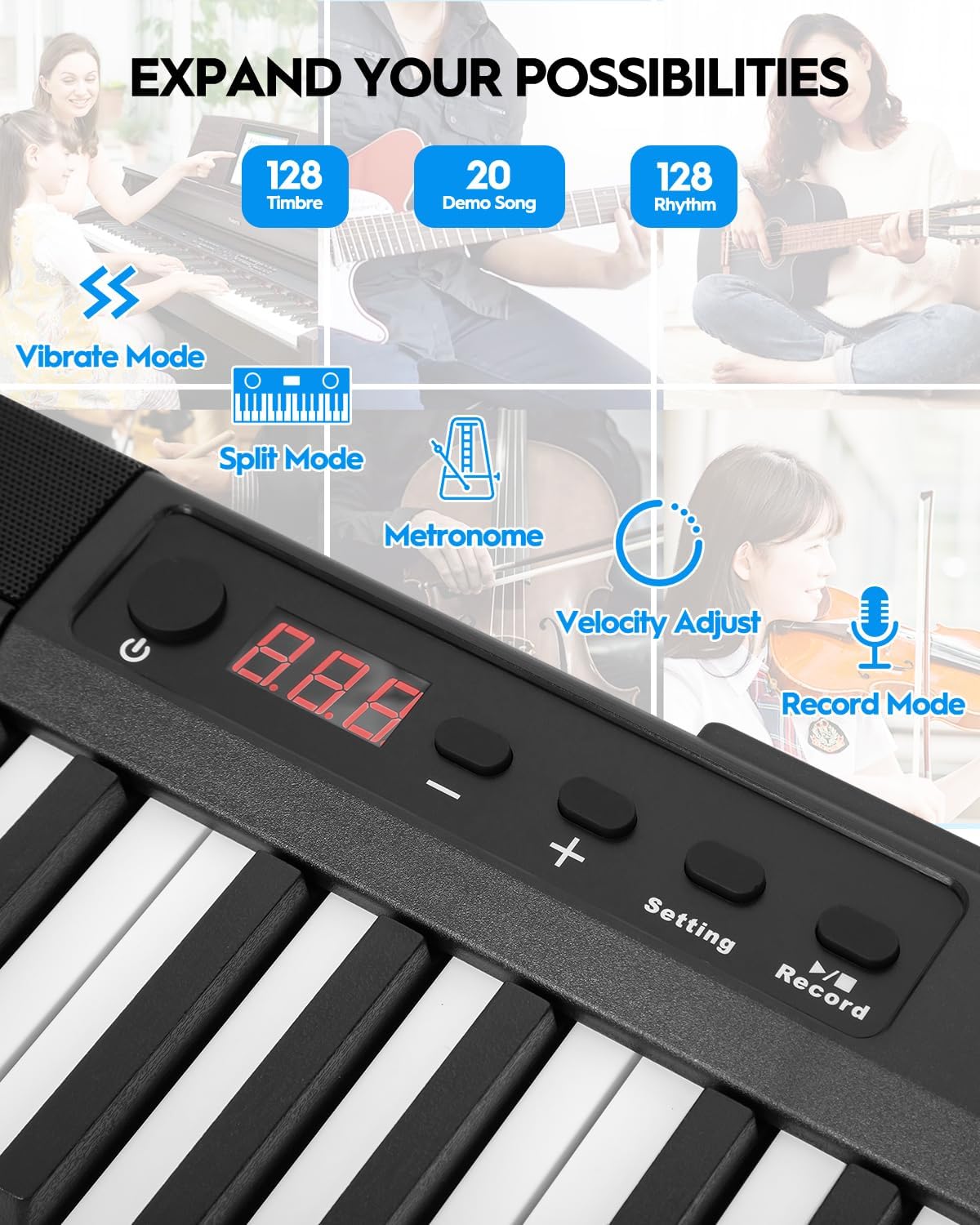
Figure 8: Control panel with various function buttons.
4.4 Падключэнне
- Раз'ём для навушнікаў (3.5 мм): Для прыватнай практыкі.
- Audio Input (3.5mm): Connect external audio sources.
- MIDI Interface (via USB port): Connect to external software for learning and practice.
- Wireless Connect (GZUT-MUSIC): For wireless connectivity options.

Малюнак 9: падрабязна view of the control panel and connectivity ports.
4.5 Відэа пра прадукты
Video 1: STRICH SEP-80 Velocity-Sensitive Piano Keyboard 88 Keys DEMO. This video demonstrates the velocity-sensitive keys and overall sound of the SEP-80 digital piano.
Video 2: STRICH SEP-80 Rechargeable 88-Keys Portable Electric Piano. This video highlights the portability and rechargeable battery feature of the SEP-80.
Video 3: Sound Sample | SEP-80 Comparison of lively and gentle rhythms. This video provides audio samples demonstrating different rhythms and tones.
Video 4: SEP-80 Keyboard Playing Audition. This video showcases a performance on the SEP-80 keyboard.
5. Тэхнічнае абслугоўванне
- Уборка: Use a soft, dry cloth to clean the surface of the piano. Do not use abrasive cleaners or solvents.
- захоўванне: Store the piano in a dry, cool place away from direct sunlight and extreme temperatures.
- Сыход за батарэяй: Для аптымальнага тэрміну службы батарэі пазбягайце частай поўнай разрадкі. Рэгулярна зараджайце яе, нават калі яна не выкарыстоўваецца працяглы час.
6. Выпраўленне непаладак
- Няма гуку: Check if the volume is turned up. Ensure headphones are not plugged in if you intend to use the built-in speakers. Verify power connection or battery charge.
- Клавішы не рэагуюць: Ensure the piano is powered on. If specific keys are unresponsive, contact customer support.
- Праблемы з падключэннем: For MIDI via USB, ensure the correct drivers are installed on your computer. For wireless connection, ensure Bluetooth is enabled on your device and select "GZUT-MUSIC".
7. Тэхнічныя характарыстыкі
| Асаблівасць | Дэталь |
|---|---|
| Марка | СТРОГАЯ |
| Назва мадэлі | ВЕРАСЬ-80 |
| Колькасць ключоў | 88 |
| Тып ключа | Touch-Sensitive, Reduced-Weighted |
| Гукі/Тоны | 128 |
| Рытмы | 128 |
| Дэманстрацыйныя песні | 20 |
| Сувязь | 3.5mm Headphone Jack, 3.5mm Audio Input, USB (MIDI), Wireless Connect (GZUT-MUSIC) |
| Крыніца харчавання | Corded Electric (USB Adapter), Built-in Rechargeable Battery |
| Тэрмін службы батарэі | Up to 5 hours (built-in battery) |
| Памеры прадукту | 14.76" Г x 53.74" Ш x 5.31" У |
| Вага прадмета | 19.56 фунта |
| Асаблівасці | Built-In Speaker, Portable, Recording, Touch-Sensitive Keys |

Figure 10: Dimensions of the STRICH SEP-80 Digital Piano.
8. Гарантыя і падтрымка
The STRICH SEP-80 Digital Piano comes with a standard manufacturer's warranty. For detailed warranty information, product support, or service inquiries, please refer to the contact information provided in your product packaging or visit the official STRICH webсайт.