
1. Уводзіны
This manual provides detailed instructions for the installation, operation, maintenance, and troubleshooting of your XPG CORE Reactor II VE 650W Power Supply Unit (PSU). Please read this manual thoroughly before using the product to ensure proper functionality and safety.
2. Інфармацыя па бяспецы
- Always disconnect the power cord from the wall outlet before installing, removing, or cleaning the PSU.
- Не адкрывайце блок харчаванняasinг. Высокі аб'ёмtages are present inside, which can cause electric shock. The warranty will be void if the casing адкрываецца.
- Install the PSU in a well-ventilated area, away from heat sources, direct sunlight, and moisture.
- Ensure all cables are securely connected. Loose connections can cause damage to components.
- Use only the modular cables provided with this PSU. Using third-party cables may cause damage and void the warranty.
- Гэты прадукт прызначаны толькі для выкарыстання ў камп'ютарных сістэмах. Не выкарыстоўвайце яго для іншых мэтаў.
3. Змесціва ўпакоўкі
Пераканайцеся, што ўсе пералічаныя ніжэй элементы прысутнічаюць у камплекце з вашым прадуктам:
- XPG CORE Reactor II VE 650W Power Supply Unit
- Modular Cable Set (including 12V-2x6 cable)
- Шнур сілкавання
- Крапежныя шрубы
- Кароткае кіраўніцтва

Image: The XPG CORE Reactor II VE 650W power supply unit shown with its retail box, modular cables, AC power cord, and quick start guide.
4. Прадукт скончыўсяview
The XPG CORE Reactor II VE 650W is an 80 PLUS Gold certified power supply compliant with Intel's ATX 3.1 specifications. It features a fully modular design and an FDB (Fluid Dynamic Bearing) fan for efficient and quiet operation.

Выява: Пярэдні бок view of the XPG CORE Reactor II VE 650W power supply, showcasing its fan grille and XPG branding.

Image: The rear panel of the XPG CORE Reactor II VE 650W power supply, featuring the AC power inlet and the main power switch.

Image: A close-up of the modular cable connection panel on the XPG CORE Reactor II VE 650W PSU, showing labeled ports for Motherboard, CPU & VGA, 12V-2x6, and SATA & Molex connectors.
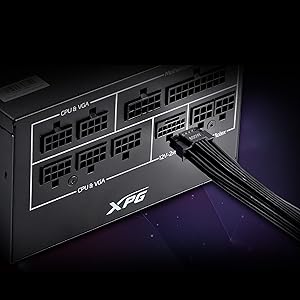
Выява: Падрабязны view of the 12V-2x6 connector port on the XPG CORE Reactor II VE 650W PSU, designed for next-generation graphics cards.
5. Настройка і ўстаноўка
Follow these steps to properly install your XPG CORE Reactor II VE 650W PSU into your computer system:
- Падрыхтуйце сваю сістэму: Пераканайцеся, што камп'ютар цалкам выключаны і адключаны ад разеткі. Адкрыйце корпус камп'ютара.
- Зняць стары блок харчавання (калі ёсць): Disconnect all cables from your old PSU and remove it from the case.
- Усталюйце новы блок харчавання: Insert the XPG CORE Reactor II VE 650W PSU into the designated PSU bay in your computer case. Secure it with the provided mounting screws.
- Падключыце неабходныя кабелі:
- Падключыце 24-кантактны кабель ATX да матчынай платы.
- Connect the 4+4-pin or 8-pin EPS/CPU cable(s) to your motherboard's CPU power connector(s).
- Connect the appropriate PCI-E (6+2-pin) or 12V-2x6 cable(s) to your graphics card(s).
- Падключыце кабелі харчавання SATA да назапашвальнікаў (жорсткіх дыскаў, цвёрдацельных назапашвальнікаў) і аптычных прывадаў.
- Connect Molex cables to any peripherals requiring them.
Ensure all modular cables are firmly seated into both the PSU and the respective components.
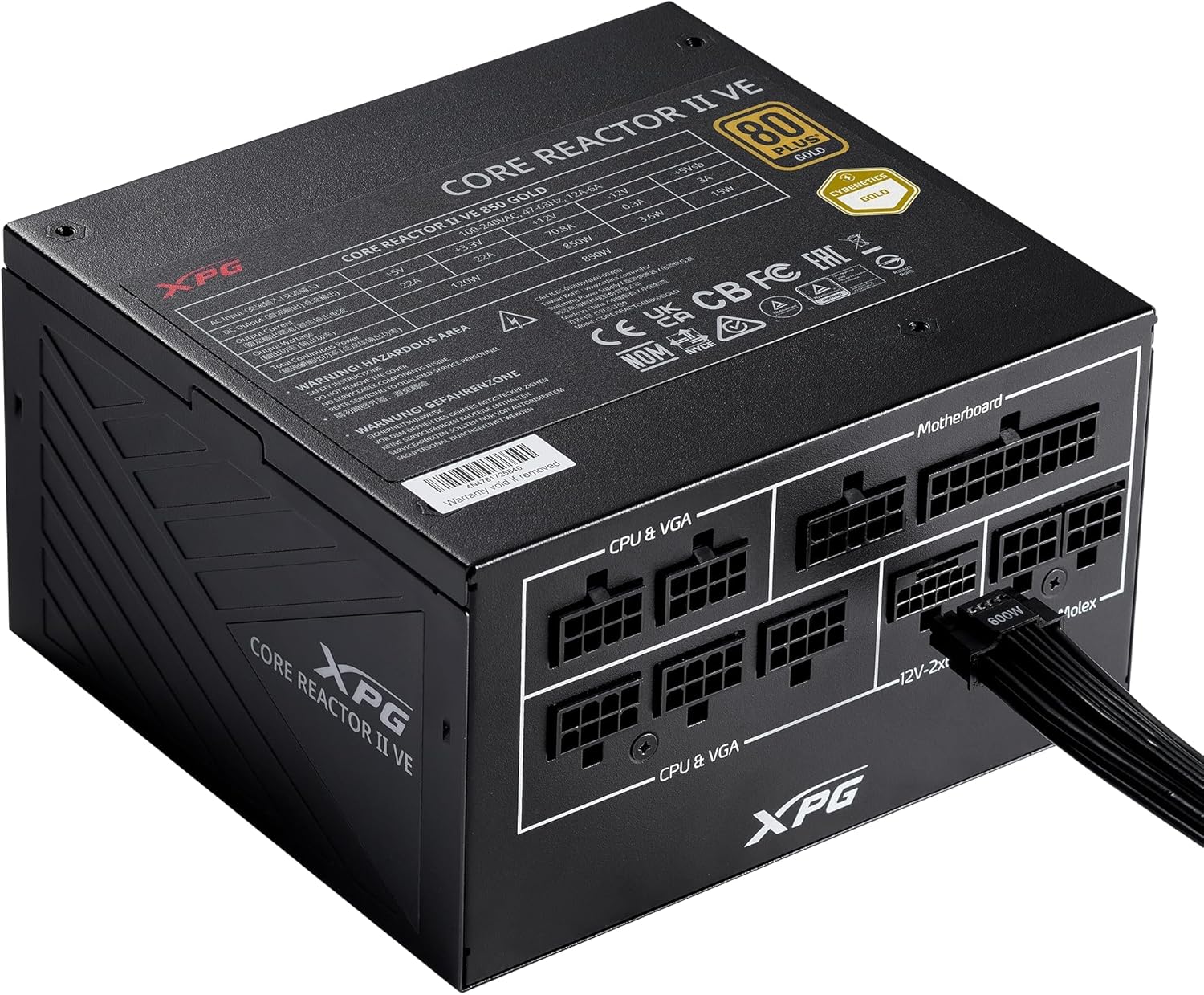
Image: The XPG CORE Reactor II VE 650W power supply with a 12V-2x6 cable connected to its modular port, illustrating a typical cable connection.
- Кабельнае кіраванне: Акуратна пракладзеце кабелі, каб палепшыць паветраабмен і эстэтыку ўнутры вашага корпуса.
- Зачыніце корпус і падключыце сілкаванне: Close your computer case. Connect the AC power cord to the PSU's inlet and then to a wall outlet.
- Уключэнне: Flip the power switch on the back of the PSU to the 'ON' position and power on your computer.
6. Інструкцыя па эксплуатацыі
The XPG CORE Reactor II VE 650W PSU operates automatically once installed and powered on. It features an FDB fan with intelligent fan control, which adjusts its speed based on the PSU's temperature and load to maintain optimal cooling and minimize noise.
The PSU is designed to provide stable and reliable power to your system. No user intervention is typically required during normal operation.
7. Тэхнічнае абслугоўванне
To ensure the longevity and optimal performance of your XPG CORE Reactor II VE 650W PSU, consider the following maintenance tips:
- Выдаленне пылу: Periodically clean the fan grille and the interior of your computer case to prevent dust buildup. Dust can impede airflow and lead to overheating. Use compressed air for this purpose, ensuring the system is powered off and unplugged.
- Праверка кабеля: Час ад часу правярайце ўсе злучэнні модульных кабеляў, каб пераканацца ў іх надзейнасці.
- Асяроддзе: Operate the PSU in a clean, dry, and well-ventilated environment.
8. Выпраўленне непаладак
If you encounter issues with your XPG CORE Reactor II VE 650W PSU, refer to the following common troubleshooting steps:
- Няма харчавання:
- Пераканайцеся, што шнур харчавання пераменнага току надзейна падключаны як да блока харчавання, так і да разеткі.
- Праверце, ці знаходзіцца выключальнік харчавання на задняй панэлі блока харчавання ў становішчы «ON».
- Праверце працаздольнасць разеткі, падключыўшы да яе іншую прыладу.
- Confirm that the 24-pin ATX and 4+4-pin/8-pin EPS/CPU cables are correctly and firmly connected to the motherboard.
- Нестабільнасць сістэмы/выпадковыя адключэнні:
- Ensure all power cables to components (motherboard, CPU, GPU, drives) are securely connected.
- Check for proper ventilation within your computer case. Overheating can cause instability.
- If you have recently added new components, ensure the 650W output is sufficient for your total system load.
- Вентылятар не круціцца:
- The FDB fan features intelligent control and may not spin at low loads or temperatures. This is normal operation.
- If the fan does not spin under heavy load and the PSU feels excessively hot, contact support.
- Незвычайныя шумы:
- A slight coil whine can sometimes occur under specific loads; this is generally not indicative of a fault.
- If you hear grinding or scraping noises, power off the system immediately and contact support.
Калі гэтыя дзеянні не вырашаць праблему, звярніцеся да раздзела «Гарантыя і падтрымка» для атрымання дадатковай дапамогі.
9. Тэхнічныя характарыстыкі
Key technical specifications for the XPG CORE Reactor II VE 650W PSU:
| Асаблівасць | Спецыфікацыя |
|---|---|
| Нумар мадэлі | COREREACTORIIVE650G-BKCUS |
| Выхад ватtage | 650 ват |
| Сертыфікацыя эфектыўнасці | 80 PLUS Gold, CYBENETICS Gold |
| Стандарт ATX | ATX 3.1 / EPS v2.92 |
| Формаў-фактар | ATX |
| Спосаб астуджэння | Air (FDB 120mm Fan) |
| Дызайн блока харчавання | Поўны модульны |
| Памеры прадукту (Д х Ш х У) | 5.86 х 5.9 х 3.38 цаляў (140 х 150 х 86 мм) |
| Вага прадмета | 5.07 фунта |
| Тыпы раздымаў | ATX, Molex, PCI Express, SATA, 12V-2x6 |
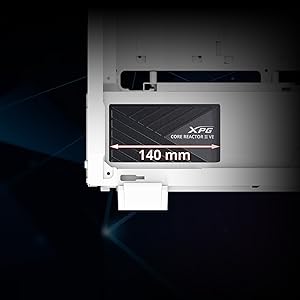
Image: A diagram illustrating the compact 140mm length of the XPG CORE Reactor II VE power supply, highlighting its compatibility with various PC cases.

Image: Visual representation of the multiple protection mechanisms integrated into the PSU, including OPP (Over Power Protection), OVP (Over Voltage Protection), SIP (Surge & Inrush Protection), SCP (Short Circuit Protection), UVP (Under Voltage Protection), OCP (Over Current Protection), OTP (Over Temperature Protection), and NLO (No Load Operation).
10. Гарантыя і падтрымка
For warranty information, technical support, or service inquiries regarding your XPG CORE Reactor II VE 650W PSU, please visit the official XPG website or contact their customer support directly. Details can typically be found on the product packaging or the manufacturer's official support pages.
Захоўвайце доказы пакупкі для прэтэнзій па гарантыі.