
Уводзіны
Thank you for choosing the Lecoo MCS30 Wireless Portable Speaker. This device is designed to provide high-quality audio and voice amplification with versatile connectivity options. Please read this manual carefully before using the product to ensure proper operation and to maximize its lifespan.
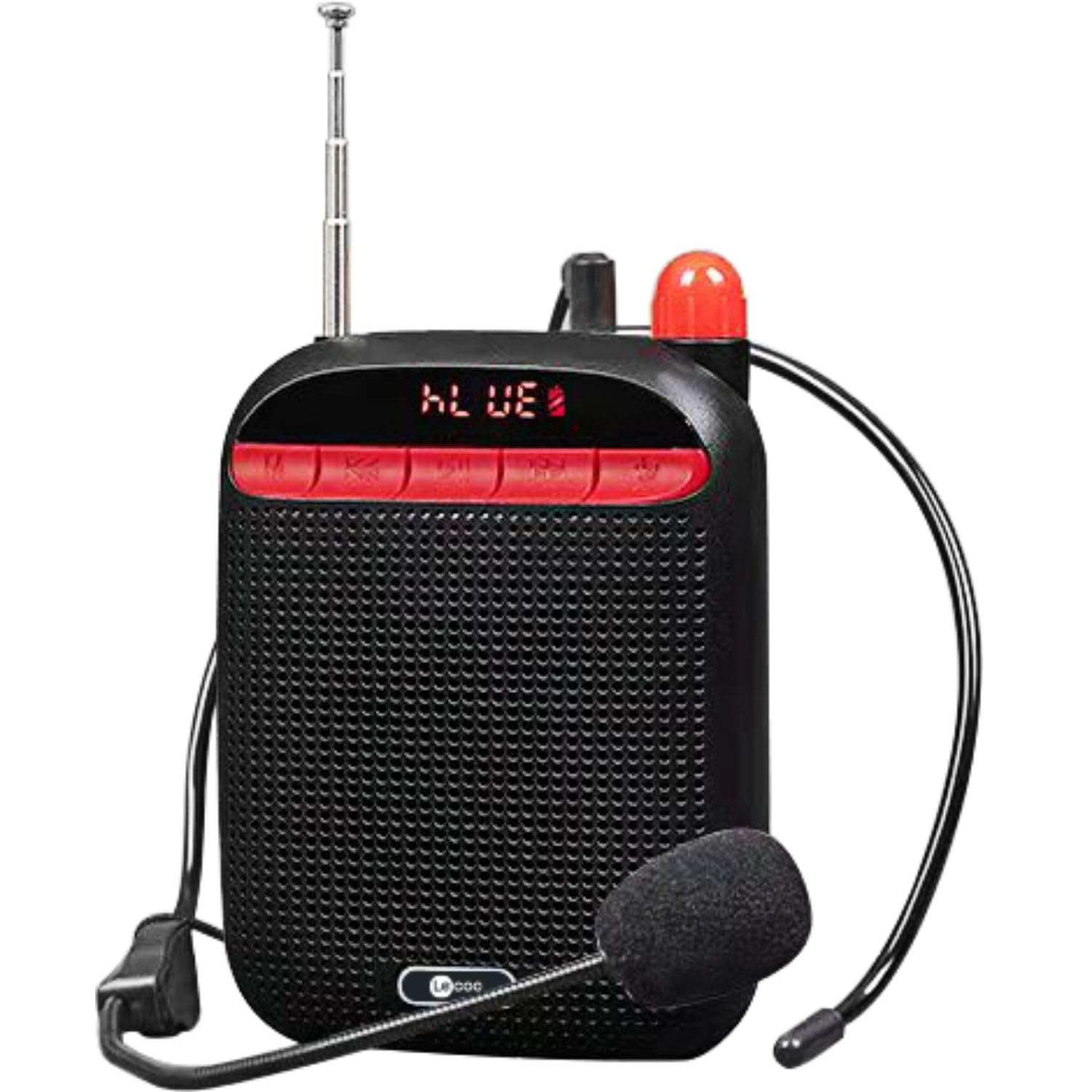
Image: Two Lecoo MCS30 portable speakers, one white and one black, shown with their respective wired headset microphones. Both speakers feature an extendable antenna and front-facing controls.
Прадукт скончаныview
The Lecoo MCS30 is a compact and powerful portable speaker featuring multiple input options and dual microphone support for amplification and recording. Familiarize yourself with the device's components and controls.
Элементы кіравання і дысплей на пярэдняй панэлі

Image: Close-up front view of the black Lecoo MCS30 speaker, highlighting the digital display and the red control buttons for mode selection, track navigation, and microphone functions.
- Экран дысплея: Shows current mode, track information, and battery status.
- Кнопка рэжыму (M): Switches between Bluetooth, USB, AUX, and SD card modes.
- Кнопка «Назад»/«Змяншэнне гучнасці»: Кароткае націсканне для папярэдняга трэка, доўгае націсканне для памяншэння гучнасці.
- Кнопка прайгравання/паўзы: Прайграе або прыпыняе аўдыё.
- Кнопка «Далей»/«Павялічыць гучнасць»: Кароткае націсканне для наступнага трэка, доўгае націсканне для павелічэння гучнасці.
- Кнопка мікрафона: Activates/deactivates microphone functions.
Бакавыя і заднія падключэнні

Выява: зверху ўніз view of the Lecoo MCS30 speaker, revealing the USB port, TF (SD card) slot, AUX input, and microphone input ports.
- Мікрафонны ўваход: For connecting external microphones (headset or lapel).
- Порт USB: Для прайгравання з USB-флэшкі.
- Слот TF карты: Для прайгравання з SD-карты.
- Уваход AUX: Для падлучэння знешніх аўдыёпрылад праз кабель 3.5 мм.
- Порт зарадкі пастаяннага току 5 В: Для зарадкі прылады.
- Выключальнік сілкавання: On/Off toggle.
- Антэна: Extendable antenna for improved signal reception (if applicable for radio functions).
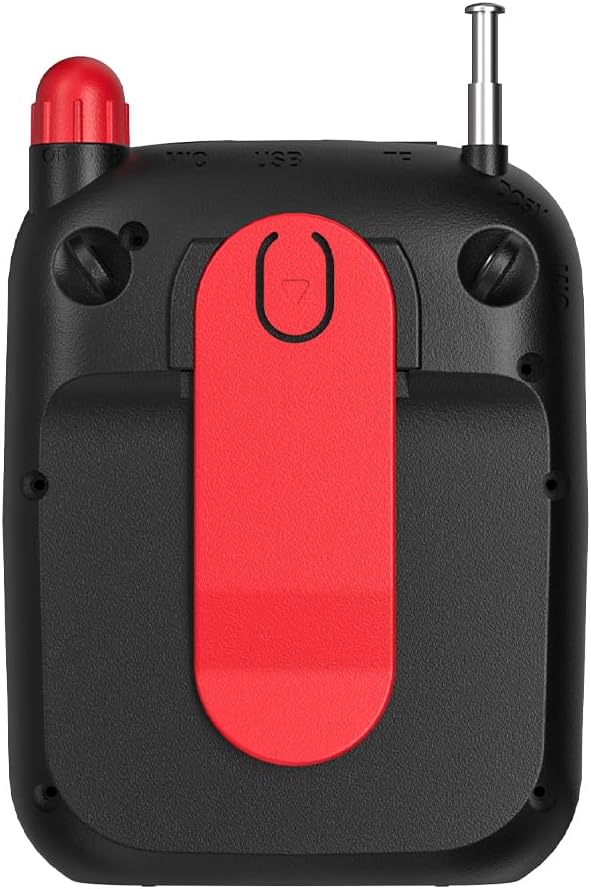
Выява: Задняя частка view of the Lecoo MCS30 speaker, clearly showing the integrated red belt clip for portable use.
- Заціск для рамяня: For attaching the speaker to clothing or a belt for hands-free use.
Настройка
1. Зарадка дынаміка
- Connect the charging cable to the DC 5V port on the speaker.
- Падключыце другі канец кабеля да адаптара харчавання USB (не ўваходзіць у камплект) або да USB-порта кампутара.
- The display will indicate charging status. A full charge typically takes 3-4 hours.
- Адключайце зарадную прыладу пасля поўнай зарадкі, каб падоўжыць тэрмін службы батарэі.
2. Уключэнне / выключэнне харчавання
- To power on, slide the power switch to the 'ON' position. The display will light up.
- Каб выключыць харчаванне, перавядзіце выключальнік у становішча «ВЫКЛ».
3. Пачатковае спалучэнне Bluetooth
- Ensure the speaker is powered on and in Bluetooth mode (the display will show 'BLUE' or a Bluetooth icon). If not, press the 'M' (Mode) button to switch.
- На мабільнай прыладзе (смартфоне, планшэце, ноўтбуку) уключыце Bluetooth і знайдзіце даступныя прылады.
- Select 'Lecoo MCS30' from the list of found devices.
- Once paired, the speaker will emit a confirmation sound, and the display will indicate a successful connection.
Інструкцыя па эксплуатацыі
1. Прайграванне праз Bluetooth
- After successful pairing, open your music player on your connected device and start playback.
- Use the speaker's 'Previous/Volume Down' and 'Next/Volume Up' buttons for track navigation (short press) and volume adjustment (long press).
- Use the 'Play/Pause' button to control playback.
2. Прайграванне з USB/SD-карты
- Устаўце флэш-назапашвальнік USB у порт USB або SD-карту ў слот для карты TF.
- The speaker will automatically switch to USB or SD card mode and begin playing MP3 files. If not, press the 'M' (Mode) button to select the correct mode.
- Use the speaker's control buttons for track navigation and volume adjustment.
3. AUX Input Playback
- Падключыце адзін канец аўдыёкабеля 3.5 мм (не ўваходзіць у камплект) да ўваходнага порта AUX на дынаміку.
- Падключыце другі канец да раздыма для навушнікаў аўдыяпрылады.
- Press the 'M' (Mode) button until the speaker enters AUX mode.
- Start playback from your audio device. Volume can be controlled via both the speaker and the connected device.
4. Microphone Usage and Voice Recording
- Connect the headset microphone or a lapel microphone to the MIC input port.
- Press the 'Microphone' button to activate the amplification function. Your voice will be ampліфікаваны праз дынамік.
- To record your voice, ensure a USB flash drive or SD card is inserted. Press and hold the 'Microphone' button (or follow specific instructions if a dedicated record button exists, otherwise assume long press). The speaker will indicate recording has started.
- Press the 'Microphone' button again to stop recording. Recorded files are saved to the USB drive or SD card.
5. Рэгулятар гучнасці
- Long press the 'Next/Volume Up' button to increase the volume.
- Long press the 'Previous/Volume Down' button to decrease the volume.
Тэхнічнае абслугоўванне
Уборка
- Wipe the speaker's surface with a soft, dry cloth.
- Не выкарыстоўвайце абразіўныя ачышчальнікі, спірт або хімічныя растваральнікі, бо яны могуць пашкодзіць пакрыццё.
- Avoid getting moisture into any ports or openings.
Захоўванне
- Захоўвайце дынамік у прахалодным, сухім месцы, удалечыні ад прамых сонечных прамянёў і экстрэмальных тэмператур.
- Калі вы захоўваеце акумулятар працяглы час, перыядычна зараджайце яго (напрыклад, кожныя 3 месяцы), каб падтрымліваць яго ў працоўным стане.
Ліквідацыю непаладак
- Няма харчавання:
Пераканайцеся, што дынамік цалкам зараджаны. Праверце, ці знаходзіцца выключальнік харчавання ў становішчы «ON». - Няма гуку:
Check the volume level on both the speaker and the connected device. Ensure the correct input mode (Bluetooth, USB, AUX, SD) is selected. Verify cables are securely connected for AUX input. - Bluetooth не падключаецца:
Ensure the speaker is in Bluetooth pairing mode. Turn off and on Bluetooth on your device. Move the speaker closer to your device. Clear previous Bluetooth connections on your device and try pairing again. - Мікрафон не працуе:
Ensure the microphone is securely plugged into the MIC input. Press the 'Microphone' button to activate it. Check the microphone's own power source if it has one. - Recording Not Working:
Ensure a compatible USB flash drive or SD card is inserted and has sufficient free space. Check if the recording function is properly activated (refer to 'Microphone Usage and Voice Recording' section).
Тэхнічныя характарыстыкі
| Асаблівасць | Апісанне |
|---|---|
| Марка | Леку |
| мадэль | MCS30 |
| Тэхналогія падлучэння | Bluetooth 5.3, USB, AUX, SD Card |
| Выходная магутнасць | 5W |
| Дыяпазон частот | 100 Гц-20 кГц |
| Сумяшчальныя прылады | Smartphone, Laptop, Karaoke Machine, MP3 Player, Tablet |
| Падтрымка мікрафона | Dual Microphone (Headset/Lapel) with Amplification and Recording |
| Падтрымка аўдыёфарматаў | MP3 |
| Колер | Чорны |
Гарантыя і падтрымка
The Lecoo MCS30 Portable Speaker comes with a Lecoo Turkey Warranty. For warranty claims or technical support, please refer to the warranty card included with your product or visit the official Lecoo webсайт.
Вы можаце знайсці больш інфармацыі і падтрымкі, наведаўшы Lecoo Store on Amazon.