
Уводзіны
This manual provides instructions for the setup, operation, and maintenance of your OttLite Wake Up Light with White Noise Sound Machine. This device combines a sunrise simulation alarm clock, a white noise sound machine, and a versatile color-changing light to enhance your daily routine.
Інфармацыя па бяспецы
- Прачытайце ўсе інструкцыі перад выкарыстаннем.
- Гэты прадукт прызначаны толькі для выкарыстання ў памяшканнях.
- Выкарыстоўвайце толькі адаптар сілкавання, які ўваходзіць у камплект.
- Не падвяргайце прыладу ўздзеянню вады або празмернай вільгаці.
- Захоўваць у месцах, недаступных дзецям.
- Не спрабуйце разбіраць або рамантаваць прыладу самастойна. Звярніцеся да кваліфікаванага абслугоўваючага персаналу.
Змест пакета
- OttLite Wake Up Light with White Noise Sound Machine
- USB кабель харчавання
- Кіраўніцтва карыстальніка
Прадукт скончаныview
Familiarize yourself with the components of your OttLite Wake Up Light.

Выява: спераду view of the OttLite Wake Up Light, displaying the time and connected to a USB charging pad.

Выява: Збоку view of the OttLite Wake Up Light, showing the various control buttons and the USB port.
Key Controls:
- Дысплей часу: Дысплей лічбавага гадзінніка.
- Светлавая панэль: Provides white and color-changing illumination.
- Кнопкі кіравання: Located on the side for setting time, alarms, light modes, and sounds.
- Порт для зарадкі USB: Для зарадкі знешніх прылад.
Настройка
- Распакуйце: Акуратна дастаньце ўсе кампаненты з упакоўкі.
- Падключэнне сілкавання: Connect the provided USB power cable to the device and plug the adapter into a standard wall outlet. The device will power on and the time display will activate.
- Размяшчэнне: Place the Wake Up Light on a stable, flat surface, such as a bedside table, ensuring it is within reach of a power outlet.
Інструкцыя па эксплуатацыі
1. Наладжванне гадзінніка
- Press the 'Time Set' button (often indicated by a clock icon).
- Use the '+' and '-' buttons to adjust the hour and minute.
- Press 'Time Set' again to confirm each setting.
- Toggle between 12-hour and 24-hour format using the dedicated button or by cycling through time settings.
2. Wake-Up Light & Alarm Function
The sunrise simulation gradually increases light intensity before your set alarm time.

Image: A user interacting with the Wake Up Light as it emits a warm, sunrise-like glow.
- Усталяваць будзільнік: Press the 'Alarm Set' button (bell icon). Use '+' and '-' to set the desired wake-up time.
- Сімуляцыя ўзыходу сонца: The light will begin to brighten 30 minutes before the set alarm time, gradually increasing to full brightness.
- Гукі для абуджэння: Choose from 7 pre-set sounds (nature sounds, FM radio, traditional alarm) by pressing the 'Sound' button. Adjust volume with '+' and '-'.
- Функцыя затрымкі: Press the 'Snooze' button (often a large button on top or front) to temporarily pause the alarm for a few minutes.
3. Sleep Aid & Sunset Simulation
Utilize the white noise and sunset simulation for a calming environment.
- Белы шум: Activate the white noise sound machine by pressing the 'White Noise' button. Adjust volume as needed.
- Сімуляцыя заходу сонца: Set the light to gradually dim over 15, 30, or 60 minutes. Refer to the specific button for 'Sunset' or 'Sleep Timer' and cycle through options.
4. Lighting Functions
The device offers various lighting options for ambiance and utility.
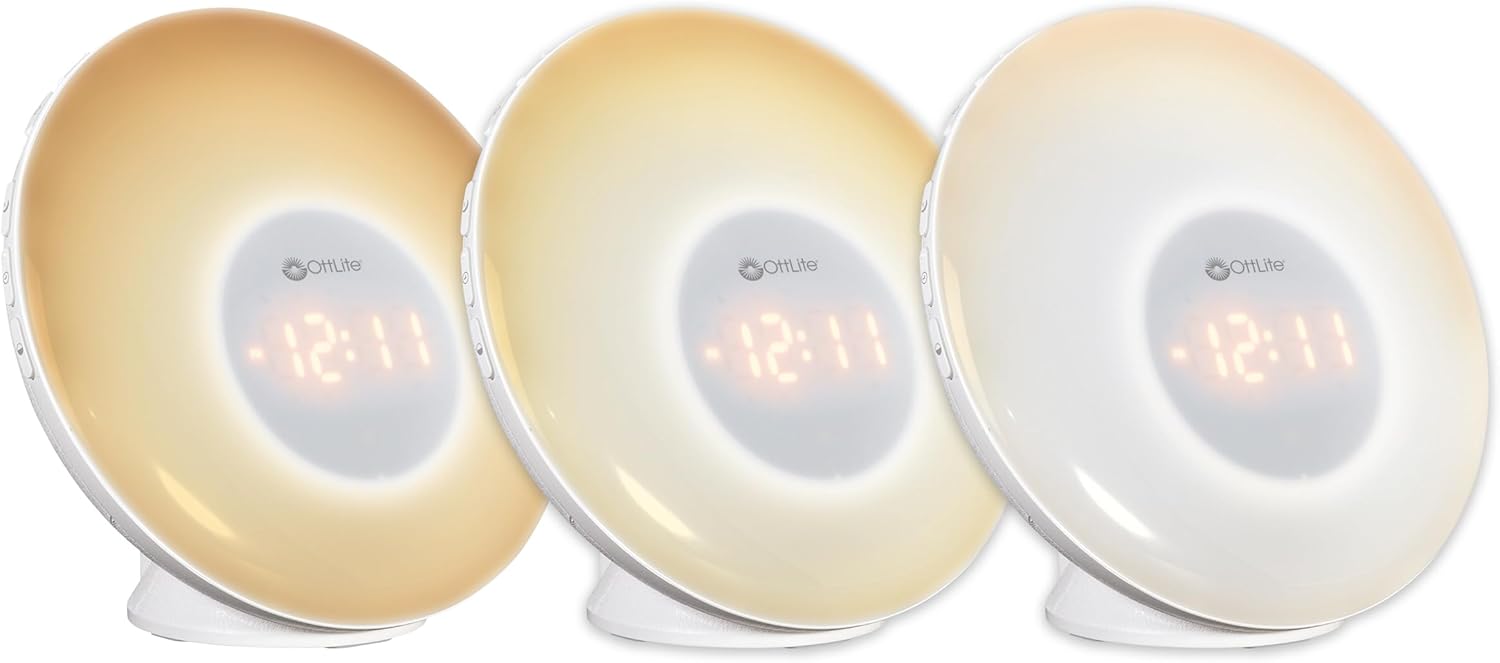
Image: Three units demonstrating the adjustable white light temperatures.

Выява: Паказана некалькі адзінакasing the range of color-changing options.
- Белае святло: Press the 'Light' button to activate soft white light. Adjust brightness using '+' and '-' buttons (three brightness levels available).
- Змена колеру: Press the 'RGB' button to cycle through a spectrum of colors.
- Fixed Color: While in color-changing mode, press the 'RGB' button again to pause on your desired color.
5. Порт для зарадкі USB
A convenient USB port is integrated for charging your devices.

Image: A smartphone being charged via the USB port on the Wake Up Light.
- Locate the USB port (5V, 1A output) on the side or back of the unit.
- Connect your device's USB charging cable to this port.
- Ensure the Wake Up Light is powered on for the USB port to function.
Тэхнічнае абслугоўванне
- Уборка: Disconnect the power before cleaning. Wipe the device with a soft, dry cloth. Do not use abrasive cleaners or solvents.
- захоўванне: Калі прылада не выкарыстоўваецца працяглы час, захоўвайце яе ў прахалодным, сухім месцы, удалечыні ад прамых сонечных прамянёў.
Ліквідацыю непаладак
| праблема | Магчымая прычына | Рашэнне |
|---|---|---|
| Прылада не ўключаецца. | Power cable not connected properly or power outlet is not active. | Ensure the power cable is securely connected to the device and the wall outlet. Test the outlet with another device. |
| Alarm does not sound or light does not activate. | Будзільнік не настроены або гучнасць занадта нізкая. | Verify alarm settings and ensure the alarm is activated. Increase alarm volume. |
| High-pitched buzzing sound when light is on. | Potential internal component noise at certain brightness levels. | Try adjusting the brightness level. If the issue persists and is disruptive, contact customer support. |
| Difficulty setting the alarm or other functions. | Unfamiliarity with button layout or sequence. | Refer to the 'Operating Instructions' section carefully. Practice setting functions when not under time pressure. |
| Не працуе порт зарадкі USB. | Device not powered on or cable issue. | Ensure the Wake Up Light is powered on. Try a different USB cable or device to rule out cable/device issues. |
Тэхнічныя характарыстыкі
| Асаблівасць | Дэталь |
|---|---|
| Нумар мадэлі | WU300Z-SHPR |
| Памеры прадукту | 4" Г x 6.75" Ш x 6.7" У |
| Вага прадмета | 1.23 фунта |
| Крыніца харчавання | Правадная электрычная (120 вольт пераменнага току) |
| Тып крыніцы святла | святлодыёд |
| Асаблівасці | Color Changing, Dimmable, Sunrise Simulation, Sunset Simulation, White Noise, USB Charging Port |
| USB выхад | 5 В, 1 А |
| Матэрыял | Пластыкавыя |
| Выкарыстанне ў памяшканні/на вуліцы | Толькі для выкарыстання ў памяшканнях |
Гарантыя і падтрымка
OttLite products are designed for quality and durability. For warranty information or technical support, please refer to the warranty card included with your purchase or visit the official OttLite webсайт. Захоўвайце чэк аб пакупцы на выпадак прэтэнзій па гарантыі.
For further assistance, please contact OttLite customer service.