
1. Уводзіны
Дзякуй за пакупкуasing the Dpofirs LMD-750 Portable DVD Player. This device is designed to provide versatile entertainment on the go, at home, or in the office. Featuring a 270° rotating HD LCD screen, multi-format disc support, USB/SD card playback, analog TV function, FM radio, and game capabilities, it offers a comprehensive multimedia experience. Please read this manual carefully to ensure proper use and to maximize the performance and longevity of your device.
2. Інфармацыя па бяспецы
- Не падвяргайце прыладу ўздзеянню дажджу, вільгаці або экстрэмальных тэмператур.
- Пазбягайце размяшчэння прылады побач з крыніцамі цяпла або пад прамымі сонечнымі прамянямі.
- Use only the provided power adapter and car adapter.
- Не спрабуйце разбіраць або рамантаваць прыладу самастойна. Звярніцеся да кваліфікаванага абслугоўваючага персаналу.
- Трымайце прыладу далей ад моцных магнітных палёў.
- Забяспечце належную вентыляцыю падчас працы прылады.
- Remove discs when transporting the player to prevent damage.
3. Змесціва ўпакоўкі
Калі ласка, праверце ўпакоўку на наяўнасць наступных прадметаў:
- 1 x Dpofirs LMD-750 Portable DVD Player
- 1 х пульт дыстанцыйнага кіравання
- 1 x Power Adapter (EU Plug)
- 1 х аўтамабільны адаптар
- 1 х AV-кабель
- 1 х антэна
- 1 х геймпад
- 1 x Game Disc
- 1 х Кіраўніцтва карыстальніка
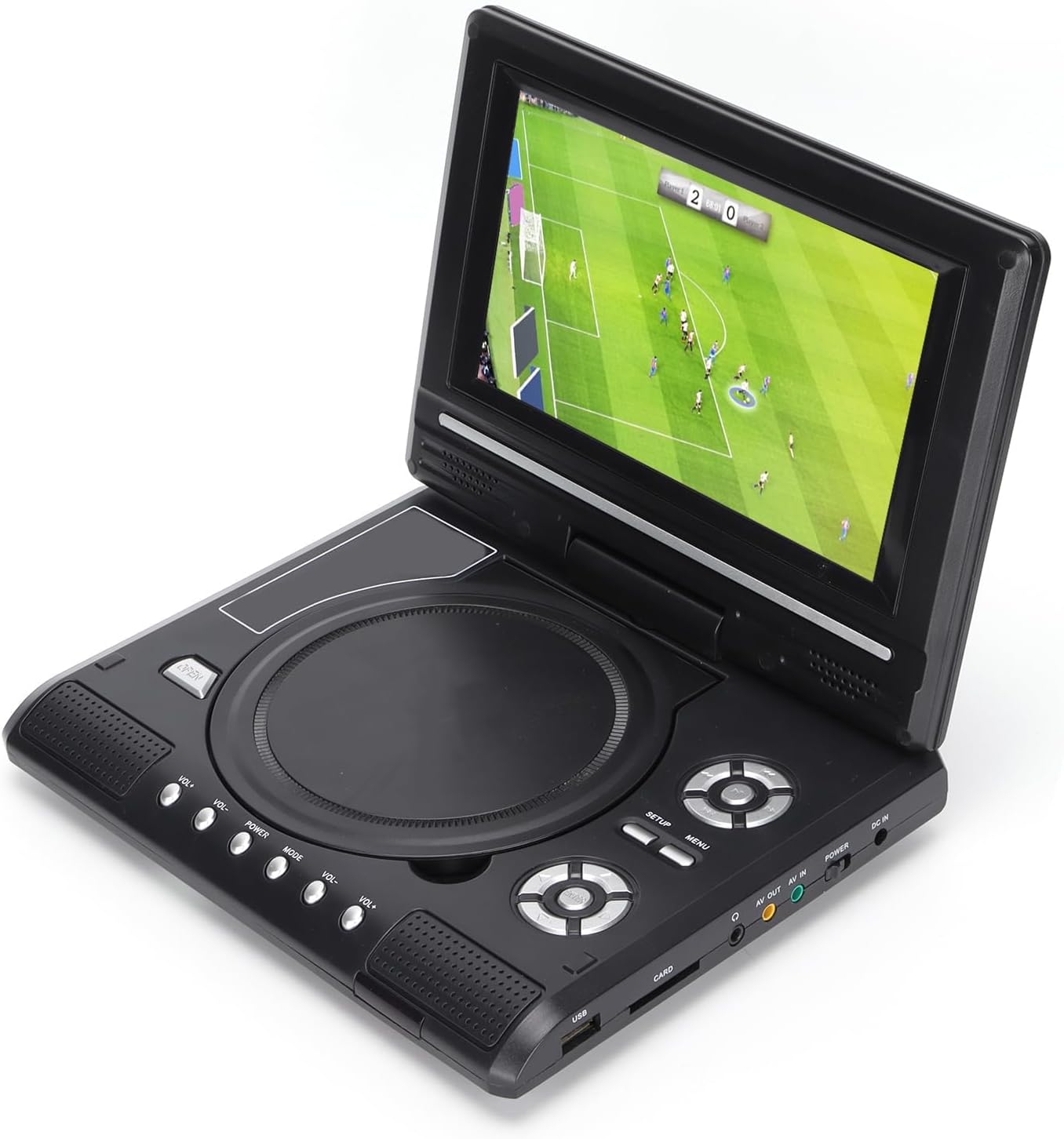
Image: All accessories included with the Dpofirs LMD-750 Portable DVD Player.
4. Прадукт скончыўсяview
The Dpofirs LMD-750 features a compact design with intuitive controls and multiple connectivity options.

Выява: спераду view of the Dpofirs LMD-750 Portable DVD Player with the screen open.

Выява: Збоку view detailing the input/output ports.

Выява: Уверсе view of the player when closed.
Элементы кіравання і парты:
- экран: 6.8"/8.5" HD LCD, 270° rotatable.
- Латок для дыска: For DVD/CD media.
- Кнопкі кіравання: Play/Pause, Stop, Fast Forward/Rewind, Next/Previous, Setup, Menu, Volume +/-.
- Порт USB: Для падлучэння USB-флэш-назапашвальнікаў.
- CARD Slot: For inserting memory cards (e.g., SD card).
- Раз'ём для навушнікаў: Для прыватнага праслухоўвання.
- AV-выхад: Audio/Video output to external display.
- AV IN: Audio/Video input from external source.
- Выключальнік сілкавання: To turn the device On/Off.
- DC IN: Power input for adapter.
5. Настройка
5.1 Зарадка акумулятара
Before first use, fully charge the built-in 1500mAh lithium battery. Connect the power adapter to the DC IN port on the player and plug it into a wall outlet (110-240V 50/60Hz). The charging indicator will illuminate. Once fully charged, the indicator may change color or turn off. A full charge provides approximately 30-60 minutes of continuous playback, depending on usage.
5.2 Падключэнне сілкавання
- Хатняе выкарыстанне: Connect the AC power adapter to the DC IN port and a wall socket.
- Выкарыстанне аўтамабіля: Connect the car adapter to the DC IN port and your vehicle's cigarette lighter socket.
5.3 Connecting to an External Display (AV OUT)
каб view кантэнт на большым экране:
- Падключыце адзін канец AV-кабеля да порта AV OUT на DVD-плэеры.
- Connect the other end of the AV cable to the corresponding AV IN ports (Yellow for Video, White/Red for Audio) on your TV or monitor.
- Select the correct AV input source on your external display.
5.4 Connecting External Devices (AV IN)
To display content from an external source on the DVD player's screen:
- Connect one end of the AV cable to the AV IN port on the DVD player.
- Connect the other end of the AV cable to the AV OUT ports of your external device (e.g., another DVD player, game console).
- Switch the DVD player to AV IN mode (refer to Operating Instructions).
6. Інструкцыя па эксплуатацыі
6.1 Уключэнне/выключэнне сілкавання
Ссуньце УЛАДА switch to the "ON" position to turn on the player. Slide it to "OFF" to power down.
6.2 Паварот экрана
The LCD screen can rotate up to 270 degrees. Gently adjust the screen to your desired viewing angle. This allows for flexible viewякія знаходзяцца ў розных асяроддзях.
6.3 Рэгулятар гучнасці
Выкарыстоўвайце ГУЧНАСЦЬ+ і ГУЧ- buttons on the player or remote control to adjust the audio volume.
6.4 Навігацыя па меню
Націсніце МЕНЮ button to access the main menu. Use the directional buttons (up, down, left, right) to navigate and the OK кнопку для пацверджання выбару. Націсніце НАСТРОЙКА для доступу да налад сістэмы.
7. Прайграванне медыяфайлаў
7.1 Прайграванне дыскаў (DVD/CD)
- Адкрыйце крышку дыска.
- Carefully place a compatible disc (DVD, DVD±R, DVD±RW, VCD, CD, CD±R, CD±RW) onto the spindle with the label side facing up.
- Шчыльна зачыніце вечка дыска.
- The player will automatically detect and begin playback. If not, press the ГУЛЬНЯ кнопка.

Image: Player displaying video content.

Image: Player displaying a sports event.
7.2 Прайграванне з USB/SD-карты
- Устаўце флэшку USB у USB port or a memory card into the КАРТА слот.
- The player will automatically switch to USB/Card mode or prompt you to select the source.
- Перамяшчайцеся па сваім files using the directional buttons and press OK гуляць.
Падтрымліваюцца фарматы: DIVX, AV/VOB, MPG, MP3, MP4, WMA, JPEG, TXT, RMVB.
The player features an intelligent power-off memory function, resuming playback from where it stopped after a power interruption.
8. TV Function
The Dpofirs LMD-750 includes an analog TV tuner.
- Connect the included antenna to the antenna port on the player.
- Switch the player to TV mode (usually via the РЭЖЫМ button or menu selection).
- Perform an automatic channel scan in the TV settings menu to find available analog channels.
- Channel reception quality depends on local signal strength.
Supported TV Standards: PAL, NTSC, SECAM (optional).
9. Game Function
Enjoy gaming with the included gamepad and game disc.
- Connect the gamepad to the designated game port on the player.
- Insert the game disc into the disc tray.
- Select the game function from the main menu.
- Choose from the available games on the disc (up to 300 games).
10. Тэхнічнае абслугоўванне
10.1 Ачыстка прылады
- Працярыце знешнія паверхні прайгравальніка мяккай сухой тканінай.
- Не выкарыстоўвайце вадкія ачышчальнікі або абразіўныя матэрыялы.
- For the screen, use a soft, lint-free cloth specifically designed for LCD screens.
10.2 Сыход за дыскам
- Трымайце дыскі за краю, каб пазбегнуць адбіткаў пальцаў.
- Працірайце дыскі мяккай тканінай без ворса, рухаючыся ад цэнтра да краёў.
- Store discs in their cases to prevent scratches.

Image: Internal disc mechanism.
11. Выпраўленне непаладак
| праблема | Магчымая прычына | Рашэнне |
|---|---|---|
| Няма ўлады | Battery drained; Power adapter not connected; Power switch OFF. | Charge the battery; Connect power adapter; Slide POWER switch to ON. |
| Няма прайгравання дыска | Disc inserted incorrectly; Disc dirty or scratched; Incompatible disc format. | Insert disc correctly (label up); Clean or replace disc; Use supported disc format. |
| Няма гуку | Занадта нізкі гук; функцыя адключэння гуку ўключана; падключаны навушнікі. | Павялічыць гучнасць; Адключыць гук; Адключыць навушнікі, калі карыстаецеся дынамікамі. |
| Дрэнны прыём тэлебачання | Weak signal; Antenna not positioned correctly. | Adjust antenna position; Rescan channels; Check local signal strength. |
| Пульт дыстанцыйнага кіравання не працуе | Batteries drained or inserted incorrectly; Obstruction between remote and player. | Replace batteries (2x AAA); Ensure correct polarity; Remove obstructions. |
12. Тэхнічныя характарыстыкі
| Нумар мадэлі | LMD-750 (Dpofirsrgi5bmonx0-13) |
| Матэрыял | АБС |
| Колер | Чорны |
| Памер экрана | 6.8" / 8.5" (diagonal, depending on variant) |
| Тып дысплея | ВК |
| Дазвол дысплея | 234 x 480 x RGB (native), supports up to 1280 x 720, 1366 x 768 |
| Уваходны кнtage | 110-240 В 50/60 Гц |
| Выхад Voltage | 12В |
| Ёмістасць батарэі | Літыевая батарэя ёмістасцю 1500 мАг (убудаваная) |
| Акумулятар пульта дыстанцыйнага кіравання | 2 х ААА батарэі (не ўключаны) |
| Падтрымліваюцца фарматы дыскаў | DVD, DVD±R, DVD±RW, VCD, MP3, MP4, CD±R, CD±RW |
| Supported Media Formats (USB/Card) | DIVX, AV/VOB, MPG, MP3, MP4, WMA, JPEG, TXT, RMVB |
| Тэлевізійная сістэма | PAL, NTSC, SECAM (full system) |
| Каналы прыёму | LHF1-5, VHF6-12, UHF13-69, ATV |
| Тэхналогія кадавання аўдыё | 96 кГц/24 біты |
| Дынамічны дыяпазон | ≥ 80 дБ |
| Стаўленне сігнал / шум | ≥ 70 дБ |
| Ізаляцыя канала | ≥ 70 дБ |
| Тэхналогія падлучэння | USB, Composite Video |
| Вытворца | Дпофіры |
| Краіна паходжання | Кітай |
13. Гарантыя і падтрымка
Каб атрымаць інфармацыю аб гарантыі і падтрымцы кліентаў, звярніцеся да дакументацыі, якая пастаўляецца з пакупкай, або звярніцеся да прадаўца. Захоўвайце пацвярджэнне пакупкі для любых гарантыйных прэтэнзій.