
Tecno LH8n (256+8)
Кіраўніцтва карыстальніка TECNO Pova 5 Pro 5G
Model: LH8n (256+8)
Уводзіны
This manual provides essential information for the safe and efficient operation of your TECNO Pova 5 Pro 5G smartphone. Please read it thoroughly before using your device to ensure optimal performance and longevity.

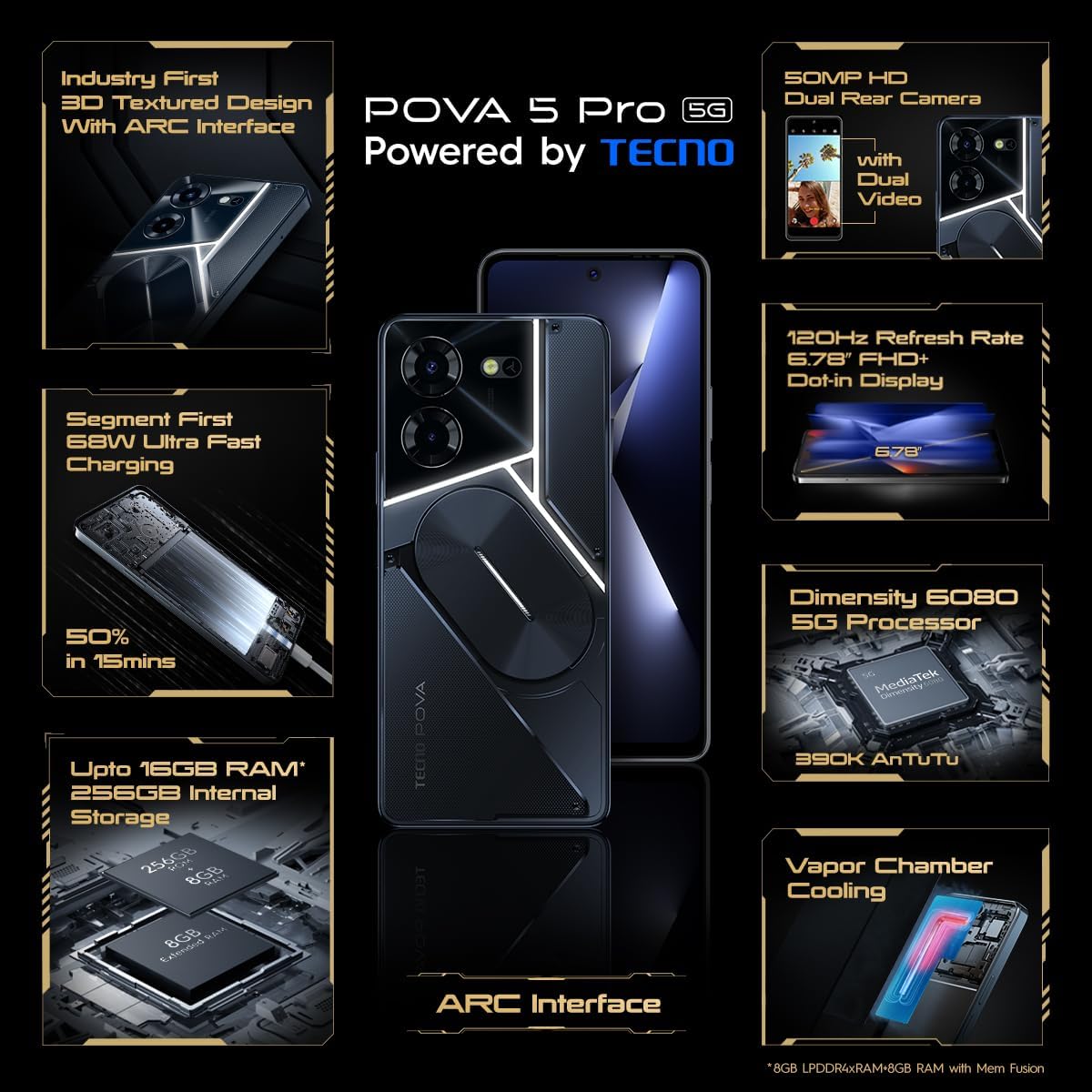
Image: The TECNO Pova 5 Pro 5G smartphone, showcasing its design and key feature of 68W Ultra Fast Charging.
Што ў скрынцы
Праверце наяўнасць усіх прадметаў ва ўпакоўцы:
- Смартфон
- Адаптар сілкавання 68 Вт
- Кабель Type-C
- TPU Cover
- Інструмент выцягвання SIM-карты

Image: A flat lay of the TECNO Pova 5 Pro 5G packaging contents, showing the smartphone, 68W power adapter, USB-C cable, TPU protective cover, and the SIM ejector tool.
Настройка
Пачатковая налада
- Устаўце SIM-карту/SD-карту: Locate the SIM tray on the side of the device. Use the provided SIM ejector tool to open the tray. Insert your Nano-SIM card(s) and/or microSD card into the designated slots. Ensure the tray is fully reinserted.
- Уключэнне: Press and hold the Power button (located on the right side) until the TECNO logo appears.
- Выконвайце падказкі на экране: The device will guide you through initial setup, including language selection, Wi-Fi connection, Google account setup, and security settings.
Зарадка прылады
The TECNO Pova 5 Pro 5G supports 68W Ultra Fast Charging.
- Connect the Type-C cable to the charging port at the bottom of the phone.
- Падключыце другі канец кабеля да адаптара харчавання магутнасцю 68 Вт.
- Падключыце адаптар сілкавання да насценнай разеткі.
- A full charge typically takes approximately 45 minutes, with 50% charge achievable in about 15 minutes.
Выява: Чысты фронт view of the TECNO Pova 5 Pro 5G smartphone, highlighting its display and front camera.
Кіраванне прыладай
Базавая навігацыя
- Сэнсарны экран: Націсніце, каб выбраць, правядзіце пальцам, каб пракруціць, звядзіце пальцамі, каб павялічыць.
- Кнопка харчавання: Націсніце, каб абудзіць/перавесці экран у рэжым сну. Націсніце і ўтрымлівайце, каб выключыць або перазагрузіць прыладу.
- Кнопкі гучнасці: Адрэгулюйце гучнасць мультымедыя, гучнасць выклікаў або гучнасць мелодыі званка.
Выкарыстанне камеры
The device features a 50MP AI Dual Rear Camera and a 16MP Selfie Camera.
- Адкрыйце праграму «Камера» на галоўным экране або ў панэлі праграм.
- Выберыце патрэбны рэжым (Фота, Відэа, Партрэт і г.д.).
- Націсніце кнопку спуску засаўкі, каб зрабіць фота ці пачаць/спыніць відэазапіс.
- Utilize AI enhancements for optimized scene recognition and image quality.
ARC Interface and Notifications
The TECNO Pova 5 Pro 5G features a unique multi-color ARC interface with backlighting.
- The ARC interface provides customizable light effects for notifications, incoming calls, gaming, and music playback.
- Access settings to personalize the light patterns and colors for different alerts.

Выява: Задняя частка view of the TECNO Pova 5 Pro 5G, showcasing its distinctive 3D textured design and the illuminated ARC interface.

Выява: Падрабязны view of the TECNO Pova 5 Pro 5G's ARC interface, illustrating the multi-color backlighting feature.
Тэхнічнае абслугоўванне
- Сыход за батарэяй: To prolong battery life, avoid exposing the device to extreme temperatures. Do not fully discharge the battery regularly.
- Уборка: Для чысткі экрана і корпуса выкарыстоўвайце мяккую тканіну без ворса. Пазбягайце выкарыстання агрэсіўных хімічных рэчываў або абразіўных матэрыялаў.
- Абнаўленні праграмнага забеспячэння: Regularly check for and install system updates to ensure optimal performance, security, and access to new features. Navigate to Settings > System > System update.
- Кіраванне сховішчам: Перыядычна чысціце непатрэбнае fileі праграмы для падтрымання дастатковай прасторы для захоўвання і хуткасці прылады.
Ліквідацыю непаладак
- Прылада не ўключаецца: Ensure the battery is charged. Connect the device to the charger for at least 15 minutes before attempting to power on again. If the issue persists, perform a forced restart by holding the Power button for 10-15 seconds.
- Праблемы з зарадкай: Verify that the charging cable and adapter are securely connected and undamaged. Try using a different outlet.
- Збой/завісанне праграмы: Close the problematic app and reopen it. If the issue continues, clear the app's cache and data in Settings > Apps. As a last resort, uninstall and reinstall the app.
- Слабае падключэнне да сеткі: Check if Airplane Mode is off. Restart the device. If using mobile data, ensure your SIM card is properly inserted and your data plan is active.
- Перагрэў: Avoid using the device in direct sunlight or during intensive tasks for extended periods. Close background applications.
Тэхнічныя характарыстыкі
| Асаблівасць | Спецыфікацыя |
|---|---|
| Назва мадэлі | Pova 5 Pro 5G |
| Аперацыйная сістэма | Android 13.0 |
| Працэсар | Dimensity 6080 (2.4 GHz Octa-Core) |
| АЗП | 8 GB (expandable up to 16 GB with Memory Fusion) |
| Унутраная памяць | 256 GB (UMCP) |
| Дысплей | 6.78-inch FHD+ Dot-in Display |
| Частата абнаўлення | 120 Гц |
| Задняя камера | Двайная камера са штучным інтэлектам 50 Мп |
| Пярэдняя камера | 16 MP Selfie Camera |
| акумулятар | 5000 мАг літый-палімерны |
| Зарадка | 68W Ultra Fast Charging |
| Памеры | 16.9 х 7.7 х 16.9 см |
| Вага | 214 грамаў |
| Сувязь | 5G (10 bands supported), NFC, Bluetooth 5.1 |

Image: An internal diagram or view of the TECNO Pova 5 Pro 5G, illustrating its vapor chamber cooling system for efficient heat dissipation.
Гарантыя і падтрымка
Your TECNO Pova 5 Pro 5G comes with a manufacturer's warranty. Please refer to the warranty card included in your product packaging for specific terms and conditions.
For technical support, service, or warranty claims, please contact TECNO customer service. TECNO maintains a large service network with over 1200 service centers in India.
You can find more information and support resources by visiting the official Tecno store on Amazon: Tecno Store