
Уводзіны
This manual provides instructions for the use and maintenance of your Generic ADN-306 remote control, designed for Pioneer AVH-P4450 and AVH-P4450BT multimedia receivers. Please read this manual thoroughly before use to ensure proper operation and to maximize the lifespan of your device.
Прадукт скончаныview
The ADN-306 remote control is a high-quality, ergonomic button-controlled device designed to provide convenient operation of your compatible Pioneer auto stereo system. It allows you to control various functions of your multimedia receiver from a distance.
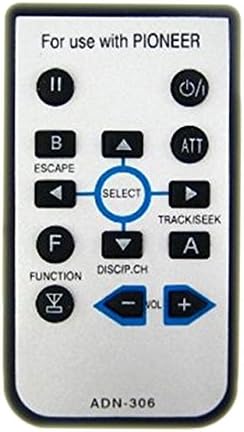
Апісанне малюнка: A rectangular silver-colored remote control with black buttons. The top of the remote reads "For use with PIONEER". Key buttons include: Power (top right), Play/Pause (top left), Escape/B, ATT, Select (center navigation cluster with up, down, left, right arrows), Track/Seek (right of select), Function/F, DISCIP.CH, and Volume controls (- and +). The bottom of the remote shows "ADN-306".
Настройка
Ўстаноўка акумулятара
The remote control comes with a battery included and pre-installed. If replacement is needed in the future, locate the battery compartment on the back of the remote. Open the compartment, remove the old battery, and insert the new battery, ensuring correct polarity (positive and negative terminals are aligned as indicated). Close the compartment securely.
Інструкцыя па эксплуатацыі
This section details the functions of each button on your ADN-306 remote control. Point the remote control directly at the infrared (IR) sensor on your Pioneer multimedia receiver for optimal performance.
- Магутнасць (⏻): Turns the multimedia receiver on or off.
- Play/Pause (II): Toggles playback between play and pause modes for audio or video content.
- B / ESCAPE: Used for backing out of menus, canceling selections, or returning to the previous screen.
- ATT (Аслабленне): Mutes or significantly reduces the audio volume temporarily. Press again to restore volume.
- SELECT (Center Button): Confirms selections within menus or activates a highlighted option.
- Стрэлка ўверх (▲): Navigates up in menus, scrolls through lists, or increases a setting value.
- Стрэлка ўніз (▼): Navigates down in menus, scrolls through lists, or decreases a setting value.
- Left Arrow (◄): Navigates left in menus, skips backward through tracks, or tunes to a lower frequency station.
- Right Arrow (►) / TRACK/SEEK: Navigates right in menus, skips forward through tracks, or tunes to a higher frequency station.
- F / FUNCTION: Accesses various function modes or settings specific to the multimedia receiver.
- DISCIP.CH: Likely used for disc or channel selection/switching, depending on the current source.
- A: An auxiliary function button; its specific use may vary depending on the current mode or source of the receiver.
- VOL - (Volume Down): Decreases the audio volume.
- VOL + (павялічыць гучнасць): Increases the audio volume.
Тэхнічнае абслугоўванне
Каб забяспечыць даўгавечнасць і належную працу пульта дыстанцыйнага кіравання, выконвайце наступныя рэкамендацыі па тэхнічным абслугоўванні:
- Keep the remote clean by wiping it with a soft, dry cloth. Avoid using abrasive cleaners or solvents.
- Пазбягайце ўздзеяння экстрэмальных тэмператур, прамых сонечных прамянёў або высокай вільготнасці на пульт дыстанцыйнага кіравання.
- Do not drop the remote or subject it to strong impacts, as this can damage internal components.
- If the remote will not be used for an extended period (e.g., several months), remove the battery to prevent potential leakage and damage.
Ліквідацыю непаладак
Калі ў вас узніклі праблемы з пультам дыстанцыйнага кіравання, звярніцеся да наступнай табліцы, каб знайсці распаўсюджаныя праблемы і рашэнні:
| праблема | Рашэнне |
|---|---|
| Пульт дыстанцыйнага кіравання не адказвае | Check battery polarity. Replace battery if low or depleted. Ensure there is a clear line of sight between the remote and the receiver's IR sensor. |
| Кнопкі ліпнуць або не рэагуюць | Clean the remote surface and around the buttons with a soft, dry cloth. Avoid spills on the remote. |
| Limited operating range | Ensure no obstructions are blocking the signal between the remote and the receiver. Replace the battery with a fresh one. |
Тэхнічныя характарыстыкі
- мадэль: ADN-306
- Сумяшчальнасць: Pioneer AVH-P4450, AVH-P4450BT Multimedia Receivers
- Тып кантролера: Кіраванне кнопкамі
- асаблівасць: Эрганамічны дызайн
- вытворца: StreamUSA
- Першыя даступныя: 20 лістапада 2016 г
Гарантыя і падтрымка
Гэты прадукт пастаўляецца з a Гарантыя 60 дзён from the date of purchase. This warranty covers manufacturing defects under normal use. It does not cover damage caused by misuse, accidents, unauthorized modifications, or improper maintenance.
For warranty claims or technical support, please contact your retailer or the manufacturer, StreamUSA. Please retain your proof of purchase (e.g., receipt or order confirmation) as it will be required for any warranty service.