
1. Уводзіны і большview
This Docooler Wireless Digital Thermometer provides simultaneous display of indoor and outdoor temperatures, along with the current time. It utilizes wireless technology for convenient outdoor temperature monitoring from an indoor receiver. The device records maximum and minimum indoor/outdoor temperatures and offers selectable temperature units (Celsius/Fahrenheit) and time formats (12H/24H).

Image 1.1: Docooler Wireless Digital Thermometer main unit and outdoor transmitter.
2. Кампаненты прадукту
Пакет уключае наступныя рэчы:
- Main Temperature Unit (Receiver)
- Бесправадны вонкавы перадатчык
- Кіраўніцтва карыстальніка (гэты дакумент)
Заўвага: 2x AA 1.5V batteries for the transmitter and 2x AAA 1.5V batteries for the main unit are не ўключаны і павінны быць набыты асобна.

Малюнак 2.1: Пярэдняя і задняя часткі view of the main temperature unit.
3. Настройка
3.1 Устаноўка батарэі
- For the Main Temperature Unit: Open the battery compartment cover on the back of the main unit. Insert 2x AAA 1.5V batteries, ensuring correct polarity (+/-). Close the cover.
- For the Wireless Outdoor Transmitter: Open the battery compartment cover on the back of the transmitter. Insert 2x AA 1.5V batteries, ensuring correct polarity (+/-). Close the cover.

Image 3.1: Battery compartment of the main temperature unit.

Image 3.2: Battery compartment of the wireless outdoor transmitter.
3.2 Размяшчэнне
- Main Temperature Unit: Place the main unit indoors on a flat surface using its integrated kickstand or mount it on a wall using the hanging hole. Ensure it is away from direct sunlight or heat sources that could affect indoor temperature readings.
- Wireless Outdoor Transmitter: Place the outdoor transmitter in a sheltered location outdoors, protected from direct rain and sunlight. For optimal wireless signal, ensure it is within 100 meters (unobstructed) of the main unit. Avoid placing it near large metal objects or electrical appliances that may cause interference.

Image 3.3: Diagram illustrating wireless data transmission.
4. Інструкцыя па эксплуатацыі
The main unit features an LCD screen displaying indoor temperature, outdoor temperature, and current time. Control buttons are located below the display.

Image 4.1: Main unit display and control buttons.
4.1 Функцыі дысплея
- Вонкава: Displays the temperature measured by the wireless outdoor transmitter.
- У памяшканні: Displays the temperature measured by the main unit's internal sensor.
- ЧАС: Адлюстроўвае бягучы час.
4.2 Функцыі кнопак
The main unit has several buttons for control:
- SET / ℃/℉: Press to switch between Celsius (℃) and Fahrenheit (℉). Press and hold to enter time setting mode.
- ▲ / MAX/MIN: Націсніце, каб view maximum and minimum recorded temperatures. Press and hold to clear MAX/MIN records. In time setting mode, press to increase value.
- ▼ / 12/24: Press to switch between 12-hour and 24-hour time format. In time setting mode, press to decrease value.
4.3 Настройка часу
- Націсніце і ўтрымлівайце SET / ℃/℉ кнопку прыблізна 3 секунды, пакуль не пачнуць міргаць лічбы гадзін.
- Выкарыстоўвайце ▲ / MAX/MIN і ▼ / 12/24 кнопкі для рэгулявання гадзіны.
- Націсніце SET / ℃/℉ button again to confirm the hour and move to setting the minutes.
- Выкарыстоўвайце ▲ / MAX/MIN і ▼ / 12/24 кнопкі для налады хвілін.
- Націсніце SET / ℃/℉ апошні раз націсніце кнопку, каб пацвердзіць хвіліны і выйсці з рэжыму ўстаноўкі часу.
5. Тэхнічнае абслугоўванне
5.1 Замена батарэі
When the display becomes dim or readings are inconsistent, it is time to replace the batteries in both the main unit and the outdoor transmitter. Follow the battery installation steps in Section 3.1.
5.2 Ачыстка
Працярыце прыладу мяккай, damp cloth. Do not use abrasive cleaners or immerse the unit in water. Ensure the device is completely dry before re-inserting batteries or operating.
5.3 Захоўванне
If the device will not be used for an extended period, remove all batteries to prevent leakage and store it in a cool, dry place.
6. Выпраўленне непаладак
- No outdoor temperature reading or '---' displayed:
- Check if the outdoor transmitter batteries are correctly installed and not depleted.
- Ensure the outdoor transmitter is within the 100m wireless range and there are no major obstructions (e.g., thick walls, large metal objects) between the transmitter and the main unit.
- Try repositioning both units closer to each other.
- Няправільныя паказанні тэмпературы:
- Ensure both units are not exposed to direct sunlight, heat sources, or extreme drafts.
- Замяніце батарэйкі ў абодвух прыладах.
- Час няправільны:
- Follow the time setting instructions in Section 4.3 to reset the time.
- Дысплей цьмяны або пусты:
- Replace the batteries in the main unit.
7. Тэхнічныя характарыстыкі
| Асаблівасць | Спецыфікацыя |
|---|---|
| Матэрыял | ABS (акрыланітрылбутадыенстырол) |
| Памер ВК-экрана | 94 х 54 мм |
| Дыяпазон тэмператур у памяшканні | 0 ℃ ~ 50 ℃ / 32 ℉ ~ 122 ℉ |
| Дыяпазон вонкавай тэмпературы | -20 ℃ ~ 70 ℃ / -4 ℉ ~ 158 ℉ |
| Дакладнасць тэмпературы | ± 1 ℃ |
| Indoor Temp. Detection Period | Раз у 30 секунды |
| Outdoor Temp. Detection Period | Раз у 57 секунды |
| Крыніца харчавання перадатчыка | 2x 1.5V AA Batteries (not included) |
| Крыніца харчавання галоўнага блока | 2x 1.5V AAA Batteries (not included) |
| Памеры перадатчыка | 130 х 40 х 22 мм |
| Памеры асноўнага блока | 150 х 86 х 23 мм |
| Дыяпазон бесправадной перадачы | Да 100 м (без перашкод) |
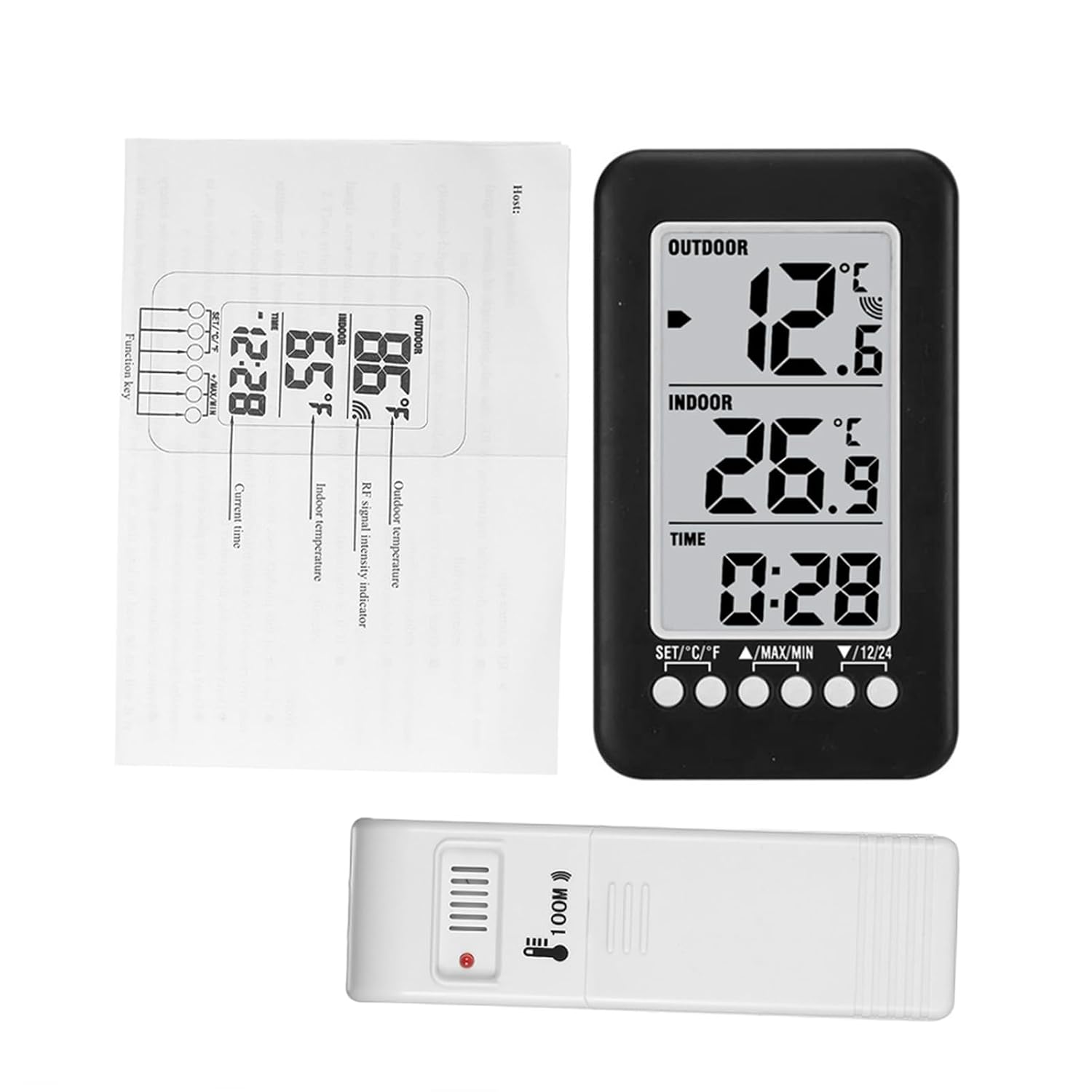
Image 7.1: Dimensions of the main unit and outdoor transmitter.
8. Інфармацыя па бяспецы
- Не падвяргайце прыладу ўздзеянню экстрэмальных тэмператур, прамых сонечных прамянёў або высокай вільготнасці.
- Не кідайце прыладу і не падвяргайце яе моцным ударам.
- Do not attempt to disassemble or modify the device. This will void any potential warranty.
- Утылізуйце выкарыстаныя батарэі адказна ў адпаведнасці з мясцовымі правіламі.
9. Гарантыя і падтрымка
For warranty information or technical support, please refer to the retailer where the product was purchased or visit the official Docooler website. Please have your product model number (36ea5cd0-0bae-43c6-b51b-88b35e12f8b8) available when contacting support.