
1. Уводзіны
The AOPUTTRIVER AP-189A is a high-precision digital manometer designed for measuring differential, positive, and negative pressure. It is widely used in various applications including flow measurement, air quality monitoring, level measurement, gas temperature measurement, and HVAC system control. This manual provides detailed instructions for the safe and effective use of your device.
The device features a large LCD with backlight, data hold function, automatic power-off, and the ability to record maximum, minimum, and average values, as well as differential pressure (DIF). It supports 11 selectable pressure units for versatility in professional applications.
2. Асаблівасці прадукту
- Высокая дакладнасць: Measurement range of ±2.000psi with an accuracy of ±0.3%FSO (at 25°C).
- Некалькі адзінак: Easily switch between 11 pressure units: Psi, kPa, Kgfcm2, ozin2, Bar, mbar, inHg, mmHg, inH2O, ftH2O, cmH2O.
- Запіс дадзеных: Records MAX/MIN/AVG values for easy data analysis.
- Нулявая налада: Allows for precise zero calibration before measurements.
- Шматфункцыянальны дысплей: Large LCD with backlight for clear readings.
- Упраўленне харчаваннем: Low battery indicator and automatic power-off after 25 minutes of inactivity to conserve battery life.
- DIF Function: Measures differential pressure.

Выява: Зверхуview of the AP-189A Digital Manometer's key features and specifications, including accuracy, repeatability, maximum pressure, and various functions like data hold, auto-off, and unit selection.
3. Змесціва ўпакоўкі
Пасля адкрыцця ўпакоўкі пераканайцеся, што ўсе прадметы наяўныя і ў добрым стане:
- 1 x AP-189A Digital Manometer
- 1 х ахоўны мяшок
- 1 х Малая адвёртка
- 2 батарэйкі 1.5 В ААА
- 1 x User Manual (Japanese)

Image: The complete package contents of the AP-189A Digital Manometer, showing the device, a protective carrying bag, a small screwdriver, two AAA batteries, and the user manual.
4. Настройка
4.1 Устаноўка батарэі
- Знайдзіце вечка батарэйнага адсека на задняй панэлі прылады.
- Use the provided small screwdriver to open the battery compartment.
- Устаўце дзве батарэйкі тыпу ААА 1.5 В, сачыце за правільнай палярнасцю (+/-).
- Замяніце крышку батарэйнага адсека і замацуеце яе шрубай.
4.2 Падключэнне шлангаў
The AP-189A features dual ports for differential pressure measurement. Connect the hoses to the appropriate ports (+ and -) based on your measurement requirements. Ensure a secure connection to prevent leaks.

Выява: Падрабязны view of the AP-189A Digital Manometer, highlighting its dimensions and the dual port connections at the top for pressure hoses.
5. Інструкцыя па эксплуатацыі
5.1 Уключэнне/выключэнне сілкавання
- Націсніце Кнопка харчавання (
 ) to turn the device ON.
 - Націсніце і ўтрымлівайце Кнопка харчавання for a few seconds to turn the device OFF.
5.2 Устаноўка нуля
Before taking any measurements, it is crucial to perform a zero setting to ensure accuracy. Disconnect all pressure hoses from the device before performing this step.
- Ensure the device is powered on and no pressure is applied to the ports.
- Націсніце і ўтрымлівайце ТРЫМАЦЬ кнопку прыблізна на 5 секунды.
- The display will show "----" indicating that the zero setting is complete.

Image: Visual guide demonstrating how to perform a zero setting on the manometer by long-pressing the HOLD button until the display shows dashes.
5.3 Выбар блока
Націсніце АДЗІНКА button to cycle through the 11 available pressure units (Psi, kPa, Kgfcm2, ozin2, Bar, mbar, inHg, mmHg, inH2O, ftH2O, cmH2O) until your desired unit is displayed.
5.4 Функцыя падсветкі
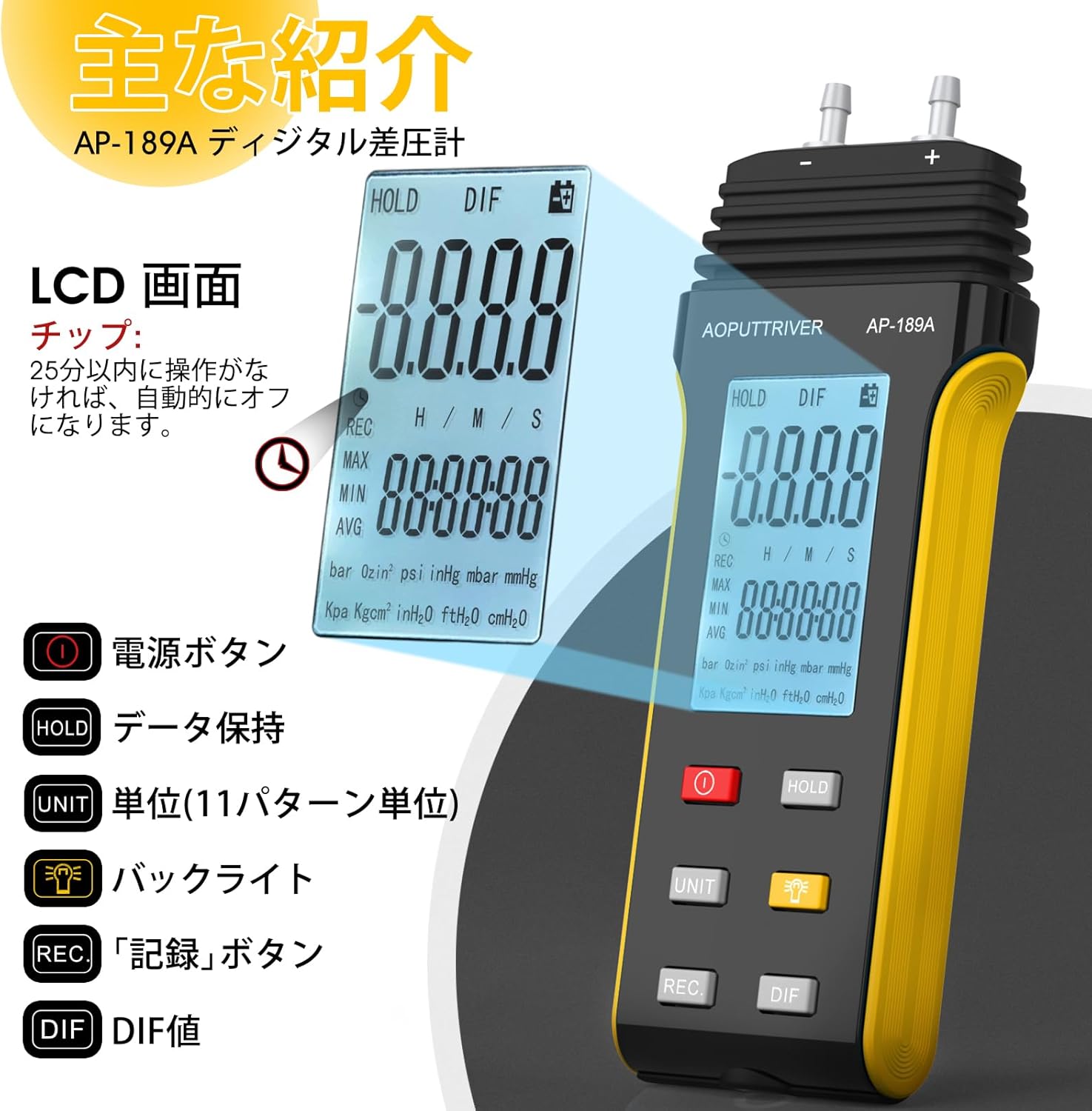
Націсніце Кнопка падсвятлення () to turn the LCD backlight ON or OFF for improved visibility in low-light conditions.
5.5 Утрыманне дадзеных
Націсніце ТРЫМАЦЬ button briefly to freeze the current reading on the display. Press it again to release the hold function and resume live readings.
5.6 MAX/MIN/AVG/DIF Recording
Націсніце ЗАПІС button to enter recording mode. In this mode, the device will track the maximum, minimum, and average pressure values. Press ЗАПІС repeatedly to cycle through MAX, MIN, AVG, and DIF displays. To exit recording mode, press and hold the ЗАПІС кнопка.
5.7 Аўтаматычнае адключэнне
The device will automatically power off after 25 minutes of inactivity to save battery life. This feature can typically be disabled or adjusted by pressing and holding specific buttons during power-on, as detailed in the full manual.
Image: A close-up of the AP-189A's LCD screen and control buttons, illustrating the functions of the Power, Hold, Unit, Backlight, Record, and DIF buttons.
6. Тэхнічнае абслугоўванне
- Уборка: Працірайце прыладу мяккай сухой тканінай. Не выкарыстоўвайце абразіўныя ачышчальнікі або растваральнікі.
- захоўванне: Store the manometer in its protective bag in a cool, dry place when not in use. Remove batteries if storing for extended periods to prevent leakage.
- Каліброўка: Regular calibration by a qualified technician is recommended to maintain measurement accuracy, especially for critical applications.
- Замена батарэі: Неадкладна замяняйце батарэйкі, калі з'яўляецца індыкатар нізкага ўзроўню зарада батарэй, каб забяспечыць бесперапынную працу і прадухіліць страту дадзеных.
7. Выпраўленне непаладак
| праблема | Магчымая прычына | Рашэнне |
|---|---|---|
| Прылада не ўключаецца | Разраджаныя або няправільна ўсталяваныя батарэі | Праверце палярнасць батарэек; заменіце батарэйкі. |
| Няправільныя паказанні | No zero setting performed; sensor obstruction; device not calibrated | Perform zero setting; ensure ports are clear; consider professional calibration. |
| Display shows "OL" or "Err" | Overload (pressure exceeds maximum limit) | Remove pressure immediately. Ensure pressure does not exceed 6 Psi. |
| Падсвятленне не працуе | Backlight function off; low battery | Press the backlight button; replace batteries. |
8. Тэхнічныя характарыстыкі
- Дыяпазон вымярэнняў: ± 2.000 пс
- Дакладнасць: ±0.3%FSO (at 25°C)
- Паўтараемасць: ±0.25%FSO
- Linearity/Hysteresis: ±0.1%FSO
- Limited Maximum Pressure: 6 псі
- Адзінкі: Psi, kPa, Kgfcm2, ozin2, Bar, mbar, inHg, mmHg, inH2O, ftH2O, cmH2O
- Функцыі: Backlight, Data Hold, Auto Power Off (25 min), MAX/MIN/AVG/DIF, Zero Setting
- крыніца харчавання: 2 батарэйкі 1.5 В ААА
- Памеры: Approximately 166mm x 62mm x 31mm (6.29in x 2.44in x 1.22in)
- Вага: Прыкладна 250г
Image: A diagram illustrating the physical dimensions of the AP-189A Digital Manometer, including length, width, and thickness.
9. Гарантыя і падтрымка
The AOPUTTRIVER AP-189A Digital Manometer comes with a 365-day warranty and lifetime technical support. If you encounter any quality issues with the product, please contact our customer support team. We are committed to resolving any problems as quickly as possible.
For support, please refer to the contact information provided in your product packaging or visit the official AOPUTTRIVER webсайт.