
1. Інфармацыя па бяспецы
- This product is intended for children aged 3 to 12 years. Adult supervision is recommended during use.
- Do not disassemble or attempt to repair the camera. Contact support if issues arise.
- Keep the camera away from water and excessive moisture to prevent damage.
- Для зарадкі выкарыстоўвайце толькі кабель USB, які ўваходзіць у камплект.
- The thermal print paper is a consumable item. Ensure replacements are compatible.
2. Змесціва ўпакоўкі
Праверце, ці ёсць усе прадметы ў вашай упакоўцы:
- 1 x GREENKINDER X6 Kids Instant Print Camera
- 1 карта MicroSD на 32 ГБ
- 3 x Rolls of Thermal Print Paper
- 1 х шнурок
- 1 х кабель для зарадкі USB-C
- 1 x Cartoon Sticker Set
- 5 каляровых ручак
- 1 х Кіраўніцтва карыстальніка
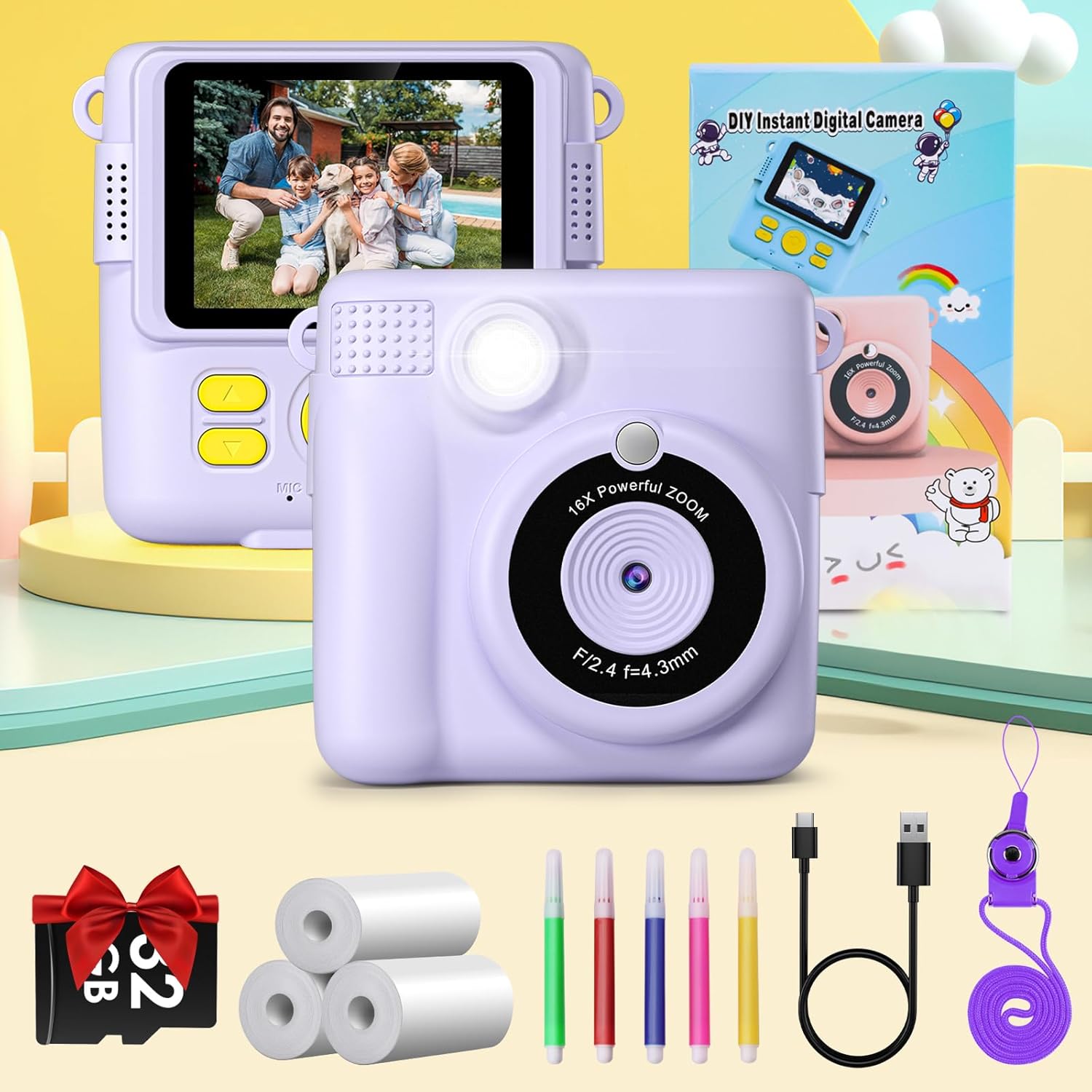
Figure 2.1: Complete package contents of the GREENKINDER X6 camera.
3. Прадукт скончыўсяview
Азнаёмцеся з кампанентамі камеры:

Малюнак 3.1: Пярэдняя і задняя часткі views of the GREENKINDER X6 camera with key features highlighted.
- Аб'ектыў: Main camera lens for capturing photos and videos.
- Успышка: Забяспечвае падсвятленне ў цёмных умовах.
- 2.4-цалевы ВК-экран: Для viewрабіць фота і відэа, а таксама карыстацца меню.
- Кнопкі кіравання: Power, Shutter, Navigation (Up/Down/Left/Right), OK/Menu.
- Выхадны слот для друку: Where instant prints emerge.
- Слот для карты MicroSD: For memory expansion (32GB card included).
- Порт USB-C: Для зарадкі і перадачы дадзеных.
4. Настройка
4.1 Зарадка акумулятара
The camera is equipped with a 1000mAh lithium-polymer battery. Before first use, fully charge the camera.
- Connect the provided USB-C cable to the camera's USB-C port.
- Падключыце другі канец кабеля да адаптара харчавання USB (не ўваходзіць у камплект) або да USB-порта кампутара.
- Індыкатар зарадкі загарыцца. Пасля завяршэння зарадкі ён выключыцца або зменіць колер.
4.2 Устаўка карты MicroSD
A 32GB MicroSD card is included for storing photos and videos.
- Знайдзіце слот для карты MicroSD на бакавой панэлі камеры.
- Устаўце карту MicroSD залацістымі кантактамі ўніз да пстрычкі.
- Каб выняць, акуратна націсніце на карту да пстрычкі, затым адпусціце, і яна выскочыць.
4.3 Loading Print Paper
The camera uses thermal print paper for instant black and white prints. Three rolls are included.
- Gently push the part of the camera with the lens upwards to open the paper compartment.
- Insert a roll of thermal print paper into the compartment, ensuring the paper feeds out from the top.
- Close the camera by pushing the two parts back together until they click securely.

Figure 4.1: Steps for loading thermal print paper.
5. Інструкцыя па эксплуатацыі
5.1 Уключэнне/выключэнне сілкавання
- Каб уключыць прыладу, націсніце і ўтрымлівайце кнопку харчавання некалькі секунд.
- Каб выключыць прыладу, зноў націсніце і ўтрымлівайце кнопку харчавання, пакуль экран не выключыцца.
5.2 Basic Photography and Instant Printing
The camera allows for instant black and white prints using thermal technology.
- Уключыце камеру.
- Скампануйце кадр з дапамогай 2.4-цалевага ВК-экрана.
- Націсніце кнопку спуску, каб зрабіць фота.
- The camera will automatically print the photo in black and white from the output slot.
5.3 Запіс відэа
Record moments in 1080P resolution.
- Navigate to video mode using the menu buttons.
- Press the Shutter button to start recording.
- Націсніце кнопку спуску яшчэ раз, каб спыніць запіс.

Figure 5.1: Demonstrating 1080P video, time-lapse, and burst shooting features.
5.4 Спецыяльныя магчымасці
- 16x лічбавы зум: Use the navigation buttons to zoom in or out before taking a photo.
- Успышка: Activate or deactivate the flash for improved lighting in dark environments.
- Прамежак часу: Set the camera to take photos automatically at intervals of 3, 5, or 10 seconds.
- Стрэльба: Зрабіце некалькі здымкаў запар, утрымліваючы кнопку спуску засаўкі.
- гульні: The camera includes built-in puzzle games for entertainment. Access them via the menu.
- Filters and Frames: Apply various fun filters and decorative frames to your photos before printing or saving.

Figure 5.2: 16x Zoom and Flash functionality.

Малюнак 5.3: Выпamples of different frames and filters.
5.5 DIY Coloring
After printing black and white photos, use the included color pens to personalize them.

Figure 5.4: DIY coloring of instant prints.
6. Тэхнічнае абслугоўванне
6.1 Чыстка камеры
- Выкарыстоўвайце мяккую, сухую тканіну для чысткі корпуса камеры.
- For the lens, use a specialized lens cleaning cloth.
- Не выкарыстоўвайце вадкія ачышчальнікі або абразіўныя матэрыялы.
6.2 Захоўванне камеры
- Захоўвайце камеру ў прахалодным, сухім месцы, удалечыні ад прамых сонечных прамянёў.
- Remove the MicroSD card if storing for extended periods.
6.3 Сыход за акумулятарам
- Рэгулярна зараджайце акумулятар, нават калі камера рэдка выкарыстоўваецца, каб падтрымліваць яго працаздольнасць.
- Пазбягайце частай поўнай разрадкі акумулятара.
6.4 Replacing Print Paper
When the print paper runs out, you can purchase compatible thermal print paper. Пошук ASIN: B0C52Q298V for refills.
7. Выпраўленне непаладак
| праблема | Магчымая прычына | Рашэнне |
|---|---|---|
| Камера не ўключаецца. | Нізкі акумулятар. | Цалкам зарадзіце камеру з дапамогай кабеля USB-C, які ўваходзіць у камплект. |
| Немагчыма рабіць фота/відэа. | No MicroSD card inserted or card is full. | Insert a MicroSD card or delete old files, каб вызваліць месца. |
| Prints are blank or faded. | Print paper is incorrectly loaded or has run out. | Check paper orientation and ensure it is loaded correctly. Replace the paper roll if empty. |
| Camera freezes or is unresponsive. | Праграмны збой. | Press and hold the Power button for 10 seconds to force a restart. |
8. Тэхнічныя характарыстыкі
| Асаблівасць | Дэталь |
|---|---|
| Марка | ЗЯЛЁНЫЯ ДЗІЦЯ |
| мадэль | X6 |
| Тып прадукту | Instant Print Camera (DSLR type) |
| Колер | Бэз |
| Экран | 2.4-цалевы ВК-экран |
| Дазвол відэа | 1080p |
| Эфектыўнае рашэнне | 12 мегапікселяў |
| Лічбавы зум | 16x |
| Тэхналогія падлучэння | USB-C |
| Памяць | Падтрымка карты MicroSD (32 ГБ у камплекце) |
| Склад батарэі | Літый-палімерны (1000 мАг) |
| Асаблівасці | Time-lapse, Flash, Burst Shooting, Games, Filters, Frames |
| Вага прадмета | 250 грам |
| Мадэльны год | 2023 |
9. Гарантыя і падтрымка
For warranty information or technical support, please refer to the contact details provided with your purchase or visit the official GREENKINDER webсайт. Захоўвайце чэк аб куплі як пацверджанне пакупкі.