
Уводзіны
Thank you for choosing the Sensei Phase 61 Pro Electronic Keyboard. This manual provides essential information for the safe and effective use of your instrument. Please read it thoroughly before operation and retain it for future reference.
Інфармацыя па бяспецы
- Пераканайцеся, што крыніца харчавання адпавядае аб'ёмуtage requirements specified for the keyboard.
- Do not expose the keyboard to water, moisture, or extreme temperatures.
- Avoid placing heavy objects on the keyboard.
- Keep the instrument away from direct sunlight and heat sources.
- Disconnect the power cable during thunderstorms or when not in use for extended periods.
- Do not attempt to disassemble or modify the keyboard. Refer all servicing to qualified personnel.
Змест пакета
Праверце наяўнасць усіх прадметаў у камплекце:
- Sensei Phase 61 Pro Electronic Keyboard
- Падстаўка для клавіятуры
- зэдлік
- Навушнікі
- USB Charger Line
- Музычны адпачынак
Прадукт скончаныview
The Sensei Phase 61 Pro is a 61-key touch-sensitive electronic keyboard designed for a comprehensive musical experience. It features an LCD display, various control buttons, built-in speakers, and multiple connectivity options.

Малюнак 1: Sensei Phase 61 Pro Electronic Keyboard complete set, including the keyboard, adjustable stand, padded stool, and headphones.
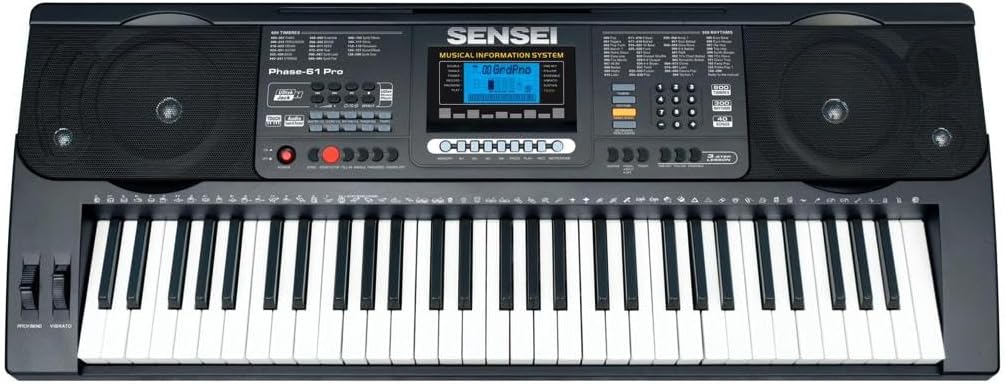
Малюнак 2: Падрабязны view of the Sensei Phase 61 Pro keyboard's control panel, LCD display, speakers, and 61 touch-sensitive keys.
Настройка
1. Зборка падстаўкі для клавіятуры
Unfold the keyboard stand and adjust it to a comfortable playing height. Ensure all locking mechanisms are securely fastened to prevent wobbling.
2. Stool Assembly
Unfold the stool and ensure its legs are stable. The stool provides a comfortable seating option for playing.

Малюнак 3: The included foldable stool, designed for stability and portability.
3. Падключэнне сілкавання
Connect the provided USB charger line to the keyboard's power input port and then to a suitable USB power adapter (not included) or a powered USB port. The keyboard is USB powered.
4. Падключэнне аксесуараў
- Навушнікі: Plug the headphones into the 3.5mm Phone/Output Jack for private practice.
- USB флэш-дыск: Insert a USB flash disk (not included) into the Udisk Jack to use the music player function.
- Мікрафон: Connect a microphone to the MIC Jack for vocal input.
- Аўдыё ўваход: Use the Audio Input Jack to connect external audio sources.

Малюнак 4: The included over-ear headphones for silent practice.
Інструкцыя па эксплуатацыі
1. Уключэнне/выключэнне харчавання і гучнасць
- Націсніце УЛАДА кнопка для ўключэння або выключэння клавіятуры.
- Адрэгулюйце агульны ўзровень гуку з дапамогай Галоўны том кантроль.
- Separate volume controls are available for Chord Volume і Аб'ём рытму.
2. Timbres and Rhythms
- The keyboard features 600 Timbres (instrument sounds) and 300 рытмаў (accompaniment styles).
- Use the dedicated buttons or number pad to select desired Timbres and Rhythms. The LCD display will show the current selection.
3. Demonstration Songs and Percussion
- Доступ 40 Demonstration Songs for listening or practice.
- Займацца Ударная клавіятура mode to assign drum sounds to the keys.
4. Advanced Key Features
- Сэнсарная функцыя: The keys are touch-sensitive, meaning the volume changes based on how hard you press them, mimicking an acoustic piano.
- Transpose Control: Adjust the pitch of the entire keyboard up or down in semitone steps.
- Двайны рэжым: Layer two different Timbres to play simultaneously with each key press.
- Keyboard Split: Divide the keyboard into two sections, each with a different Timbre, allowing two different sounds to be played at once.
- Chord Functions:
- Акорд для аднаго пальца: Play chords by pressing a single key in the lower section of the keyboard.
- Пальцы акорд: Play chords by pressing the appropriate chord notes in the lower section.
- Акорд выключаны: Disables the auto-accompaniment chord function.
5. Rhythm Control
- Пуск/Стоп: Begin or end the selected rhythm.
- Сінхранізацыя: Start the rhythm automatically when you play a key or chord.
- Запаўненне: Add a short drum fill to the rhythm.
- Метраном: Activate a click track for timing practice.
- Кіраванне тэмпам: Adjust the speed of the rhythm and metronome.
6. Learning Modes
- One-key: Practice a song by pressing any key to advance the melody.
- Сачыце за: The keyboard waits for you to play the correct note before proceeding.
- Разам: Play along with the melody, and the keyboard will provide accompaniment.
7. Запіс і прайграванне
- Выкарыстоўвайце Функцыя праграмавання рытму to create and store your own rhythm patterns.
- The Запіс і прайграванне function allows you to record your performances and listen back to them.
8. Функцыі памяці
Store your preferred settings (Timbre, Rhythm, Tempo, etc.) into Memory banks M1, M2, M3, M4 для хуткага адклікання.
9. Элементы кіравання экспрэсіяй
- Pitch Bend: Use the pitch bend wheel to smoothly raise or lower the pitch of notes.
- Вібрата: Add a slight, rapid fluctuation in pitch to notes for expressive effect.
- Сустэйн: Extend the decay of notes, similar to a piano's sustain pedal.
Тэхнічнае абслугоўванне
- Уборка: Працярыце паверхню клавіятуры мяккай сухой тканінай. Для ўстойлівага бруду выкарыстоўвайце злёгкуamp тканінай і старанна высушыце. Пазбягайце абразіўных ачышчальнікаў або растваральнікаў.
- захоўванне: When not in use, store the keyboard in a clean, dry place, away from direct sunlight and extreme temperatures. If possible, cover it to protect against dust.
- Апрацоўка: Заўсёды асцярожна абыходзьцеся з клавіятурай. Пазбягайце яе падзення і моцных удараў.
Ліквідацыю непаладак
| праблема | Магчымая прычына | Рашэнне |
|---|---|---|
| Няма ўлады | Power cable not connected; USB power source faulty. | Ensure USB cable is securely connected. Try a different USB power adapter or port. |
| Няма гуку | Volume too low; headphones connected; Timbre not selected. | Increase Master Volume. Disconnect headphones. Select a Timbre. |
| Клавішы не рэагуюць | Keyboard in a specific mode (e.g., learning mode waiting for input). | Check current mode settings. Power cycle the keyboard. |
| Rhythm not playing | Rhythm not selected; Tempo set to zero; Start/Stop not pressed. | Select a rhythm. Adjust Tempo. Press Start/Stop. |
Тэхнічныя характарыстыкі
| Асаблівасць | Дэталь |
|---|---|
| Назва мадэлі | PHASE-61 PRO |
| Колькасць ключоў | 61 Touch Sensitive Keys |
| Тэмбры | 600 |
| Рытмы | 300 |
| Паказальныя песні | 40 |
| Крыніца харчавання | Харчаванне ад USB |
| Раз'ём для навушнікаў | Гняздо 3.5 мм |
| Тэхналогія падлучэння | USB |
| Вага прадмета | 8.1 кг |
| Памеры прадукту | 16 х 16.8 х 41 см |
| UPC | 810015319994 |
Гарантыя і падтрымка
For warranty information, please refer to the documentation provided at the time of purchase or contact your retailer. For technical support or service inquiries, please reach out to the manufacturer, SENSEI, through their official support channels.