
WUYJTIF Street Fighter
WUYJTIF Pandora Box DX Retro Arcade Console
Instruction Manual - Street Fighter Edition
1. Уводзіны
Дзякуй за пакупкуasing the WUYJTIF Pandora Box DX Retro Arcade Console, Street Fighter Edition. This console brings the classic arcade experience to your home with a vast library of 10888 pre-installed games, including 300 3D titles. Featuring an 8-way joystick, 16 responsive buttons, and 720P HD output, it offers a versatile gaming experience. This manual provides essential information for setting up, operating, maintaining, and troubleshooting your new arcade system.
2. Інфармацыя па бяспецы
- Always use the provided power adapter. Using an incorrect adapter may damage the device and void the warranty.
- Keep the console away from water, moisture, and extreme temperatures.
- Do not attempt to open or repair the console yourself. Refer all servicing to qualified personnel.
- Ensure proper ventilation around the console during operation to prevent overheating.
- Захоўвайце ў месцах, недаступных для маленькіх дзяцей, каб пазбегнуць выпадковых пашкоджанняў або траўмаў.
3. Змесціва ўпакоўкі
Калі ласка, праверце ўпакоўку на наяўнасць наступных прадметаў:
- WUYJTIF Pandora Box DX Retro Arcade Console (Street Fighter Edition)
- Адаптар сілкавання
- HDMI Cable (3 meters)
- VGA Cable (3 meters)
- Кіраўніцтва карыстальніка (гэты дакумент)
4. Прадукт скончыўсяview
The Pandora Box DX console features a classic arcade layout with two sets of controls, allowing for immediate two-player action. The system supports HD 720P output for a clear visual experience on modern displays.

Выява: спераду view of the Pandora Box DX console, displaying the game selection menu and key features like 720P HD output and game saving.
4.1 Console Layout and Ports
Familiarize yourself with the console's rear panel for proper connection.
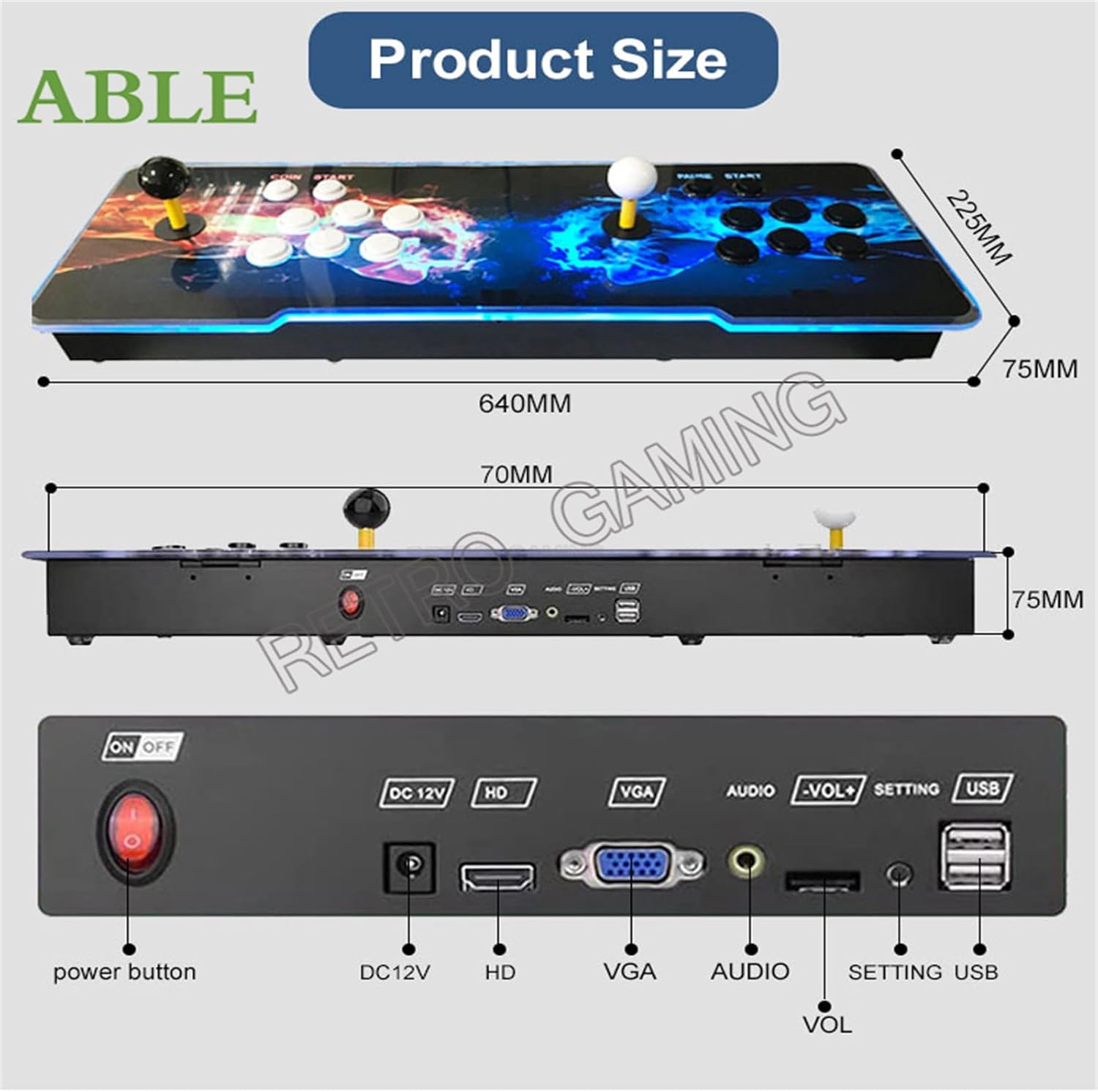
Выява: Задняя частка view of the console detailing the power button, DC12V power input, HDMI (HD) output, VGA output, Audio output, Volume controls (-VOL+), Setting button, and USB ports.
- Кнопка харчавання: Turns the console On/Off.
- DC12V: Порт ўводу харчавання.
- HD (HDMI): Connects to an HDMI-compatible display for video and audio output.
- VGA: Connects to a VGA-compatible display for video output.
- Аўдыё: 3.5mm audio output jack.
- -VOL+: Volume adjustment buttons.
- НАЛАДКА: Доступ да сістэмных налад.
- USB: For connecting external USB controllers or USB drives to add games.
5. Інструкцыі па ўсталёўцы
- Падключэнне да дысплея:
Choose your preferred display connection:
- For HDMI: Connect one end of the provided HDMI cable to the HD port on the console and the other end to an HDMI input on your TV or monitor.
- For VGA: Connect one end of the provided VGA cable to the VGA port on the console and the other end to a VGA input on your TV or monitor. If using VGA, you may need to connect an external speaker system to the Аўдыё port for sound.
- Падключыце харчаванне: Insert the DC12V power adapter into the 12 В пастаяннага току port on the console, then plug the adapter into a power outlet.
- Уключэнне: Націсніце Кнопка харчавання on the rear panel to turn on the console.
- Першапачатковая ўстаноўка: The console will boot up and display the main game selection menu. You may be prompted to select a language if it's the first use.

Image: The arcade console connected to a television, demonstrating 720P HD video output during gameplay.
6. Інструкцыя па эксплуатацыі
6.1 Навігацыя па гульнявым меню
Use the joysticks and buttons to navigate the game selection menu. The main screen displays a list of games. Use the joystick to scroll up and down, and the primary action button (usually 'A' or 'X') to select a game.
6.2 Асаблівасці сістэмы
The Pandora Box DX system offers several advanced features:
- Pause/Exit in games: Press the PAUSE/START button during gameplay to pause or exit to the main menu.
- Захаваць/загрузіць гульні: Save your game progress and load it later.
- Схаваць гульні: Conceal specific games from the main list.
- Favorite GameList: Mark games as favorites for quick access.
- Пошук гульняў: Use the search function to find specific titles.
- Recent games: Доступ да спісу нядаўна прайграных гульняў.
- Game Classification: Games are categorized by genre or system for easier browsing.
- Паляпшэнне выявы: Adjust visual settings for improved graphics.
- One Key Switch: Quickly switch between system modes or functions.
- Выбар мовы: Supports English, Chinese, Korean, Japanese, and Spanish. Access this option via the SETTING button.
6.3 Adding Games via Wi-Fi
The console features a built-in game market allowing you to download additional games via Wi-Fi.
- Navigate to the "Settings" menu using the SETTING button or joystick.
- Select "Wi-Fi" and connect to your local wireless network by entering the password.
- Once connected, access the "Game Market" or "Download Management" section.
- Browse and select games to download. Downloaded games will appear in your game list.

Image: Screenshots illustrating the Wi-Fi connection process, game category browsing, game search, and download progress within the console's interface.
6.4 Adding Games via USB
You can also add games by copying them to a USB drive and inserting it into the console.
- Copy your desired game ROMs to a USB drive.
- Insert the USB drive into one of the USB ports on the console.
- Access the system settings to match the emulator for the new games.
- The newly added games will appear in the game lists after launching.
6.5 Шматкарыстальніцкая гульня
The console supports up to 4 players by connecting additional external USB gamepads to the USB ports via a USB hub (not included). This allows for an enhanced multiplayer experience.
6.6 Наладжвальныя кнопкі
The system allows for customization of button mappings. Access this feature through the system settings to configure controls to your preference.
7. Тэхнічнае абслугоўванне
- Уборка: Use a soft, dry cloth to wipe the console's surface. Do not use liquid cleaners or abrasive materials.
- захоўванне: When not in use, store the console in a cool, dry place away from direct sunlight.
- Абнаўленні праграмнага забеспячэння: Перыядычна правярайце наяўнасць абнаўленняў сістэмы праз падключэнне Wi-Fi, каб забяспечыць аптымальную прадукцыйнасць і доступ да новых функцый.
8. Выпраўленне непаладак
- Няма харчавання:
- Ensure the power adapter is securely connected to both the console and a working power outlet. Check if the power button is pressed.
- Няма відэавыхаду:
- Verify that the HDMI or VGA cable is correctly connected to both the console and the display. Ensure your TV/monitor is set to the correct input source (e.g., HDMI 1, VGA). Try a different cable or display if possible.
- Няма аўдыя:
- If using HDMI, check your TV's volume. If using VGA, ensure external speakers are connected to the Audio port and are powered on. Adjust the console's volume using the -VOL+ buttons.
- Games Not Loading/Freezing:
- Restart the console. Ensure the game files are not corrupted if you added them via USB. If downloading via Wi-Fi, ensure a stable internet connection.
- Праблемы з падключэннем Wi-Fi:
- Check your Wi-Fi password. Ensure the console is within range of your wireless router. Restart your router and the console.
9. Тэхнічныя характарыстыкі
| мадэль: | Pandora Box DX (Street Fighter Edition) |
| Марка: | WUYJTIF |
| сістэма: | 3D Pandora Saga EX WIFI |
| Працэсар: | Amlogic S812, ARM Cortex A9 2.0 Ghz |
| Графічны працэсар: | Mali450MP8 |
| Аператыўная памяць: | 1 ГБ |
| Унутраная памяць: | 8 ГБ NAND FLASH |
| Карта памяці: | SD-карта 128 ГБ (папярэдне ўсталяваная) |
| Pre-installed Games: | 10888 (including 300 3D games) |
| Выхадная раздзяляльнасць: | HD 1280x720P |
| Hardware Interface: | HDMI, VGA, USB |
| Тып кантролера: | 8-Way Joystick, 16 Buttons (per player) |
| Колькасць гульцоў: | 2 (built-in), up to 4 (with external USB controllers) |
| Памеры (Д х Ш х У): | 25.59 x 9.45 x 2.36 цалі (прыблізна 640 мм x 225 мм x 75 мм) |
| матэрыял: | Пластыкавыя |
| Падтрымліваюцца эмулятары: | MAME, FBA, FC, SFC, PCE, GBA, GBC, MD, PSP, PS, N64 |
| Падключэнне: | Wi-Fi for game downloads |

Image: Display showing internal hardware specifications of the Pandora's EX WIFI board, including processor, RAM, storage, and game count.
10. Гарантыя і падтрымка
WUYJTIF products are manufactured to high-quality standards. For warranty information and technical support, please refer to the seller's policies or contact the retailer where the product was purchased. Keep your proof of purchase for any warranty claims.