
Уводзіны
Thank you for choosing the ciciglow SK-299 Mini Digital Voice Recorder. This compact and versatile device is designed for high-quality audio recording with intelligent noise reduction, making it ideal for meetings, lectures, interviews, and personal notes. Please read this manual carefully to ensure proper use and optimal performance of your device.
Прадукт скончаныview
Асноўныя характарыстыкі
- Высокая якасць запісу: Integrated professional high-end recording and processing scheme ensures clear and crisp sound reproduction.
- Інтэлектуальнае шумапрыглушэнне: Filters unwanted background noise for excellent recording quality.
- Працяглая батарэя: High-capacity polymer battery provides sufficient recording duration for extended sessions.
- Лёгкае кіраванне: One-click MP3 recording and intelligent voice control function simplify use, even in low-light conditions.
- Універсальная функцыянальнасць: Supports MP3 and WAV formats, with driver-free U disk function for easy file перадача.
Змест пакета
- 1 x SK-299 Digital Voice Recorder
- 1 х навушнік
- 1 х знешні мікрафон
- 1 х USB-кабель для перадачы дадзеных
Note: A small memory card is required for normal operation (not included).

The SK-299 recorder comes with essential accessories for immediate use.
Макет прылады
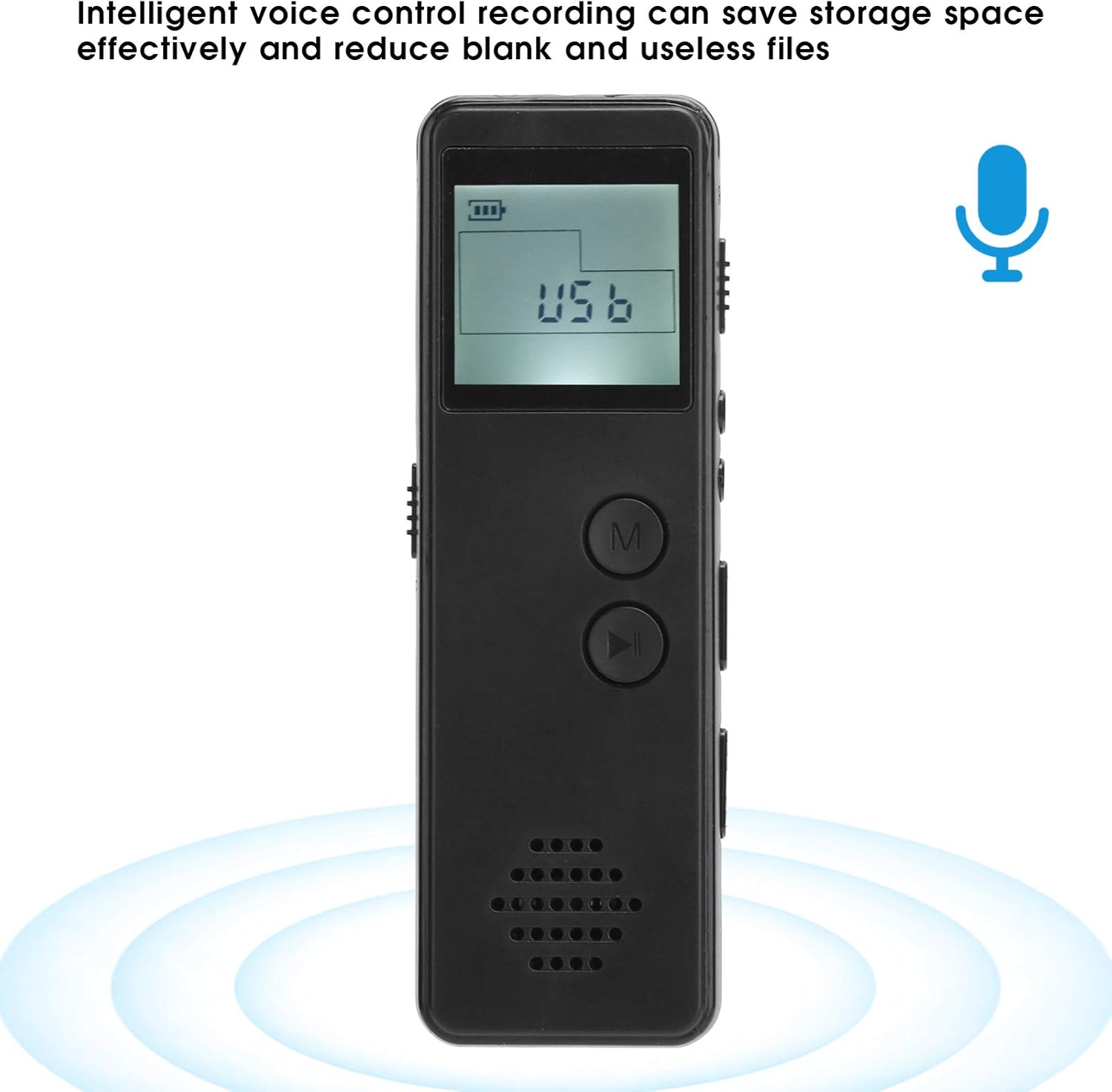
Фронт View: Features the LCD display, 'M' (Menu) button, and Play/Pause button. The speaker grille is located at the bottom.
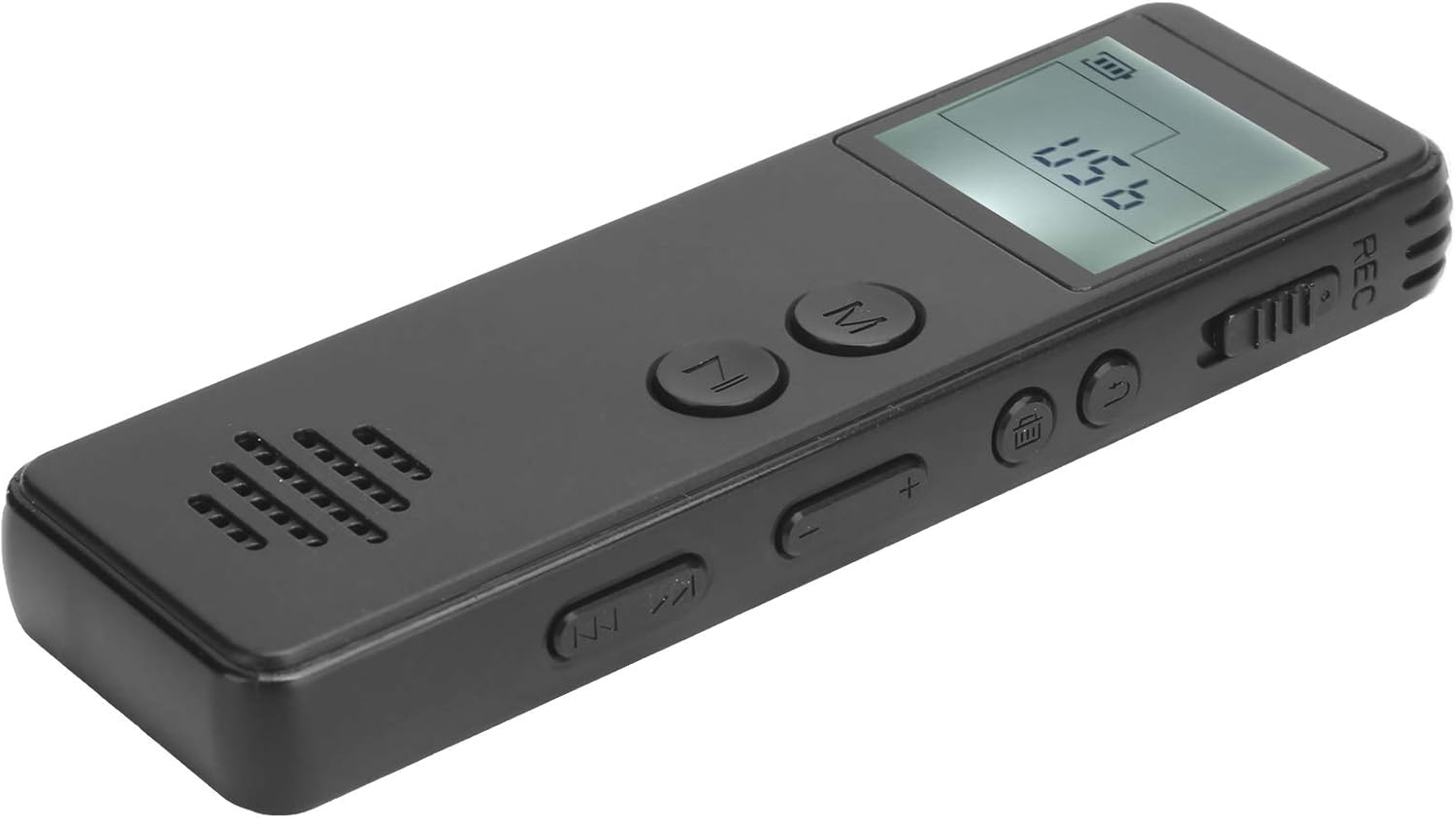
Правы бок: Includes the REC (Record) switch, volume control buttons (+/-), and track navigation buttons (previous/next).

Левы бок: Features the ON/OFF power switch and the USB port for charging and data transfer.
Настройка
1. Зарадка прылады
Before first use, fully charge the voice recorder. Connect the supplied USB data cable to the device's USB port and to a computer's USB port or a compatible USB wall adapter. The battery indicator on the display will show charging status.
2. Inserting a Memory Card (Required)
The SK-299 requires a small memory card for normal operation. Locate the memory card slot (usually on the side or bottom) and insert a compatible microSD card. Ensure it is inserted correctly until it clicks into place.
3. Уключэнне / выключэнне харчавання
To power on the device, slide the ON/OFF switch to the 'ON' position. To power off, slide the switch to the 'OFF' position.
Інструкцыя па эксплуатацыі
1. Асноўны запіс
- Пераканайцеся, што прылада ўключана.
- To start recording, slide the REC switch to the 'REC' position. The display will show a recording indicator, and the recording will begin automatically in MP3 format.
- To stop recording, slide the REC switch back to the 'OFF' or neutral position. The recording will be saved automatically.

The device supports one-click recording in MP3 format, simplifying the process.
2. Запіс з галасавой актывацыяй (VOR)
The SK-299 features intelligent voice control recording to save storage space by only recording when sound is detected.
- While in standby or playback mode, press the 'M' (Menu) button to access settings.
- Navigate through the menu options using the track navigation buttons until you find the 'VOR' or 'Voice Activated' setting.
- Select 'ON' to enable voice activated recording.
- Exit the menu. When you start recording (as per 'Basic Recording' steps), the device will now only record when sound is present.
3. Прайграванне
- Пераканайцеся, што прылада ўключана.
- Press the Play/Pause button to enter playback mode.
- Use the track navigation buttons (previous/next) to select the desired recording.
- Press the Play/Pause button again to start or pause playback.
- Adjust the volume using the '+' and '-' buttons on the side.
4. Connecting to a Computer (U Disk Function)
The device can function as a driver-free U disk for easy file перадача.
- Connect the voice recorder to your computer using the supplied USB data cable.
- The device will be recognized as a removable disk.
- You can now access, copy, or delete recorded files from the device's memory card.
Тэхнічнае абслугоўванне
- Уборка: Для чысткі прылады выкарыстоўвайце мяккую сухую тканіну. Пазбягайце выкарыстання вадкіх ачышчальнікаў або растваральнікаў.
- захоўванне: Захоўвайце прыладу ў прахалодным, сухім месцы, удалечыні ад прамых сонечных прамянёў і экстрэмальных тэмператур.
- Сыход за батарэяй: Каб падоўжыць тэрмін службы батарэі, пазбягайце частай поўнай разрадкі батарэі. Рэгулярна зараджайце прыладу, нават калі яна не выкарыстоўваецца працяглы час.
- Рэзервовае капіраванне даных: Рэгулярна рабіце рэзервовыя копіі важных запісаў на кампутары, каб прадухіліць страту дадзеных.
Ліквідацыю непаладак
| праблема | Магчымая прычына | Рашэнне |
|---|---|---|
| Прылада не ўключаецца. | Нізкі ўзровень зарада батарэі; выключальнік харчавання ў становішчы ВЫКЛ. | Charge the device; Slide the power switch to ON. |
| Немагчыма запісаць. | Memory card full or not inserted; REC switch not engaged; Device in playback mode. | Check memory card space and insertion; Slide REC switch to REC; Exit playback mode. |
| Дрэнная якасць запісу. | Microphone obstructed; Recording environment too noisy; Low battery. | Ensure microphone is clear; Record in a quieter environment; Charge the device. |
| Прылада не распазнаецца камп'ютарам. | Faulty USB cable; Loose connection; Computer port issue. | Try a different USB cable or port; Ensure cable is securely connected. |
| Знешні мікрафон не працуе. | Microphone not properly connected; Faulty microphone. | Ensure external microphone is fully plugged into the correct port. Test with another microphone if available. |
Тэхнічныя характарыстыкі
| Асаблівасць | Дэталь |
|---|---|
| мадэль | СК-299 |
| Экран дысплея | Broken screen display (LCD) |
| Фармат запісу | MP3 |
| Бітрэйт запісу | 128 Кбіт/с |
| Тып батарэі | 3.7V-4.2V 270mAh Lithium Polymer |
| Час бесперапыннай запісу | Прыкладна 10 гадзіны |
| Час прайгравання | Прыкладна 5 гадзіны |
| Матэрыял | АБС |
| Інтэрфейс | USB |
| Формаў-фактар мікрафона | Інтэграваны |
| Supported Digital Media Formats | MP3 audio, WAV |
Гарантыя і падтрымка
Каб атрымаць інфармацыю аб гарантыі і тэхнічнай падтрымцы, звярніцеся да дакументацыі, прадстаўленай пры куплі, або звярніцеся да прадаўца. Захоўвайце пацвярджэнне пакупкі для любых гарантыйных прэтэнзій.