
1. Уводзіны
This manual provides detailed instructions for the proper use and maintenance of your Arlec Remote SS3136. This remote control is specifically designed to operate the Arlec Wall Fan AWDC001HA, offering convenient and effortless control over your fan's functions. Please read this manual thoroughly before first use to ensure optimal performance and longevity of your device.
2. Асаблівасці прадукту
- Лёгкае кіраванне: Utilizes Infrared technology for seamless communication with your Arlec Wall Fan AWDC001HA from up to 10 meters away.
- Працяглая магутнасць: Requires 3 alkaline batteries for extended use.
- Элегантны дызайн: Finished in a sophisticated black color.
- Універсальная сумяшчальнасць: Designed to control Arlec Wall Fans, specifically model AWDC001HA.
- Простае кіраванне: Features 3 intuitive buttons for easy fan control.
3. Змесціва ўпакоўкі
Праверце наяўнасць усіх прадметаў у камплекце:
- 1 x Arlec Remote SS3136
- 1 x Wall Mount Holder
- 2 х крапежных шруб
- 2 х насценныя разеткі
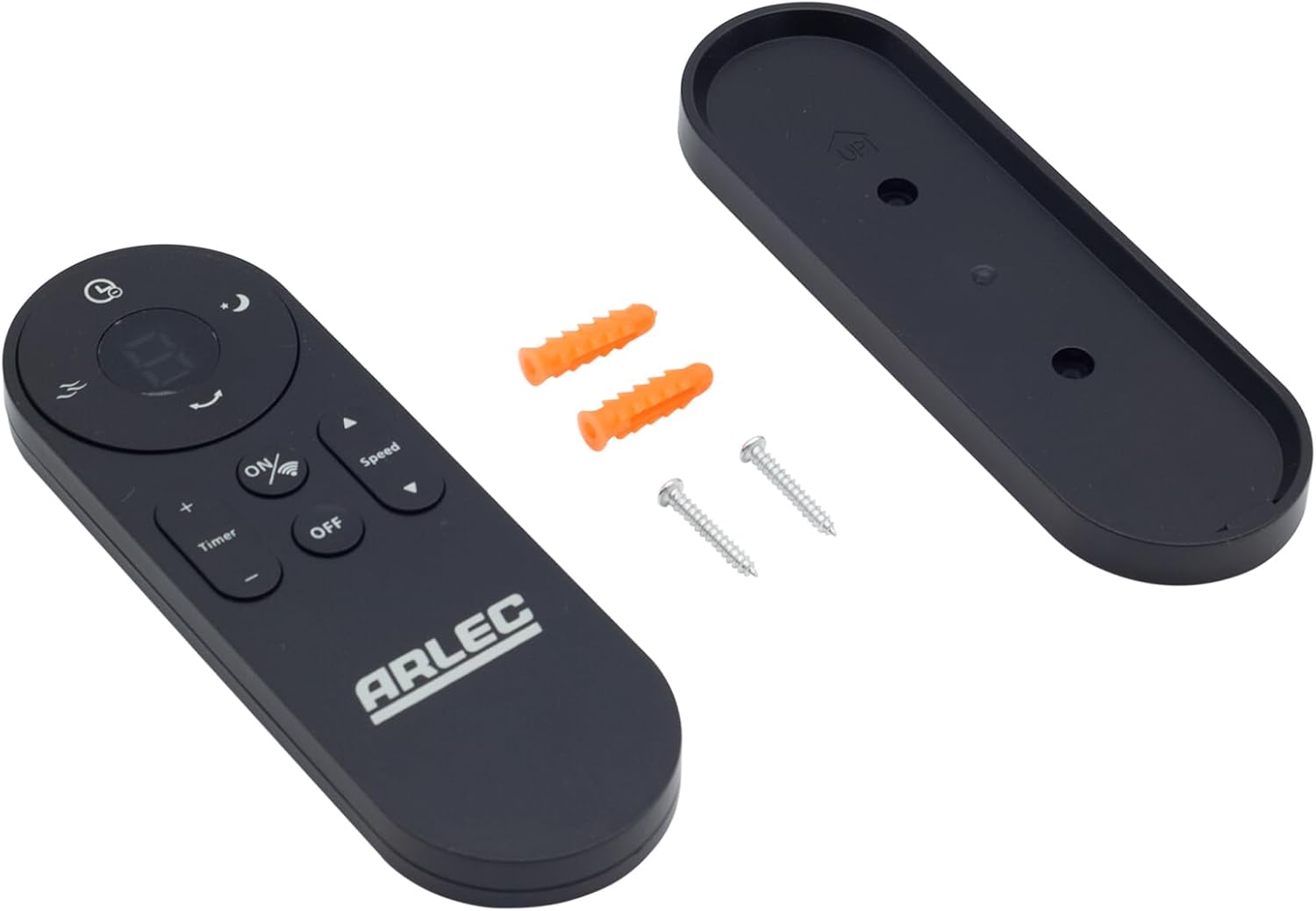
Image: Arlec Remote SS3136 shown with its included wall mount holder, two mounting screws, and two wall plugs, indicating the complete package contents.
4. Настройка
4.1 Устаноўка батарэі
- Знайдзіце батарэйны адсек на задняй частцы пульта дыстанцыйнага кіравання.
- Адкрыйце крышку батарэйнага адсека.
- Insert 3 Alkaline batteries (not included) into the compartment, ensuring the correct polarity (+ and -) as indicated inside the compartment. The remote requires 3 Volts (DC).
- Надзейна зачыніце крышку батарэйнага адсека.
4.2 Усталёўка на сцяну (дадаткова)
- Choose a suitable location on a wall for the remote holder.
- Mark the positions for the two mounting screws using the holder as a template.
- Drill pilot holes at the marked positions. Insert the wall plugs if drilling into drywall or masonry.
- Secure the wall mount holder to the wall using the provided screws.
- Place the remote control into the installed holder for convenient storage.
5. Інструкцыя па эксплуатацыі
The Arlec Remote SS3136 features a simple 3-button layout for controlling your Arlec Wall Fan AWDC001HA. Ensure there is a clear line of sight between the remote and the fan's infrared receiver for optimal performance.

Выява: Крупны план view of the Arlec Remote SS3136, highlighting its three main control buttons: ON/OFF, Speed, and Timer.
- Кнопка ON/OFF: Націсніце гэтую кнопку, каб уключыць або выключыць вентылятар.
- Кнопка хуткасці: Use this button to cycle through the available fan speed settings (e.g., Low, Medium, High).
- Кнопка таймера: Press this button to set or adjust the fan's timer function. Refer to your Arlec Wall Fan AWDC001HA manual for specific timer intervals.
The remote operates using Infrared (IR) technology. Point the remote directly towards the fan's IR receiver. The effective operating range is up to 10 meters (approximately 33 feet).
6. Тэхнічнае абслугоўванне
- Уборка: Працірайце пульт дыстанцыйнага кіравання мяккай сухой тканінай. Не выкарыстоўвайце абразіўныя ачышчальнікі або растваральнікі.
- Замена батарэі: Replace batteries when the remote's performance degrades or it stops responding. Always replace all 3 batteries at the same time with new alkaline batteries.
- захоўванне: Калі пульт не будзе выкарыстоўвацца працяглы час, выміце батарэйкі, каб прадухіліць іх уцечку. Захоўвайце ў прахалодным, сухім месцы.
7. Выпраўленне непаладак
| праблема | Магчымая прычына | Рашэнне |
|---|---|---|
| Пульт не рэагуе на вентылятар. |
|
|
| Кнопкі заліпаюць або не рэагуюць. | Бруд або смецце пад кнопкамі. | Працірайце паверхню пульта дыстанцыйнага кіравання мяккай сухой тканінай. Пазбягайце кантакту з вадкасцямі. |
8. Тэхнічныя характарыстыкі
| Атрыбут | Дэталь |
|---|---|
| мадэль | SS3136 |
| Вытворца | Arlec |
| Сумяшчальныя прылады | Arlec Wall Fan AWDC001HA |
| Тэхналогія падлучэння | Інфрачырвоны (ВК) |
| Колькасць кнопак | 3 |
| Тып кантролера | Кіраванне кнопкамі |
| Тып батарэі | Alkaline (3 required) |
| тtage | 3 В (пастаянны ток) |
| Працоўны дыяпазон | Да 10 метраў |
9. Гарантыя і падтрымка
For warranty information and technical support, please refer to the documentation provided with your Arlec Wall Fan AWDC001HA or contact Arlec customer service directly. Keep your purchase receipt as proof of purchase.
For further assistance, please visit the manufacturer's official webсайт або звярніцеся ў службу падтрымкі кліентаў.