
1. Уводзіны
This manual provides detailed instructions for the installation, operation, and maintenance of your Ctronics CTIPC-790C-EU 5MP PTZ Wi-Fi Security Camera. Please read this manual thoroughly before using the product to ensure proper function and safety. This camera is designed for both indoor and outdoor surveillance, offering high-resolution video, advanced detection features, and flexible connectivity.

Малюнак 1: Спераду view of the Ctronics 5MP PTZ Wi-Fi Security Camera. This image displays the camera's dome shape, lens, and LED illuminators.
2. Змесціва ўпакоўкі
Праверце, ці ўсе пералічаныя ніжэй прадметы ўваходзяць у камплект. Калі якія-небудзь прадметы адсутнічаюць або пашкоджаныя, звярніцеся ў службу падтрымкі кліентаў.
- Ctronics CTIPC-790C-EU 5MP PTZ Wi-Fi Security Camera
- Адаптар сілкавання
- Зарадны кабель
- Кіраўніцтва па эксплуатацыі
- Мантажны кранштэйн
- Крапежныя шрубы
3. Прадукт скончыўсяview
The Ctronics CTIPC-790C-EU camera offers advanced surveillance capabilities:
- Разрозненне Ultra HD 5 Мп: Provides clear 2560x1920 pixel video and images, offering more detail than 1080P or 4MP cameras.
- Dual-Band Wi-Fi (2.4/5GHz): Supports both 2.4GHz for extended range and better penetration, and 5GHz for faster transmission and reduced interference.
- Функцыянальнасць PTZ: Pan 355° and Tilt 90° for comprehensive area coverage.
- AI Human Detection & Auto Tracking: Intelligent technology reduces false alarms by up to 95% and automatically tracks detected human movement.
- Каляровы начны бачанне: Achieves full-color night vision up to 25 meters or infrared night vision up to 30 meters for clear visibility in low-light conditions.
- Двухбаковы аўдыё: Убудаваны мікрафон і дынамік для дыстанцыйнай сувязі.
- IP66 Воданепранікальнасць: Durable construction suitable for outdoor use in various weather conditions.
- Гнуткія параметры захоўвання: Supports continuous 24/7 recording to a microSD card (up to 128GB), cloud storage, or FTP.

Figure 2: This image illustrates the superior clarity of 5MP resolution compared to 2MP, highlighting finer details in a vehicle.
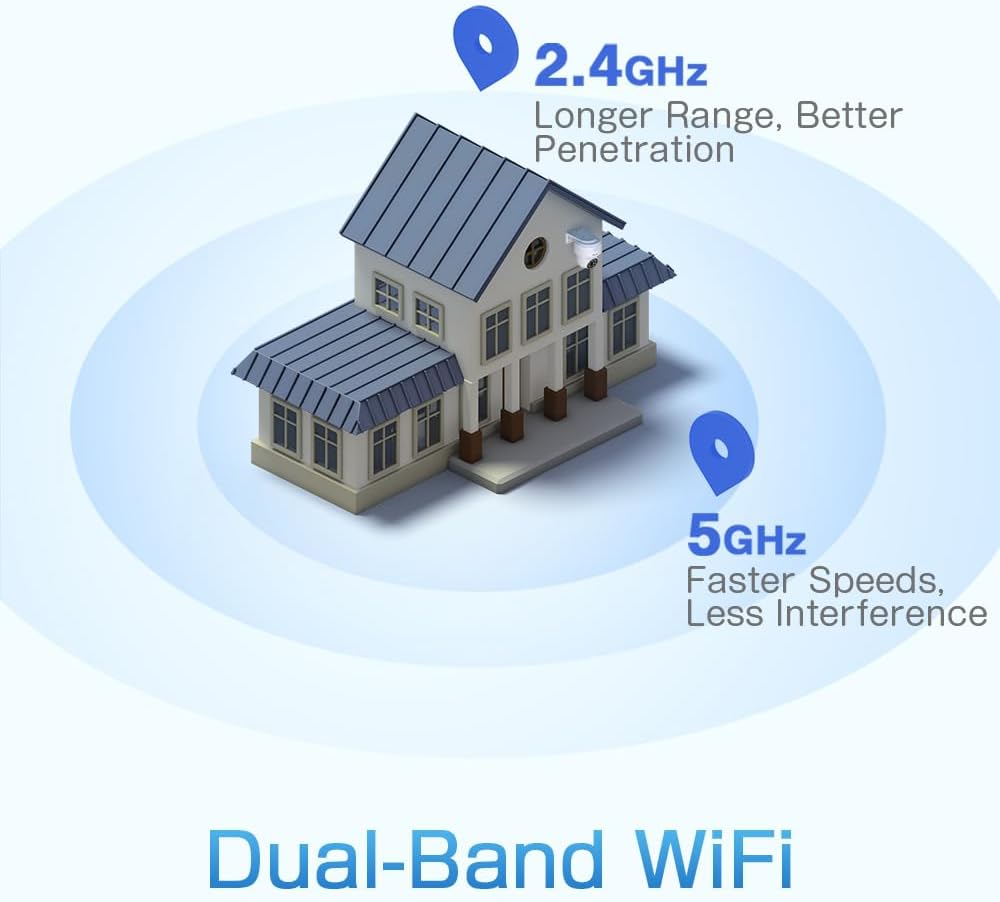
Figure 3: A diagram depicting a house with Wi-Fi signals. The 2.4GHz signal offers longer range and better penetration, while the 5GHz signal provides faster speeds and less interference.
4. Настройка
4.1 Фізічная ўстаноўка
The camera can be mounted on a wall or ceiling. Ensure the mounting location provides a clear field of view and is within Wi-Fi range.
- Выберыце месца: Select a suitable indoor or outdoor location. The camera is IP66 waterproof, making it resistant to dust and water jets.
- Мантаж:
- Насценны мацаванне: Use the provided mounting bracket and screws to secure the camera to a wall.
- Потолочное мацаванне: The camera can also be mounted directly to a ceiling.
- Наладзіць кут: After mounting, adjust the camera's orientation as needed.

Figure 4: This image displays two installation methods: wall mounting using a bracket and ceiling mounting.

Figure 5: This image illustrates both ceiling and wall installation options, emphasizing the camera's IP66 waterproof rating by showing it under simulated rain.
4.2 Падключэнне харчавання
Connect the provided power adapter to the camera's power input and then plug it into a standard electrical outlet. Ensure the connection is secure.
4.3 Сеткавае падключэнне
The camera supports both 2.4GHz and 5GHz Wi-Fi networks. For initial setup, it is recommended to place the camera near your Wi-Fi router.
- Спампаваць прыкладанне: Download the Ctronics Pro or CamHi Pro app from your smartphone's app store (available for iOS and Android). For PC, use HiP2P Client software.
- Зарэгістраваць уліковы запіс: Адкрыйце праграму і зарэгіструйце новы ўліковы запіс або ўвайдзіце ў сістэму, калі ў вас ужо ёсць уліковы запіс.
- Дадаць камеру: Выконвайце інструкцыі ў дадатку, каб дадаць камеру. Звычайна гэта патрабуе сканавання QR-кода на камеры або ўручную ўводу яе ідэнтыфікатара.
- Падключыцеся да Wi-Fi: Select your desired 2.4GHz or 5GHz Wi-Fi network and enter the password. The camera will connect to the network.
5. Інструкцыя па эксплуатацыі
5.1 У прамым эфіры View і кіраванне PTZ
Once connected, you can access the live video feed through the Ctronics app or PC software.
- Жывая стужка: Націсніце на камеру ў дадатку, каб view the real-time video stream.
- Панарамаванне/нахіл: Use the directional controls within the app to rotate the camera horizontally (pan 355°) and vertically (tilt 90°).
- Маштаб: Digital zoom is available through the app.
- Зададзеныя пазіцыі: Set up to 8 preset positions for quick navigation to specific areas.
5.2 AI Human Detection & Auto Tracking
The camera's intelligent detection system can identify human shapes and track their movement.
- Уключыць выяўленне: In the app settings, enable AI Human Detection.
- Adjust Sensitivity & Area: Customize the detection sensitivity and define specific detection zones to minimize false alarms.
- Аўтаматычнае адсочванне: When enabled, the camera will automatically follow detected human movement within its field of view.
- Абвесткі: Receive instant notifications via the app or email when motion is detected. The camera can also trigger customizable sound and light alarms.

Figure 6: This image shows the camera detecting a person at night, with an alarm notification displayed on a smartphone, illustrating the human detection and auto-tracking features.
5.3 Начное бачанне
The camera offers enhanced night vision capabilities:
- Поўнакаляровы начны бачанне: When spotlights are activated, the camera can provide full-color video in low-light conditions up to 25 meters.
- Інфрачырвонае начное бачанне: In complete darkness, the camera automatically switches to infrared mode, providing clear black and white video up to 30 meters.

Figure 7: An image showing the camera mounted outdoors at night, with its spotlights illuminated to provide full-color night vision. A smartphone displays the live feed.
5.4 Двухбаковае аўдыё
Выкарыстоўвайце функцыю двухбаковай аўдыёсувязі для сувязі з людзьмі, якія знаходзяцца побач з камерай.
- гаварыць: Press and hold the microphone icon in the app to speak through the camera's speaker.
- Слухай: Enable the speaker icon to listen to audio from the camera's microphone.
5.5 Запіс і захоўванне
The camera supports various recording and storage methods:
- Карта MicroSD: Insert a microSD card (up to 128GB, not included) into the designated slot for local 24/7 continuous recording.
- Воблачнае сховішча: Subscribe to a cloud storage service (if available) for off-site video backup.
- FTP: Configure FTP settings in the app to upload recordings to an FTP server.

Figure 8: This image illustrates the camera's 24/7 recording capability and various recording modes, including a timeline view on a smartphone and a filmstrip showing recorded events.
6. Тэхнічнае абслугоўванне
6.1 Ачыстка
Regularly clean the camera lens and housing to ensure optimal image quality and performance.
- Выкарыстоўвайце мяккі, damp cloth to wipe the camera's exterior.
- Для лінзаў выкарыстоўвайце спецыяльную сурвэтку і раствор для чысткі лінзаў, каб пазбегнуць драпін.
- Не выкарыстоўвайце агрэсіўныя хімічныя рэчывы або абразіўныя мыйныя сродкі.
6.2 Абнаўленне прашыўкі
Periodically check for firmware updates through the Ctronics app. Keeping your camera's firmware updated ensures access to the latest features and security enhancements.
7. Выпраўленне непаладак
Калі ў вас узніклі праблемы з камерай, звярніцеся да наступных распаўсюджаных рашэнняў:
| праблема | Магчымае рашэнне |
|---|---|
| Камера не падключаецца да Wi-Fi |
|
| Дрэнная якасць выявы |
|
| Няма абвестак аб выяўленні руху |
|
| Карта MicroSD не запісвае |
|
Каб атрымаць дадатковую дапамогу, звярніцеся ў службу падтрымкі кліентаў Ctronics.
8. Тэхнічныя характарыстыкі
Key technical specifications for the Ctronics CTIPC-790C-EU camera:
| Асаблівасць | Спецыфікацыя |
|---|---|
| Назва мадэлі | CTIPC-790C-EU |
| дазвол | 5 МП (2560x1920) |
| Бесправадныя тэхналогіі | Wi-Fi (2.4 ГГц/5 ГГц) |
| Пан Кут | 355 градусаў |
| Кут нахілу | 90 градусаў |
| Дыяпазон начнога бачання | 25 Meters (Color), 30 Meters (IR) |
| Узровень воданепранікальнасці | IP66 (воданепранікальны) |
| Параметры захоўвання | MicroSD (up to 128GB), Cloud, FTP |
| Крыніца харчавання | Electric Cable (12 Volts, 12 Watts) |
| Тып мацавання | Wall Mount, Screw-in |
| Матэрыял | Акрыланітрылбутадыенстырол (АБС) |
| Сумяшчальныя прылады | Кампутар, смартфон, планшэт |
| Падтрымка аперацыйнай сістэмы | Android, iOS, Windows, Mac OS |
9. Гарантыя і падтрымка
Ctronics products are designed for reliability and performance. For warranty information and technical support, please refer to the official Ctronics webсайт або звярніцеся непасрэдна ў службу падтрымкі кліентаў. Захоўвайце чэк аб куплі як пацвярджэнне пакупкі для гарантыйных прэтэнзій.
- Інтэрнэт-падтрымка: Наведайце афіцыйны сайт Ctronics webсайт з часта задаванымі пытаннямі, кіраўніцтвамі па ліквідацыі непаладак і загрузкай праграмнага забеспячэння.
- Падтрымка па электроннай пошце: Contact Ctronics customer service via email for technical assistance.