
F1
TWS F1 Gaming Earphone User Manual
Мадэль: F1
Уводзіны
Thank you for choosing the TWS F1 Gaming Earphones. These true wireless stereo earbuds are designed to provide an immersive audio experience for gaming and everyday use, featuring low latency, clear calls, and a comfortable fit. Please read this manual carefully before using the product to ensure proper operation and to maximize its lifespan.
Змест пакета
Калі ласка, праверце змесціва пакета пасля распакавання:
- TWS F1 Gaming Earbuds (Left and Right)
- Чахол для зарадкі
- USB-кабель для зарадкі
- Кіраўніцтва карыстальніка
- Амбушуры (розныя памеры)
Асаблівасці прадукту
The TWS F1 Gaming Earphones are equipped with advanced features for an enhanced audio experience:
- Падключэнне Bluetooth 5.0: Ensures stable and fast wireless connection up to 15 meters.
- Гукавы эфект Hi-Fi: Delivers high-fidelity audio for an immersive listening experience.
- Game/Music Dual Mode: Optimize audio performance for either gaming or music playback.
- 60 мс Нізкая затрымка: Minimizes audio delay, crucial for competitive gaming.
- Актыўнае падаўленне шуму: Зніжае навакольны шум для больш выразнага гуку.
- HD Binaural Call: Provides clear voice transmission during calls.
- IPX-5 Waterproof Standard: Забяспечвае абарону ад поту і лёгкіх пырскаў.
- Разумныя сэнсарныя элементы кіравання: Intuitive touch sensors for easy management of music, calls, and modes.
- Automatic Power-On Pairing: Earbuds automatically connect to your device when the case is opened.
- Доўгі тэрмін службы батарэі: Extended playtime and standby time.
- 10mm Graphene Composite Diaphragm: Delivers rich bass and clear highs.

Image: The TWS F1 earbuds and their charging case, highlighting the HiFi sound effect and long battery life, along with the game and music dual mode.

Выява: Падрабязны view of the TWS F1 earbuds in their charging case, illustrating key features such as HiFi lossless sound, long battery life, HD calls, automatic pairing, Siri support, and dual game/music modes.

Image: The TWS F1 earbuds and charging case, emphasizing their design for gamers with Bluetooth 5.0 dual transmission, a 15-meter uninterrupted link, and strong anti-interference capabilities.

Image: The TWS F1 earbuds, highlighting their H+ special-tuned game sound and ultra-low 60ms latency for an optimized gaming audio experience.
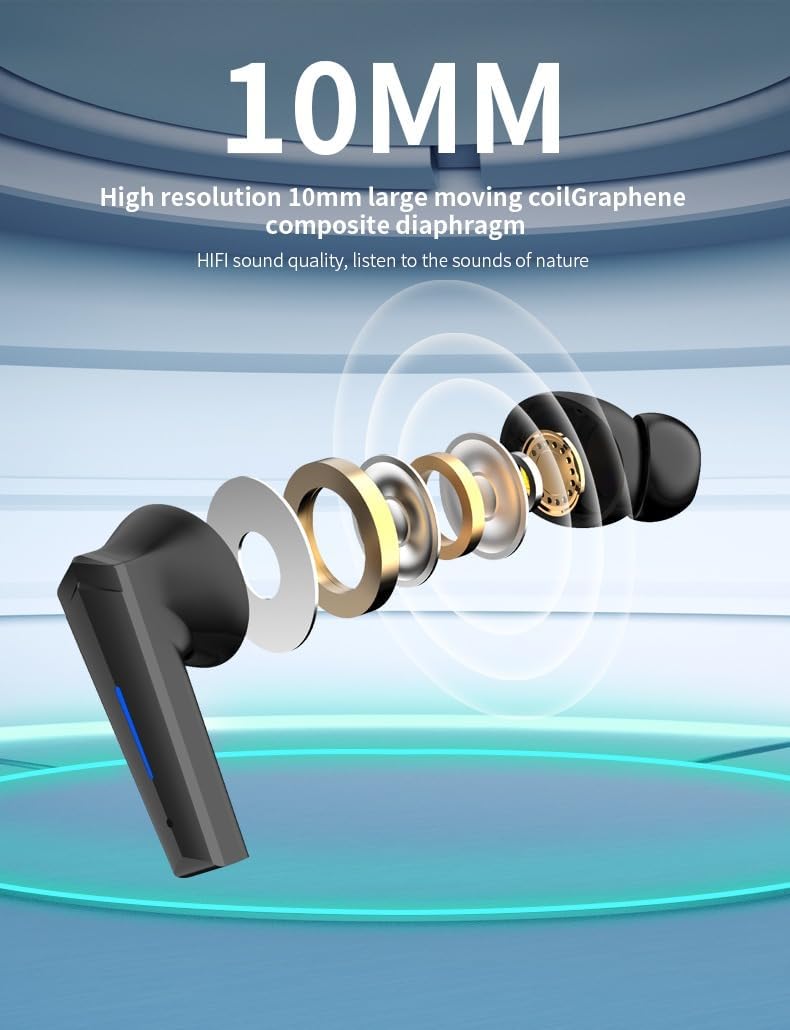
Image: An exploded diagram of the TWS F1 earbud, showcasing its 10mm high-resolution large moving coil with a Graphene composite diaphragm, responsible for its high-fidelity sound quality.
Настройка
1. Пачатковая зарадка
Before first use, fully charge the TWS F1 earbuds and their charging case. Connect the provided USB charging cable to the charging port on the case and a power source. The LED indicator on the case will show charging status. A full charge typically takes 1-2 hours.

Image: The TWS F1 Gaming Earbuds placed inside their open charging case, ready for charging or pairing.
2. Спалучэнне з вашай прыладай
- Пераканайцеся, што абодва навушнікі зараджаны.
- Адкрыйце зарадны кейс. Навушнікі аўтаматычна ўключацца і пяройдуць у рэжым спалучэння.
- На вашай прыладзе (смартфоне, планшэце, камп'ютары) перайдзіце ў налады Bluetooth і ўключыце Bluetooth.
- Пошук available devices. You should see "F1" or "TWS F1" in the list.
- Select "F1" to connect. Once connected, a voice prompt will confirm successful pairing.
- The earbuds will automatically reconnect to the last paired device when the case is opened, if Bluetooth is enabled on the device.
Інструкцыя па эксплуатацыі
Разумнае сэнсарнае кіраванне
The TWS F1 earbuds feature intuitive touch controls on each earbud. The touch sensitive area is located on the outer surface of the earbud.

Image: A visual guide to the smart touch controls on the TWS F1 earbuds, detailing actions for short press, long press, double click, three clicks, and four taps for both left and right earbuds.
| Дзеянне | Левы навушнік (L) | Правы навушнік (R) |
|---|---|---|
| Кароткі прэс | Play/Pause/Hang up call | Play/Pause/Hang up call |
| Доўгі націск (2 секунд) | Power on (from off state) / Call Siri | Power on (from off state) / Call Siri |
| Доўгі націск (4 секунд) | Shutdown (from on state) | Shutdown (from on state) |
| Двайны клік | Наступная песня | Папярэдняя песня |
| Тры пстрычкі | гучнасць - | Аб'ём + |
| Чатыры краны | Switch between Game Mode and Music Mode. (LED light flashes when in game mode, 4 clicks again to switch back to music mode) | |
| Уваходны званок | Short Press to Answer / Long Press to Reject | Short Press to Answer / Long Press to Reject |
Пераключэнне рэжымаў (гульня/музыка)
To switch between Game Mode (low latency) and Music Mode (HiFi sound), tap either earbud four times. The LED indicator will flash to confirm Game Mode activation. Repeat the four-tap action to return to Music Mode.
Тэхнічнае абслугоўванне
- Уборка: Рэгулярна працірайце навушнікі і зарадны футляр мяккай, сухой тканінай без ворса. Не выкарыстоўвайце абразіўныя ачышчальнікі або растваральнікі.
- захоўванне: Калі навушнікі не выкарыстоўваюцца, захоўвайце іх у зарадным чахле, каб абараніць і падтрымліваць зарад. Захоўвайце ў прахалодным, сухім месцы, удалечыні ад прамых сонечных прамянёў і экстрэмальных тэмператур.
- Воданепранікальнасць: The earbuds are IPX-5 rated, meaning they are resistant to light splashes and sweat. Do not submerge them in water or expose them to heavy rain. Dry them thoroughly if they get wet.
- Зарадка: Выкарыстоўвайце толькі зарадны кабель, які пастаўляецца ў камплекце, або яго сертыфікаваны эквівалент. Пазбягайце празмернай зарадкі.
Ліквідацыю непаладак
If you encounter issues with your TWS F1 Gaming Earphones, please refer to the following common solutions:
- Навушнікі не спалучаюцца або не падключаюцца:
- Пераканайцеся, што абодва навушнікі зараджаны.
- Змесціце навушнікі назад у чахол, зачыніце вечка, пачакайце некалькі секунд, а затым зноў адкрыйце вечка.
- Выключыце і ўключыце Bluetooth на вашай прыладзе.
- Forget "F1" from your device's Bluetooth list and try pairing again.
- Пераканайцеся, што іншыя прылады Bluetooth не перашкаджаюць працы.
- Працуе толькі адзін навушнік:
- Пераканайцеся, што абодва навушнікі зараджаны.
- Place both earbuds back in the charging case, close the lid, and then open it again. This often re-syncs them.
- Check if the earbud is properly seated in the charging case and making contact with the charging pins.
- Нізкая гучнасць або дрэнная якасць гуку:
- Адрэгулюйце гучнасць як на прыладзе, так і ў навушніках (з дапамогай сэнсарнага кіравання).
- Пераканайцеся, што навушнікі чыстыя і без смецця.
- Try different sized ear cushions for a better seal in your ear canal.
- Падыдзіце бліжэй да падлучанай прылады, каб пазбегнуць перашкод сігналу.
- Чахол для зарадкі не зараджаецца:
- Пераканайцеся, што зарадны кабель надзейна падключаны як да корпуса, так і да крыніцы харчавання.
- Паспрабуйце іншы порт USB або адаптар сілкавання.
- Праверце зарадны кабель на наяўнасць пашкоджанняў.
Тэхнічныя характарыстыкі
| Асаблівасць | Дэталь |
|---|---|
| Назва мадэлі | F1 |
| Марка | Радавыя |
| Тэхналогія падлучэння | Бесправадная сувязь (Bluetooth 5.0) |
| Кантроль шуму | Актыўнае падаўленне шуму |
| Воданепранікальны стандарт | IPX-5 |
| Час зарадкі | 1-2 гадзін |
| Час чакання | 120 гадзін |
| Памер драйвера | 10mm (Graphene Composite Diaphragm) |
| Нізкая затрымка | 60 мс (гульнявы рэжым) |
| Уключаныя кампаненты | Кабель, кіраўніцтва карыстальніка, амбушюры |
| Памеры прадукту | 14.2 х 6.1 х 3.5 см; 160 г |
Гарантыя і падтрымка
For warranty information and technical support, please refer to the purchase documentation or contact the retailer where you purchased the TWS F1 Gaming Earphones. Keep your proof of purchase for any warranty claims.
For further assistance, you may also visit the manufacturer's website (if available) or contact their customer service department.
Ask a question about this manual
Ask about setup, troubleshooting, compatibility, parts, safety, or missing instructions. Manuals+ will review the question and use this page’s manual context to help answer it.