
Уводзіны
This manual provides detailed instructions for the safe and efficient operation of your CAIWEI X99+ 4K Smart Projector. Please read this manual thoroughly before using the projector and retain it for future reference.
Інфармацыя па бяспецы
Каб забяспечыць бяспечную працу і прадухіліць пашкоджанні, выконвайце наступныя меры засцярогі:
- Do not place the projector in boxes or cabinets with poor ventilation properties. Ensure adequate airflow around the device to prevent overheating.
- Avoid direct exposure of the projector lens to sunlight.
- Не закрывайце вентыляцыйныя адтуліны.
- Выкарыстоўвайце толькі адаптар сілкавання, які пастаўляецца з праектарам.
- Трымайце праектар далей ад вады або іншых вадкасцей.
- Не спрабуйце разбіраць або рамантаваць праектар самастойна. Звярніцеся па дапамогу да кваліфікаванага абслугоўваючага персаналу.
Змест пакета
Праверце наяўнасць усіх прадметаў у камплекце:
- CAIWEI X99+ Smart Projector
- Пульт дыстанцыйнага кіравання
- Кабель HDMI
- Power Cable (UK-plug)
- AV-кабель
- Сумка для праектара
- Кіраўніцтва карыстальніка (гэты дакумент)
Прадукт скончаныview
The CAIWEI X99+ is a smart projector designed for versatile entertainment and presentation needs. It features a native 1080P resolution with 4K support, 800 ANSI lumens brightness, and an integrated Android 9.0 operating system.

Figure 1: CAIWEI X99+ Smart Projector front view, шоуasinяго кампактны дызайн і асноўныя характарыстыкі.
Асноўныя характарыстыкі:
- Тэхналогія адлюстравання: Native 1920x1080P resolution, 4K support, 800 ANSI lumens, 15500:1 contrast ratio.
- Smart OS: Android 9.0 with access to over 6000 authorized apps (Netflix, YouTube, Prime Video, etc.).
- Памяць: 2GB RAM + 16GB ROM.
- Бесправаднае падключэнне: Dual 2.4G/5G WiFi, Airplay/DLNA/Miracast support, Bluetooth 5.0.
- Аўдыё: Integrated 10W high-power stereo speakers, Dolby Audio support, 3.5mm audio output.
- Паляпшэнне выявы: HDR10 processing, MEMC technology for smoother motion.
- Карэкціроўкі: 4D and ±50° vertical/horizontal electronic keystone correction, 40% digital image zoom.
- Трываласць: Fully sealed optical engine for dust protection and extended lifespan.

Figure 2: Visual representation of the projector's color accuracy, brightness, and image quality in various lighting conditions.
Настройка
1. размяшчэнне
Position the projector on a stable, flat surface or mount it to the ceiling using the four screw holes. Ensure the projector is placed at an appropriate distance from the projection surface to achieve the desired screen size. Maintain adequate ventilation around the unit.
2. Падключэнне сілкавання
- Падключыце кабель харчавання да ўваходнага порта харчавання праектара.
- Падключыце другі канец кабеля харчавання да адпаведнай электрычнай разеткі.
- Націсніце кнопку харчавання на праектары або пульце дыстанцыйнага кіравання, каб уключыць прыладу.
3. Initial Focus and Keystone Adjustment
Upon initial power-on, the projected image may appear blurry or distorted. Adjust these settings for optimal clarity:
- Фокус: Паварочвайце кольца факусоўкі на аб'ектыве праектара, пакуль выява не стане рэзкай і выразнай.
- Карэкцыя трапецеідальных скажэнняў: Use the remote control to access the keystone correction settings. The projector supports 4D keystone correction and ±50° vertical/horizontal electronic correction to square the image if the projector is not perfectly perpendicular to the screen.
- Лічбавае павелічэнне: Adjust the image size without moving the projector using the digital zoom function (40% zoom out/in).
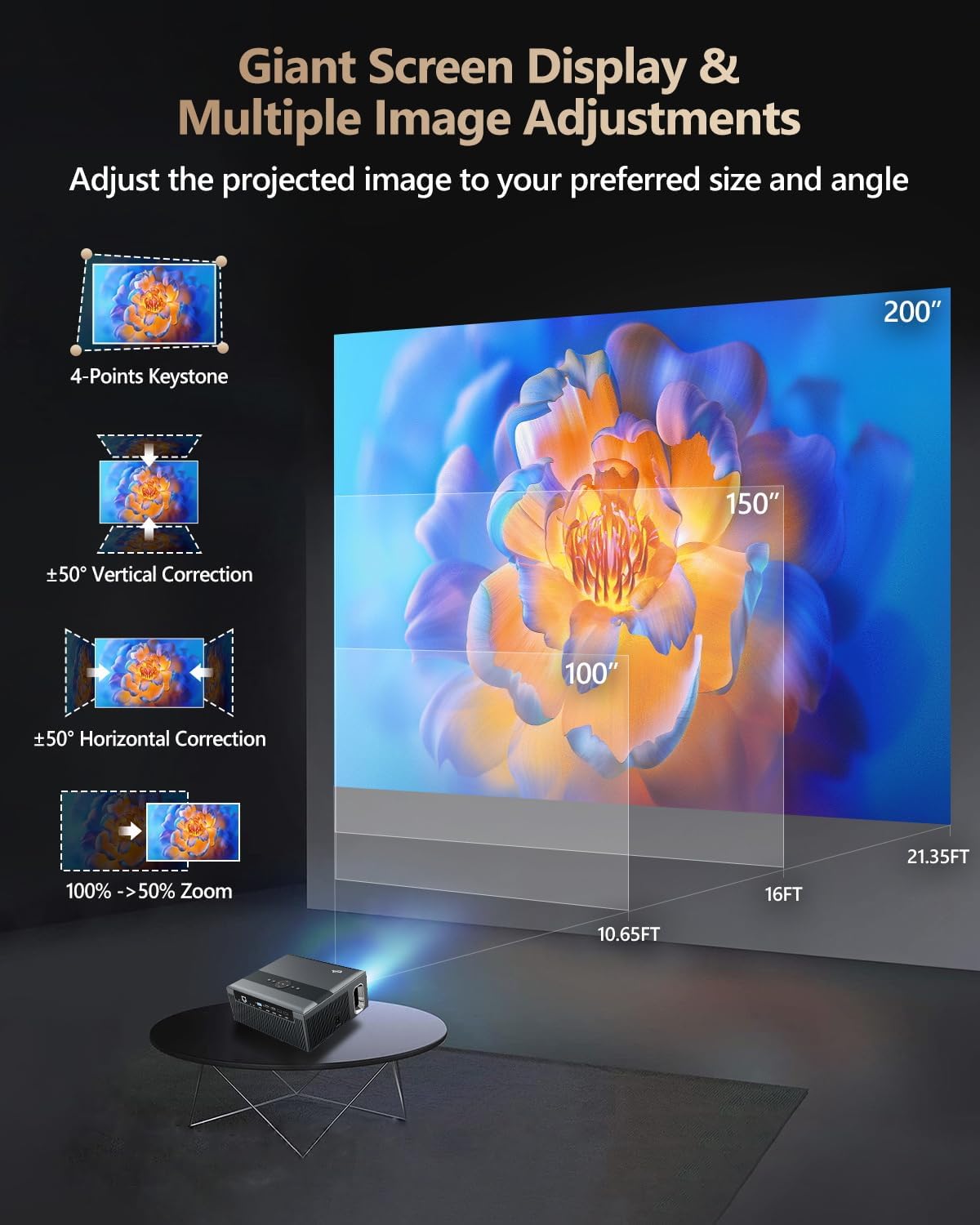
Figure 3: Image adjustment options including keystone correction and digital zoom.
4. Падключэнне да сеткі
Connect the projector to the internet for access to streaming apps and online content.
- Wi-Fi: Navigate to the network settings in the Android OS. Select your desired 2.4G or 5G Wi-Fi network and enter the password.
- Лакальная сетка (Ethernet): Connect an Ethernet cable from your router to the RJ45 port on the projector for a wired internet connection.
5. Спарванне Bluetooth
Pair Bluetooth devices such as external speakers, headphones, mice, keyboards, or gamepads.
- Пераканайцеся, што прылада Bluetooth знаходзіцца ў рэжыме спалучэння.
- On the projector, go to Bluetooth settings within the Android OS.
- Select the desired device from the list and confirm pairing.

Figure 4: Wireless connectivity for streaming and audio.
Інструкцыя па эксплуатацыі
1. Android TV OS Navigation
Use the remote control to navigate the Android 9.0 interface. The home screen provides access to installed applications, settings, and input sources.

Figure 5: Android TV 9.0 interface with pre-installed and accessible applications.
2. Усталёўка і выкарыстанне праграмы
The projector comes with pre-installed apps like Netflix, YouTube, and Prime Video. You can download additional authorized applications from the app store within the Android OS.
- Select an app icon from the home screen to launch it.
- Follow on-screen prompts for login or content selection.
3. Screen Mirroring (Airplay/DLNA/Miracast)
Synchronize your smartphone, tablet, or laptop screen wirelessly to the projector.
- Ensure your device and the projector are connected to the same Wi-Fi network.
- Select the appropriate mirroring function (Airplay for iOS, Miracast for Android/Windows, DLNA for compatible devices) on the projector's interface.
- Initiate screen mirroring from your source device.
4. Падключэнне знешніх прылад
The projector offers multiple ports for connecting various external devices.

Figure 6: Available input and output ports for external devices.
- HDMI: Connect Blu-ray/DVD players, TV sticks, game consoles (PS5), PCs, or laptops using an HDMI cable. Select the corresponding HDMI input from the projector's source menu.
- USB: Insert USB flash drives or hard drives into the USB ports to play media files непасрэдна.
- VGA: Падключыце старыя ПК або ноўтбукі з дапамогай кабеля VGA.
- АВ: Use the AV cable to connect devices with composite video and stereo audio outputs.
5. Аўдыёвыхад
The projector features built-in 10W stereo speakers. For alternative audio experiences:
- Bluetooth: Pair with external Bluetooth speakers or headphones as described in the Setup section.
- Аўдыёвыхад 3.5 мм: Connect wired headphones or external speakers using a 3.5mm audio cable.

Figure 7: Projector's integrated audio system.
Тэхнічнае абслугоўванне
1. Уборка
- Аб'ектыў: Выкарыстоўвайце мяккую тканіну без ворса, спецыяльна прызначаную для аптычных лінзаў. Не выкарыстоўвайце абразіўныя ачышчальныя сродкі.
- Знешні выгляд: Працярыце знешнія паверхні праектара мяккай сухой тканінай. Для выдалення ўстойлівых плям злёгкуampen тканіна з вадой.
- Вентыляцыйныя адтуліны: Periodically check and gently clean the ventilation openings to ensure unobstructed airflow.
2. Dust Protection
The CAIWEI X99+ features a fully sealed optical engine and an air purifier filter, which significantly reduces dust accumulation and light decay, contributing to a longer service life.

Figure 8: Dust-proof design of the CAIWEI X99+ projector.
3. Захоўванне
When not in use for extended periods, store the projector in a cool, dry place, preferably in its original packaging or the provided projector bag, to protect it from dust and physical damage.
Ліквідацыю непаладак
Калі ў вас узніклі праблемы з праектарам, звярніцеся да наступных распаўсюджаных праблем і рашэнняў:
| праблема | Магчымая прычына | Рашэнне |
|---|---|---|
| Няма выявы або паведамленне «Няма сігналу» | Няправільная крыніца ўваходнага сігналу выбрана; няшчыльнае падключэнне кабеля; прылада не ўключана. |
|
| Размыты малюнак | Focus not adjusted; keystone correction needed. |
|
| Няма гуку | Volume too low; incorrect audio output selected; external device audio issue. |
|
| Праблемы з падключэннем да Wi-Fi | Няправільны пароль; па-за зонай дзеяння; праблемы з маршрутызатарам. |
|
| Пульт дыстанцыйнага кіравання не працуе | Разраджаныя батарэйкі; перашкода; праблема са спалучэннем. |
|
Тэхнічныя характарыстыкі
| Марка | КАЙВЕЙ |
| мадэль | X99+ |
| Дазвол дысплея | Native 1920 x 1080 (Supports 4K) |
| Яркасць | 800 ANSI Lumens (12000 LED Lumens) |
| Каэфіцыент кантраснасці | 15500:1 |
| Аперацыйная сістэма | Android 9.0 |
| Памяць | 2 ГБ АЗП + 16 ГБ ПЗУ |
| Тэхналогія падлучэння | Bluetooth 5.0, Dual-band Wi-Fi (2.4G/5G), USB, HDMI, VGA, AV, LAN (RJ45) |
| Асаблівасці | Built-In Wi-Fi, Portable, Wireless, HDR10, MEMC, Dolby Audio, Sealed Optical Engine, 4D Keystone Correction, Digital Zoom |
| Аўдыё | 10W High Power Stereo Speakers, 3.5mm Audio Output |
| Памеры прадукту | 10.55 х 9.25 х 4.92 цалі |
| Вага прадмета | 7.48 фунта |
Гарантыя і падтрымка
For warranty information and technical support, please refer to the warranty card included with your product or visit the official CAIWEI webсайт. Звярніцеся ў службу падтрымкі кліентаў па дапамогу па любых пытаннях, не апісаных у гэтым кіраўніцтве.
вытворца: КАЙВЕЙ
Webсайт: CAIWEI Official Store on Amazon