
Уводзіны
This manual provides detailed instructions for the WOLFANG GA300 Action Camera. It covers setup, operation, maintenance, and specifications to ensure optimal performance and user experience. The GA300 is designed to capture high-quality video and photos in various environments, including underwater, with advanced stabilization and versatile features.
Што ў скрынцы
The WOLFANG GA300 Action Camera package includes the following items:
- 1x WOLFANG GA300 Action Camera
- 1x Пульт дыстанцыйнага кіравання
- 2x 1350 мАг акумулятар
- 1x Воданепранікальны чахол
- Стэнд 1x ровараў
- 5x Mount
- 2x 2-sided tape
- 2x Helmet Mount
- 4x Бінты
- 5x Тросы
- 1x кабель USB
- Тканіна 1x аб'ектыва
- 1x Кароткі даведнік
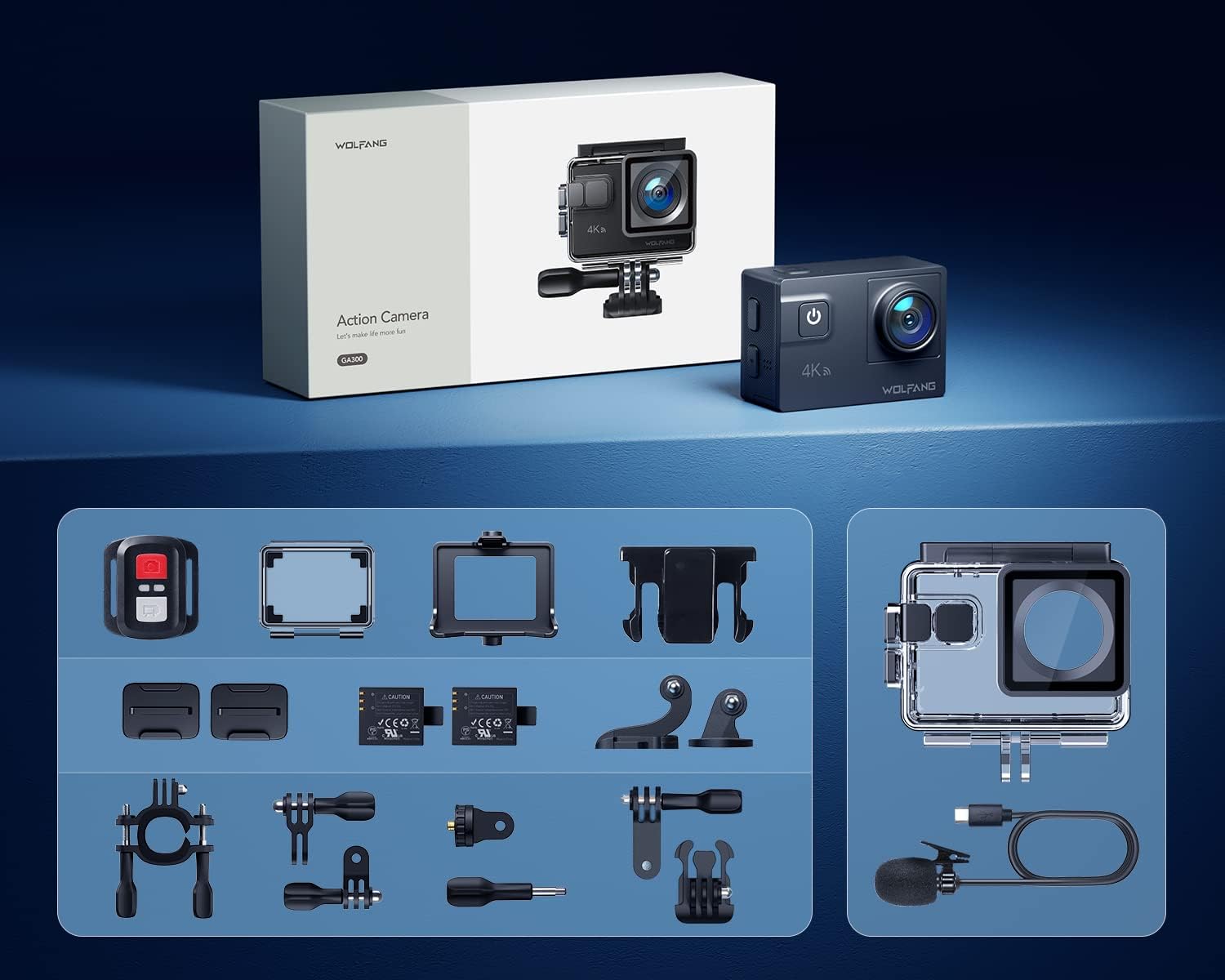
Image: All components included in the WOLFANG GA300 Action Camera kit, neatly laid out.
Прадукт скончаныview
The WOLFANG GA300 Action Camera features a compact design with intuitive controls and multiple connectivity options.
Кампаненты камеры
- Пярэдні экран: For live preview і індыкатары стану.
- Rear Touchscreen (2-inch): For menu navigation, settings adjustment, and playback.
- Кнопка харчавання / рэжыму: To power on/off and switch between modes.
- Кнопка спуску затвора/ОК: To start/stop recording or take photos.
- Порт USB-C: Для зарадкі і перадачы дадзеных.
- Порт Mini HDMI: Для вываду відэа на знешнія дысплеі.
- Мікрафонны ўваход: For connecting the external microphone.
- Слот для карты Micro SD: Supports up to 128GB cards (32GB included).
- Батарэйны адсек: Houses the removable 1350mAh battery.

Image: The WOLFANG GA300 camera, showcasing its compact size and key accessories.
Настройка
1. Устаўка батарэі
Open the battery compartment cover located at the bottom of the camera. Insert a fully charged 1350mAh battery, ensuring the contacts align correctly. Close the cover securely.
2. Устаўка карты Micro SD
Locate the Micro SD card slot on the side of the camera. Insert a compatible Micro SD card (Class 10 or higher, up to 128GB) with the contacts facing the correct direction until it clicks into place.
3. Зарадка камеры
Connect the camera to a USB power source using the provided USB-C cable. The charging indicator will illuminate. A full charge typically takes a few hours. Two batteries are included, each providing approximately 90 minutes of recording time.
4. Усталяванне воданепранікальнага корпуса
For underwater use or protection against dust and impact, place the camera inside the waterproof case. Ensure the case is properly sealed before use. The case allows the camera to be waterproof up to 40 meters.

Image: The WOLFANG GA300 in its waterproof housing, demonstrating its 40M waterproof capability.
5. Мацаванне мацаванняў
Utilize the various included mounts (bicycle stand, helmet mounts, general mounts) to secure your camera for different activities. Ensure all mounts are firmly attached to prevent accidental detachment.

Image: A person on a mountain bike with the camera mounted, illustrating helmet mount usage.
Кіраванне камерай
1. Уключэнне/выключэнне харчавання
Каб уключыць або выключыць камеру, націсніце і ўтрымлівайце кнопку харчавання/рэжыму.
2. Выкарыстанне сэнсарнага экрана
Navigate through menus and settings by swiping and tapping on the 2-inch rear touchscreen. The responsive touchscreen allows for easy operation.
3. Запіс відэа
Select video mode from the menu. Press the Shutter/OK button to start recording. Press again to stop. The camera supports 4K at 60FPS, 1080P at 120FPS, and 720P at 240FPS for various recording needs.
4. Фотаздымка
Switch to photo mode. Press the Shutter/OK button to take a 24MP photo.
5. Выкарыстанне пульта дыстанцыйнага кіравання
The included remote control allows you to start/stop video recording and take photos from a distance of up to 10 meters.
6. Wi-Fi Connectivity and App
Enable Wi-Fi on the camera and connect it to your smartphone via the IBK Cam app. This allows for live preview, remote control, and easy transfer of media to your device.

Image: The camera's live view displayed on a smartphone, demonstrating Wi-Fi connectivity.
7. Спецыяльныя функцыі
- Запаволены рух: Capture fast-paced action in slow motion.
- Прамежак часу: Condense long events into short, dynamic videos.
- Рэжым серыйнай здымкі: Зрабіце некалькі здымкаў у хуткай паслядоўнасці.
- Рэжым апускання: Enhances underwater footage by correcting color balance.

Выява: Visual examples of Time Lapse, Loop Recording, Slow Motion, and Long Exposure modes.
8. Рэгуляваны View Кутнік
The camera features an adjustable view angle lens, allowing you to switch between Wide, Medium, and Narrow fields of view to suit your shooting needs.

Image: The adjustable view angle feature, demonstrating different perspectives from Wide to Narrow.
9. 6-Axis EIS Stabilization & 8x Zoom
The advanced 6-axis Electronic Image Stabilization (EIS) ensures your videos remain smooth and stable, even during dynamic activities. The 8x zoom function allows for precise control over shooting distance and capturing distant details.
Тэхнічнае абслугоўванне
- Воданепранікальны корпус: Regularly inspect the waterproof case for any damage or debris on the seal. Clean with fresh water after saltwater use and allow to air dry.
- Сыход за лінзамі: Use the provided lens cloth to gently clean the camera lens and waterproof case lens. Avoid abrasive materials.
- Захоўванне батарэі: Store batteries in a cool, dry place. For long-term storage, charge batteries to approximately 50% capacity.
- Генеральная ўборка: Працірайце корпус камеры мяккай сухой тканінай. Пазбягайце выкарыстання агрэсіўных хімічных рэчываў.
Ліквідацыю непаладак
- Камера не ўключаецца: Ensure the battery is fully charged and correctly inserted. Try using the second included battery.
- Праблемы з запісам: Check if the Micro SD card is properly inserted and has sufficient free space. Ensure the card is Class 10 or higher.
- Дрэнная якасць гуку: If using the external microphone, ensure it is securely plugged into the correct port. Check camera settings to confirm external mic is selected.
- Праблемы з падключэннем Wi-Fi: Restart both the camera and your smartphone. Ensure the IBK Cam app is up to date.
- Уцечка вады: Immediately remove the camera from the waterproof case. Inspect the case for cracks or damage to the rubber seal. Do not use the case if damaged.
Тэхнічныя характарыстыкі
| Асаблівасць | Спецыфікацыя |
|---|---|
| Марка | ВОЛЬФАНГ |
| Нумар мадэлі | GA300 |
| Дазвол відэазахопу | 4K 60FPS, 4K 30FPS, 2.7K 30FPS, 1080P 120FPS, 1080P 60FPS, 1080P 30FPS, 720P 240FPS, 720P 120FPS, 720P 60FPS |
| Дазвол фота | 24 МП |
| Воданепранікальная глыбіня | 40M (with included case) |
| Стабілізацыя выявы | 6-Axis EIS |
| маштабаванне | 8x |
| Памер экрана | 2 цалі (сэнсарны экран) |
| Сувязь | Wi-Fi, USB-C, Mini HDMI |
| Захоўванне | Micro SD (up to 128GB, 32GB included) |
| Батарэі | 2x 1350mAh Lithium Ion (included) |
| Вага прадмета | 1.19 фунта |
| Памеры прадукту | 2.36 х 1.65 х 0.98 цалі |
Афіцыйныя відэа пра прадукт
WOLFANG GA300 Audio Test
Video: An audio test demonstrating the sound recording capabilities of the WOLFANG GA300 Action Camera, including both internal and external microphone performance.
WOLFANG Action Camera 4K 60FPS 24MP Review
Відэа: Падрабязны аглядview of the WOLFANG GA300 Action Camera, highlighting its 4K 60FPS video and 24MP photo capabilities, along with other features.


